AWS Cloud Development Kit(CDK)でURL短縮サービスを作ってみた

サーバーレスなURL短縮サービスを Python 版 AWS CDK で作るウェビナーを見つけたので、動かしてみました。
最終的には下図のようなサーバーレスなインフラを構築します。
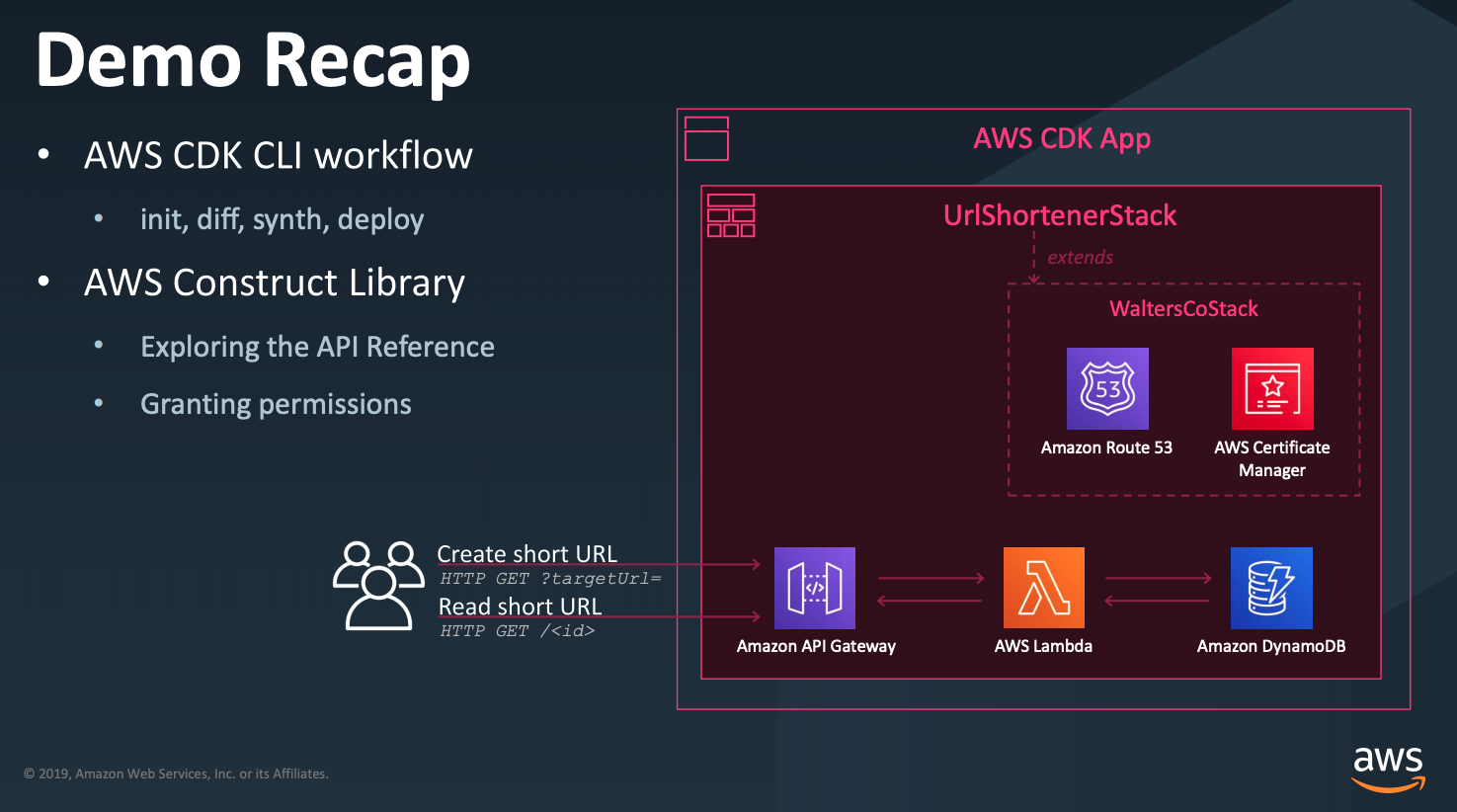 ※図はウェビナーから引用
構築された URL 短縮サービスを触ってみます。
targetUrl に URL を渡し、短縮 URL を生成します。
短縮 URL でアクセスすると、元の URL にリダイレクトされます。
1 2 3 4 5 6 7 8 9 | $ curl -I https://go.example.info/4692efecHTTP/2 301date: Wed, 09 Oct 2019 10:03:35 GMTcontent-type: application/jsoncontent-length: 0location: https://aws.amazon.com/cdk/x-amzn-requestid: 939ce6c8-ddcf-48b7-a758-e244bd42d12cx-amz-apigw-id: BSiCsGQ-liAFgmA=x-amzn-trace-id: Root=1-5d9db077-c89a4731411fa428e4c1b245;Sampled=0 |
301 ステータスと location から期待通りリダイレクトされていることがわかりますね。
本ブログでは、ウェビナーに従い、ミニマムな CDK アプリケーションから始めて、インクリメンタルに機能拡張・デプロイし、短縮URLサービスを構築します。
チュートリアルの流れ
- AWS CDK のインストール
- CDK アプリケーションの作成
- パッケージのインストール
- DynamoDB のモデリング
- Lambda 関数の作成
- Lambda の権限設定
- API Gateway の構築
- DNS 設定
- 後片付け
1. AWS CDK のインストール
まずは AWS CDK をインストールします。
1 2 3 4 | $ npm install -g aws-cdk...$ cdk --version1.12.0 (build 923055e) |
利用リージョンでまだ一度も AWS CDK を利用したことがない場合、$ cdk bootstrap で初期化します。
CDKToolkit という CloudFormation スタックが作成され、CDK の実行に必要な S3 バケットなどが作成されます。
この処理をスキップすると、以下のようなエラーが発生します。
1 2 3 4 | $ cdk deploy... ❌ cdk-app-name failed: Error: This stack uses assets, so the toolkit stack must be deployed to the environment (Run "cdk bootstrap aws://unknown-account/unknown-region")This stack uses assets, so the toolkit stack must be deployed to the environment (Run "cdk bootstrap aws://unknown-account/unknown-region") |
2. CDK アプリケーションの作成
url-shortener という名前の新規アプリケーションを作成します。
1 2 3 | [~]$ mkdir url-shortener[~]$ cd url-shortener[~/url-shortener]$ cdk init --language python |
ファイル構成を確認します。
1 2 3 4 5 6 7 8 9 10 11 12 | [~/url-shortener]$ tree.├── README.md├── app.py├── cdk.json├── requirements.txt├── setup.py└── url_shortener ├── __init__.py └── url_shortener_stack.py1 directory, 7 files |
主要ファイルに絞って解説します。
| ファイル名 | 概要 |
|---|---|
| app.py | CDKで呼び出されるメインプログラムです。 |
| requirements.txt | setup.pyを参照するようになっているため、直接は編集しません。 |
| setup.py | 依存パッケージを管理します。 |
| url_shortener/url_shorteneer_stack.py | Constructs/Stacksを定義します。今回はこのファイルを主に編集します。 |
CDK 初期化直後の app.py と url_shortener_stack.py を確認します。
app.py
アプリケーションを定義している app.py を確認します。
1 2 3 4 5 6 7 8 9 10 11 | #!/usr/bin/env python3from aws_cdk import corefrom url_shortener.url_shortener_stack import UrlShortenerStack # UrlShortenerStack スタックをインポートapp = core.App() # CDK App の作成UrlShortenerStack(app, "url-shortener") # App と Stack の紐付けapp.synth() |
url_shortener_stack.py
スタックを定義している url_shortener_stack.py を確認します。 初期状態では Construct は何も定義されていません。
1 2 3 4 5 6 7 8 9 10 11 | #!/usr/bin/env python3from aws_cdk import corefrom url_shortener.url_shortener_stack import UrlShortenerStackapp = core.App()UrlShortenerStack(app, "url-shortener")app.synth() |
以降では
- Construct
- Stack
を追加・編集して機能拡張します。
3. パッケージのインストール
アプリケーションに必要なパッケージをインストールします。
requirements.txt の中身は -e . となっていて、インストールするパッケージは同じ階層にある setup.py を参照するようになっています。
setup.py の install_requires にインストールするパッケージを追加します。
1 2 3 4 5 6 7 8 9 10 11 12 13 14 15 16 17 | ... install_requires=[ "aws-cdk.core", "aws-cdk.aws-dynamodb", "aws-cdk.aws-events", "aws-cdk.aws-events-targets", "aws-cdk.aws-lambda", "aws-cdk.aws-s3", "aws-cdk.aws-ec2", "aws-cdk.aws-ecs-patterns", "aws-cdk.aws-certificatemanager", "aws-cdk.aws-apigateway", "aws-cdk.aws-cloudwatch", "cdk-watchful", "boto3" ],... |
※ Tech Talk のデモ全体で利用するモジュールを含めています。
次に venv で仮想環境を作成し、パッケージをインストールします。
1 2 3 | [~/url-shortener]$ python3 -m venv .env[~/url-shortener]$ source .env/bin/activate(.env) [~/url-shortener]$ pip install -r requirements.txt |
4. DynamoDB のモデリング
URL と短縮 URL のマッピングを行う DynamoDB のモデルを定義します。
- 論理テーブル名 : mapping-table
- パーティションキー : id(STRING 型)
キーが短縮 URL、バリューが元の URL というシンプルなデータモデルです。
url_shortener/url_shortener_stack.py を更新します。
1 2 3 4 5 6 7 8 9 10 11 12 | from aws_cdk import corefrom aws_cdk import aws_dynamodbclass UrlShortenerStack(core.Stack): def __init__(self, scope: core.Construct, id: str, **kwargs) -> None: super().__init__(scope, id, **kwargs) table = aws_dynamodb.Table(self, "mapping-table", partition_key=aws_dynamodb.Attribute( name="id", type=aws_dynamodb.AttributeType.STRING)) |
$ cdk deploy コマンドでデプロイします。
1 2 3 4 5 6 7 8 9 10 11 12 13 14 15 | $ cdk deployurl-shortener: deploying...url-shortener: creating CloudFormation changeset... 0/3 | 18:23:41 | CREATE_IN_PROGRESS | AWS::CDK::Metadata | CDKMetadata 0/3 | 18:23:41 | CREATE_IN_PROGRESS | AWS::DynamoDB::Table | mapping-table (mappingtable5416B587) 0/3 | 18:23:41 | CREATE_IN_PROGRESS | AWS::DynamoDB::Table | mapping-table (mappingtable5416B587) Resource creation Initiated 0/3 | 18:23:42 | CREATE_IN_PROGRESS | AWS::CDK::Metadata | CDKMetadata Resource creation Initiated 1/3 | 18:23:42 | CREATE_COMPLETE | AWS::CDK::Metadata | CDKMetadata 2/3 | 18:24:12 | CREATE_COMPLETE | AWS::DynamoDB::Table | mapping-table (mappingtable5416B587) 3/3 | 18:24:13 | CREATE_COMPLETE | AWS::CloudFormation::Stack | url-shortener ✅ url-shortenerStack ARN:arn:aws:cloudformation:eu-central-1:12345:stack/url-shortener/xxx |
コンソールの DynamoDB を確認すると、新規テーブルが作成されています。
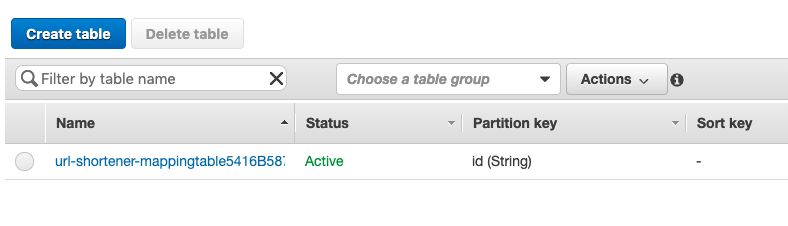
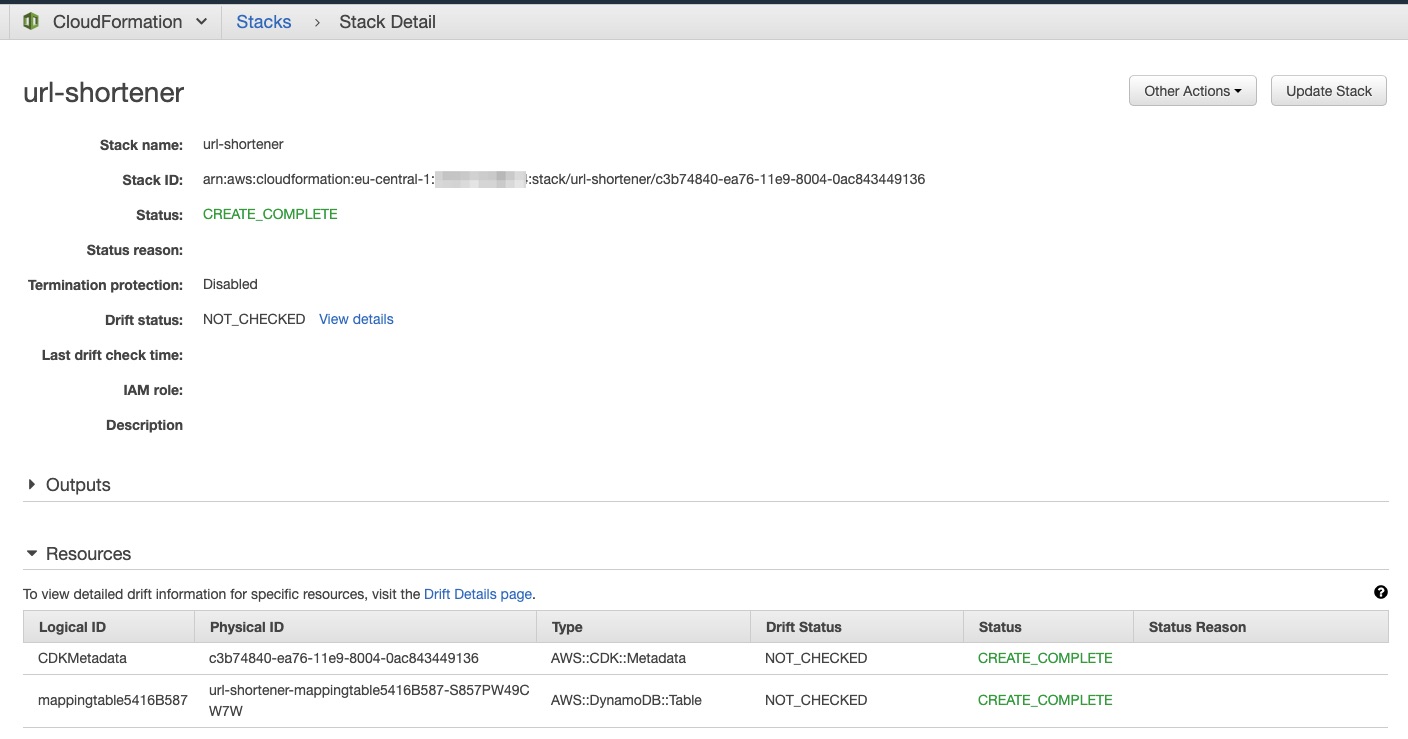
また、CloudFormation を確認すると、 url-shortener というスタックが作成されています。 以降では、このスタックを差分更新します。
5 :Lambda 関数の作成
短縮 URL サービスは API Gateway と Lambda でサーバーレスに構築します。 URL の登録とリダイレクトを行う Lambda 関数を作成します。
まず、Lambda 関数用ディレクトリ・ファイルを作成します
1 2 | [~/url-shortener]$ mkdir lambda[~/url-shortener]$ touch lambda/handler.py |
Lambda 関数lambda/handler.py では以下の関数を定義します。
create_short_url関数 : クエリーストリングtargetUrlから短縮 URL を生成し、DynamoDB に登録read_short_url関数 : 短縮 URL から本来の URL を DynamoDB から取得し、HTTP ステータス 301 でリダイレクト
1 2 3 4 5 6 7 8 9 10 11 12 13 14 15 16 17 18 19 20 21 22 23 24 25 26 27 28 29 30 31 32 33 34 35 36 37 38 39 40 41 42 43 44 45 46 47 48 49 50 51 52 53 54 55 56 57 58 59 60 61 62 63 64 65 66 67 68 69 70 71 72 73 74 75 76 77 78 79 80 81 82 83 84 85 86 87 88 89 | import jsonimport osimport uuidimport loggingimport boto3LOG = logging.getLogger()LOG.setLevel(logging.INFO)def main(event, context): LOG.info("EVENT: " + json.dumps(event)) query_string_params = event["queryStringParameters"] if query_string_params is not None: target_url = query_string_params['targetUrl'] if target_url is not None: return create_short_url(event) path_parameters = event['pathParameters'] if path_parameters is not None: if path_parameters['proxy'] is not None: return read_short_url(event) return { 'statusCode': 200, 'body': 'usage: ?targetUrl=URL' }def create_short_url(event): # Pull out the DynamoDB table name from environment table_name = os.environ.get('TABLE_NAME') # Parse targetUrl target_url = event["queryStringParameters"]['targetUrl'] # Create a unique id (take first 8 chars) id = str(uuid.uuid4())[0:8] # Create item in DynamoDB dynamodb = boto3.resource('dynamodb') table = dynamodb.Table(table_name) table.put_item(Item={ 'id': id, 'target_url': target_url }) # Create the redirect URL + event["requestContext"]["domainName"] \ + event["requestContext"]["path"] \ + id return { 'statusCode': 200, 'headers': {'Content-Type': 'text/plain'}, 'body': "Created URL: %s" % url }def read_short_url(event): # Parse redirect ID from path id = event['pathParameters']['proxy'] # Pull out the DynamoDB table name from the environment table_name = os.environ.get('TABLE_NAME') # Load redirect target from DynamoDB ddb = boto3.resource('dynamodb') table = ddb.Table(table_name) response = table.get_item(Key={'id': id}) LOG.debug("RESPONSE: " + json.dumps(response)) item = response.get('Item', None) if item is None: return { 'statusCode': 400, 'headers': {'Content-Type': 'text/plain'}, 'body': 'No redirect found for ' + id } # Respond with a redirect return { 'statusCode': 301, 'headers': { 'Location': item.get('target_url') } } |
デプロイ対象に Lambda 関数を含めるよう、url_shortener/url_shortener_stack.py を更新します。
1 2 3 4 5 6 7 8 9 10 11 12 13 14 15 16 17 | from aws_cdk import corefrom aws_cdk import aws_dynamodb, aws_lambdaclass UrlShortenerStack(core.Stack): def __init__(self, scope: core.Construct, id: str, **kwargs) -> None: super().__init__(scope, id, **kwargs) table = aws_dynamodb.Table(self, "mapping-table", partition_key=aws_dynamodb.Attribute( name="id", type=aws_dynamodb.AttributeType.STRING)) handler = aws_lambda.Function(self, "backend", runtime=aws_lambda.Runtime.PYTHON_3_7, handler="handler.main", code=aws_lambda.AssetCode(path="./lambda")) |
aws_lambda.Function の code 引数で Lambda 関数のソースパスを指定します。
aws_cdk.aws_lambda.AssetCode で Lambda 関数のソースコードのパスを指定します。
デモでは aws_cdk.aws_lambda.Code が利用されていますが、現在は非推奨のため、使わないようにしてください。
$ cdk deploy でデプロイします。
6:Lambda の権限設定
Lambda 関数が DynamoDB を読み書きできるように IAM 設定します。
DynamoDB Table のハイレベル API の grantReadWriteData(grantee) メソッドを利用すると、必要なポリシーを付与できます。JSON で複雑なポリシーを定義する必要はありません。
メソッド名からどのような権限が自明であり、可読性にも優れています。
grantReadWriteData(grantee) 以外にも
grantFullAccess(grantee)grantReadData
など、ユースケースごとに権限が用意されています。
次に、書き込み先の DynamoDB テーブルを 環境変数 TABLE_NAME から取得するようにします。
この変数はプロビジョニング時に解決されます。
1 2 3 4 5 6 7 8 9 10 11 12 13 14 15 16 17 18 19 20 | from aws_cdk import corefrom aws_cdk import aws_dynamodb, aws_lambdaclass UrlShortenerStack(core.Stack): def __init__(self, scope: core.Construct, id: str, **kwargs) -> None: super().__init__(scope, id, **kwargs) table = aws_dynamodb.Table(self, "mapping-table", partition_key=aws_dynamodb.Attribute( name="id", type=aws_dynamodb.AttributeType.STRING)) handler = aws_lambda.Function(self, "backend", runtime=aws_lambda.Runtime.PYTHON_3_7, handler="handler.main", code=aws_lambda.AssetCode(path="./lambda")) table.grant_read_write_data(handler) handler.add_environment('TABLE_NAME', table.table_name) |
更新差分を確認
$ cdk diff コマンドで dry run します。
1 2 3 4 5 6 7 8 9 10 11 12 13 14 15 16 17 18 19 20 21 22 23 24 25 26 27 28 29 30 31 32 33 | [~/url-shortener]$ cdk diffStack url-shortenerThe url-shortener stack uses assets, which are currently not accounted for in the diff output! See https://github.com/aws/aws-cdk/issues/395IAM Statement Changes┌───┬────────────────────────────────┬────────┬────────────────────────────────┬─────────────────────────────────┬───────────┐│ │ Resource │ Effect │ Action │ Principal │ Condition │├───┼────────────────────────────────┼────────┼────────────────────────────────┼─────────────────────────────────┼───────────┤│ + │ ${mapping-table.Arn} │ Allow │ dynamodb:BatchGetItem │ AWS:${backend/ServiceRole} │ ││ │ │ │ dynamodb:BatchWriteItem │ │ ││ │ │ │ dynamodb:DeleteItem │ │ ││ │ │ │ dynamodb:GetItem │ │ ││ │ │ │ dynamodb:GetRecords │ │ ││ │ │ │ dynamodb:GetShardIterator │ │ ││ │ │ │ dynamodb:PutItem │ │ ││ │ │ │ dynamodb:Query │ │ ││ │ │ │ dynamodb:Scan │ │ ││ │ │ │ dynamodb:UpdateItem │ │ │└───┴────────────────────────────────┴────────┴────────────────────────────────┴─────────────────────────────────┴───────────┘(NOTE: There may be security-related changes not in this list. See https://github.com/aws/aws-cdk/issues/1299)Resources[+] AWS::IAM::Policy backend/ServiceRole/DefaultPolicy backendServiceRoleDefaultPolicy78BAA8F9[~] AWS::Lambda::Function backend backendCBA98286 ├─ [+] Environment │ └─ {"Variables":{"TABLE_NAME":{"Ref":"mappingtable5416B587"}}} └─ [~] DependsOn └─ @@ -1,3 +1,4 @@ [ ] [ [+] "backendServiceRoleDefaultPolicy78BAA8F9", [ ] "backendServiceRole77A15DC8" [ ] ][~/url-shortener]$ |
問題がなければデプロイします。
1 | $ cde deploy |
7 :API Gateway の構築
次に、Lambda 関数を呼び出す API Gateway を定義します。
aws_apigateway.LambdaRestApi メソッドで、 Lambda をバックエンドとした API Gateway を作成します。
1 2 3 4 5 6 7 8 9 10 11 12 13 14 15 16 17 18 19 20 21 22 23 | from aws_cdk import corefrom aws_cdk import aws_dynamodb, aws_lambda, aws_apigatewayclass UrlShortenerStack(core.Stack): def __init__(self, scope: core.Construct, id: str, **kwargs) -> None: super().__init__(scope, id, **kwargs) table = aws_dynamodb.Table(self, "mapping-table", partition_key=aws_dynamodb.Attribute( name="id", type=aws_dynamodb.AttributeType.STRING)) handler = aws_lambda.Function(self, "backend", runtime=aws_lambda.Runtime.PYTHON_3_7, handler="handler.main", code=aws_lambda.AssetCode(path="./lambda")) table.grant_read_write_data(handler) handler.add_environment('TABLE_NAME', table.table_name) # define the API endpoint and associate the handler api = aws_apigateway.LambdaRestApi(self, "UrlShortenerApi", handler=handler) |
デプロイします。
1 2 3 4 5 6 7 8 9 10 | $ cdk deploy... ✅ url-shortenerOutputs:url-shortener.UrlShortenerApiEndpoint23405F0E = https://XXX.execute-api.eu-central-1.amazonaws.com/prod/Stack ARN:arn:aws:cloudformation:eu-central-1:1234:stack/url-shortener/5ea22370-e851-11e9-ab5a-025adfcb1154 |
デプロイが完了すると、最後に API Gateway のエンドポイントが出力されます。 このエンドポイントに対して、短縮 URL サービスを試してみましょう。
GET パラメーター targetUrl に短縮したい URL を渡します。
1 2 3 | $ curl $URL?targetUrl=https://aws.amazon.com/cdk/ |
生成された短縮 URL を GET します。
1 2 3 4 5 6 7 8 9 10 11 12 13 | HTTP/2 301content-type: application/jsoncontent-length: 0location: https://aws.amazon.com/cdk/date: Wed, 09 Oct 2019 09:47:52 GMTx-amzn-requestid: e44cbbf8-048e-4b1e-b061-6aa886c65e64x-amz-apigw-id: BSfvSFyVliAFWOA=x-amzn-trace-id: Root=1-5d9dacc8-786515e42454443a25f9e8aa;Sampled=0x-cache: Miss from cloudfrontvia: 1.1 6eea7c9b83576b73ff12f8e9ff2ad318.cloudfront.net (CloudFront)x-amz-cf-pop: TXL51x-amz-cf-id: H9_Jb03zbCpGtrb0GwS0gThJaFlgTOzZb0iisD-LuOx_FcrSg711yA== |
レスポンスヘッダーの Location から、短縮元の URL にリダイレクトされていることがわかります。
8 :DNS 設定
最後に、API Gateway をカスタムドメイン名、かつ、HTTPS で公開するため、Amazon Route 53 と AWS Certificate Manager(ACM) の 設定を行います。
ホストゾーンを複数のアプリケーションで共有することを想定し、別スタックで定義します。
実運用では、このようなスタックはライブラリー化し、他の CDK プロジェクトからも利用できるようにしたいところですが、今回は簡略化して単に別ディレクトリで管理します。
デモでは 架空企業"Walters co." 向けにサイト構築しているため、waltersco_common という名前のディレクトリを作成します。
1 2 | $ mkdir waltersco_common$ touch waltersco_common/__init__.py |
スタックにドメイン情報を含めます。
1 2 3 4 5 6 7 8 9 10 11 12 13 14 15 16 17 18 19 20 21 22 23 24 25 26 27 28 29 30 31 32 33 34 35 36 37 38 39 40 41 42 43 44 | import osfrom aws_cdk.core import Stack, Construct # , Environmentfrom aws_cdk import aws_apigateway, aws_route53, aws_route53_targets, aws_certificatemanager# we need default values here since aws-cdk-examples build synthesizes the appZONE_NAME = os.environ.get('WALTERSCO_ZONE_NAME', 'example.info')ZONE_ID = os.environ.get('WALTERSCO_ZONE_ID', 'XXXX')ZONE_CERT = os.environ.get('WALTERSCO_ZONE_CERT', 'arn:aws:acm:eu-central-1:1234:certificate/1-2-3-4')class WaltersCoStack(Stack): """ A base CDK stack class for all stacks defined in our fun little company. """ def __init__(self, scope: Construct, id: str, **kwargs): super().__init__(scope, id, **kwargs) def map_waltersco_subdomain(self, subdomain: str, api: aws_apigateway.RestApi) -> str: """ Maps a sub-domain of waltersco.co to an API gateway :param subdomain: The sub-domain (e.g. "www") :param api: The API gateway endpoint :return: The base url (e.g. "https://www.waltersco.co") """ domain_name = subdomain + '.' + ZONE_NAME cert = aws_certificatemanager.Certificate.from_certificate_arn(self, 'DomainCertificate', ZONE_CERT) hosted_zone = aws_route53.HostedZone.from_hosted_zone_attributes(self, 'HostedZone', hosted_zone_id=ZONE_ID, zone_name=ZONE_NAME) # add the domain name to the api and the A record to our hosted zone domain = api.add_domain_name('Domain', certificate=cert, domain_name=domain_name) aws_route53.ARecord( self, 'UrlShortenerDomain', record_name=subdomain, zone=hosted_zone, target=aws_route53.RecordTarget.from_alias(aws_route53_targets.ApiGatewayDomain(domain))) return url__all__ = ["WaltersCoStack"] |
URL 短縮サービスのスタックもこのスタックを継承し、go のサブドメインで API Gateway を公開するようにします。
1 2 3 4 5 6 7 8 9 10 11 12 13 14 15 16 17 18 19 20 21 22 23 24 25 26 27 | from aws_cdk import corefrom aws_cdk import aws_dynamodb, aws_lambda, aws_apigatewayfrom waltersco_common import WaltersCoStackclass UrlShortenerStack(WaltersCoStack): def __init__(self, scope: core.Construct, id: str, **kwargs) -> None: super().__init__(scope, id, **kwargs) table = aws_dynamodb.Table(self, "mapping-table", partition_key=aws_dynamodb.Attribute( name="id", type=aws_dynamodb.AttributeType.STRING)) handler = aws_lambda.Function(self, "backend", runtime=aws_lambda.Runtime.PYTHON_3_7, handler="handler.main", code=aws_lambda.AssetCode(path="./lambda")) table.grant_read_write_data(handler) handler.add_environment('TABLE_NAME', table.table_name) # define the API endpoint and associate the handler api = aws_apigateway.LambdaRestApi(self, "UrlShortenerApi", handler=handler) self.map_waltersco_subdomain('go', api) |
デプロイします。
1 2 3 4 5 6 7 8 9 10 11 12 13 14 15 16 17 18 19 20 21 22 | [~/url-shortener]$ cdk deployurl-shortener: deploying...url-shortener: creating CloudFormation changeset... 0/5 | 11:52:16 | CREATE_IN_PROGRESS | AWS::ApiGateway::DomainName | UrlShortenerApi/Domain (UrlShortenerApiDomain85D0CE65) 0/5 | 11:52:16 | UPDATE_IN_PROGRESS | AWS::CDK::Metadata | CDKMetadata 1/5 | 11:52:17 | UPDATE_COMPLETE | AWS::CDK::Metadata | CDKMetadata 1/5 | 11:52:18 | CREATE_IN_PROGRESS | AWS::ApiGateway::DomainName | UrlShortenerApi/Domain (UrlShortenerApiDomain85D0CE65) Resource creation Initiated 2/5 | 11:52:18 | CREATE_COMPLETE | AWS::ApiGateway::DomainName | UrlShortenerApi/Domain (UrlShortenerApiDomain85D0CE65) 2/5 | 11:52:20 | CREATE_IN_PROGRESS | AWS::ApiGateway::BasePathMapping | UrlShortenerApi/Domain/Map:--=>urlshortenerUrlShortenerApi41983DFF (UrlShortenerApiDomainMapurlshortenerUrlShortenerApi41983DFF17DD9E30) 2/5 | 11:52:20 | CREATE_IN_PROGRESS | AWS::Route53::RecordSet | UrlShortenerDomain (UrlShortenerDomain9F16453F) 2/5 | 11:52:20 | CREATE_IN_PROGRESS | AWS::ApiGateway::BasePathMapping | UrlShortenerApi/Domain/Map:--=>urlshortenerUrlShortenerApi41983DFF (UrlShortenerApiDomainMapurlshortenerUrlShortenerApi41983DFF17DD9E30) Resource creation Initiated 3/5 | 11:52:20 | CREATE_COMPLETE | AWS::ApiGateway::BasePathMapping | UrlShortenerApi/Domain/Map:--=>urlshortenerUrlShortenerApi41983DFF (UrlShortenerApiDomainMapurlshortenerUrlShortenerApi41983DFF17DD9E30) 3/5 | 11:52:21 | CREATE_IN_PROGRESS | AWS::Route53::RecordSet | UrlShortenerDomain (UrlShortenerDomain9F16453F) Resource creation Initiated 4/5 | 11:52:53 | CREATE_COMPLETE | AWS::Route53::RecordSet | UrlShortenerDomain (UrlShortenerDomain9F16453F) ✅ url-shortenerOutputs:url-shortener.UrlShortenerApiEndpoint23405F0E = https://0m59dyay05.execute-api.eu-central-1.amazonaws.com/prod/Stack ARN:arn:aws:cloudformation:eu-central-1:1234:stack/url-shortener/c3b74840-ea76-11e9-8004-0ac843449136 |
DNS の確認
Route 53 の ホストゾーンにレコードが追加されていることを確認します。
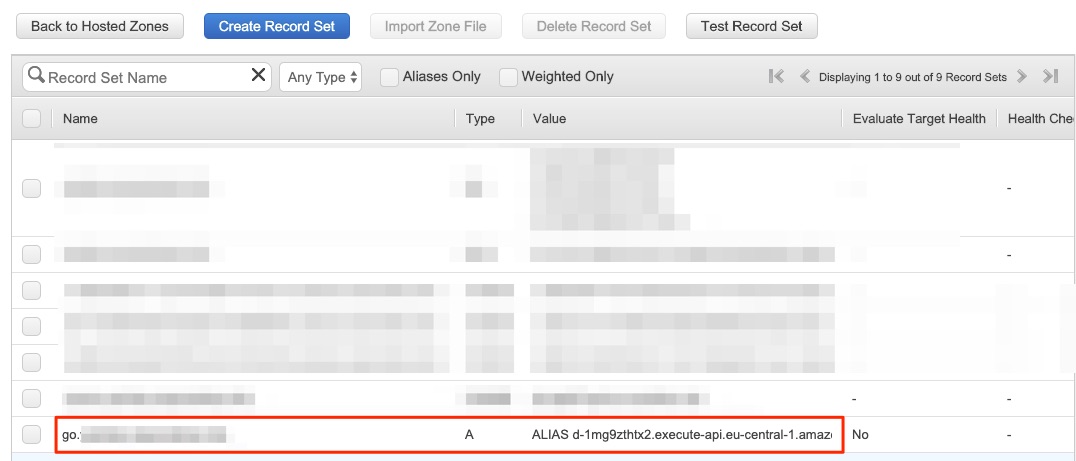
コマンドラインからも DNS レコードを確認します。
1 2 3 4 5 6 7 8 9 10 11 12 13 14 15 16 17 18 19 20 21 | $ dig go.example.info; <<>> DiG 9.10.6 <<>> go.example.info;; global options: +cmd;; Got answer:;; ->>HEADER<<- opcode: QUERY, status: NOERROR, id: 34240;; flags: qr rd ra; QUERY: 1, ANSWER: 2, AUTHORITY: 0, ADDITIONAL: 1;; OPT PSEUDOSECTION:; EDNS: version: 0, flags:; udp: 4096;; QUESTION SECTION:;go.example.info. IN A;; ANSWER SECTION:go.example.info. 60 IN A 3.123.86.188go.example.info. 60 IN A 3.120.53.211;; Query time: 77 msec;; SERVER: 192.168.178.1#53(192.168.178.1);; WHEN: Wed Oct 09 12:02:02 CEST 2019;; MSG SIZE rcvd: 88 |
このカスタムドメインに対して、短縮URLサービスを試します。
targetUrl に URL を渡し、短縮 URL を生成します。
短縮 URL でアクセスします。
1 2 3 4 5 6 7 8 9 | $ curl -I https://go.example.info/4692efecHTTP/2 301date: Wed, 09 Oct 2019 10:03:35 GMTcontent-type: application/jsoncontent-length: 0location: https://aws.amazon.com/cdk/x-amzn-requestid: 939ce6c8-ddcf-48b7-a758-e244bd42d12cx-amz-apigw-id: BSiCsGQ-liAFgmA=x-amzn-trace-id: Root=1-5d9db077-c89a4731411fa428e4c1b245;Sampled=0 |
301 ステータスと location から期待通りリダイレクトされていることがわかりますね。
9 後片付け
最後に、作成した AWS リソースをスを cdk destroy で削除しましょう。
1 2 3 4 5 6 | $ cdk destroyAre you sure you want to delete: url-shortener (y/n)? yurl-shortener: destroying... 0 | 12:04:28 | DELETE_IN_PROGRESS | AWS::CloudFormation::Stack | url-shortener User Initiated... ✅ url-shortener: destroyed |
裏では、CloudFormation のスタックが削除されます。
DynamoDB は CloudFormation の DeletionPolicy を Retain にして作成されているため、スタックを削除しても、テーブルは削除されません。
手動で削除してください。
最後に
Python 版 AWS CDK で短縮 URL サービスを作りました。
CDK アプリケーションの開発スタイル・サイクルの雰囲気が何となく伝わったのではないかと思います。
繰り返しとなりますが、本ブログは次の AWS Online Tech Talks が元になっています。
このウェビナーは
- 前半:(DynamoDB/Lambda/API Gateway/Route 53/ACM)アプリケーションの構築
- 後半:(Fargate/CloudWatch)負荷ツール、テスト、監視
の2本立てで、最終的には下図のようなシステムを構築し、ブログではその前半に焦点をあてています。
 ※図はウェビナーから引用
CDK を試してみたいアプリケーションエンジニアは、ドキュメントを読むよりも、この動画を見たほうがとっつきやすいのではないかと思います。
CDK に興味を持たれた方は、CDK Workshop を参考に手を動かすと、理解が進むと思います。
なお、ウェビナーに付随するソースコードは GitHub で公開されています。
aws-cdk-examples/python/url-shortener at master · aws-samples/aws-cdk-examples · GitHub
それでは。


