

Flutterでは縦書きテキストが標準でサポートされていません。
また、 Stack Overflowでも縦書きテキストのサポートについて言及されていましたが、将来的にもFlutterに追加される予定は無いとのことです。
通常ならプラグインを導入するだけで解決しますが、日本語等のCJK文字に対応するものが見つからなかったため、今回は一から自作することにしました。
(2022年11月20日更新)改良版を投稿しました!
完成版
文字の描画方法は主にParagraphを使用する方法(標準のTextと同じ)とTextPainterを使用する方法(図形を描画する方法と同じ)の2通りから選べますが、今回は簡易的な方法であるTextPainterを採用しました。
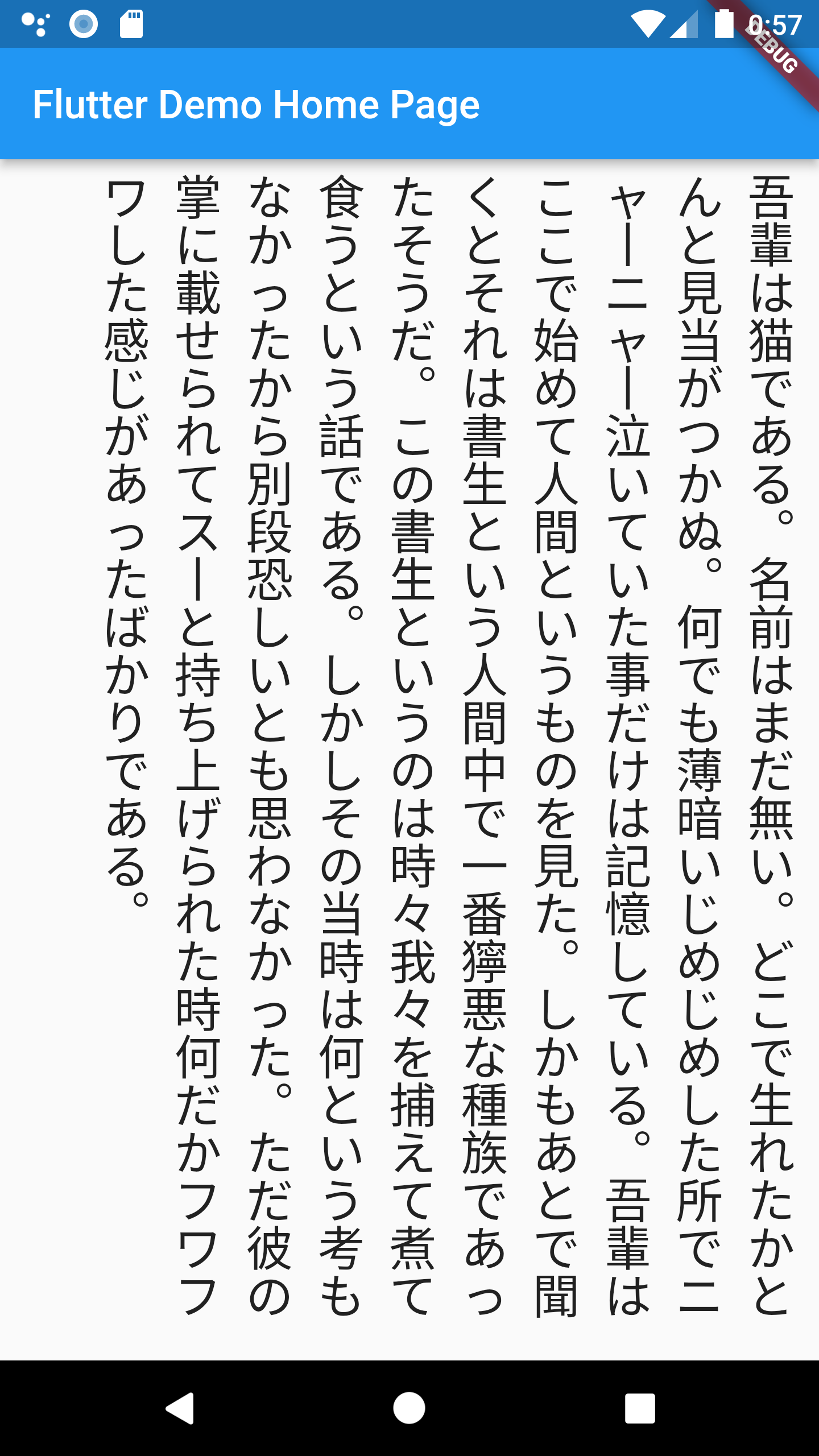
最終的なコードがこちらです。
import 'package:flutter/material.dart';
import 'package:untitled/tategaki.dart';

void main() {
  runApp(const MyApp());
}

class MyApp extends StatelessWidget {
  const MyApp({Key? key}) : super(key: key);

  // This widget is the root of your application.
  @override
  Widget build(BuildContext context) {
    return MaterialApp(
      title: 'Flutter Demo',
      theme: ThemeData(
        primarySwatch: Colors.blue,
      ),
      home: _MyHomePage(),
    );
  }
}

class _MyHomePage extends StatelessWidget {
  @override
  Widget build(BuildContext context) {
    return Scaffold(
      appBar: AppBar(
        title: const Text('Flutter Demo Home Page'),
      ),
      body: Tategaki(
        "吾輩は猫である。名前はまだ無い。どこで生れたかとんと見当がつかぬ。"
        "何でも薄暗いじめじめした所でニャーニャー泣いていた事だけは記憶している。"
        "吾輩はここで始めて人間というものを見た。しかもあとで聞くとそれは書生という人間中で一番獰悪な種族であったそうだ。"
        "この書生というのは時々我々を捕えて煮て食うという話である。しかしその当時は何という考もなかったから別段恐しいとも思わなかった。"
        "ただ彼の掌に載せられてスーと持ち上げられた時何だかフワフワした感じがあったばかりである。",
        style: const TextStyle(fontSize: 24),
      ),
    );
  }
}
import 'package:flutter/material.dart';
import 'package:untitled/vertical_rotated.dart';

class Tategaki extends StatelessWidget {
  Tategaki(
    this.text, {
    this.style,
    this.space = 12,
  });

  final String text;
  final TextStyle? style;
  final double space;

  @override
  Widget build(BuildContext context) {
    final mergeStyle = DefaultTextStyle.of(context).style.merge(style);
    return LayoutBuilder(
      builder: (context, constraints) {
        return RepaintBoundary(
          child: CustomPaint(
            size: Size(constraints.maxWidth, constraints.maxHeight - 4),
            painter: _TategakiPainter(text, mergeStyle, space),
          ),
        );
      },
    );
  }
}

class _TategakiPainter extends CustomPainter {
  _TategakiPainter(this.text, this.style, this.space);

  final String text;
  final TextStyle style;
  final double space;

  @override
  void paint(Canvas canvas, Size size) {
    canvas.save();

    final columnCount = size.height ~/ style.fontSize!;
    final rowCount = (text.length / columnCount).ceil();

    for (int x = 0; x < rowCount; x++) {
      drawTextLine(canvas, size, x, columnCount);
    }

    canvas.restore();
  }

  void drawTextLine(Canvas canvas, Size size, int x, int columnCount) {
    final runes = text.runes;
    final fontSize = style.fontSize!;
    final charWidth = fontSize + space;

    for (int y = 0; y < columnCount; y++) {
      final charIndex = x * columnCount + y;
      if (runes.length <= charIndex) return;

      String char = String.fromCharCode(runes.elementAt(charIndex));
      if (VerticalRotated.map[char] != null) {
        char = VerticalRotated.map[char] ?? "";
      }

      TextSpan span = TextSpan(
        style: style,
        text: char,
      );
      TextPainter tp = TextPainter(
        text: span,
        textDirection: TextDirection.ltr,
      );

      tp.layout();
      tp.paint(
        canvas,
        Offset(
          (size.width - (x + 1) * charWidth).toDouble(),
          (y * fontSize).toDouble(),
        ),
      );
    }
  }

  @override
  bool shouldRepaint(CustomPainter oldDelegate) => true;
}
class VerticalRotated {
  static const map = {
    ' ': ' ',
    '↑': '→',
    '↓': '←',
    '←': '↑',
    '→': '↓',
    '。': '︒',
    '、': '︑',
    'ー': '丨',
    '─': '丨',
    '-': '丨',
    'ー': '丨',
    '_': '丨 ',
    '−': '丨',
    '-': '丨',
    '—': '丨',
    '〜': '丨',
    '~': '丨',
    '/': '\',
    '…': '︙',
    '‥': '︰',
    '︙': '…',
    ':': '︓',
    ':': '︓',
    ';': '︔',
    ';': '︔',
    '=': '॥',
    '=': '॥',
    '(': '︵',
    '(': '︵',
    ')': '︶',
    ')': '︶',
    '[': '﹇',
    "[": '﹇',
    ']': '﹈',
    ']': '﹈',
    '{': '︷',
    '{': '︷',
    '<': '︿',
    '<': '︿',
    '>': '﹀',
    '>': '﹀',
    '}': '︸',
    '}': '︸',
    '「': '﹁',
    '」': '﹂',
    '『': '﹃',
    '』': '﹄',
    '【': '︻',
    '】': '︼',
    '〖': '︗',
    '〗': '︘',
    '「': '﹁',
    '」': '﹂',
    ',': '︐',
    '、': '︑',
  };
}
CustomPainterによる描画
第3引数のspaceでは一行同士の隙間サイズを指定します。
RepaintBoundaryはCustomPaintのキャッシュを保持するために使用しています。
@override
Widget build(BuildContext context) {
  final mergeStyle = DefaultTextStyle.of(context).style.merge(style);
  return LayoutBuilder(
    builder: (context, constraints) {
      return RepaintBoundary(
        child: CustomPaint(
          size: Size(constraints.maxWidth, constraints.maxHeight - 4),
          painter: _TategakiPainter(text, mergeStyle, space),
        ),
      );
    },
  );
}
縦書きテキストの描画
縦横の文字数を計算しておきます。
今回の場合はcolumnCountが24文字、rowCountが10行になります。
@override
void paint(Canvas canvas, Size size) {
  canvas.save();

  final columnCount = size.height ~/ style.fontSize!;
  final rowCount = (text.length / columnCount).ceil();

  for (int x = 0; x < rowCount; x++) {
    drawTextLine(canvas, size, x, columnCount);
  }

  canvas.restore();
}
縦書きテキストの一行分を描画
String型のテキストはrunesで文字コード(Unicodeコードポイント)のリストを取得することができます。
文字コードから復元する場合はString.fromCharCode()を使用します。
横書き時と縦書き時で文字コードが変わるものについては、VerticalRotated.map[char]より取得します。
例)「」, ー, 【】, <>
Offsetは左上が(0, 0)になるためsize.widthから減算することで、右から左に描画されるようになります。
void drawTextLine(Canvas canvas, Size size, int x, int columnCount) {
  final runes = text.runes;
  final fontSize = style.fontSize!;
  final charWidth = fontSize + space;

  for (int y = 0; y < columnCount; y++) {
    final charIndex = x * columnCount + y;
    if (runes.length <= charIndex) return;

    String char = String.fromCharCode(runes.elementAt(charIndex));
    if (VerticalRotated.map[char] != null) {
      char = VerticalRotated.map[char] ?? "";
    }

    TextSpan span = TextSpan(
      style: style,
      text: char,
    );
    TextPainter tp = TextPainter(
      text: span,
      textDirection: TextDirection.ltr,
    );

    tp.layout();
    tp.paint(
      canvas,
      Offset(
        (size.width - (x + 1) * charWidth).toDouble(),
        (y * fontSize).toDouble(),
      ),
    );
  }
}
おまけ: プラグインを利用する場合(mongol)
Flutterの縦書きテキストについて検索すると、mongolプラグインを利用する方法が見つかるかと思います。
この方法でも縦書きを行うことが可能ですが、CJK表示に対応していないためモンゴル語の「左 → 右」方向に表示されてしまいます。
また、日本語自体に最適化されておらず記号等も横書き表示のままです。
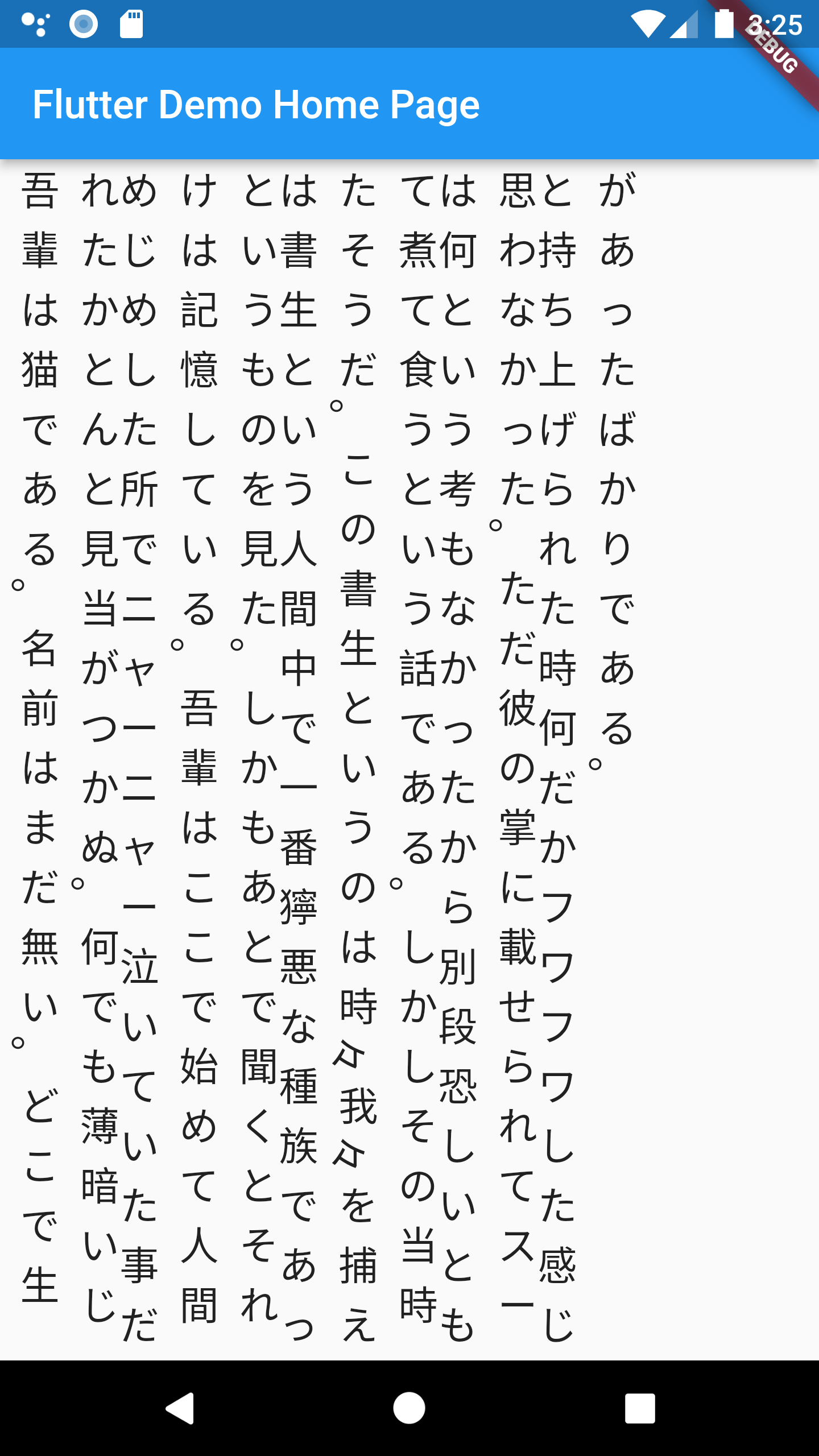
一行のみの場合や英文表示用で使い分けると良いと思います。
参考


コメント @M8KzBFdJPyD1kKd
1
素晴らしい!
これをパッケージとかにしてほしいです。
もしくは、簡単に使えるようにしてもらいたいです。
また、欲を言えば、小文字「つ」等が中央になっているので、もう少し右側にしてもらいたいですね。
ともかく素晴らしい!!