
The Corsair XENEON 27QHD240 is a 27-inch gaming monitor with a 1440p resolution. Alongside the Corsair XENEON FLEX 45WQHD240, it's one of two OLEDs that Corsair has, and it uses the same panel as the LG 27GR95QE-B and ASUS ROG Swift OLED PG27AQDM. It has everything you'd expect in a high-end gaming monitor, like a 240Hz refresh rate, variable refresh rate (VRR) support, and HDMI 2.1 bandwidth. Although it's focused on gaming, it has a few features for other uses like productivity, as it has a KVM switch that makes it easy to use the same keyboard and mouse connected to the monitor with two different sources. It has a few settings to combat permanent burn-in, which OLEDs are prone to, and Corsair advertises that there's a warranty against burn-in, but it's unclear what specific burn-in is covered as the warranty excludes normal wear and tear.
Our Verdict
The Corsair XENEON 27QHD240 is amazing for PC gaming. Its 240Hz refresh rate is great for competitive gaming, and it has VRR support that works with any source to reduce screen tearing. Motion looks sharp no matter the refresh rate you're gaming at, and it has low input lag at high refresh rates, but it increases at 60Hz. It also has distracting VRR flicker with changing frame rates, which is noticeable in dark scenes. On the plus side, it displays deep and inky blacks without blooming, making it a great choice in dark rooms.
- 240Hz max refresh rate.
- Supports all common VRR formats at any refresh rate.
- Near-instantaneous response time.
- Perfect black levels.
- Input lag increases with 60Hz signals.
- Distracting VRR flicker with changing frame rates.
The Corsair XENEON 27QHD240 is incredible for console gaming. It has HDMI 2.1 bandwidth, so it supports any signal from the PS5 and Xbox Series X|S, including downscaled 4k @ 120Hz signals. Gaming feels responsive thanks to its low enough input at 120Hz, but its input lag increases at 60Hz, which is disappointing for playing reaction-based games. Luckily, your games also look realistic thanks to its excellent HDR picture quality with its deep blacks, but it doesn't deliver vivid colors.
- Supports all common VRR formats at any refresh rate.
- Near-instantaneous response time.
- Perfect black levels.
- Takes full advantage of modern consoles.
- Input lag increases with 60Hz signals.
The Corsair XENEON 27QHD240 is decent for the office, but there are some limitations. Its wide viewing angles and great ergonomics make it easy to adjust the screen, like when you need to show something to a coworker. It also has a few office-oriented features, like a KVM switch, so you can control two devices with the same keyboard and mouse. While it has fantastic reflection handling, it doesn't get bright enough to fight a lot of glare. Sadly, it has text clarity issues due to its RWBG subpixel layout, and OLEDs also risk permanent burn-in when exposed to the same static elements over time.
- Fantastic reflection handling.
- Wide viewing angles.
- Great ergonomics.
- USB-C port and KVM switch.
- Text clarity issues due to RWBG subpixel layout.
- Limited peak brightness and aggressive ABL.
- Risk of burn-in with static elements.
The Corsair XENEON 27QHD240 is great for content creation, but there are limitations. It displays a wide range of accurate colors in SDR, but you still need to calibrate it for the best accuracy possible. It also has great ergonomics and wide viewing angles, which help if you often need to share your screen with a coworker or client. However, there are text clarity issues due to its subpixel layout, resulting in color fringing and text that isn't very sharp. Also, OLEDs risk burn-in with exposure to static elements over time, like if you always have your editing software open.
- Fantastic reflection handling.
- Wide viewing angles.
- Great ergonomics.
- USB-C port and KVM switch.
- Text clarity issues due to RWBG subpixel layout.
- Limited peak brightness and aggressive ABL.
- Risk of burn-in with static elements.
The Corsair XENEON 27QHD240 has mediocre brightness. It doesn't get bright enough to fight glare in SDR, and while some highlights stand out in HDR, it can't maintain this brightness with larger highlights or across the screen.
- Small highlights pop in HDR.
- Limited peak brightness and aggressive ABL.
The Corsair XENEON 27QHD240 has a near-instantaneous response time, leading to exceptionally crisp motion.
- Supports all common VRR formats at any refresh rate.
- Outstanding refresh rate compliance.
The Corsair XENEON 27QHD240 is excellent for HDR. It displays deep blacks next to bright highlights in dark rooms, and there isn't any blooming either. However, it doesn't get bright enough in HDR to display vivid colors, and it has tone mapping issues.
- Perfect black levels.
- Small highlights pop in HDR.
- No blooming around bright objects.
- Limited HDR color volume.
The Corsair XENEON 27QHD240 has exceptional picture quality in SDR. It displays deep and inky blacks without any blooming, and it also displays a wide range of colors.
- Perfect black levels.
- No blooming around bright objects.
The Corsair XENEON 27QHD240 has great color accuracy. Although it has a dedicated sRGB mode, its accuracy before calibration isn't anything special as most colors are off, and you need to calibrate it for the best accuracy. That said, the image remains consistently accurate across the entire screen, as it doesn't have any uniformity issues.
- No uniformity issues.
- Needs calibration for best accuracy.
Performance Usages
Changelog
- Updated Feb 21, 2025: We've converted this review to Test Bench 2.0.1. This includes a new test result for DisplayPort 2.1 Transmission Bandwidth.
- Updated Apr 17, 2024: Updated text throughout the review according to Test Bench 2.0, mainly in the Verdict and Motion sections.
- Updated Apr 17, 2024: We've converted this review to Test Bench 2.0. This includes new tests for VRR Motion Performance, Refresh Rate Compliance, Cumulative Absolute Deviation (CAD), and VRR Flicker. You can read the full changelog here.
- Updated Oct 19, 2023: Mentioned that the Acer Predator X27U bmiipruzx has better Ergonomics.
Check Price
Differences Between Sizes And Variants
We tested the 27-inch Corsair XENEON 27WQHD240, which is the only size available for this model. Corsair also has the 45-inch Corsair XENEON FLEX 45WQHD240 monitor available, which is another OLED, but it's a different monitor with an ultrawide display and is bendable.
| Model | Size | Panel Type | Resolution | Max Refresh Rate |
|---|---|---|---|---|
| 27QHD240 | 27" | OLED | 2560x1440 | 240Hz |
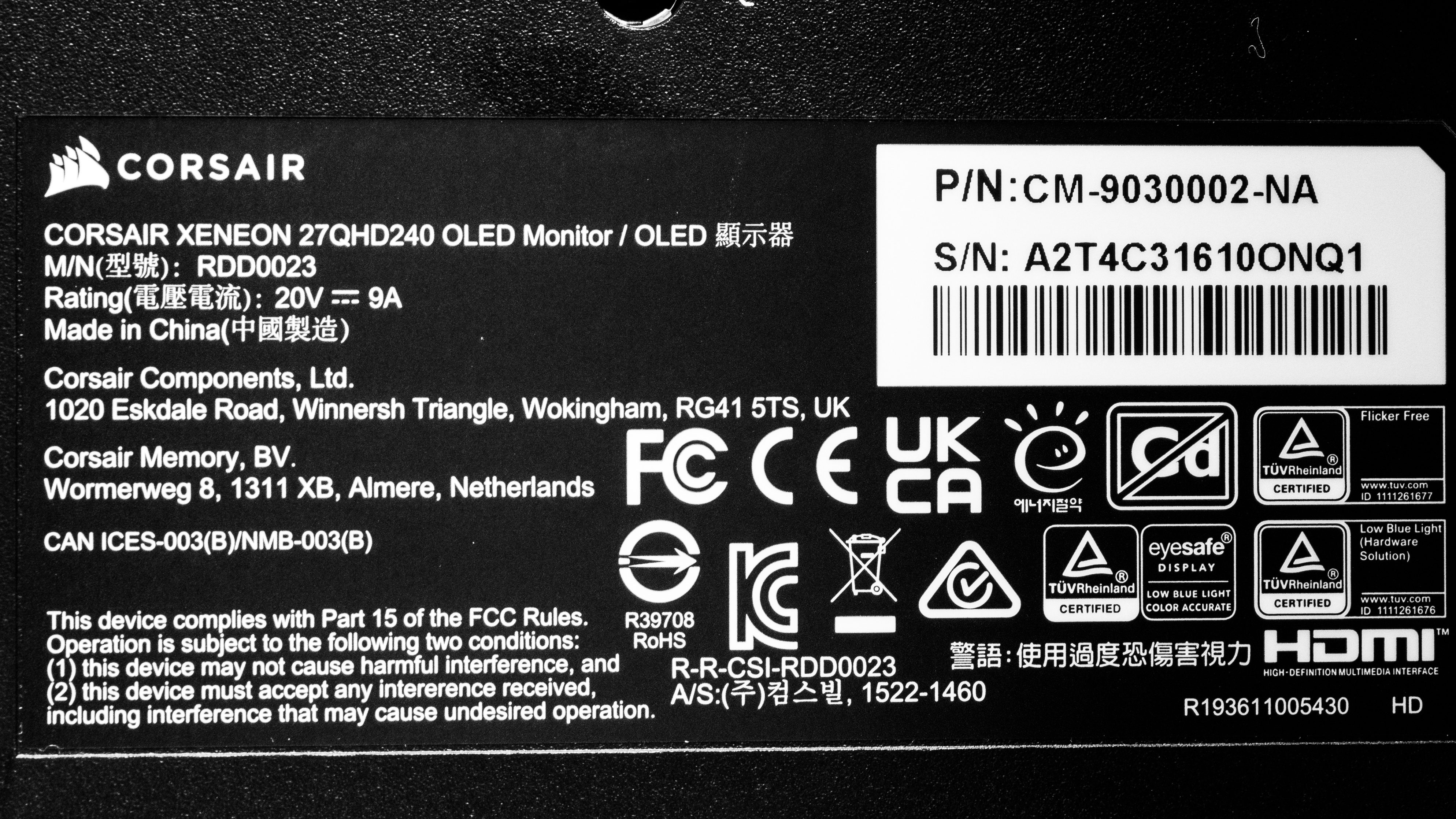
You can see the label for our unit here. We originally tested this monitor with firmware V102.
Popular Monitor Comparisons
The Corsair XENEON 27QHD240 is an amazing PC gaming monitor with incredible motion handling, a high refresh rate, and perfect black levels. It can please any type of gamer with the combination of the fast refresh rate and premium picture quality. On top of its amazing gaming performance, it even has a few extra productivity features compared to some other monitors. However, considering it doesn't get as bright as the ASUS ROG Swift OLED PG27AQDM and has higher input lag at low refresh rates, the ASUS offers better value. Still, if you can find it for less than the ASUS and the LG 27GR95QE-B, it might be worth getting if its downsides don't bother you. The limited three-year warranty on the Corsair is positive compared to the LG and ASUS, but the warranty also has some exceptions.
See our recommendations for the best gaming monitors, the best 1440p gaming monitors, and the best 240Hz monitors.
The Corsair XENEON 27QHD240 and the ASUS ROG Swift OLED PG27AQDM use the same panel, but there are a few differences. The ASUS gets much brighter, especially in HDR, and colors look more vivid thanks to its improved color volume, so its overall picture quality is better. However, the Corsair has a few extra features that the ASUS doesn't have, like HDMI 2.1 bandwidth, USB-C ports, and a KVM switch. These can be useful if you want to connect multiple devices.
The Samsung Odyssey OLED G85SB S34BG85 and the Corsair XENEON 27QHD240 are different types of OLEDs. The Samsung has an ultrawide display with a QD-OLED panel, allowing it to get much brighter with more vivid colors than the Corsair. On the other hand, the Corsair has a higher 240Hz refresh rate, which is ideal for competitive gaming, and it supports 4k signals up to 120Hz from the PS5 and Xbox Series X|S, which the Samsung monitor can't do.
The Dell Alienware AW3423DWF and the Corsair XENEON 27QHD240 are different types of OLEDs. The Dell has an ultrawide display with a QD-OLED panel, allowing it to get much brighter with more vivid colors than the Corsair. On the other hand, the Corsair has a higher 240Hz refresh rate, which is ideal for competitive gaming and supports 4k signals up to 120Hz from the PS5 and Xbox Series X|S, which the Dell can't do.
The Corsair XENEON 27QHD240 and the LG 27GR95QE-B use the same panel and perform similarly. However, there are still a few differences as the LG gets brighter in HDR and has improved color volume, while the Corsair has less overshoot with fast-moving objects. The Corsair also has a few extra features, like USB-C ports and a KVM switch. They both support HDMI 2.1 bandwidth, but the LG supports 48 Gbps bandwidth compared to 24 Gbps on the Corsair, so your source doesn't need to use compression for demanding signals.

We buy and test more than 30 monitors each year, all of which we purchase ourselves, without cherry-picked units or samples. We put a lot into each unbiased, straight-to-the-point review, and there's a whole process from purchasing to publishing, involving multiple teams and people. We do more than just use the monitor for a week; we use specialized, custom tools to measure various aspects and deliver objective, data-driven results. We also consider multiple factors before making any recommendations, including the monitor's cost, its performance compared to the competition, and whether it's easy to find.
Test Results


for pictures & test results


for pictures & test results

for videos & test results

for pictures & test results

for pictures & test results

for pictures & test results

for videos & test results

for pictures & test results

for pictures & test results

for pictures & test results


for pictures & test results

for pictures & test results

for pictures & test results

for pictures & test results

for pictures & test results

for pictures & test results


| Retailers' prices | Amazon.co.jp |
|---|---|
| 27" XENEON 27QHD240 | SEE PRICE |


Comments
Corsair XENEON 27QHD240: Main DiscussionTrack a Product
Track
Let us know why you want us to review the product here, or encourage others to vote for this product. Comments transferred from merged discussions are also included.
The USB-C to USB-A cable that comes with this is only 2.0 so you can’t fully utilize the USB-A 3.0 ports if you’re plugging in bandwidth hungry devices. Tested it myself, kinda weird Corsair provided that cable, surely it doesn’t cost significantly more for a 3.0 cable.
Hi, that’s a great question! NVIDIA’s G-SYNC Compatible designation means that VRR will work with the monitor if you have an NVIDIA graphics card. However, it doesn’t mean that there won’t be VRR flicker while you’re doing so. If you want to reduce VRR flicker you can try to limit variation in the frame rate in the games you’re playing by adjusting settings in the game, like adding a frame rate cap. We discuss this more in our VRR Flicker article.
Update: Converted to Test Bench 2.0.1.
G-SYNC Compatible (NVIDIA Certified) but still when G-sync on vrr flicker is bad … why ?
Update: Updated text throughout the review according to Test Bench 2.0, mainly in the Verdict and Motion sections.
+1
I love this corsair oled monitor. Even had the LG oled and switched it for this one. I have no issues with brightness with the updates that are available. Solid monitor.
I’m thinking of getting this one. It would primarily be for gaming. Has anyone had any issues with the brightness? Any feed back would be great.
Theoretically yes, a 360Hz monitor should have lower input lag, but we don’t know until we test it.
No that’s correct, as we aim to calibrate at a brightness of 100 nits, and in this case, setting the brightness setting that low achieved that.
Hi! I have had this monitor for a few days, purchased through a discount on Amazon. At the moment I’m largely satisfied, as already written in other comments the subpixel layout problem is not so harmful and after a bit of getting used to it you get the hang of it (mainly gaming use but also office use). I was looking at the review and wanted to ask the administrators to confirm if it was correct to post-calibrate brightness value to a value of 17 O_o. Personally it seems too low to me and I wouldn’t want there to be an error in the sense of 17 -> 71.
So im asumming those alienware 360hz OLED’s being released in january will have lower input lag?
Hey! As mentioned here, we looked into it and it didn’t increase the brightness significantly!
Any update on the new firmware v104 that increases brightness by 30%?
While it’s technically possible, it’s unlikely that it would be a significant difference, as the minimum theoretical input lag we could measure at 240Hz is 2.1 ms, but no monitor we’ve tested has a 240Hz input lag lower than 2.5 ms.