Enjoy fast, free delivery, exclusive deals, and award-winning movies & TV shows.
¥5,599 Tax included
Amazon Points: 112pt  (2%)  See details
FREE delivery Wednesday, June 24. Details
Or fastest delivery Today. Order within 48 mins. Details
In Stock Click here for details of availability.
¥¥5,599 () Includes selected options. Includes initial monthly payment and selected options. Details
Price
Subtotal
¥¥5,599
Subtotal
Initial payment breakdown
Shipping cost, delivery date, and order total (including tax) shown at checkout.
Ships from
Amazon
Amazon
Ships from
Amazon
Sold by
fairikabe
Sold by
(8 ratings)
Gift options
Available at checkout
Available at checkout This item is a gift. Change
At checkout, you can add a custom message, a gift receipt for easy returns and have the item gift-wrapped
Payment
Secure transaction
Your transaction is secure
We work hard to protect your security and privacy. Our payment security system encrypts your information during transmission. We don’t share your credit card details with third-party sellers, and we don’t sell your information to others. Learn more
Added to

Sorry, there was a problem.

There was an error retrieving your Wish Lists. Please try again.

Sorry, there was a problem.

List unavailable.
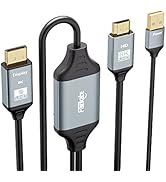
  • fairikabe DisplayPort to USB C Cable 5K60Hz/4K144Hz/4K60Hz, 2m Unidirectional DisplayPort Source to USB-C Touchable Mobile Monitor, Studio Display, Nreal Air/Xreal Glass, USB C Monitor, Projector and

fairikabe DisplayPort to USB C Cable 5K60Hz/4K144Hz/4K60Hz, 2m Unidirectional DisplayPort Source to USB-C Touchable Mobile Monitor, Studio Display, Nreal Air/Xreal Glass, USB C Monitor, Projector and


¥5,599 Tax included
Amazon Points: 112pt  (2%)  See details
Ships from Amazon
  • By qualifying any of Free Standard Shipping condition, you can have items delivered for free to addresses in Japan.

    Customers who are placing their first orders can enjoy free Standard Shipping regardless of the order amount. Please refer to About Shipping Cost for more details. For Amazon Prime and Prime Student members, the rates won't be charged for any shipping options.

    You can find tracking information in your order detail.
    For more information about tracking, please refer to this page.
  • Learn more
Worry free shopping
Amazon is committed to making shopping safe, secure, and easy. We are obsessed with providing a worry free shopping experience to our customers by offering comprehensive benefits and supports such as easy return policy, 24/7 customer supports, curated customer reviews, and strict privacy policy. We are also committed to a sustainable future in many ways, including delivery, packaging, products, and logistics locations. Learn more
Your transaction is secure
We work hard to protect your security and privacy. Our payment security system encrypts your information during transmission. We don’t share your credit card details with third-party sellers, and we don’t sell your information to others. Learn more
Brief content visible, double tap to read full content.
Full content visible, double tap to read brief content.
Model: MY-DPMTC184
{"desktop_buybox_group_1":[{"displayPrice":"¥5,599","priceAmount":5599.00,"currencySymbol":"¥","integerValue":"5,599","decimalSeparator":null,"fractionalValue":null,"symbolPosition":"left","hasSpace":false,"showFractionalPartIfEmpty":true,"offerListingId":"SIXKVfFsCXTjEjYpKxAZrdaHp9J%2Bpd5NM8CF7DAYdxDyBKlshgN3cVANqyXjyu%2FAvJorR6nGOw50Je8DI3uE0TLwX37oUI%2BA3J%2FNY5fW44ijEustUhnPtQ6DUMM9YKjgFwEjBSFxDK2ox%2BHDvKSVFAPVUgL4eeTVf3oAKGtEYyoGm77yqtURbH730pynB%2F17","locale":"en-US","buyingOptionType":"NEW","aapiBuyingOptionIndex":0}]}

Purchase options and add-ons

About this item

  • 【Unidirectional DisplayPort to USB-C】Fairikabe's DisplayPort input to USB-C monitor cable allows you to extend the DP port of your PC or laptop to a USB-C monitor (not compatible with USB-C laptops) The maximum resolution supports 5K 60Hz, and is compatible with 4K 144Hz / 4K 60Hz / 2K / 1080P etc To achieve the appropriate resolution, both the host device and the monitor must support that resolution simultaneously *Not compatible with USB-C smartphones, USB-C laptops, USB-C PCs or USB-C docking stations
  • 【Compatible with Mobile Monitors】It is necessary for the USB-C port of the mobile monitor to support video input, and for the USB-C charger to support PD protocol, providing a minimum power of 60W Note: Your device and charging adapter must support PD3.0 Included are USB-A (connect to PC) and USB-C (connect to external charging adapter) cables, which support the touch function of the mobile monitor and supply power to the monitor (does not charge) Easy to use without any drivers, plug and play compatible
  • 【Studio Display Compatible】Fully compatible for expanding from a Windows computer or laptop to a Studio Display, support up to 5K resolutions on the Studio Display Note: The monitor itself requires a separate power cable connection
  • 【Compatible with most USB-C VR goggles】Connect the DisplayPort connector to the DP output port of your laptop/desktop, and connect the USB-C display connector to the USB-C input of VR goggles such as nreal air VR goggles, Xreal Air Pro, etc
  • 【Wide Compatibility】The unidirectional DisplayPort to USB-C cable is widely compatible with Windows and macOS operating systems, supporting video extension from DisplayPort of PC/laptop/desktop/graphic cards to USB Type-C monitors, projectors, HDTVs, and Nreal Air Note: Please make sure that the USB-C port on your monitor supports DP Alt Mode (video output compatible) The USB C port is dedicated for charging and cannot output video
  • 【注意】これは片方向のDPからUSB-Cケーブルであり、USB-CからDisplayPortへの接続には対応していません。 This 6.6ft DisplayPort to Type-C cable comes with a 24-month warranty Fairikabe focuses on product quality and customer experience, and we provide support if you have any questions about the product
  • 【Troubleshooting】If the image is not output, please unplug and reinsert the cable once Also, if you have other ports, connect it to another port and try it This DP to USB-C cable is not compatible with any adapters or docking stations

Competitively priced item

Amazon's Choice

Frequently bought together

This item: fairikabe DisplayPort to USB C Cable 5K60Hz/4K144Hz/4K60Hz, 2m Unidirectional DisplayPort Source to USB-C Touchable Mobile Monitor, Studio Display, Nreal Air/Xreal Glass, USB C Monitor, Projector and
¥5,599
Get it as soon as Wednesday, Jun 24
In Stock
Sold by fairikabe and ships from Amazon Fulfillment.
Total price: ¥8,597
Total Points:112pt
Details
Added to Cart
These items are shipped from and sold by different sellers.

From the brand


Product description

displayport to usb c

fairikabe DisplayPort to USB-C cable connectivity, add USB-C monitor/mobile monitor (touchscreen) or AR glasses to DP enabled PCs and laptopsThe resolution is compatible with 5K60Hz/4K144Hz/4K60Hz, and is backwards compatible with 2K and 1080P (specific resolution must support the corresponding resolution)

DP to USB C

Connect your DisplayPort enabled PC or laptop to USB-C AR glasses (such as Nreal Air, Xreal Air 2 / Xreal Air 2 Pro, Huawei VR glasses, Rayneo, etc.)* Connect USB-A cable to your PC/Laptop and connect the USB-C power cable to the charger.

Xreal

Specifically designed for the touch screen of a mobile monitor with only one USB-C port.

Nreal
DP to C

Product information

Warranty & Support

Amazon.co.jp Return Policy:You may return the item you purchased at Amazon.co.jp within 30 days of delivery only if unopened and unused in principle( excluding the non-returnable and non-exchangeable items). Please confirm the condition of the item promptly upon delivery. We may accept return of the item with initial failure even after the refund period depending on the details of your inquiry. The conditions for refund differs for the items shipped by Amazon.co.jp and those shipped by a seller on Amazon Market place. For more information on return of home electrical appliances and cameras, please see, here.

Feedback

Please sign in to provide feedback.

Customer reviews

4 out of 5 stars
113 global ratings

Review this product

Share your thoughts with other customers
PCでXREAR ONEを使うために購入
4 out of 5 stars
PCでXREAR ONEを使うために購入
PCとディスプレィはHDMIケーブルを使用しており、余ったDisplay PortにXreal Oneを接続するために購入しました。 結果、全く問題ありませんでした。ケーブルが4つあり、一つはPCのDPへ。片方のUSB-CをXreal Oneへ。もう一つのUSB-Cは給電用らしく、こちらを繋がないと使えませんが、最後のUSB-Aはタッチ操作の端子?みたいなので、こちらは繋がなくても大丈夫だと思います。Xreal側のメニューも問題なく表示されます。 ☆1つ分は値段が高いのと、USB-Aが不要なのと、コードが(もともとそういう想定ではないですが)すこし太めなとこでマイナスにさせていただきました。 ご参考ください。
Thank you for your feedback
Sorry, there was an error
Sorry we couldn't load the review

Top reviews from Japan

    Translated by Amazon
    See original
  • 5 out of 5 stars
    Wacom link の代替として
    Reviewed in Japan on June 10, 2026
    Brief content visible, double tap to read full content.
    Full content visible, double tap to read brief content.

    Wacom link の入手が難しくなってる今、大変ありがたい。PC→液タブが usb c 一本になってすっきり。

    Sending feedback...
    Thank you for your feedback.
    Sending feedback...
    Thanks, we'll investigate in the next few days.
    Translated from Japanese by Amazon
    See original
  • 5 out of 5 stars
    環境(スペック)がちゃんとしていれば使えるはず
    Reviewed in Japan on March 15, 2026
    Brief content visible, double tap to read full content.
    Full content visible, double tap to read brief content.

    液タブ接続用途

    内臓GPUなしデスクトップパソコンで一応グラボにHDMIポートがあるので使えないことはないがHDMIポートが一つしかないのでDisplayPortで使いたくて購入

    私の使用環境では16インチは電力供給をマザーボードの背面のタイプCに繋いでもちゃんと液タブを使うことができました。

    大型は別途コンセントから電源供給した

    高価格帯のグラボにしか付いていないC付のグラボを買い替えようかと悩んでいたので、安価でDisplayPortでも使えるようになって大変満足しています。

    Sending feedback...
    Thank you for your feedback.
    Sending feedback...
    Thanks, we'll investigate in the next few days.
    Translated from Japanese by Amazon
    See original
  • 1 out of 5 stars
    寿命が短いこと
    Reviewed in Japan on May 21, 2026
    Brief content visible, double tap to read full content.
    Full content visible, double tap to read brief content.

    3ヶ月で映らなくなりました 接続してから1度も動かしたことがなくRT X 5070につないでいたのですが寿命は短かったです

    Sending feedback...
    Thank you for your feedback.
    Sending feedback...
    Thanks, we'll investigate in the next few days.
    Translated from Japanese by Amazon
    See original
  • 4 out of 5 stars
    Wacom link plusの代用として
    Reviewed in Japan on September 10, 2025
    Brief content visible, double tap to read full content.
    Full content visible, double tap to read brief content.

    Wacom MobileStudio Pro 16

    (DTH-W1620H)とDPポートのPCを繋ぐ事が出来ました。

    Cintiq pro24と同時に接続しているためか、アプリ内ツールのボタン切り替え時に上手くいかない時もありますが、繋いで使用と言う部分はクリア出来ます。

    Wacom link plusの代替となる商品かと思いました。

    3 people found this helpful
    Sending feedback...
    Thank you for your feedback.
    Sending feedback...
    Thanks, we'll investigate in the next few days.
    Translated from Japanese by Amazon
    See original
  • 5 out of 5 stars
    Wacom One 14が動きました
    Reviewed in Japan on November 27, 2025
    Brief content visible, double tap to read full content.
    Full content visible, double tap to read brief content.

    ご家庭(のWindows)にDisplayPort Altモードは無い!!という訳でデスクトップPCを所有されている方の大多数はたとえ良いグラフィックボードを使っていてもWacom One 14を使う事はできないと思います。マカーなら別かもしれませんが…

    ではどうするかっていうと公式の変換アダプタを買うのが第一の選択ですが、値段がスゴイ上に絶賛売り切れ中(2025年時点)…、対応するUSBポートを追加するのが第二の選択ですが、そちらもお値段がスゴイ上にPCの知識も必要…

    藁にもすがる思いで公式のアダプタとほぼ同等の機能を有するこちらの製品に泣きついたわけですが、めでたく起動し、液タブとして使用することも出来ました。本当にありがたい。(比較的)安いし。

    全然知らないメーカーさんですが、モノ自体は丁寧に梱包して届いたので、耐用年数もそんなに悪くないんじゃないかな…と勝手に思ってます。まぁ仮に数年で壊れても公式のアダプタ買うお金で三本くらい買えちゃうので全然問題ないんですが…

    12 people found this helpful
    Sending feedback...
    Thank you for your feedback.
    Sending feedback...
    Thanks, we'll investigate in the next few days.
    Translated from Japanese by Amazon
    See original
  • 3 out of 5 stars
    問題無し→有り
    Reviewed in Japan on April 14, 2026
    Brief content visible, double tap to read full content.
    Full content visible, double tap to read brief content.

    期待した動作です。

    タッチパネルモバイルディスプレイへTYPE C一本で映像も電力供給もタッチパネル動作もOK

    追記

    RTX3050からkksmartのGT-156 への接続は問題無かったが、

    RTX5070からUPERFECTの18.5インチタッチパネルモニターに接続すると何も映らない…

    ほかの方のレビューにもあったけれど最近の(120Hzの)モバイルモニターはダメなのかも知れない。リフレッシュレートのネゴシエーションが出来ない?

    Sending feedback...
    Thank you for your feedback.
    Sending feedback...
    Thanks, we'll investigate in the next few days.
    Translated from Japanese by Amazon
    See original
  • 5 out of 5 stars
    Wacom One 14で使えた
    Reviewed in Japan on October 17, 2025
    Brief content visible, double tap to read full content.
    Full content visible, double tap to read brief content.

    Wacom One 14で使えた。まったく違和感ないのに安い。

    9 people found this helpful
    Sending feedback...
    Thank you for your feedback.
    Sending feedback...
    Thanks, we'll investigate in the next few days.
    Translated from Japanese by Amazon
    See original
  • 5 out of 5 stars
    リコーのディスプレイに使っている。
    Reviewed in Japan on August 3, 2025
    Brief content visible, double tap to read full content.
    Full content visible, double tap to read brief content.

    Lenovo P340にRichoのモバイルディスプレイ150を接続するために購入。

    使えている。

    スリープの復帰では、信号無しとなる場合がある。

    PC側のコネクタ抜き差しなどで復旧させている。

    これはケーブルの問題では無く評価とは別次元。

    ディスプレイがUSB-C接続専用なのでこういう使い方には

    クセがあるのは仕方が無い。自己責任。

    One person found this helpful
    Sending feedback...
    Thank you for your feedback.
    Sending feedback...
    Thanks, we'll investigate in the next few days.
    Translated from Japanese by Amazon
    See original

Top reviews from other countries

  • 5 out of 5 stars
    Saves the clutter on the desk
    Reviewed in Germany on May 19, 2026
    Brief content visible, double tap to read full content.
    Full content visible, double tap to read brief content.

    The only saving grace for my Wacom Cintiq display and my PC. The other option is three cables at once. Wacom sells similar solution as a standalone module for 2-3 times more money.

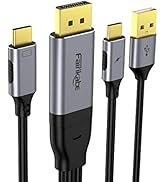
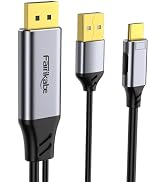
    This Fairikabe cable has USB-A (PC), Display Port (PC) and USB-C (Charger) on one side (they split off from the Display Port and the USB-A & USB-C branches are maybe like 1 meter long). The other end is the USB-C, display port capable plug for the Wacom display. Those USB-C (DP mode) ports are common in laptops and phones(?), but are missing usually from the PC stations (except if you have special GPU or Motherboard).

    Anyway, this cable works great and the only thing which I would like to have been improved was if it was a bit longer - 2 meters for my case are a bit short. Btw, Fairikabe has, I think, and HDMI version of this one, so it can be used for GPUs who has only such port available.

    Sending feedback...
    Thanks, we'll investigate in the next few days.
  • 5 out of 5 stars
    Seamless Integration: VITURE Pro XR/AR Glasses with Gigabyte GeForce RTX 4060
    Reviewed in Canada on March 26, 2025
    Brief content visible, double tap to read full content.
    Full content visible, double tap to read brief content.

    ​I recently connected my VITURE Pro XR/AR Glasses to the DisplayPort of my Gigabyte GeForce RTX 4060 WINDFORCE OC 8G Graphics Card as a third display, and the combination works seamlessly. The glasses deliver an impressive Full HD display, providing an immersive visual experience. ​

    When connecting the VITURE Pro XR/AR Glasses, ensure the USB-C connector is oriented correctly. If the glasses do not function as expected, try reversing the USB-C connector by turning it upside down. This simple adjustment can resolve connectivity issues. ​

    Overall, pairing the VITURE Pro XR/AR Glasses with the Gigabyte GeForce RTX 4060 WINDFORCE OC 8G Graphics Card enhances the visual experience, making it a great combination for both gaming and professional applications.

    Sending feedback...
    Thanks, we'll investigate in the next few days.
  • 5 out of 5 stars
    Supports USB Video and USB 2.0 Data (Injecting USB Data into DisplayPort to USB-C)!
    Reviewed in the United States on August 19, 2024
    Brief content visible, double tap to read full content.
    Full content visible, double tap to read brief content.

    I bought this specifically because I wanted to use an RTX 30 or 40 Series card with a USB-C monitor, which also has a USB hub, but the trouble is that only the RTX 20 Series (or laptops) have USB-C outputs that support this particular feature. (Yes, I could just run two separate cables, but I don't want to.) Well, this works flawlessly, with one tiny exception: this is only just over six feet long. Not a deal breaker for me, as I have several give-or-take ten/fifteen-feet USB-C cables, and using a C-to-C coupler, that seems to work fine. Presently, I have around twenty-one feet of cable, including a coupler, running 2560x1600@144hz with HDR, and with full USB 2.0 capabilities, over DisplayPort>USB-C, with both extra heads plugged into respective sockets. The main issue is that this requires a pretty hefty USB-C power supply, so I'm using one that can go up to 12v, not the motherboard's USB-C (which I think this particular Motherboard predates USB-C). A pass-through device I have plugged in directly to said monitor says its running at around 10.3v, 1.12a, for around 11w, and that's only going to go up, as I demand more from it.

    Given that this is plugged into the DisplayPort, I'm not worried at all about the voltage possibly damaging my video card, computer, or monitor. USB power over DP or HDMI should be completely safe, due to the necessity that those standards require a strict signaling voltage, without the option to backfeed voltage. (as I understand it, DP is 3.3v, HDMI is 5v; USB-C, using DP-Alt Mode is likely also 3.3v). I did once blow out a PS3's USB ports, but only the power part, as long as I use a hub that requires external power, it still works; but I don't want to make that mistake again.

    I'm nothing if not spoiled for choice, but something appeals to me about being able to stretch a single USB-C cable around a room and still get high resolution and framerate, with the option for using my existing USB devices, and not having to resort to wireless. I understand that wireless is "more convenient" or "better now than in years prior", but I like a simple solution to a specific problem. This cable solves my specific problem. At present, though, this is just an experiment for me, and won't get to be implemented until much later.

    Supports USB Video and USB 2.0 Data (Injecting USB Data into DisplayPort to USB-C)!
    Supports USB Video and USB 2.0 Data (Injecting USB Data into DisplayPort to USB-C)!
    Supports USB Video and USB 2.0 Data (Injecting USB Data into DisplayPort to USB-C)!
    5 out of 5 stars
    Supports USB Video and USB 2.0 Data (Injecting USB Data into DisplayPort to USB-C)!
    Reviewed in the United States on August 19, 2024

    I bought this specifically because I wanted to use an RTX 30 or 40 Series card with a USB-C monitor, which also has a USB hub, but the trouble is that only the RTX 20 Series (or laptops) have USB-C outputs that support this particular feature. (Yes, I could just run two separate cables, but I don't want to.) Well, this works flawlessly, with one tiny exception: this is only just over six feet long. Not a deal breaker for me, as I have several give-or-take ten/fifteen-feet USB-C cables, and using a C-to-C coupler, that seems to work fine. Presently, I have around twenty-one feet of cable, including a coupler, running 2560x1600@144hz with HDR, and with full USB 2.0 capabilities, over DisplayPort>USB-C, with both extra heads plugged into respective sockets. The main issue is that this requires a pretty hefty USB-C power supply, so I'm using one that can go up to 12v, not the motherboard's USB-C (which I think this particular Motherboard predates USB-C). A pass-through device I have plugged in directly to said monitor says its running at around 10.3v, 1.12a, for around 11w, and that's only going to go up, as I demand more from it.

    Given that this is plugged into the DisplayPort, I'm not worried at all about the voltage possibly damaging my video card, computer, or monitor. USB power over DP or HDMI should be completely safe, due to the necessity that those standards require a strict signaling voltage, without the option to backfeed voltage. (as I understand it, DP is 3.3v, HDMI is 5v; USB-C, using DP-Alt Mode is likely also 3.3v). I did once blow out a PS3's USB ports, but only the power part, as long as I use a hub that requires external power, it still works; but I don't want to make that mistake again.

    I'm nothing if not spoiled for choice, but something appeals to me about being able to stretch a single USB-C cable around a room and still get high resolution and framerate, with the option for using my existing USB devices, and not having to resort to wireless. I understand that wireless is "more convenient" or "better now than in years prior", but I like a simple solution to a specific problem. This cable solves my specific problem. At present, though, this is just an experiment for me, and won't get to be implemented until much later.

    Sending feedback...
    Thanks, we'll investigate in the next few days.
  • 5 out of 5 stars
    Works well with display glasses
    Reviewed in the Netherlands on July 22, 2025
    Brief content visible, double tap to read full content.
    Full content visible, double tap to read brief content.

    Using this for my XReal One Pro display glasses. Works great.

    Sending feedback...
    Thanks, we'll investigate in the next few days.
  • 5 out of 5 stars
    Donwstream connection to DP-MST+USB for Wacom
    Reviewed in Sweden on February 5, 2026
    Brief content visible, double tap to read full content.
    Full content visible, double tap to read brief content.

    Enabled me to connect my Wacom drawing pad to the USB-A and DP-MST connectors on my monitor, which is WAY more convenient than having to use the docking station's or the notebook's USB-C.

    Sending feedback...
    Thanks, we'll investigate in the next few days.

Product Summary: fairikabe DisplayPort to USB C Cable 5K60Hz/4K144Hz/4K60Hz, 2m Unidirectional DisplayPort Source to USB-C Touchable Mobile Monitor, Studio Display, Nreal Air/Xreal Glass, USB C Monitor, Projector and

From fairikabe

4.0 out of 5 stars, 113 ratings

Customer reviews

Price

One-time purchase: ¥5,599

Tax included

Purchasing options

Other sellers

Other sellers

About this Item

  • 【Unidirectional DisplayPort to USB-C】Fairikabe's DisplayPort input to USB-C monitor cable allows you to extend the DP port of your PC or laptop to a USB-C monitor (not compatible with USB-C laptops) The maximum resolution supports 5K 60Hz, and is compatible with 4K 144Hz / 4K 60Hz / 2K / 1080P etc To achieve the appropriate resolution, both the host device and the monitor must support that resolution simultaneously *Not compatible with USB-C smartphones, USB-C laptops, USB-C PCs or USB-C docking stations
  • 【Compatible with Mobile Monitors】It is necessary for the USB-C port of the mobile monitor to support video input, and for the USB-C charger to support PD protocol, providing a minimum power of 60W Note: Your device and charging adapter must support PD3.0 Included are USB-A (connect to PC) and USB-C (connect to external charging adapter) cables, which support the touch function of the mobile monitor and supply power to the monitor (does not charge) Easy to use without any drivers, plug and play compatible
  • 【Studio Display Compatible】Fully compatible for expanding from a Windows computer or laptop to a Studio Display, support up to 5K resolutions on the Studio Display Note: The monitor itself requires a separate power cable connection
  • 【Compatible with most USB-C VR goggles】Connect the DisplayPort connector to the DP output port of your laptop/desktop, and connect the USB-C display connector to the USB-C input of VR goggles such as nreal air VR goggles, Xreal Air Pro, etc
  • 【Wide Compatibility】The unidirectional DisplayPort to USB-C cable is widely compatible with Windows and macOS operating systems, supporting video extension from DisplayPort of PC/laptop/desktop/graphic cards to USB Type-C monitors, projectors, HDTVs, and Nreal Air Note: Please make sure that the USB-C port on your monitor supports DP Alt Mode (video output compatible) The USB C port is dedicated for charging and cannot output video
  • 【注意】これは片方向のDPからUSB-Cケーブルであり、USB-CからDisplayPortへの接続には対応していません。 This 6.6ft DisplayPort to Type-C cable comes with a 24-month warranty Fairikabe focuses on product quality and customer experience, and we provide support if you have any questions about the product
  • 【Troubleshooting】If the image is not output, please unplug and reinsert the cable once Also, if you have other ports, connect it to another port and try it This DP to USB-C cable is not compatible with any adapters or docking stations

Product description

DisplayPort - USB-C Cable 6.6 Feet

Options Available

Model

  • MY-DPMTC184
Browse all available options

Feedback

Did you find this product summary feature useful?

Thank you for your feedback
Thank you for your feedback. You selected "Yes, it is useful"
Thank you for your feedback. You selected "No, it is not useful"
Product summary presents key information. Close to see all product details.