- Skip to main contentHotkey 1
- Skip to main navigationHotkey 2

Administered by:


Nightmare-Eclipse has published two new toys to GitHub: GreenPlasma and YellowKey.
TL;DR:
- GreenPlasma looks interesting, but it's not a complete exploit. It's at best a building block toward LPE on Windows.
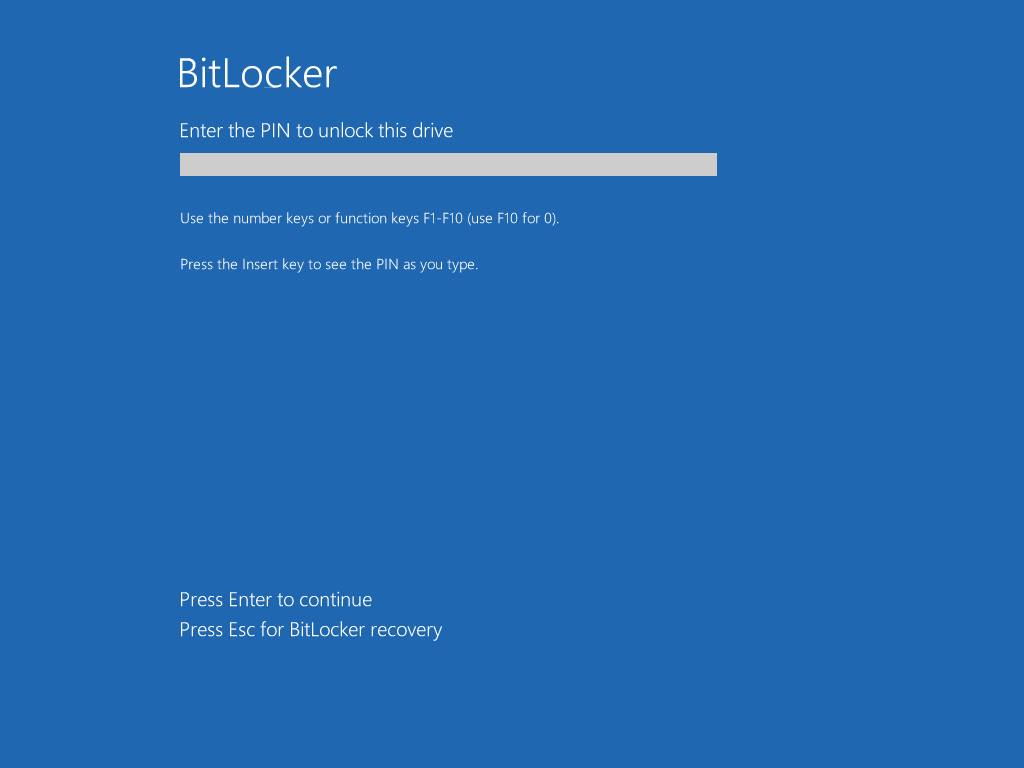
- YellowKey is a Windows login bypass for an attacker with physical access. Use case: Your roomate wants to get into your roomate's poorly protected (potentially work-owned) laptop. Mitigation: Use Bitlocker with a PIN. (Note: The YellowKey author disagrees that PIN is a protection [deadeclipse666.blogspot.com] 🤔)
1) GreenPlasma [github.com]
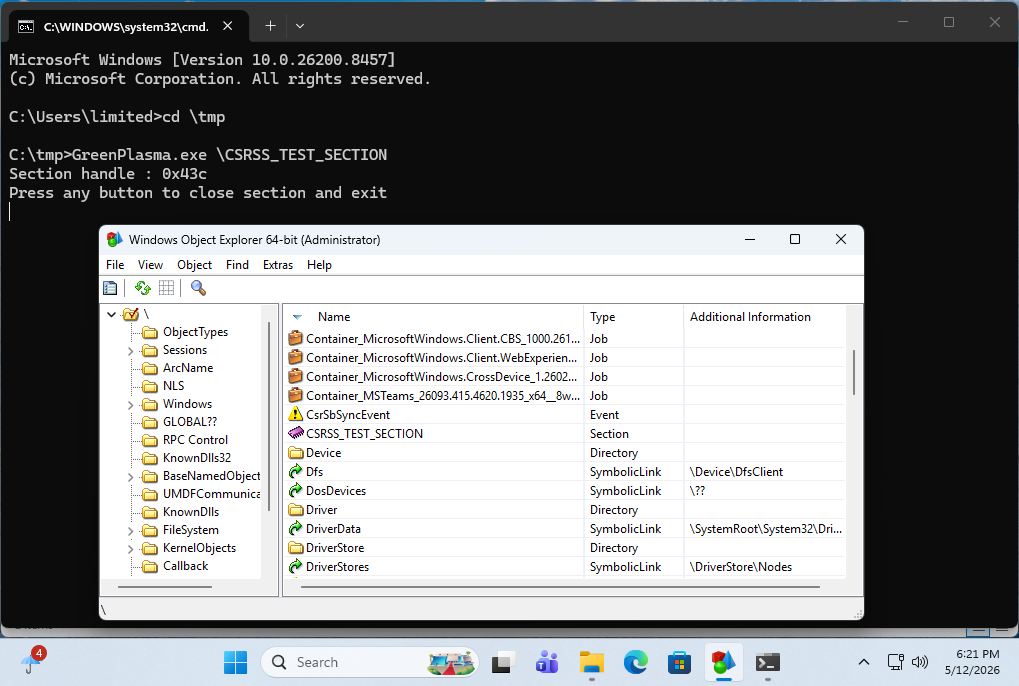
Here , an unprivileged user can create an arbitrary memory section in an object. While the first time I tried it it hung at the UAC prompt, but subsequent attempts worked to go from low-privileged to creating a \CSRSS_TEST_SECTION object.
It is worth noting that the PoC as it is does not have the bits that would turn it into a true LPE, as that is left as an exercise to the user.
2) YellowKey [github.com]
This one is a bit hand-wavy to me, But I eventually was able to reproduce it. Via an attached USB drive. I could NOT reproduce it via putting the FsTx directory on the EFI partition. Potentially because the FsTx replay happened before my triggering of Recovery. I was able to reproduce with a USB drive attached.
The target is a TPM-only bitlocker, which is known to be insecure. The use case is that, with physical access, you can access the filesystem with root privileges. Which even TPM-only bitlocker would prevent.
There is a thread on Twitter [nitter.net] that claims to have reverse engineered the YellowKey Bitlocker bypass. And it talks about RecoverySimulation.ini and how it skips re-locking a bitlocker drive. The thing about this is:
1) This RecoverySimulation.ini stuff was talked about publicly last year [patchmypc.com]
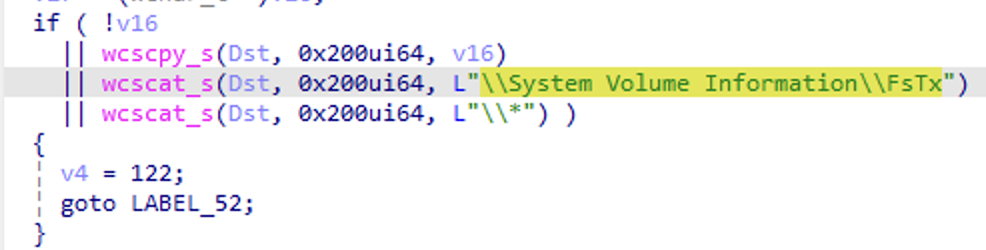
2) The actual bits in the YellowKey GitHub repo are the contents of an FsTx directory. Which appears to be be related to Transactional NTFS [learn.microsoft.com], which uses CLFS under the hood. (The files parse with python's dissect.clfs). Also note that by looking at Windows' fstx.dll, we can see code that explicitly looks for \System Volume Information\FsTx in the FsTxFindSessions() function.
Microsoft themselves have this to say [learn.microsoft.com] about TxF 😂:
While TxF is a powerful set of APIs, there has been extremely limited developer interest in this API platform since Windows Vista primarily due to its complexity and various nuances which developers need to consider as part of application development. As a result, Microsoft is considering deprecating TxF APIs in a future version of Windows to focus development and maintenance efforts on other features and APIs which have more value to a larger majority of customers.
And if one looks at the contents of this FsTx directory in the GitHub repo, there are no strings related to RecoverySimulation.ini in it at all. Only of interest is perhaps:\??\C:\Windows\win.ini
and\??\X:\Windows\System32\winpeshl.ini
Where X:\Windows\System32\winpeshl.ini is what controls what WinRE does when it fires up.
But anyway, yes it works.
But what's intriguing to me is: Why can the presence a \System Volume Information\FsTx directory on one volume affect the contents of ANOTHER VOLUME when it's replayed? 🤔
In a normal WinRE session, you have a X:\Windows\System32 directory that has a winpeshl.ini file in it:
[LaunchApp]
AppPath=X:\sources\recovery\recenv.exe
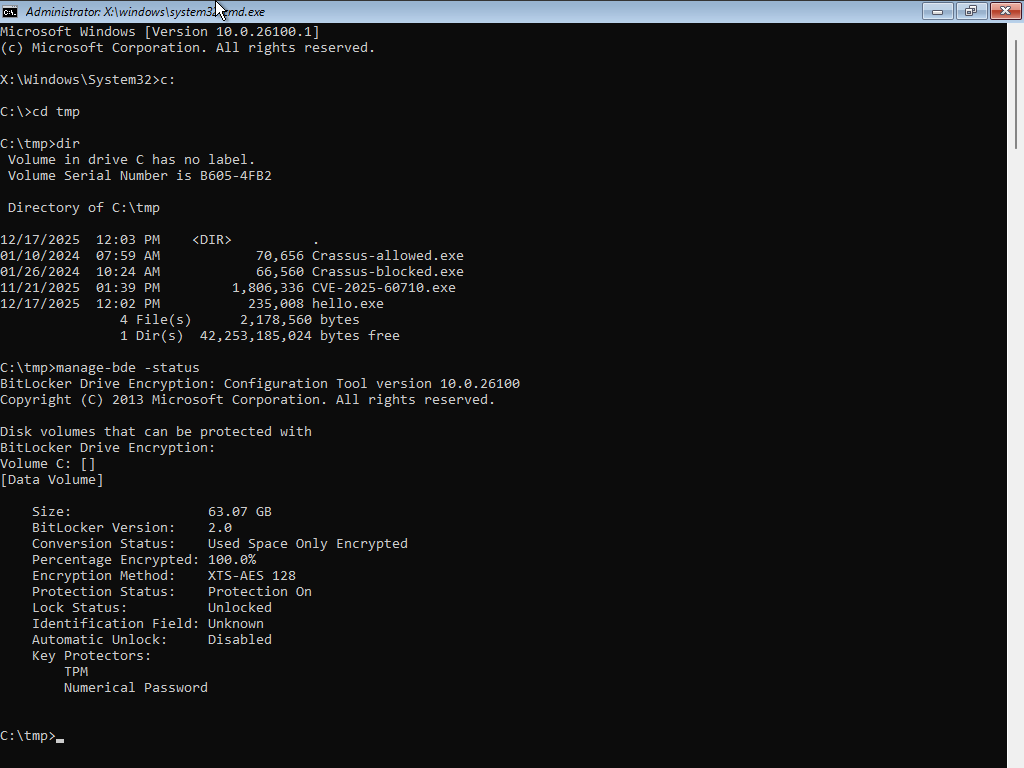
However, with the YellowKey exploit, it looks like Transactional NTFS bits on a USB Drive are able to delete the winpeshl.ini file on ANOTHER DRIVE (X:). And we get a cmd.exe prompt, with bitlocker unlocked instead of the expected Windows Recovery environment. While the TPM-only Bitlocker bypass is indeed interesting, I think the buried lede here is that a \System Volume Information\FsTx directory on one volume has the ability to modify the contents of another volume when it is replayed. To me, this in and of itself sounds like a vulnerability.
Note that I've found the hold CRTL and do NOT lift your finger off it part of YellowKey to be completely unnecessary.
From the beginning, I wondered why that was even part of the instructions (what does it accomplish?). And I guess the answer to that question is: Nothing?
🤷♂️

> TPM-only bitlocker is known to not be very secure, and if you have TPM+PIN, then you can't get to Windows Recovery Environment Agent without the PIN. So again, where's the bypass?
The TPM-only mode works well to lock employees out of their corporate laptops (users can't mount the drive on another computer or in another OS using a user password) and with no requirement to create another strong password.
Also, all WinRE bypasses affect the TPM plus Network Key mode (seamless boot when the computer is in the trusted wired network: both the network server and TPM unwrap the encryption key).
---
It's interesting that Microsoft disguises some vulnerability descriptions as EoP, not as SfB.
@wdormann I find his claim that a variant of this attack works with TPM + PIN a bit hard to believe. If a TPM can be coaxed to give up secrets without the user needing to enter the PIN, wouldn't that constitute a vulnerability that extends far beyond BitLocker?
@Billbremer
Yes, I'm quite skeptical.
POC||GTFO
😂
P.S.
> The YellowKey author disagrees that PIN is a protection
Since early WinRE bypasses, Microsoft treats the "my PIN is known to the attacker, in the TPM+PIN configuration" situation as within the threat model. (IMO, this is not 2FA with one factor known to the attacker, but something similar.)

@wdormann "While TxF is a powerful set of APIs, there has been extremely limited developer interest in this API platform since Windows Vista primarily due to its complexity and various nuances which developers need to consider as part of application development. As a result, Microsoft is considering deprecating TxF APIs in a future version of Windows..." Wonder what "nuances" means here?

@wdormann YellowKey works fine on my laptop – copied the FsTx folder to System Volume Information directory on my sysresccd USB drive (2GB FAT32), Shift+restart, held Ctrl until recovery environment booted to command prompt. Unlocked C: partition, predictably did not unlock D:.
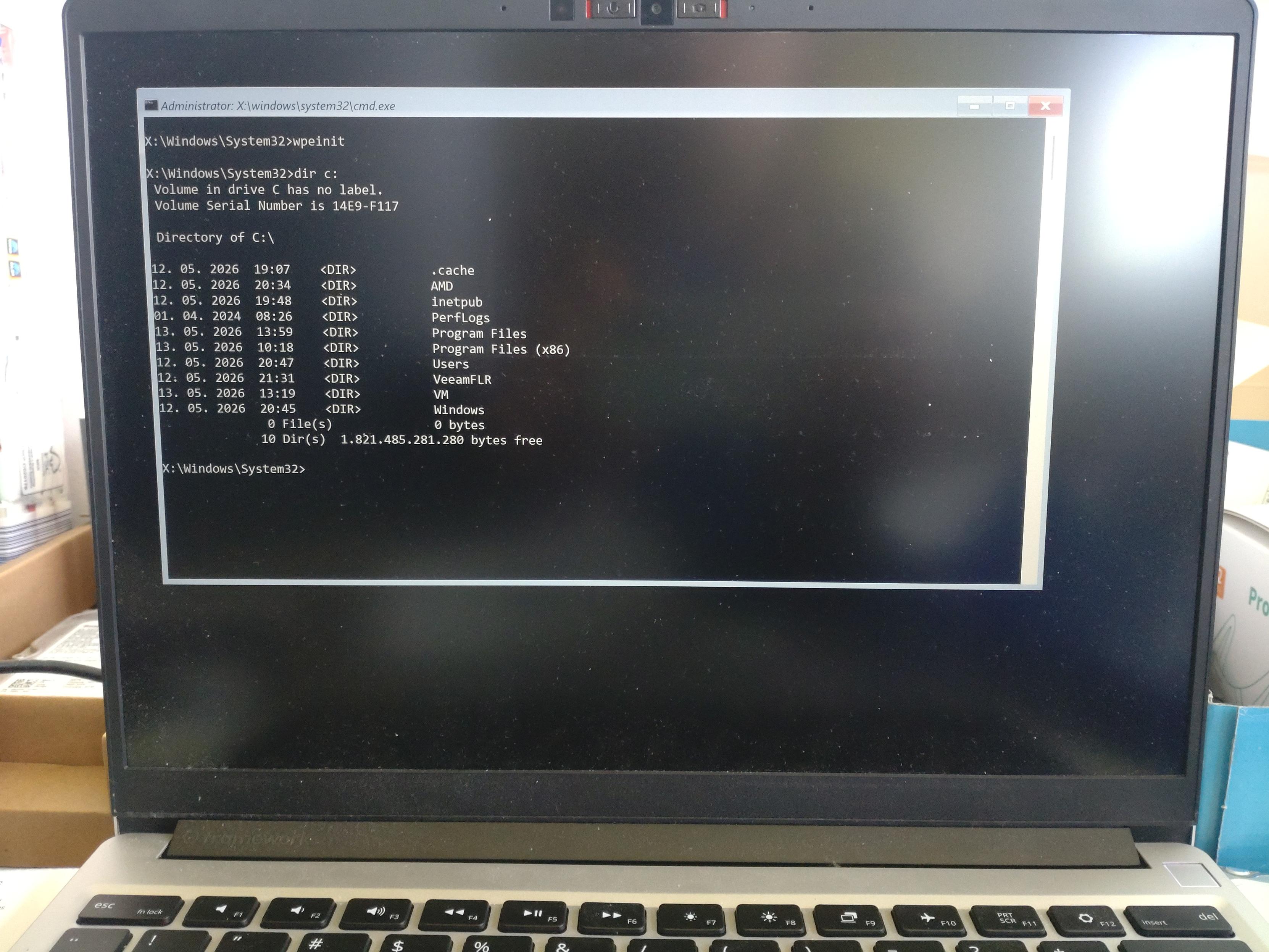
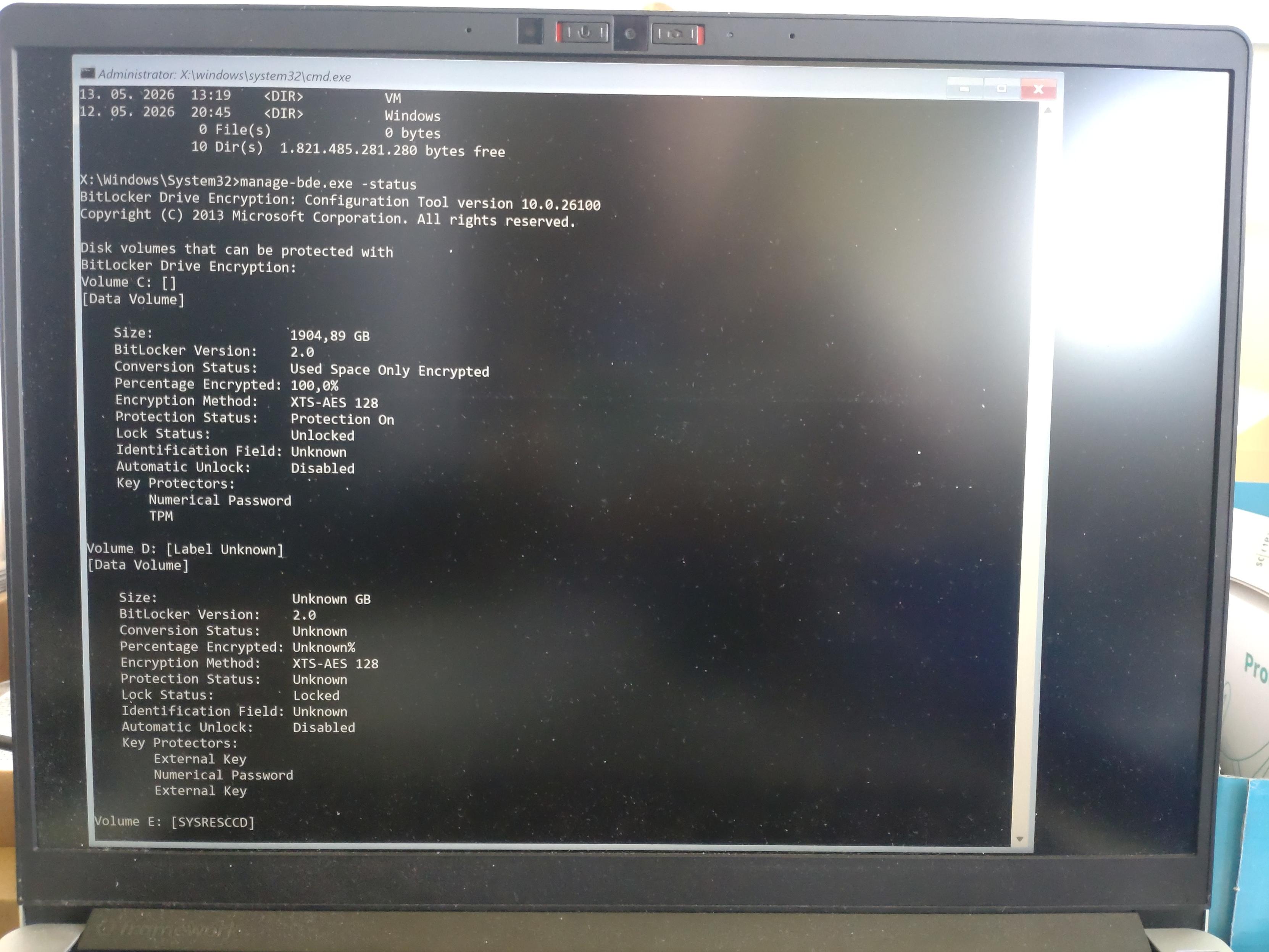
Worked fine here. If the backdoor works you habe an open system shell before any menue. You can than use diskpart to mount the internal drive
@wdormann, these bypasses are very close to login/lock screen bypasses (after the usual boot) and kiosk mode escapes (in WinRE).

Pressing Shift or Ctrl using a reboot changes the resulting action.
If I remember correctly it used to invoke safe mode on boot up, but that only works now if the relevent option are set manually(?) 🙂🤷♂️
@simonzerafa
Pressing [Shift] when the reboot button is clicked invokes the reboot to go into Windows Recovery.
My question is: What would the subsequent holding of [Ctrl] key after the Shift-reboot has started accomplish?
@wdormann Could he have just thrown that bit about holding ctrl key into his instructions so as to make the whole thing sound more nefarious and "hidden"?
@wdormann same, I can't find any reference to control being relevant to recovery, maybe it's something with their hardware.
Also the exploit looks awfully similar or related to the first 25 mins of this talk
https://media.ccc.de/v/39c3-bitunlocker-leveraging-windows-recovery-to-extract-bitlocker-secrets


@wdormann This whole TPM backed FDE scenario seems pointless. What is the threat? Somebody steals only your storage? The only realistic scenario is TPM+PIN which defeats all these attacks. Right?
@zazen
I could imagine that companies that have employees with non-admin user accounts might like for those employees not to be able to escalate themselves to being admin. Or not being able to reset the Admin user's password.
You can't do that without bitlocker. And TPM-only bitlocker is the pain-free way of doing that.