

How to Put Applications and Homebrew Games on Your PSP


Ever wonder how your friend turned his PSP into a PDA or a calculator, or even a 3-D modeler? Find out how! (Requires Custom Firmware.)
Step 1: Hooking Up Your PSP.
First, connect your cables to your PSP and computer. Go to Settings --> Usb Connection to connect your PSP. Your computer will detect the PSP and it (should) automatically open the root menu of your PSP.
Step 2: Learning the Root Menu.
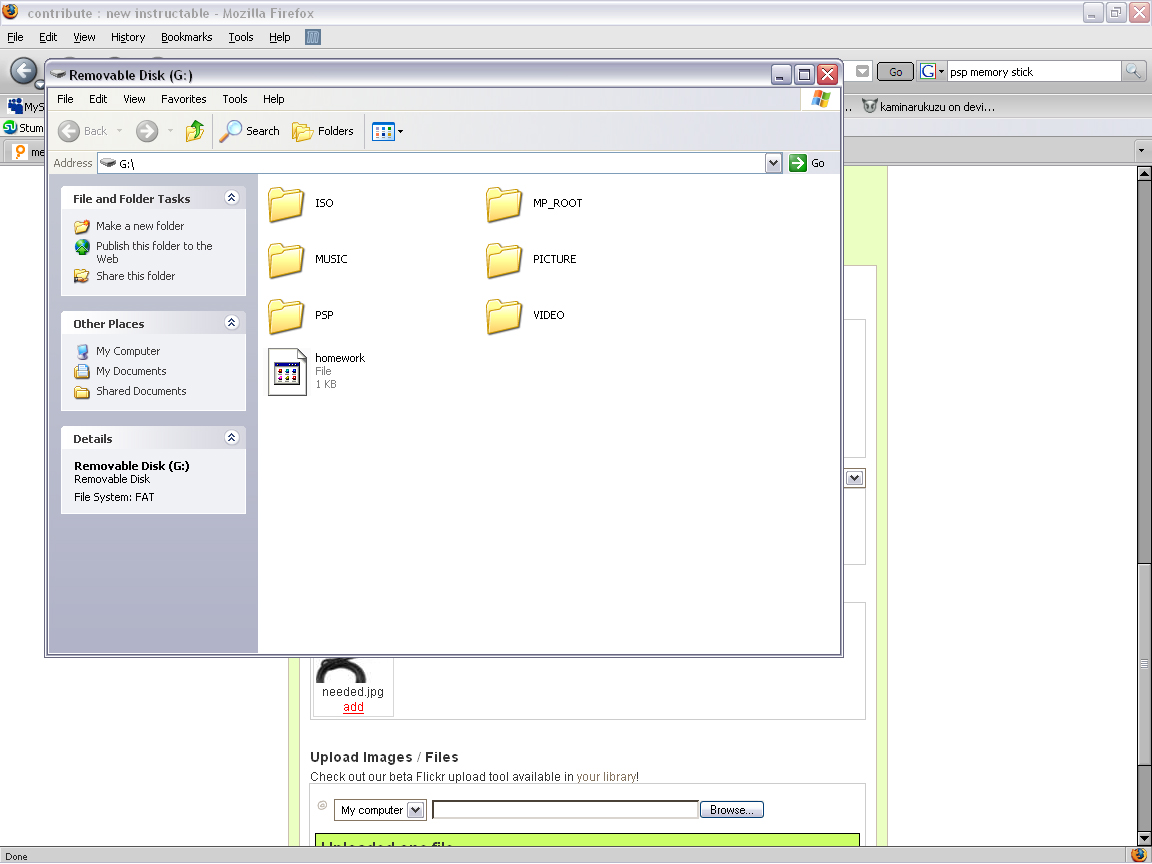
This is the ROOT of your PSP. Don't delete any folders, they're all important.
Note the folders, and go to the one named PSP. It should be the fifth folder. Double click, and open.
Note the folders, and go to the one named PSP. It should be the fifth folder. Double click, and open.
Step 3: Putting the Applications on Your Psp.
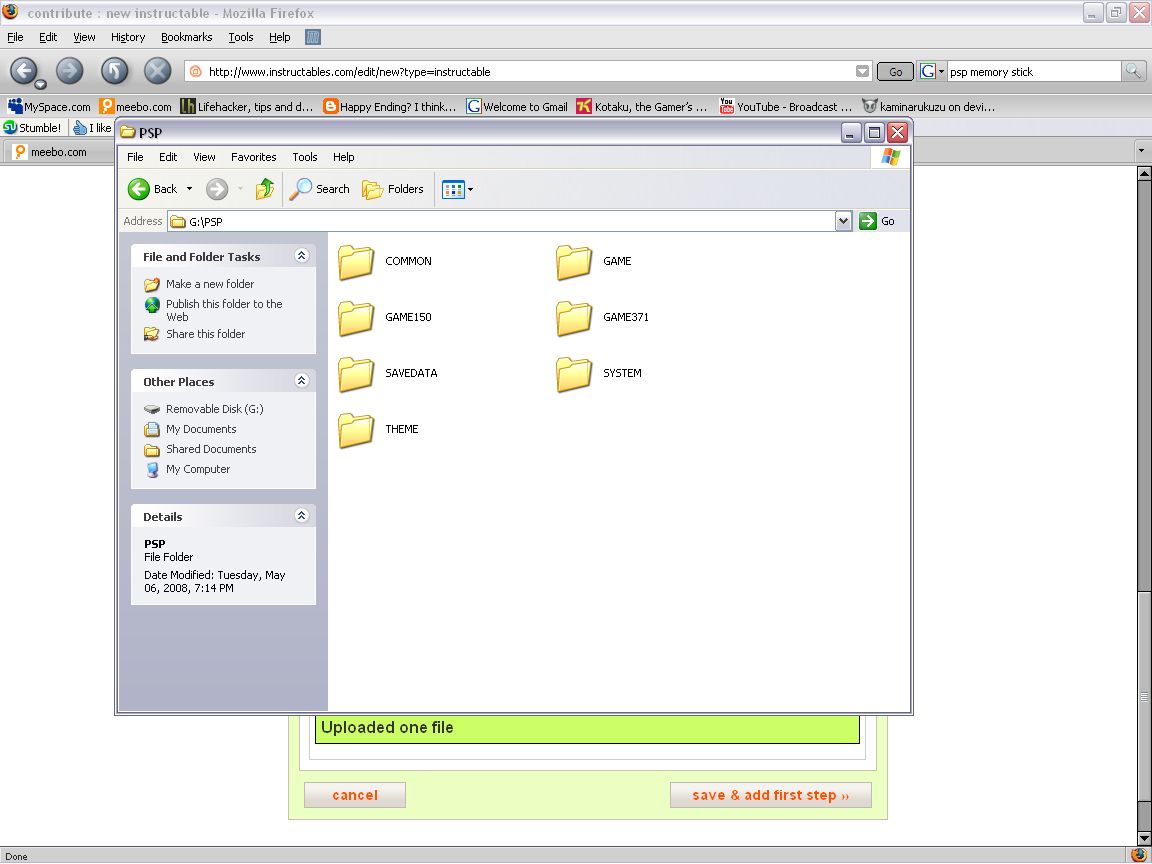
Downloading some Applications first would help. A great place is PSP-Homebrew. Download what you think is useful and interesting, and go to the GAME folder in your PSP.
G:/PSP---> GAME
What you want to do, is click and drag the application's folders to the GAME folder. If the application has one folder that contains another folder (in which the second folder has all the files), delete the first folder and keep the second. If you have a folder leading to a folder, your PSP will say it is a Corrupted File.
G:/PSP---> GAME
What you want to do, is click and drag the application's folders to the GAME folder. If the application has one folder that contains another folder (in which the second folder has all the files), delete the first folder and keep the second. If you have a folder leading to a folder, your PSP will say it is a Corrupted File.
Step 4: Test and Use!
Go to your PSP and hit the Circle Button. It will disconnect from your computer, and then you can test and toy with your applications. They should be under the Game section, in the Memory stick area. If it says "Corrupted Data", then you either have:
-One folder leading to another
-An incomplete download/transfer. Reconnect, delete the file, and try again.
OR
-Your PSP Is not compatible with the application. This means you either need to Update your Custom Firmware or the application just won't run on your psp model (Example: Some applications can't run on PSP Slim/Lite).
Enjoy your homebrew and have fun!
-One folder leading to another
-An incomplete download/transfer. Reconnect, delete the file, and try again.
OR
-Your PSP Is not compatible with the application. This means you either need to Update your Custom Firmware or the application just won't run on your psp model (Example: Some applications can't run on PSP Slim/Lite).
Enjoy your homebrew and have fun!


You must be logged in to post a comment or add an I Made It.
Log In25 Comments
If a person downloaded PSP games from an emulator site, would they just drag those into the game folder as well?
Flag
every time I put a game on my psp nothing comes up on my psp memory stick can someone plz help
Flag
1 reply
u have to upgrade ur psp to custom firmware(cfw) and then download games for psp in iso format and then creat a folde in root of psp.and now u are set up:)
Flag
u have to upgrade ur psp to custom firmware(cfw) and then download games for psp in iso format and then creat a folde in root of psp.and now u are set up:)
Flag
Flag
I havenewly reformmatted PSP, everytime I try to put games on the PSP-GAME folder, the only thing shown is that it is corrupte data, what should I do?
Flag
ok
Flag
So is there anything i can do if it says corrupted data?
Flag
1 reply
is it hacked
Flag
awesome there are some great sites on the web the best is www.pspknowhow.blogspot.com if you need to know or need help this is the site for you.I do psp downgrading and unbricking for people I do it pretty much on a donation basis, you pay shipping and handling both ways plus any donation like a psp game or a memory stick or any video game or money, any way my email is dr_lyons@yahoo.com if you contact me we can discuss the further details
Flag
so what would happen if my psp isnt compattible will the psp not work or just that program work because bigwhitebear18 mentioned that the psp wont work
Flag
can i put the custom firmware from my psp it has original firmware version 3.72
Flag
I don't think this will work at all on the PSP Slim unless you like having a shiny brick. Haven't heard of anyone cracking the slim yet. Great instructable though very easy to follow.
Flag
8 replies
I have a PSP slim and I run 3.90 M33 firmware. No bricking 'round here.
Flag
Same as Kaminarikuzu, just let my friend downgrade it from Official 3.90 using Pandora battery, and now happily running 3.90 M33-3
Flag
They cracked the slim less than a week after it's official North American release.
Flag
Well I definitely stand corrected. May just have to try this then. Thanks for the info.
Flag
i have the psp slim and i in my instructable i made https://www.instructables.com/id/PSP-downgraderunbricker/?ALLSTEPS i used the psp slim. so yeah i cracked it so yeah that means im one of the first ppl to do it
Flag
by the way i made a website it is still being created but i got some things runing on it it is http://www.elitehackers.weebly.com
Flag
I think it's just the psp 3000, though, not just slim. you can check on the bottom of your psp, the first number of the serial number indicates 1000, 2000, or 3000.
Flag
the slim has bee cracked for awhile... way before may
Flag
for buying memory sticks, I would recommend ebay. now I know what you're thinking, "I heard some guy bought a counterfeit stick off ebay!". but here are some tips to buying off ebay: when looking for a memory stick, type sandisk. sony memory sticks are the most counterfeited sticks out there, so you already cut down your chances. also, look for a very unprofessional photo. if it's a stock photo, they could be selling tons of these, and are therefore more likely to be fakes. look for the photo taken with a cell phone on somebody's living room carpet. not the pro picture. also, check the price to shipping ratio. if their price is low, but they have high shipping, then if you get a fake they can say, "well, I can't refund shipping...: which is what happened to me. lastly, but definitely not least(ly?) make sure they're not coming from hong kong. almost ALL memory sticks coming from hong kong are fake. or , if you want to play it safe, buy at best buy or something. you know, if you want to pay triple the price for peace of mind.
Flag
. you have to have a pandoras battery if you want to un-brick and mod /downgrade your PSP's. you cant downgrade any PSP with firmware 3.51 or above without the Pandora battery.....I just bought a Pandoras Battery from http://www.pandorasales.com/index.html and i got a great deal cause it came (2days) with the 1 gig magic memory card
fully programmed. I hope this helps
Flag
My sentiments exactly. =D
Flag
It says unbricker/downgrader but it does the job:
https://www.instructables.com/id/PSP-downgraderunbricker/?ALLSTEPS
Flag