
The Sony BRAVIA 8 II OLED is the 2025 successor to the Sony A95L OLED. It technically sits above the Sony BRAVIA 8 OLED, which has been carried over from 2024. It only sits below the flagship Sony BRAVIA 9. It uses a new QD-OLED panel, the same one found in the Samsung S95F OLED. The TV uses an upgraded version of Sony's XR Processor, which includes an AI feature that automatically adjusts picture settings based on the type of content you're watching. It has many of the same features as Sony's other higher-end models, so you get HDMI 2.1 bandwidth on two ports, 4k @ 120Hz, VRR, Dolby Vision, and DTS audio passthrough. It also has Sony's S-Center input, which allows you to use the TV's speakers as a dedicated center channel when paired with compatible soundbars. It runs version 12 of the popular Google TV OS, so you get access to a huge selection of apps. We bought and tested the 65-inch model, but it's also available in a 55-inch option.
Our Verdict
The Sony BRAVIA 8 II is excellent for mixed usage. It looks stellar in a dark room, thanks to its perfect black levels, vibrant colors, and great HDR brightness. The TV offers modern gaming features and, combined with its excellent image quality, it's a solid choice for gamers. It has solid reflection handling, but it's only bright enough to overcome glare in a moderately lit room, and blacks look gray in a room with ambient lighting; you don't enjoy the same image quality when you flip your lights on. Fortunately, the TV has an incredibly wide viewing angle, making it an outstanding choice for a wide seating arrangement.
Perfect blacks with no blooming around bright highlights.
Incredibly wide viewing angle for a consistent image from the sides.
Colors are vibrant, lifelike, and bright.
Does a great job lessening the intensity of direct reflections.
Black levels are significantly raised in a bright room.
Not bright enough in SDR for well-lit rooms.
The Sony BRAVIA 8 II is outstanding for a home theater. It displays perfect black levels with no blooming at all, making it look stellar in a dark room. You also get well-saturated, lifelike, and bright colors in both SDR and HDR thanks to its outstanding color volume, so it truly delivers a vibrant image. Highlights in HDR content really pop out in most scenes, but the TV is noticeably dimmer in rare HDR scenes that are entirely bright. Still, HDR content looks great, and it respects the filmmaker's intent when it comes to colors and the brightness of HDR content. Like all OLEDs, there's noticeable stutter during slow camera movements, so they aren't as smooth as they're intended to be.
Perfect blacks with no blooming around bright highlights.
Colors are vibrant, lifelike, and bright.
Does a superb job upscaling and a great job cleaning up low-quality content.
Impressive HDR peak brightness means highlights really pop.
Very good color accuracy in HDR.
Very noticeable stutter due to the TV's fast response time.
Mediocre SDR color accuracy before calibration.
The Sony BRAVIA 8 II is decent for a bright room. It does a great job reducing the intensity of direct reflections caused by light sources placed opposite the screen, and it's bright enough in SDR to overcome glare in a moderately lit room. However, it's not bright enough for well-lit rooms, especially when your curtains are open on a sunny day. The TV does a very good job of retaining its color vibrancy in a bright room, although dark colors do lose some perceived saturation. Unfortunately, black levels are raised in a bright room, making them look grayish with a slight purple tint.
Colors stay vibrant in a room with ambient lighting.
Does a great job lessening the intensity of direct reflections.
Black levels are significantly raised in a bright room.
Not bright enough in SDR for well-lit rooms.
The Sony BRAVIA 8 II is very good for watching sports. It has solid reflection handling overall and adequate SDR brightness, so you don't have to worry about glare in a moderately lit room. However, it's not bright enough to overcome glare on a sunny afternoon with the curtains open. Colors are vibrant, compressed feeds are cleaned up well, and the TV has superb upscaling, so you get a pleasant-looking image from heavily compressed streams and cable broadcasts. You also get an incredibly wide viewing angle, so your friends sitting to the sides of the screen see the same image quality as viewers watching from the front. Finally, motion looks nice and smooth thanks to its nearly instantaneous response time and clean transitions.
Incredibly wide viewing angle for a consistent image from the sides.
Does a superb job upscaling and a great job cleaning up low-quality content.
Does a great job lessening the intensity of direct reflections.
Very good gray uniformity with no noticeable dirty screen effect.
No transition artifacts.
Not bright enough in SDR for well-lit rooms.
The Sony BRAVIA 8 II is excellent for gaming. It displays perfect blacks, has great HDR brightness for punchy highlights, and displays incredibly vivid colors in SDR and HDR, so you get awesome image quality when playing any game. The TV has HDMI 2.1 bandwidth, VRR, and 4k @ 120Hz, so you can take advantage of the features your modern console provides. You also get very clear motion thanks to its nearly instantaneous pixel transitions. Its input lag is low enough for a responsive feel, but it's higher than competing OLEDs from other brands, which is a bit of a drawback if you mostly play PVP titles.
Nearly instantaneous pixel transitions for no noticeable blur behind fast motion.
Colors are vibrant, lifelike, and bright.
Impressive HDR peak brightness means highlights really pop.
Higher input lag than competing models from other brands.
Has only two HDMI 2.1 ports, and the TV is limited to 120Hz, so it's not as versatile and future-proof as competing models from other brands.
The Sony BRAVIA 8 II has very good brightness overall. It displays very bright highlights in HDR, making them pop during dim and moderately lit scenes. However, the TV is noticeably dimmer in HDR during well-lit scenes with large areas of brightness. Its SDR brightness is adequate for a moderately lit room with some overhead lights on, but it's not bright enough to overcome glare in well-lit rooms.
Impressive HDR peak brightness means highlights really pop.
Not bright enough in SDR for well-lit rooms.
The Sony BRAVIA 8 II is an OLED, so it has perfect black levels. Blacks are deep and inky when viewed in a dark room, with no blooming around bright highlights.
Perfect blacks with no blooming around bright highlights.
The Sony BRAVIA 8 II has excellent colors overall. It has outstanding color volume in SDR and HDR, so colors are bright and well-saturated regardless of the format of your content. Colors have very good accuracy in HDR without calibration, so most viewers who care about the filmmaker's intent will be pleased. However, its SDR color accuracy out of the box is mediocre, so you need to get the TV calibrated if you want movies and shows to look the way they should.
Colors are vibrant, lifelike, and bright.
Very good color accuracy in HDR.
Mediocre SDR color accuracy before calibration.
The Sony BRAVIA 8 II OLED has very good motion handling when watching all types of content. The TV is free from transition artifacts, so colors are consistent, and there's no ghosting in fast-paced scenes and sports. There's some subtle judder with 25p content being sent via a 60p signal, which leads to hiccups in motion when watching some European content on older streaming devices. However, the TV is completely judder-free with all other signals and from the internal apps. Unfortunately, there's visible micro-judder when watching movies and shows from a 60p signal, so scenes with a lot of movement on the screen look a bit choppy if you're streaming from an older device. Like any OLED, there's stutter that's most noticeable during slow panning shots.
No transition artifacts.
Removes judder from most content.
No micro-judder except when using an older streaming device.
Perfect lighting zone transitions.
Very noticeable stutter due to the TV's fast response time.
The Sony BRAVIA 8 II has excellent responsiveness in its dedicated game mode. It supports up to 4k @ 120Hz with either G-SYNC or HDMI Forum VRR on two of its HDMI 2.1 ports, making it a good choice to pair with modern consoles. Motion is crisp thanks to its nearly instantaneous pixel transitions, so you get the clearest motion possible at both 60Hz and 120Hz. The TV's input lag is low enough that you don't feel a delay with your inputs, but it's notably higher than competing models from other brands, which isn't ideal for playing competitive titles where every millisecond counts.
Nearly instantaneous pixel transitions for no noticeable blur behind fast motion.
Higher input lag than competing models from other brands.
Has only two HDMI 2.1 ports, and the TV is limited to 120Hz, so it's not as versatile and future-proof as competing models from other brands.
Note: We're in the process of improving our tests related to image processing, but this score should give you a general idea of how a TV performs overall with its image processing capabilities.
The Sony BRAVIA 8 II has amazing processing capabilities. It does a great job cleaning up artifacts in heavily compressed low-quality content, and it does a superb job upscaling low-resolution content, making it a great choice when the quality of your movies, shows, and games isn't ideal. The TV respects the filmmaker's intent when it comes to the brightness of HDR content, so it's outstanding if you care about accuracy. Although there's a bit more banding than most other QD-OLED TVs, it's barely noticeable with real content, so you aren't distracted by ugly lines in color gradients.
Does a superb job upscaling and a great job cleaning up low-quality content.
Outstanding HDR brightness accuracy.
Very little banding in color gradients.
Performance Usages
Changelog
- Updated Mar 10, 2026:
We added text to our new Motion Handling performance usage and our new Transition Artifacts and Stutter Reduction Via Interpolation test sections after converting the review to TV 2.2.
- Updated Mar 10, 2026: This review has been updated to TV 2.2. We've added new sections for Transition Artifacts and Stutter Reduction Via Interpolation, and updated the way we test Stutter. Additionally, we removed the 'Broken' disclaimer from our Motion Handling usage.
- Updated Oct 21, 2025:
This review has been updated to Test Bench 2.1. We wrote text for the newly added Micro-Judder test, refreshed the text in the updated Judder section, and tweaked the text in the renamed Response Time Stutter section.
- Updated Oct 21, 2025: We added text to the new Micro-Judder section and refreshed the text in the updated Judder and Response Time Stutter sections after converting the review to TV 2.1.
Check Price
Differences Between Sizes And Variants
We bought and tested the 65-inch Sony BRAVIA 8 II, and these results also apply to the 55-inch model. This TV has no known variants, and it's the same in all regions.
| Size | Model |
|---|---|
| 55" | K55XR80M2 |
| 65" | K65XR80M2 |
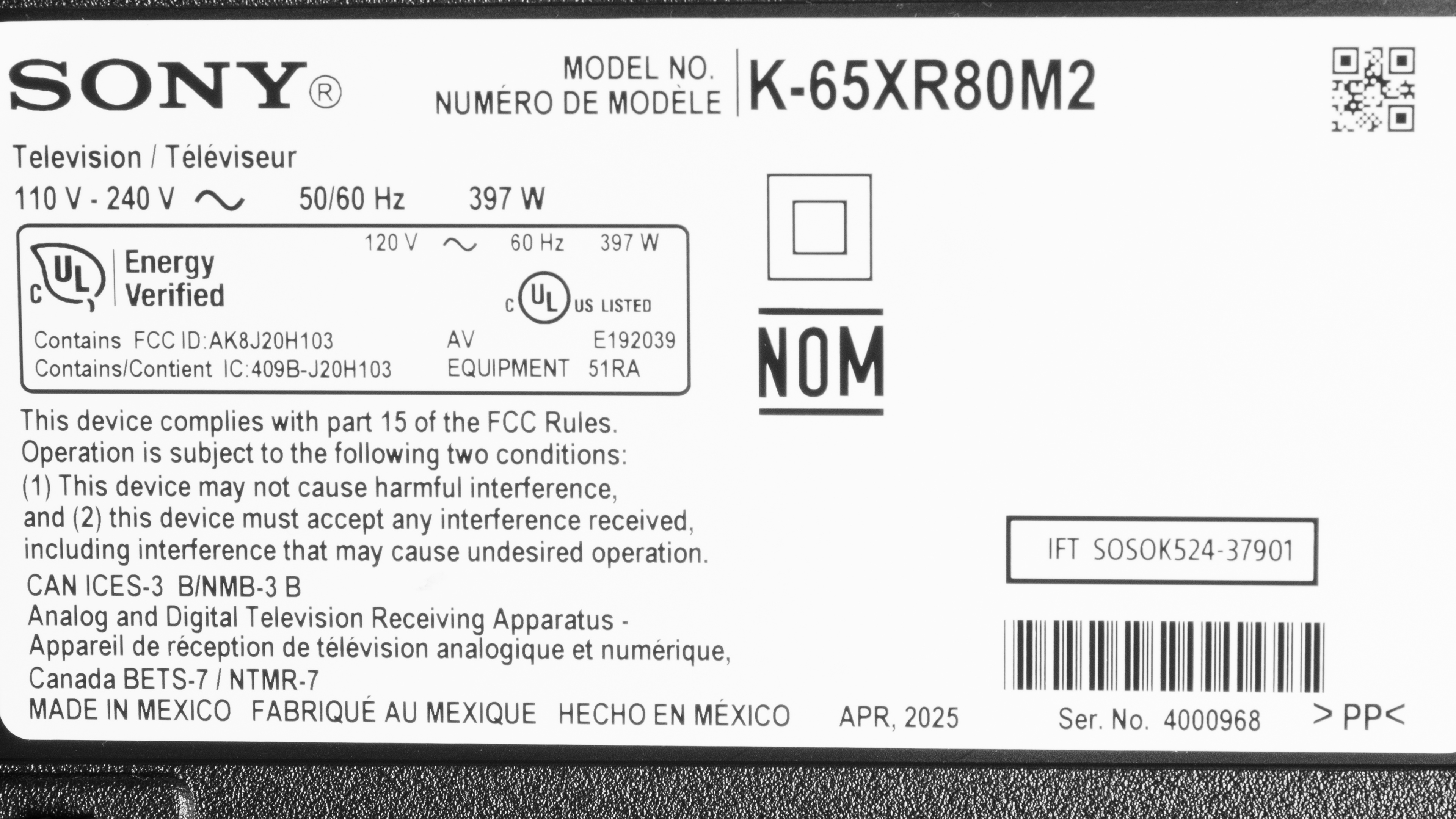
Our unit was manufactured in April 2025, as seen on the label.
Popular TV Comparisons
The Sony BRAVIA 8 II OLED is an excellent TV overall, albeit a bit disappointing. Despite coming out almost two years after the enthusiast-oriented Sony A95L OLED, it barely does anything better than that TV. It uses the same QD-OLED panel as the Samsung S95F OLED, but it's not nearly as bright as that TV is. The TV is barely any brighter than its predecessor in HDR, and you'd be hard-pressed to notice a difference between them if you had the two TVs side by side. Sadly, it's dimmer than the A95L in SDR and has worse SDR color accuracy out of the box. It even has a bit more banding than its predecessor in color gradients. There isn't much that it does better than the A95L, so if you want a Sony QD-OLED for your home theater, you're better off getting the cheaper and better overall A95L. If you want an OLED that performs well in a bright room, the Samsung S95F OLED is a much better option.
For more options, check out our recommendations for the best OLED TVs, the best gaming TVs, and the best TVs for watching movies.
The LG G5 OLED is better overall than the Sony BRAVIA 8 II OLED. The LG is the much brighter TV overall, so it delivers more impactful highlights in HDR and overcomes a lot more glare in a well-lit room. The LG also does a superior job of retaining its black levels and color saturation in a bright room. When it comes to gaming performance, the LG is better since it provides lower input lag, up to 4k @ 165Hz, 4 HDMI 2.1 ports, and supports FreeSync. On the other hand, the Sony has the advantage when it comes to color vibrancy and gradient handling due to its QD-OLED panel.
The Sony A95L OLED and the Sony BRAVIA 8 II OLED are very similar overall, but the A95L is a bit better. The A95L is brighter in SDR, has better accuracy in SDR, and has less banding in color gradients. On the other hand, the BRAVIA 8 II has a slight edge with HDR brightness and color volume. With most content, you won't notice a difference between them, so go with whatever model is more affordable.
The Sony BRAVIA 9 is built for bright living rooms, pushing much higher full-screen bright scenes and SDR brightness than the Sony BRAVIA 8 II OLED, and its extra dimming zones rein in blooming better than earlier Sony FALD sets. Still, the OLED's classic strengths come through: the BRAVIA 8 II delivers flawless pixel-level blacks and wider viewing angles. Both TVs share Sony's XR processor, Dolby Vision, DTS passthrough, and solid motion interpolation, and both still top out at 4k @ 120Hz on their two full-bandwidth HDMI ports. If glare fighting and SDR punch matter most, the BRAVIA 9 is the safer pick; if you value perfect blacks, the BRAVIA 8 II is the more compelling option.
The Sony BRAVIA 8 II OLED is better than the Sony BRAVIA 8 OLED. The BRAVIA 8 II is a lot brighter in HDR, so it provides more impactful highlights in HDR content, and it's the more accurate TV. The BRAVIA 8 II also has the advantage when it comes to colors, thanks to its QD-OLED panel, so you get more vibrant colors with less banding in gradients. However, the BRAVIA 8 has lower input lag.

We buy and test dozens of TVs yearly, taking an objective, data-driven approach to deliver results you can trust. Our testing process is complex, with hundreds of individual tests that take over a week to complete. Most of our tests use specially designed test patterns that mimic real content, but we also use the same sources you have at home to ensure our results match the real-world experience. We use two main tools for our testing: a Colorimetry Research CR-100 colorimeter and a CR-250 spectroradiometer.
Test Results

for pictures & test results

for pictures & test results

for pictures & test results

The Sony BRAVIA 8 II has impressive HDR brightness, and highlights really pop out in dark and moderately lit scenes. The TV is noticeably dimmer during scenes with large areas of brightness, but it still provides an impactful HDR experience during these entirely bright scenes.
The Samsung S95F OLED uses the same panel, but that TV has noticeably higher peak brightness, especially with bright elements that take up a large portion of the screen. Sony clearly isn't driving the panel as much as Samsung is with their flagship QD-OLED.
Our results above are with the TV set to Professional with 'HDR Tone Mapping' set to 'Gradation Preferred.' Below are the results with the 'Brightness Preferred' setting, which significantly increases the TV's luminance, but makes the image less accurate.
- Hallway Lights: 1590 cd/m²
- Yellow Skyscraper: 1234 cd/m²
- Landscape Pool: 859 cd/m²
for pictures & test results

for pictures & test results

for pictures & test results

The TV is noticeably dimmer in its dedicated gaming mode compared to the Professional picture mode. Highlights still pop out, and the image doesn't look dim, but you do notice a difference in luminance when gaming. Our results above are in Game Mode with 'HDR Tone Mapping' set to 'Gradation Preferred,' but you can get a brighter image by setting that to 'Brightness Preferred' if you're willing to trade in some accuracy. Those results are below.
- Hallway Lights: 1118 cd/m²
- Yellow Skyscraper: 1273 cd/m²
- Landscape Pool: 662 cd/m²
The Sony BRAVIA 8 II has adequate SDR brightness. Small and medium-sized areas of the screen have good brightness in dim and moderately lit scenes, but large areas of brightness in entirely well-lit scenes are dimmer. Unfortunately, the TV is noticeably dimmer in SDR compared to its predecessor, the Sony A95L OLED. It's also a lot dimmer than its main competitor, the Samsung S95F OLED, which uses the same panel. Still, the TV is bright enough to fight glare from indirect lighting in a room with the lights on, but it's not quite bright enough for well-lit rooms with the curtains open on a sunny day.
Our results are with the TV in Professional Mode, which is the most accurate picture mode the TV offers. However, the TV is a lot brighter when using Vivid Mode, as seen in the results below using our peak brightness window tests.
- Peak 2% Window: 2322 cd/m²
- Peak 10% Window: 1581 cd/m²
- Peak 25% Window: 761 cd/m²
- Peak 50% Window: 355 cd/m²
- Peak 100% Window: 258 cd/m²
- Sustained 2% Window: 1741 cd/m²
- Sustained 10% Window: 916 cd/m²
- Sustained 25% Window: 744 cd/m²
- Sustained 50% Window: 349 cd/m²
- Sustained 100% Window: 254 cd/m²
This large increase in brightness is most apparent in dimmer scenes. We used the photos from our Contrast and Lighting Zone Precision sections to compare the TV's maximum SDR brightness in scenes with a low average picture level (APL) when using Vivid Mode and Professional Mode.
- Contrast Photo in Vivid Mode: 1344 cd/m²
- Contrast Photo in Professional Mode: 320 cd/m²
- Blooming Photo in Vivid Mode: 1023 cd/m²
- Blooming Photo in Professional Mode: 204 cd/m²
As you can see, the TV is significantly brighter during darker scenes. However, entirely bright scenes, like our Real Scene Peak Brightness test, aren't brighter in Vivid Mode.
- SDR Real Scene Peak Brightness: 388 cd/m²
Even though you get a solid uptick in brightness using Vivid Mode, you do sacrifice quite a bit of accuracy compared to the Professional Mode. Even at 100 nits, the TV is noticeably less accurate. These inaccuracies are even more pronounced when using the TV at its maximum brightness. You can see the results using Vivid Mode below.
for pictures & test results

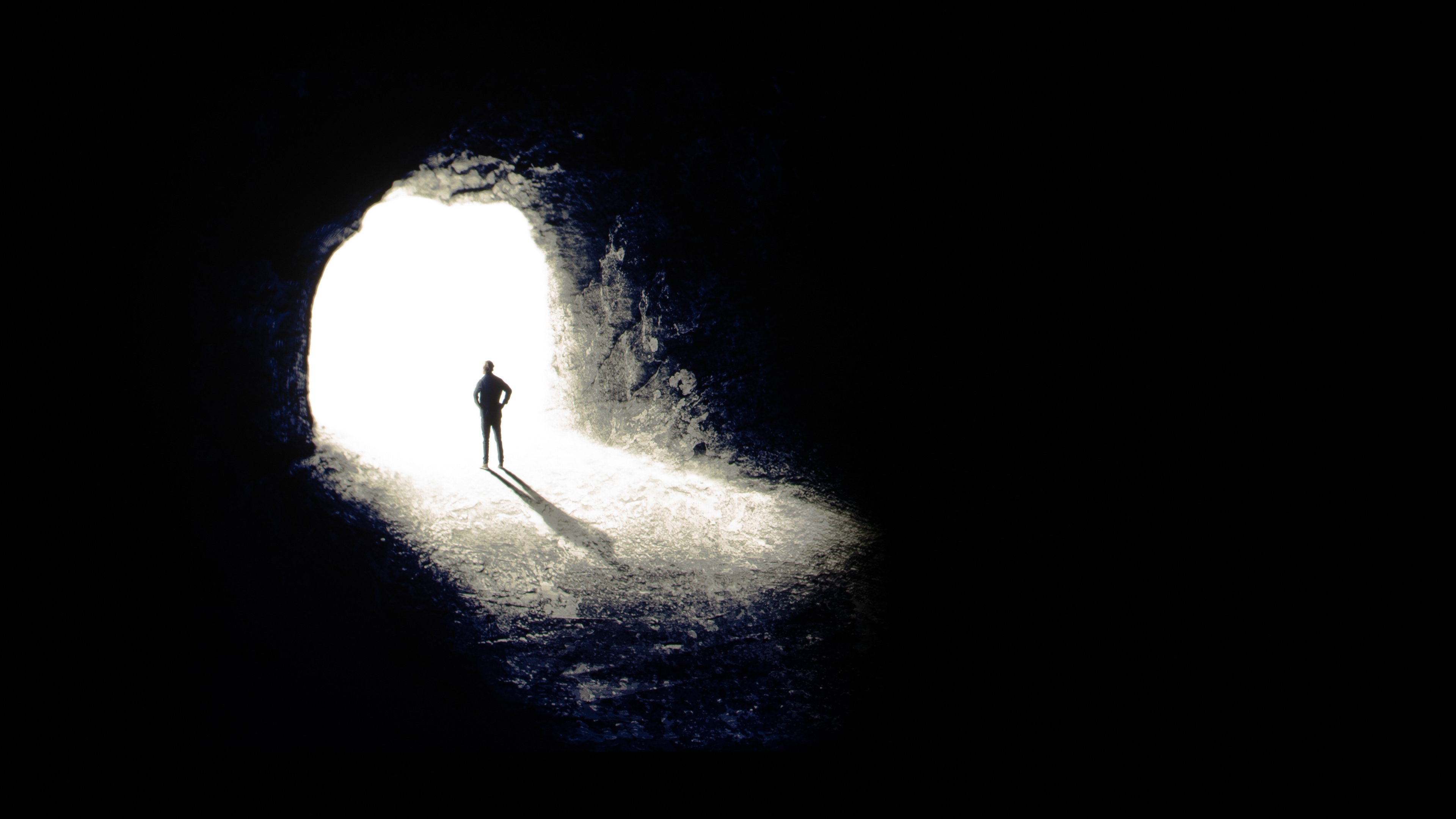
The Sony BRAVIA 8 II has a nearly infinite contrast ratio, giving it perfect contrast. Due to OLED's self-lit pixels, it displays bright highlights next to perfect inky blacks, making it very impressive in a dark room.
for pictures & test results

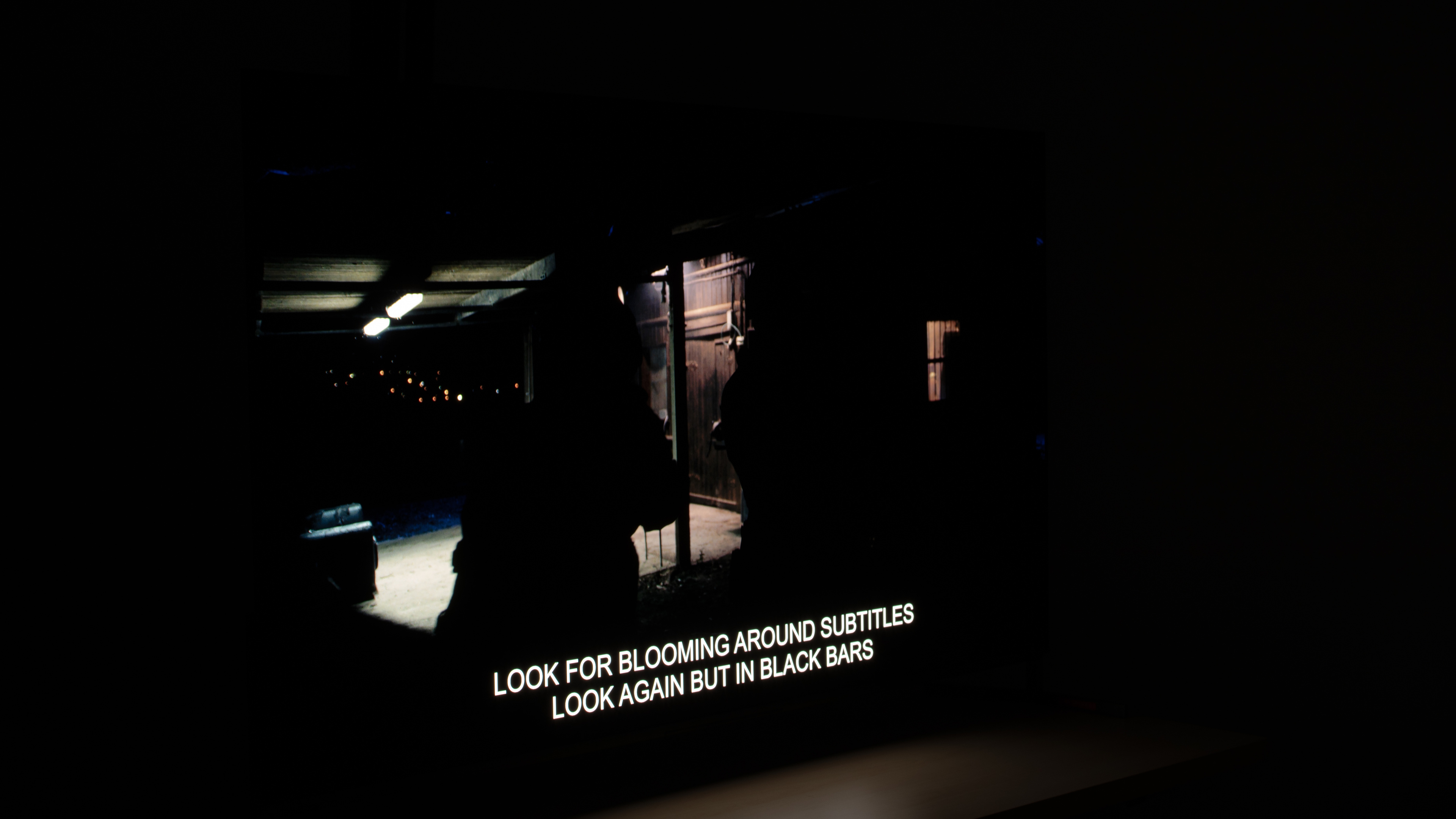
Since OLEDs don't use lighting zones and instead have individual pixels that can be lit up to their maximum brightness next to pixels that are turned off, there's no blooming when bright elements are surrounded by deep blacks.
for videos & test results

The Sony BRAVIA 8 II is an OLED without a backlight, so its self-lit pixels give it the same performance as a TV with perfect local dimming and no zone transitions. We still film the zone transition video on the TV so you can see how it compares to an option with local dimming.


for pictures & test results

Because OLEDs can turn off individual pixels, the TV has perfect black uniformity with no blooming or halo effect around bright objects.
for pictures & test results

for pictures & test results

The TV has outstanding SDR color volume. Not only does it fully cover the commonly used Rec.709 color space, but it also covers the entirety of the wider DCI-P3 color space. Furthermore, it has excellent coverage of the widest BT.2020 space, so this TV does a fantastic job when you watch the rare SDR content mastered in these wider color spaces. It's also a fantastic choice if you like to force Rec.709/sRGB content in a wider color space for increased saturation.
| Volume ΔE³ | DCI-P3 Coverage | BT.2020 Coverage |
|---|---|---|
| L10 | 99.96% | 83.59% |
| L20 | 99.96% | 83.57% |
| L30 | 99.96% | 84.16% |
| L40 | 99.95% | 86.21% |
| L50 | 99.94% | 87.41% |
| L60 | 99.93% | 88.00% |
| L70 | 100.00% | 87.21% |
| L80 | 100.00% | 84.04% |
| L90 | 100.00% | 84.38% |
| L100 | 100.00% | 99.08% |
| Total | 99.97% | 86.45% |
for pictures & test results

for pictures & test results

The Sony BRAVIA 8 II has outstanding HDR color volume. It displays dark, saturated colors with ease thanks to its nearly infinite contrast ratio. It also displays bright colors with impact, and since it doesn't rely on a white subpixel to boost the overall luminance in bright scenes like the LG G5 OLED or any other WOLED model, very bright colors aren't washed out.
for pictures & test results

for pictures & test results

for pictures & test results

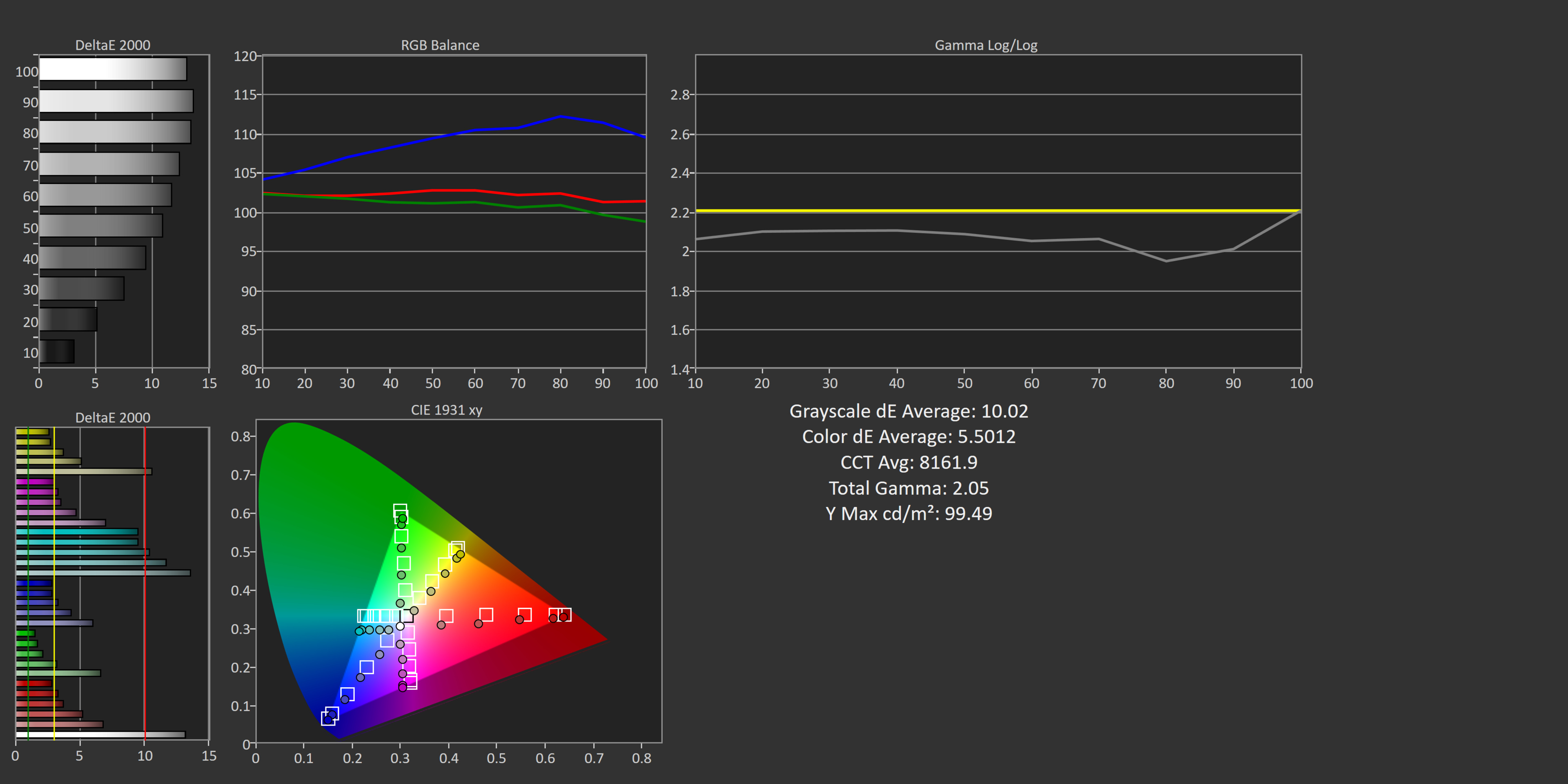
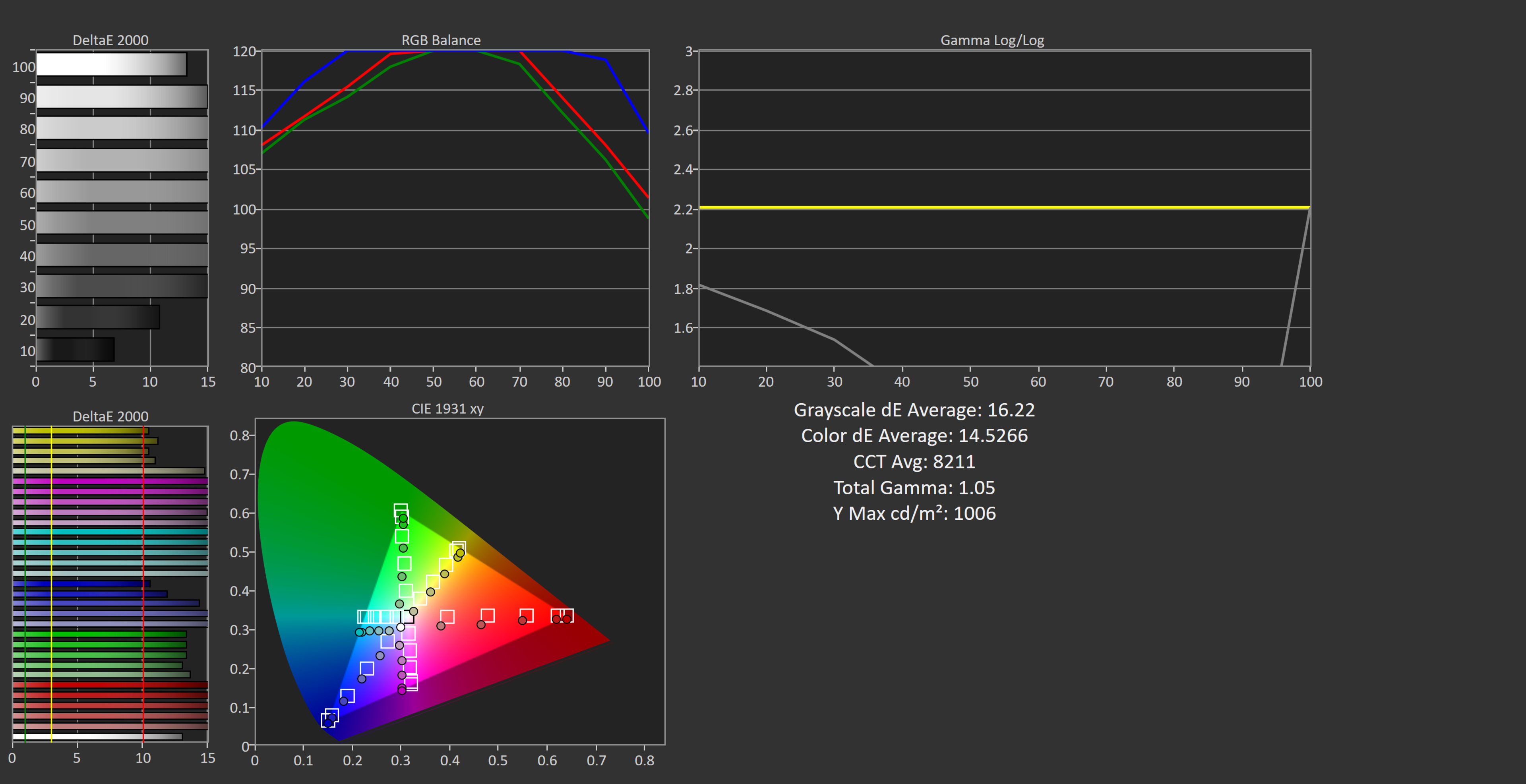
Unlike the Sony A95L OLED, which has top-tier accuracy out of the box, this TV has mediocre SDR color accuracy before calibration. Its white balance is poor overall, with too much blue in most shades of gray, contributing to the TV's overly cool color temperature. Gamma is very close to 2.2, but certain scenes are a bit too bright while others are too dark. Colors have good accuracy overall, but there are noticeable inaccuracies in whites and most light shades of colors.
The TV's SDR pre-calibration accuracy is noticeably worse than its predecessor, the Sony A95L OLED. However, we saw very similar out-of-the-box SDR color accuracy on the 2024 Sony BRAVIA 8 OLED.
It's important to note that while we use the CIE1931 Color Matching Function (CMF) for all of our standardized testing, Sony targets different standards in their calibration process. They officially recommend that calibrators use the CIE170-2:2015 CMF, but if their equipment doesn't support that, Sony recommends using the Judd modified color matching function with an alternate white point, instead of the industry-standard D65.
We took additional measurements with both of these alternative calibration methods. When measured against CIE170-2, our unit is actually a bit less accurate than the official results in the review.
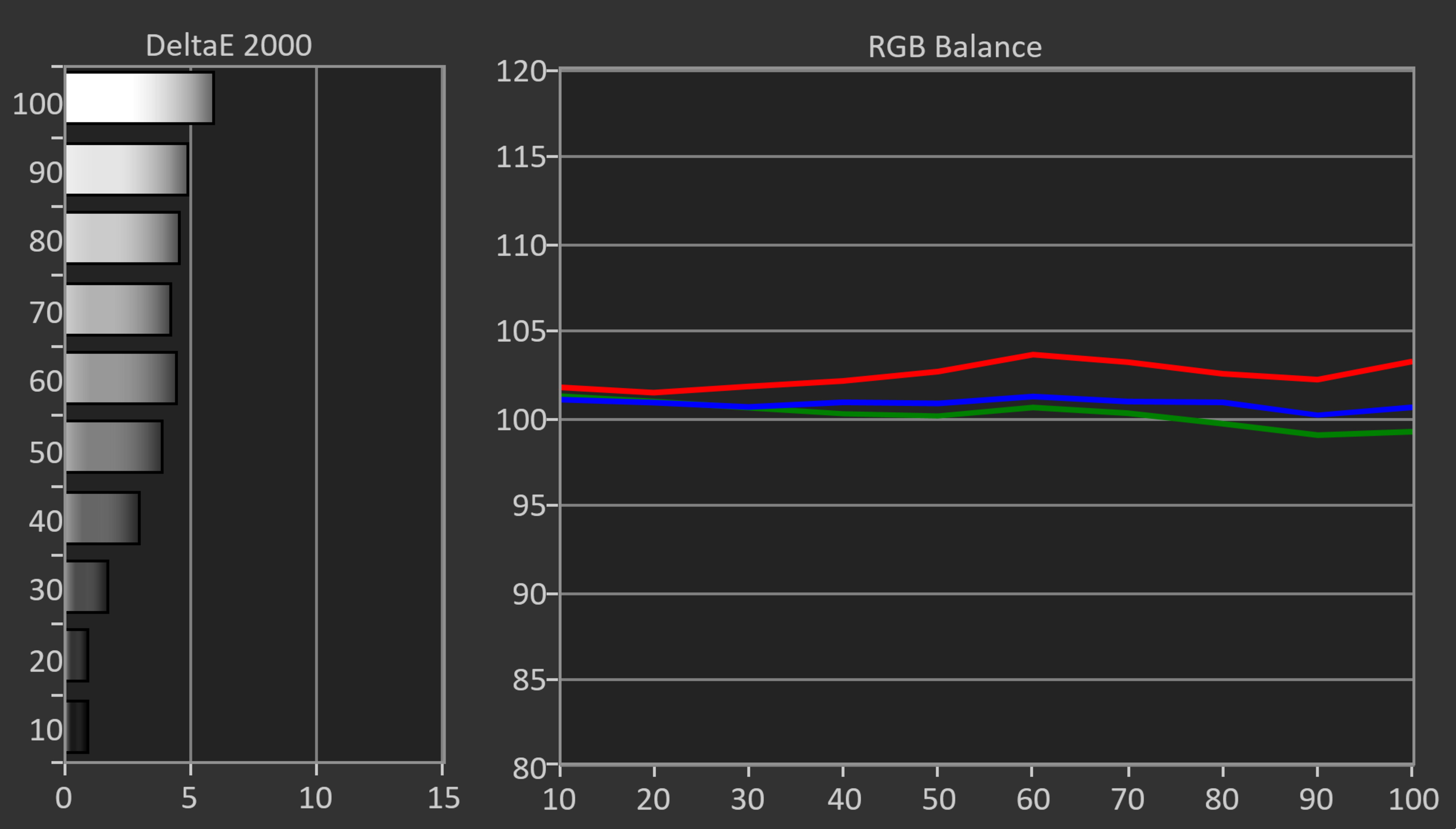
When we use the same CIE1931 CMF but with the Judd white point instead, this TV is much more accurate than the official results in our review. Since we aim for a fair comparison between every TV we test, we're leaving the results with the CIE1931 CMF and the D65 white point in the review, but here are the results relative to the Judd white point:
- White balance
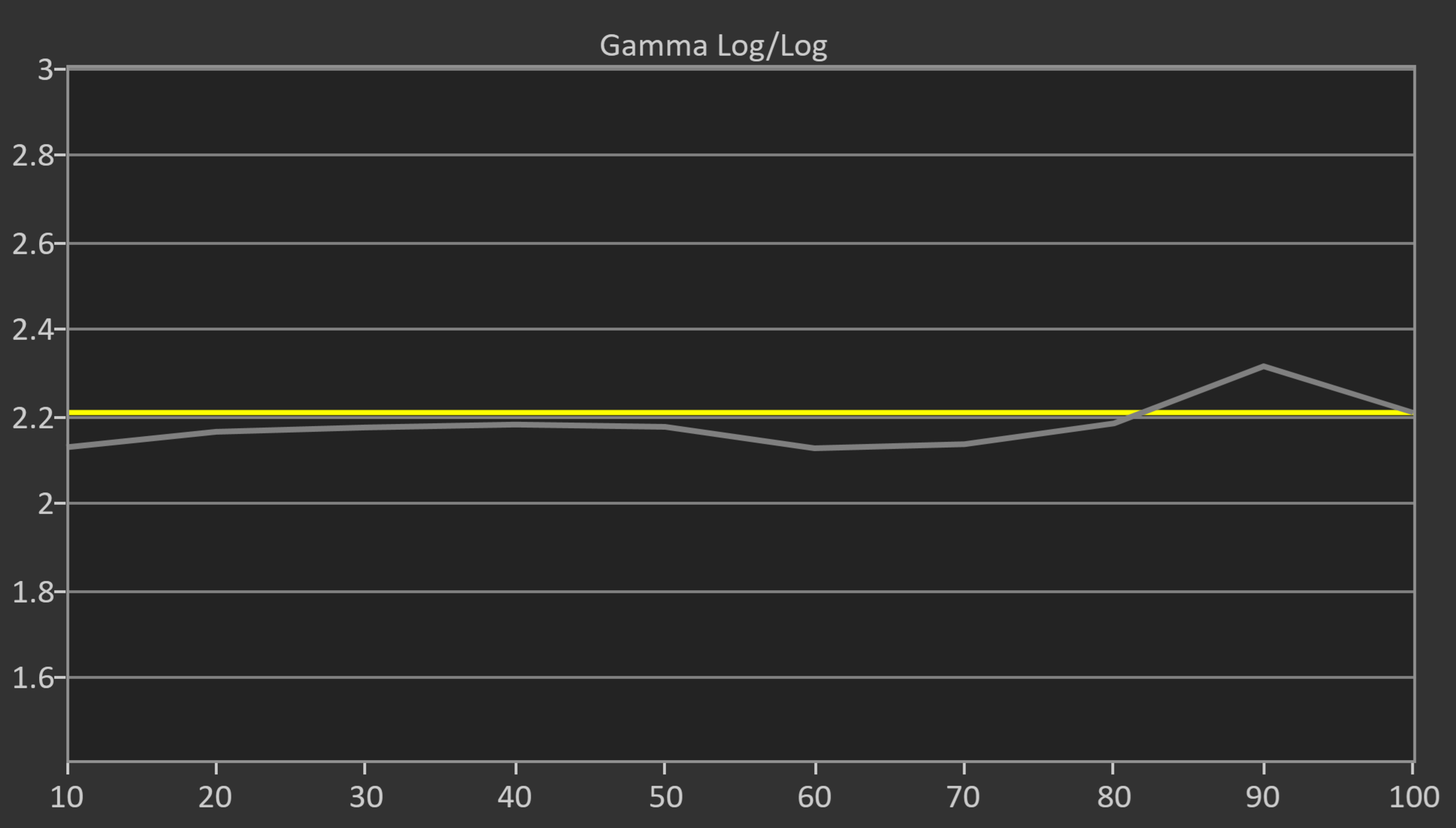
- Gamma
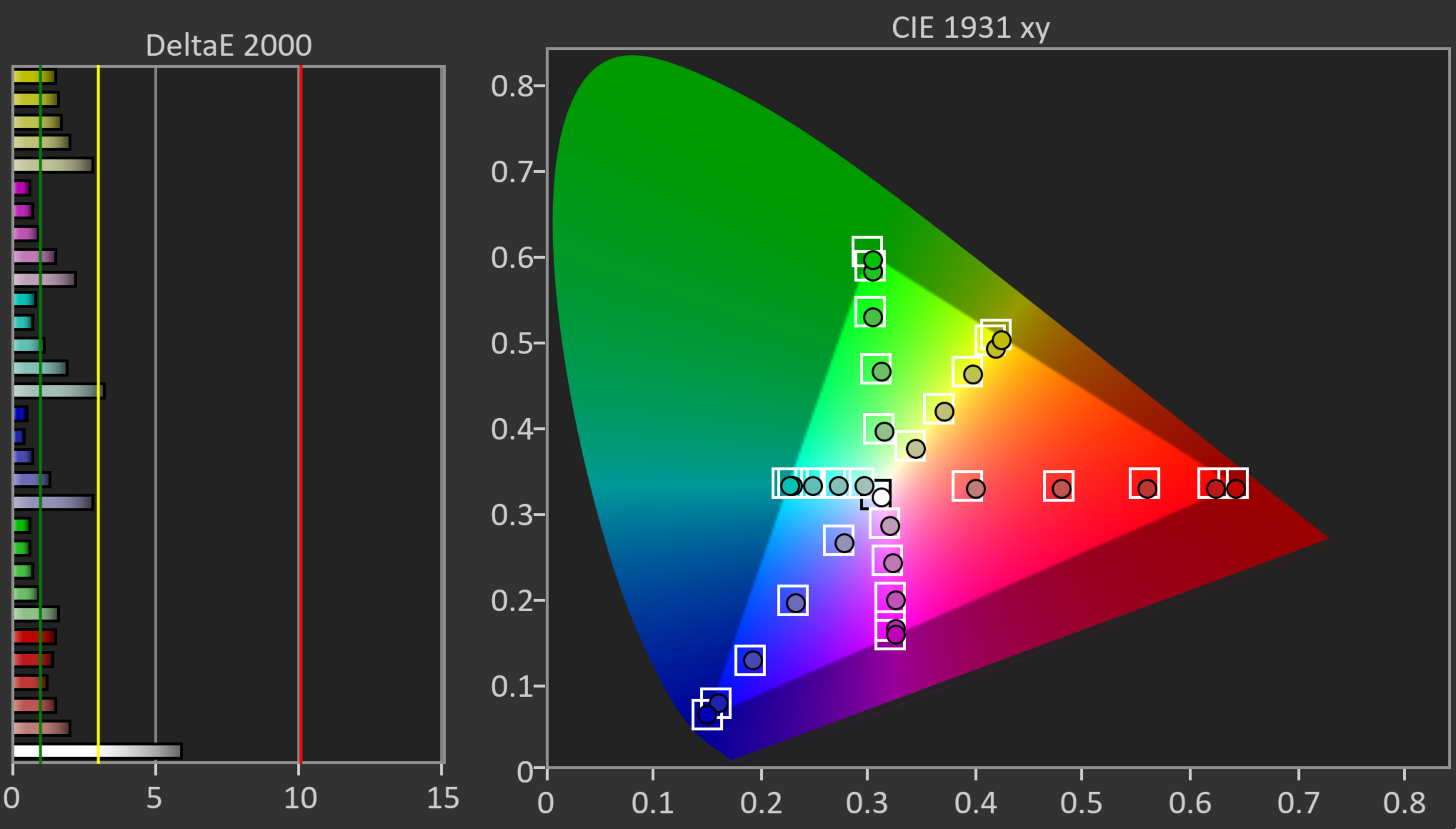
- Color
- Grayscale dE Average: 3.47
- Color dE Average: 1.55
- Color Temperature: 6,675K
- Gamma: 2.17
for pictures & test results

for pictures & test results

for pictures & test results

Fortunately, this TV is easy to calibrate, and doing so gives it fantastic SDR accuracy. Any issues with white balance, gamma, color temperature, and color accuracy are essentially gone, leaving you with an image that's incredibly close to the content creator's intent.
See our full calibration settings.
for pictures & test results

for pictures & test results

The Sony BRAVIA 8 II has very good HDR color accuracy before calibration. Its white balance is great overall, but there's too much blue in lighter shades of gray. This affects the TV's color temperature, which is cooler than the industry standard 6500K. The accuracy of colors is very good, but there are noticeable mapping errors throughout, so color enthusiasts will want to get the TV calibrated.
for pictures & test results

for pictures & test results

After calibration, the TV has fantastic HDR color accuracy. There are still some minor errors in white balance, color temperature, and overall color accuracy, but these inaccuracies are very hard to notice with real content. If you're after the most accurate image possible from this TV, calibration is worth it.
for pictures & test results

The TV has outstanding PQ EOTF tracking. Near-blacks are slightly raised, while some shadows and highlights are a bit dimmer than intended. However, these very small inaccuracies are hard to notice, and the brightness of HDR content stays true to the filmmaker's intent. There's a slight roll-off near the TV's peak brightness, which helps to maintain detail in specular highlights that are brighter than the TV's capabilities.
for pictures & test results

The Sony BRAVIA 8 II has great low-quality content smoothing. It's excellent at smoothing out macro-blocking and pixelization when streaming content, with only a slight loss of detail.
for pictures & test results

The Sony BRAVIA 8 II has superb sharpness processing and upscaling overall. Fine details in low-resolution content are upscaled well, and text is clear and easy to read.
for pictures & test results

The TV has excellent gradient handling in HDR. There's some slight banding in most colors, but it's hard to notice unless you're up close to the screen and looking for it. Even though you're unlikely to notice much banding at all when watching real content from a normal viewing distance, there is a bit more banding than other QD-OLEDs like the Sony A95L OLED.
Like most Sony models, the TV's input lag is a bit higher than competing models from other brands. It's still low enough in Game Mode for a responsive feel, but it's a bit disappointing for gamers who mostly play PVP titles. The TV's input lag is a lot higher in the other picture modes, so you really feel a delay when scrolling through menus and pausing content.
The Sony BRAVIA 8 II supports all common formats up to 4k @ 120Hz, but it doesn't support 165Hz like the LG G5 OLED and the Samsung S95F OLED do. Fortunately, it displays chroma 4:4:4 at both 60Hz and 120Hz, which is important for clear text from a PC.
The Sony BRAVIA 8 II supports variable refresh rate technology to reduce screen tearing. HDMI Forum VRR and G-SYNC compatibility work over the entire refresh rate range, but it doesn't support FreeSync.
for pictures & test results

for pictures & test results

The Sony BRAVIA 8 II delivers sharp motion at its maximum refresh rate of 120Hz. There's a bit of overshoot when transitioning from black, but these transitions settle quickly, so you don't notice it.
for pictures & test results

for pictures & test results

The Sony BRAVIA 8 II delivers sharp motion at its maximum refresh rate of 120Hz. There's a bit of overshoot when transitioning from black, but these transitions settle quickly, so you don't notice it.
for pictures & test results

for pictures & test results

The TV's CAD at 60Hz is fantastic. Most transitions from one RGB level to another are nearly instantaneous, but it's slightly slower when transitioning from blacks due to some overshooting. There's also still some noticeable persistence blur.
for pictures & test results

With the exception of 1440p, the TV is fully compatible with everything the PS5 offers, like 4k @ 120Hz and HDMI Forum VRR. It also supports Auto Low Latency Mode, so you don't have to worry about switching to Game Mode to get the lowest input lag.
for pictures & test results

The Sony BRAVIA 8 II is almost fully compatible with everything the Xbox Series X|S offers, including 4k @ 120Hz, HDMI Forum VRR, FreeSync Premium Pro, and Dolby Vision gaming. It also supports Auto Low Latency Mode, so you don't have to worry about switching to Game Mode to get the lowest input lag. It doesn't support 1440p @ 120Hz.
for videos & test results

for pictures & test results

for pictures & test results

Unfortunately, due to the TV's nearly instantaneous pixel response time, there's stutter with low frame rate content, which is most noticeable during slow panning shots.
for videos & test results

for pictures & test results

for pictures & test results

The Sony BRAVIA 8 II OLED does a decent job of interpolating 24fps content to 30fps. The TV's nearly instantaneous response time causes stutter that minimal motion interpolation can't fully eliminate. As a result, motion in low frame rate content still looks choppy, especially in slower panning shots. Fortunately, the feature has outstanding consistency, so the cadence of motion looks even.
for pictures & test results

The Sony BRAVIA 8 II QD-OLED removes 24p judder from any source, including those that output content in 60Hz, which helps with the appearance of motion in movies and shows. It also removes 25p judder from external sources that can send a 25Hz signal, like an Apple TV. The TV doesn't entirely remove 25p judder from the native apps or from 60p signals, but frame times are fairly consistent, so motion is just a bit jittery.
for videos & test results

for videos & test results

The Sony BRAVIA 8 II OLED is free from micro-judder with both 24p and 25p content if you're using the TV's native apps or an external device that can send a 24Hz or 25Hz signal, like a Blu-ray player. However, there's apparent micro-judder present in 24p and 25p content when it's being sent to the TV via a 60p signal, so scenes with complex motion aren't as smooth as they should be.
for pictures & test results

for pictures & test results

Like all OLED displays, this TV has a nearly instantaneous response time, resulting in incredibly clear motion behind fast-moving objects. There's some overshoot in shadow details, but it's minor and not noticeable when watching content.
for pictures & test results

for pictures & test results

The Sony BRAVIA 8 II OLED is free from any transition artifacts when watching movies, shows, and sports. There isn't any ghosting or unwanted intermediate colors during transitions, so colors remain consistent and pure, even during fast-paced scenes and sports.
for pictures & test results

This TV doesn't have a traditional backlight and doesn't use pulse-width modulation (PWM) to dim each pixel, but it's not completely flicker-free. There's a slight dip in brightness that corresponds to the TV's refresh rate. This differs from the PWM flicker on TVs with LED backlights and occurs on every OLED we've tested. It's not noticeable, and most people won't be bothered by this, but it can still bother people who are extra sensitive to flicker.
for pictures & test results

for pictures & test results

The TV has an optional black frame insertion (BFI) feature that reduces the appearance of persistence blur caused by the TV's nearly instantaneous response time. It can only insert black frames at a 60Hz refresh rate.


for pictures & test results

for pictures & test results

The TV does a disappointing job of displaying deep blacks in a bright room. Blacks look increasingly gray as your room becomes brighter, so the image looks washed out, and you lose the impactful picture quality this OLED has in a dark room.
for pictures & test results

for pictures & test results

The TV does an exceptional job with total reflected light. Its glossy screen finish significantly reduces the intensity of indirect reflections. However, due to the lack of a polarizer, the TV has a purple tint to it in a well-lit room.
for pictures & test results

The TV has very good color saturation in a bright room. Mid-luminance and high-luminance colors retain their saturation very well, but low-luminance colors lose a lot of saturation in a well-lit room. Fortunately, you still get very saturated colors in a bright room overall, since its color volume is so impressive to begin with.
for videos & test results

for pictures & test results

for pictures & test results

for pictures & test results

The TV has an incredibly wide viewing angle. You won't have any issues using it in a wide seating area as people viewing it from the side see the same image as in front.
for pictures & test results

for pictures & test results

The Sony BRAVIA 8 II TV has a clean panel, with no noticeable uniformity issues. If you look closely during scenes with near blacks (5% gray), there are some faint vertical lines on the panel, but these aren't as noticeable after the TV is broken in or when viewed from a normal viewing distance.
for pictures & test results

for pictures & test results

The Sony BRAVIA 8 II uses a unique subpixel structure. Instead of having all three subpixels in a row, each pixel forms a triangle, with the larger green subpixel at the top. This leads to color fringing; on a bright window on a Windows PC, you might notice a green fringe at the top since that's where the green subpixel is. Similarly, there's a purple fringe at the bottom of bright windows, as that's where the red and blue subpixels are. Furthermore, with this subpixel arrangement, text has just okay clarity on a PC, as Windows ClearType settings aren't designed for this subpixel structure and can't correct for it.
The TV uses quantum dots to achieve high color peaks with excellent separation between blues, greens, and reds. This gives the TV great color purity and allows it to display an incredibly wide range of colors.
for pictures & test results

HDMI ports 3 and 4 support the full 48Gbps bandwidth of HDMI 2.1, while HDMI 1 and 2 are limited to HDMI 2.0 bandwidth. However, because HDMI 3 is an HDMI 2.1 and eARC port, you lose an HDMI 2.1 slot if you connect a soundbar.
The Sony BRAVIA 8 II supports eARC, allowing you to pass high-quality, uncompressed audio to a compatible receiver or soundbar through an HDMI cable. You can also connect a compatible Sony soundbar to the S-Center speaker input and use the TV's speakers as a center channel.
for pictures & test results

The overall design of the Sony K65XR80M2 is very impressive and resembles the Sony A95L OLED. It has incredibly thin bezels and a nearly frameless design, making it look great in any room.
for pictures & test results

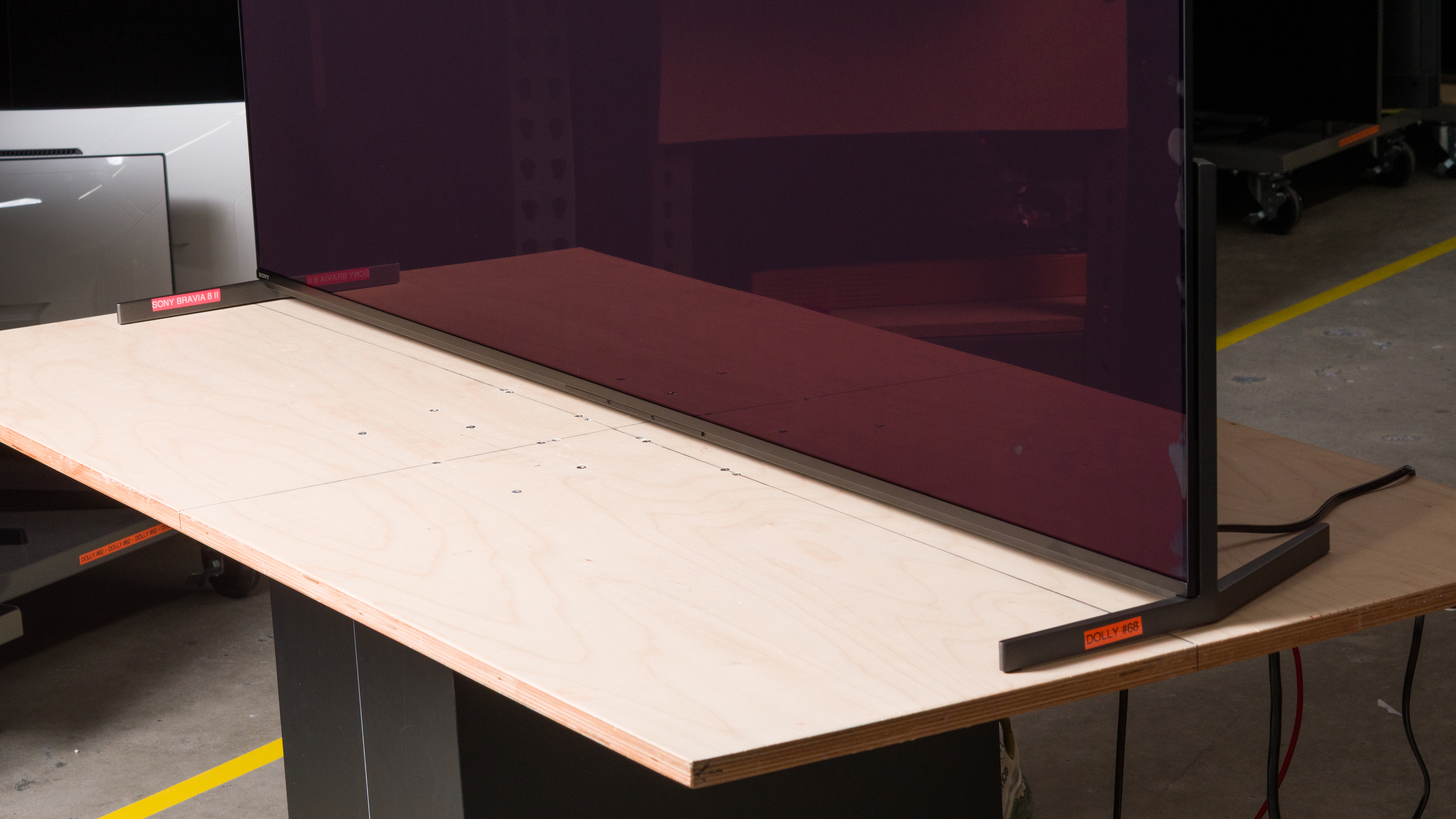
The TV uses two height-adjustable feet. They hold the TV well and can be adjusted into two different positions. The high position lifts the TV about 3.66 inches, so almost any soundbar fits underneath. If you don't need space for a soundbar, the low position only lifts the TV about 1.18 inches.
Footprint of the 65-inch stand: 56.7" x 13.4"
for pictures & test results

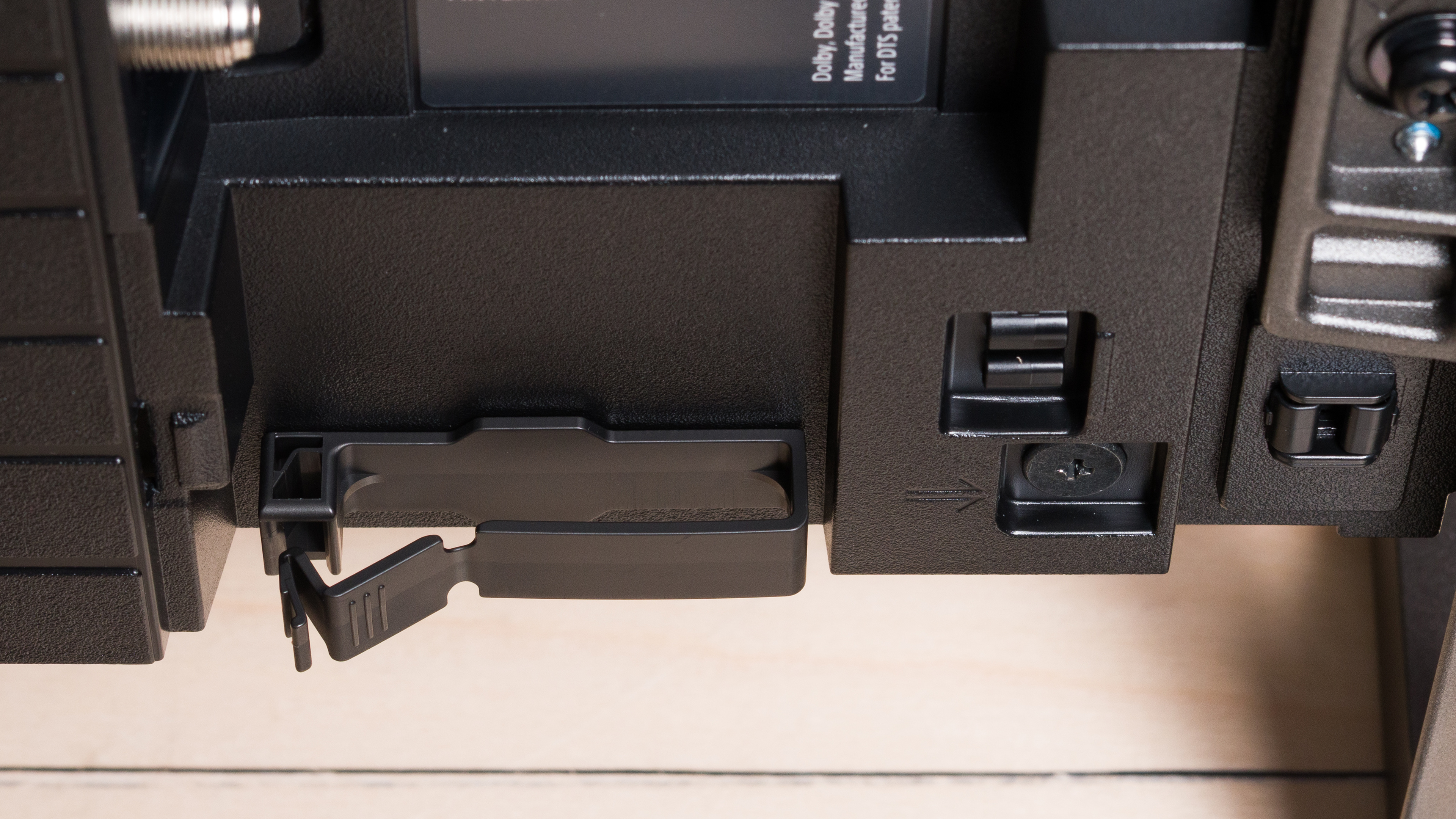
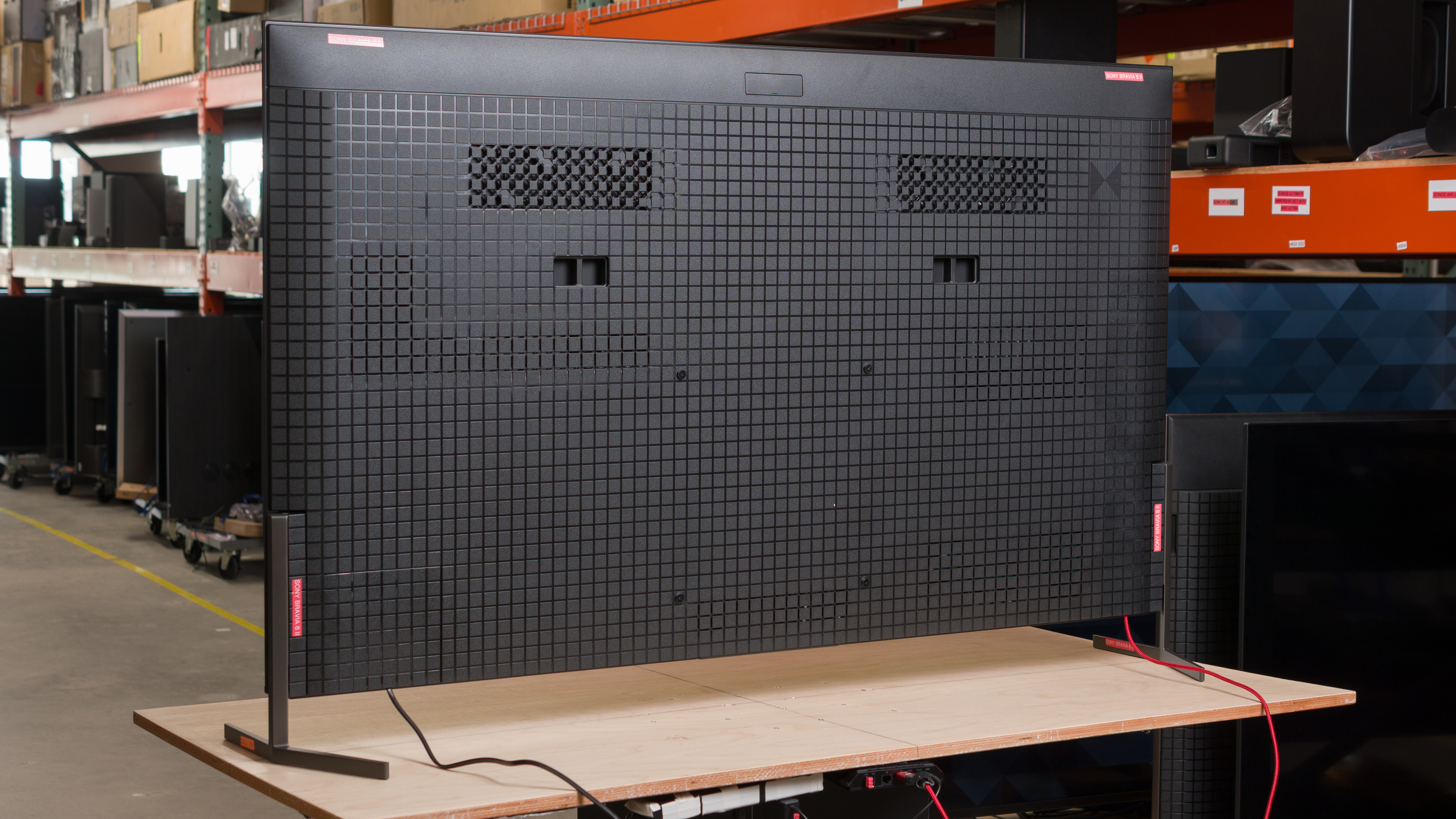
The back of the TV features the checkerboard pattern that's typical of Sony TVs. The inputs are very close to the side of the TV, making them easy to access if you wall-mount it. There's a single clip underneath the input section to help run cables through, and the back includes covers for cable management.


for pictures & test results

The Sony BRAVIA 8 II has outstanding build quality. It's made of premium materials that make it feel solid, and there are no issues with quality control.
for pictures & test results

The Sony BRAVIA 8 II runs version 12 of the popular Google TV OS, and it's loaded with apps and works well. Unfortunately, there's a minor bug when looking at the signal information that shows a 120Hz refresh rate, even when outputting a 60Hz signal.
for pictures & test results

Unfortunately, like most TVs, the interface contains ads. You can opt out of personalized ads, but this doesn't change the number of ads you'll see; they just won't be personalized to match your search and viewing history.


for pictures & test results

- Remote control
- 2x AAA batteries
- User guides
- Cable management covers
- Plastic optical adapter
for pictures & test results

The Sony BRAVIA 8 2 has an okay frequency response. There's a bit of bass, but it's not very impactful, and you're best off pairing the TV with a soundbar if you want deep bass. The TV speakers aren't very loud, but they provide a balanced sound profile at most volume levels, making dialogue easy to understand. However, the sound profile does become unbalanced at maximum volume.


Comments
Sony BRAVIA 8 II OLED: Main Discussion
Track
Let us know why you want us to review the product here, or encourage others to vote for this product. Comments transferred from merged discussions are also included.
no the panel can do 144Hz but the cadence issues are when it needs to de-judder content like 23.976 through a 60Hz connection. We didn’t notice any microstutters out of black on ours.
Hey Samuel, So no microstutter out of black with the Samsung?
Does your last sentence mean it’s a max 60Hz panel or that it does a bad job of 60Hz but does 23.976 correctly? Thanks again
the options for non-OLEDs in the smaller sizes are super limited. Most versions of most displays have either no small size available or huge compromises in picture quality for going to the smallest sizes. The samsung is probably the best pick in the smaller sizes (QN90F/D). For youruse case matching the framerate it shouldn’t have any noticeable cadence issues. It’s main issues are with content through 60Hz.
Hey Samuel, Thank you. Can you recommend the best small non-OLED options for what I’m after? Google AI recommended the Samsung QN90D & QN90F but I don’t know if the cadence issues on the Samsung S95F also apply to their non-OLEDs. I also asked about Philips and Panasonic and it recommended the Philips +908 (OLED I think) & Panasonic Z95A but they may be hard to find in the US. I forgot to ask about LG non-OLEDs. Is there anything good here in smaller sizes or will there be major issues with things I’m looking for when you step down to the smaller sizes? Whatever comes closest to the Bravia 7 in the smaller sizes would be good to know for non-OLEDs.
the black bars in most content on the bravia 9 should be pretty close to pure black unless there’s some kind of settings mis-match or you have the settings menu open (opening the menu on the sony turns the local dimming off for some reason) so it’s definitely not normal. As for the clarity/focus, not sure i can really help you with that one since it’s not an issue i’ve noticed on any of the glossy WOLED screens. but fwiw, the new LG’s don’t have an MLA layer, only the G3 and G4 had the MLA layer so none of the others will have it. Best small TV would probably be the 42" C5 (or C6 if you want the new one but it’s the same panel so odds are the performance is basically the same) and smaller FOV would make the stutter less noticeable. Strange that your Z95B had bad out of the box calibration since at least all of the panasonic TV’s we’ve bought recently (including the Z95B) had pretty stellar out of the box accuracy.
For more clarity you could always try the super-resolution (upscaling) settings and see if that helps! If not you might have to go to a store and see them in person to judge the clarity, since from a technical perspective they should all be pretty similar. Hope that helps!
Hey Samuel,
Thanks again. I don’t remember the black bars on the Bravia 7 turning less black like on the Bravia 9, so I assume it must be a dud, but can you tell me if that’s normal? I tried the Z95B, and it seems a bit out of focus even with still images, and the color and calibration out-of-the-box are so bad that it is hard to see detail in almost any dark content. The rippling effect on the tech at the end of Oblivion, you can hardly make out the ripples or the detail in the ship because it’s so washed out. I thought they had a good reputation for out-of-the-box settings, so I’m not sure what is going on. The stutter with the 55" is still pretty bad a lot of the time. Questions, if you have time: are there any good OLED TVs or TVs that are around 40 inches instead of 55 inches? If not, what are the best WRGB OLEDs without any MLA layer? Does the LG C series have an MLA layer? Is the C6 out yet or about to come out? Have you guys gotten the new Samsung QD OLED to review yet? Is that about to come out?
Claims about human visual perspective aside, if I want to get the OLED with the sharpest, clearest, most in focus image for still images, which one should I go with? Would that limit it to WRGB without MLA layer only or would QD OLED be equal there also? Is the Samsung still an option or will its reflective coating make the focus worse rather than better? FYIW at Best Buy it looked as in focus and clear as any of them. Which type of OLED and which models should be the clearest and most in focus? And does the Quad stack OLED technology,not sure what that is, versus the other types of stacks make a difference to the clarity and focus of the image? My neighbors have a 5 year old top LG model and it is clearer than the Z95B. But will I still get that clarity if i buy an MLA layer-free 2025 or 2026 LG or would they have added something new in the technology that would make it less clear than the older model? Thanks for all your help.
Sorry for the delayed respone! not sure what would be causing that “hard to focus on” problem you’re having. Although the different OLED tech’s have slightly different optical properties, from a human visual perspective (other than metameric differences) they should look pretty similar. Sorry to hear you didn’t like your bravia 9! hopefullt it was a dud, because if, not i think every LCD is going to be pretty disapointing for you and OLED might be your best bet. Anyways hope that helps!
Hey Samuel,
Thanks a lot.
FYI, my player is outputting 24p, and I turned all the motion settings, including Cinema Motion, off and put the TV in professional mode. Should Cinema Motion be on? Asking mostly for future reference, though, because I think my Bravia 9 is a dud. Turned it on, and image is a bit hard to focus on. Looming like content at top of screen causes black bar at bottom of screen to get less black. There is very little interesting contrast with the local dimming on, and with it off, it looks like the native contrast is maybe 500:1 or 1,000:1 tops.
I was not sure how hard to pull on the TV to release the wall mount and get cable access, so when it was not coming out, I pulled a little harder and I did hear some creaking at the wall mount, wall, and the screws going into the TV are to the backlight and the internal components, etc., etc. Otherwise, it just seems like a bad unit.
I’m going to try a 55 inch OLED next. Two quick questions before the weekend if you have time. Assuming cadence is correct on all, is there any difference in clarity or ability to focus on the image between regular RGB OLED, MLA layer W RGB OLED, and QD OLED? Does the MLA layer do anything to distort the focus or refract the light in different directions compared to the regular RGB OLED pixels, pushing out the light straight to the viewer or anything like that?
Lastly, can you please recommend some HDMI cables for my setup, either the one you use for testing or something that will work just as well and is a good price? Need about 8 feet and 4 feet cables.
Thanks again.