


In the land of “Other weird experiments I’ve been playing with,” it’s possible to disable Javascript JIT in (most) modern desktop browsers. Still not sure about Safari.
Why would you want to do this? Microsoft makes a pretty good case for it here:
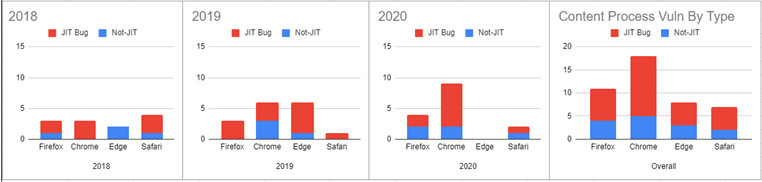
And, yes, disabling Javascript JIT hurts performance a lot. Lockdown mode on iOS does this for some serious performance hit, and it shows in Javascript benchmarks that you’re slaughtering performance… in Javascript benchmarks.
But I’ve been using it for a while and I don’t notice that most of the web is significantly slower. I can notice some performance hits, but I use slow machines to start with - my gutless wonder ARM boxes and such.
If you want to try it, with Firefox, go into about:config and change the following to false:
javascript.options.baselinejit
javascript.options.wasm_baselinejit
javascript.options.wasm_optimizingjit
javascript.options.ion
Chromium based browsers seem to require the command line flag --js-flags="--jitless" - though there may be a flag as well. I don’t have one handy.
And I’ve no idea how to do it on desktop Safari, though on mobile iOS 16 Safari, Lockdown Mode disables jit.
Would people be willing to try this for a couple days in “general use,” and report back? I’m thinking of doing a blag post on the matter, and I’d prefer a few more regular users than me with the impressions of it.

