Notice: Your browser is not supported or outdated so some features of the site might not be available.

Dell Alienware AW2725QF  Monitor Review

Reviewed Aug 26, 2025 at 10:07am
Test bench update Nov 10, 2025 at 09:01am
Tested using Methodology v2.1.1 
Dell Alienware AW2725QF
0.0
PC Gaming 
0.0
Console Gaming 
0.0
Office 
0.0
Editing 
0.0
Brightness 
0.0
Response Time 
0.0
HDR Picture 
0.0
SDR Picture 
 66

The Dell Alienware AW2725QF is a mid-range 27-inch gaming monitor with an IPS panel. Featuring a native 4k resolution and 180Hz refresh rate, it has a dual-mode feature that increases its refresh rate to 360Hz with a lower 1080p resolution. It competes against other IPS monitors that have the same feature, like the LG 27G850A-B, and it's a lower-end alternative to dual-mode OLEDs. It supports Dolby Vision and has typical gaming perks, like HDMI 2.1 bandwidth, NVIDIA G-SYNC Compatibility, and VESA AdaptiveSync. It also includes other features, like a small USB hub and Console Mode to take advantage of gaming consoles.

Our Verdict

0.0
PC Gaming 

The Dell AW2725QF is good for PC gaming. It has a native 4k resolution and a 180Hz max refresh rate, which are good to use for graphically intense and detailed games. Plus, it has a Dual-Resolution mode that switches it to a 1080p resolution and 360Hz refresh rate for a smoother feel. Gaming feels responsive at any refresh rate thanks to its low input lag, and it has a fast response time at most refresh rates, but there's still blur and inverse ghosting with fast-moving objects. Unfortunately, it has limited picture quality because it has a terrible edge-lit local dimming feature and a low contrast ratio, so blacks look gray, and it fails to make highlights pop in HDR.

Pros
  • Native 4k, 180Hz with 1080p, 360Hz mode.

  • Consistent motion handling at any refresh rate.

  • Very low input lag.

  • 4k resolution for detailed images and text.

  • Bright enough to fight glare in most well-lit rooms.

Cons
  • Blur and inverse ghosting with fast objects.

  • Low contrast ratio.

  • Terrible edge-lit local dimming that you can't turn off in HDR.

  • Highlights don't pop in HDR.

0.0
Console Gaming 

The Dell AW2725QF is great for console gaming. It can take full advantage of modern gaming consoles thanks to its HDMI 2.1 bandwidth, and its 4k resolution delivers detailed images. It has low input lag that's responsive enough even for games that need the quickest reactions, and it has consistently good motion handling at any refresh rate, but there's still blur and inverse ghosting in action games. The downside of using this for console gaming is its limited HDR performance, as blacks look gray and highlights are muted, so it fails to deliver an impactful HDR experience, despite supporting Dolby Vision.

Pros
  • Consistent motion handling at any refresh rate.

  • Very low input lag.

  • 4k resolution for detailed images and text.

  • Supports any signal with consoles.

  • Bright enough to fight glare in most well-lit rooms.

  • Supports Dolby Vision.

Cons
  • Blur and inverse ghosting with fast objects.

  • Low contrast ratio.

  • Terrible edge-lit local dimming that you can't turn off in HDR.

  • Highlights don't pop in HDR.

  • No 3.5 mm audio jack.

0.0
Office 

The Dell AW2725QF is impressive for work. It has a high 4k resolution that delivers sharp text, as long as you're in its 4k Dual-Resolution mode. The 27-inch screen is also big enough to open two windows side-by-side. While it has distracting reflections in a bright room, and it's best to avoid placing it opposite a sunny window, it still gets bright enough to fight glare from overhead lights in your office or workspace. It also has versatile ergonomics and wide enough viewing angles for sharing the screen with someone next to you. Although it has some USB ports to connect extra devices, it doesn't support DisplayPort Alt Mode or Thunderbolt to quickly connect a laptop over USB-C.

Pros
  • 4k resolution for detailed images and text.

  • Bright enough to fight glare in most well-lit rooms.

  • Versatile ergonomics.

  • Screen is big enough for some multitasking.

Cons
  • Not many extra productivity features.

  • Reflections are distracting in sunny rooms.

0.0
Editing 

The Dell AW2725QF is good for editing. It comes with an extremely accurate sRGB mode that you'd only need to calibrate if you need perfectly accurate colors for professional content creation. It even displays a wide range of colors in HDR, but fails to make colors look vivid or highlights pop for an impactful HDR experience. It also has a low contrast ratio and a terrible local dimming feature that make blacks look gray, so it's a bad choice for editing content in HDR. It does get bright enough to fight some glare in well-lit rooms, but reflections from strong light sources are distracting. On the plus side, this monitor's 4k resolution helps deliver crisp and detailed images.

Pros
  • 4k resolution for detailed images and text.

  • Bright enough to fight glare in most well-lit rooms.

  • Extremely accurate sRGB mode.

  • Displays wide range of colors.

Cons
  • Low contrast ratio.

  • Terrible edge-lit local dimming that you can't turn off in HDR.

  • Highlights don't pop in HDR.

  • Some uniformity issues.

0.0
Brightness 

The Dell AW2725QF has very good brightness. It fights glare well in most bright rooms, but not if there's a strong light source facing the screen. Unfortunately, though, it fails to make highlights pop in HDR.

Pros
  • Bright enough to fight glare in most well-lit rooms.

Cons
  • Highlights don't pop in HDR.

0.0
Response Time 

The Dell AW2725QF has a good response time. Its motion handling is consistent at any refresh rate, but there's still blur and inverse ghosting with fast-moving content.

Pros
  • Consistent motion handling at any refresh rate.

Cons
  • Blur and inverse ghosting with fast objects.

0.0
HDR Picture 

The Dell AW2725QF is disappointing for HDR. It has a low contrast ratio that makes blacks look gray and its terrible local dimming feature fails to improve it. You can't turn local dimming off in HDR, either. While it displays a wide range of colors, it struggles to make them look vivid.

Pros
  • Displays wide range of colors.

Cons
  • Low contrast ratio.

  • Terrible edge-lit local dimming that you can't turn off in HDR.

0.0
SDR Picture 

The Dell AW2725QF is okay for SDR. Its low contrast ratio means that blacks look gray, but at least it displays a wide range of colors.

Pros
  • Displays wide range of colors.

Cons
  • Low contrast ratio.

0.0
Color Accuracy 

The Dell AW2725QF has fantastic color accuracy. It's extremely accurate before any sort of calibration in the sRGB mode, and calibrating it only fixes minor issues. However, it struggles to maintain this accurate image across the screen as the edges are darker than the rest of the display.

Pros
  • Extremely accurate sRGB mode.

Cons
  • Some uniformity issues.

  • 0.0
    PC Gaming
  • 0.0
    Console Gaming
  • 0.0
    Office
  • 0.0
    Editing

  • Performance Usages

  • 0.0
    Brightness
  • 0.0
    Response Time
  • 0.0
    HDR Picture
  • 0.0
    SDR Picture
  • 0.0
    Color Accuracy
  • Changelog

    1.  Updated Nov 10, 2025: We've converted this review to Test Bench 2.1.1. We removed the Vertical Viewing Angle test.
    2.  Updated Oct 28, 2025: 

      We updated the Max Refresh Rate over HDMI and DP to reflect the max refresh rate at its native resolution, for consistency with other reviews.

    3.  Updated Aug 26, 2025: Review published.
    4.  Updated Aug 20, 2025: Early access published.

    Check Price

    27"Alienware AW2725QF
    SEE PRICE
    Amazon.co.jp

    Differences Between Sizes And Variants

    We bought and tested the 27-inch Dell AW2725QF, which is the only size available. Dell doesn't have any other similar monitors, and although there are similarly-named models, like the Dell Alienware AW2725Q and the Dell Alienware AW3225QF, they're different models. The results in the review are only valid for the AW2725QF.

    ModelSizePanel TypeResolution & Refresh Rate
    AW2725QF27"IPS4k @ 180Hz
    1080p @ 360Hz

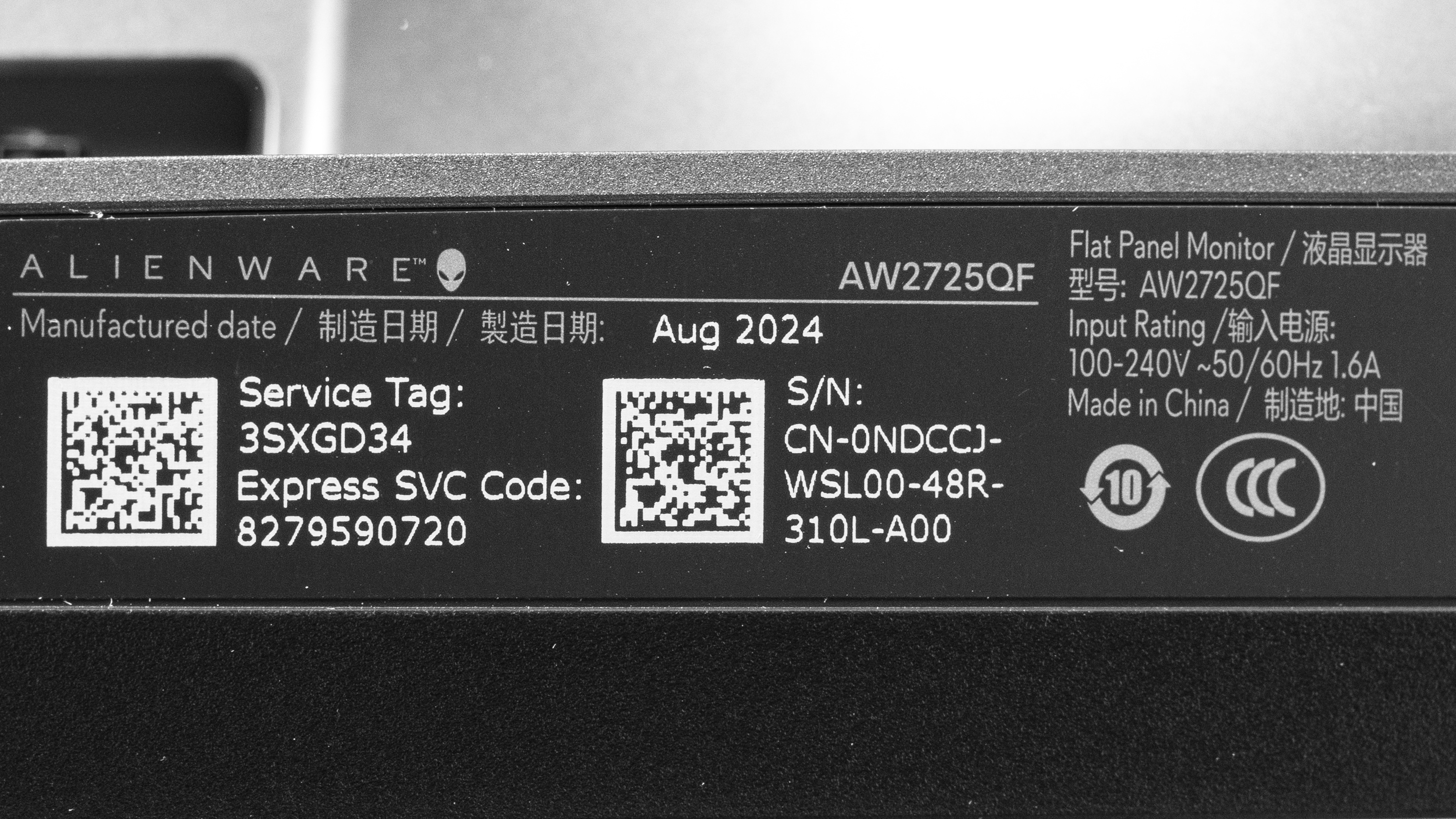
    Our unit's label indicates it was manufactured in August 2024. We tested it with firmware M3T101.

    Popular Monitor Comparisons

    The Dell Alienware AW2725QF is a mid-range 4k gaming monitor with a 180Hz refresh rate. Its main feature is its Dual-Resolution mode, which lowers its resolution to 1080p with a higher 360Hz refresh rate for a smoother feel. This puts it in competition with other dual-mode monitors, and it's a cheaper alternative to those with higher refresh rates and/or OLED panels, like the LG 27G850A-B or the LG 32GS95UE-B. This makes it a great choice if you want the versatility of the Dual-Resolution mode for playing different types of games, but your budget doesn't allow for a premium model. While it has typical gaming features, like HDMI 2.1 bandwidth, there are some trade-offs versus the higher-end models. It has some blur with fast-moving objects, and the motion isn't as crisp as an OLED. Despite supporting Dolby Vision, it has limited picture quality as it fails to make highlights pop in HDR and blacks look gray due to its low contrast ratio and terrible local dimming feature, which you can't turn off in HDR. That said, this is what you should expect for a mid-range gaming monitor, and at least it displays a wide range of accurate colors in SDR.

    Also see our recommendations for the best Dell monitors, the best 4k 144Hz monitors, and the best high refresh rate monitors.

    Dell Alienware AW2725Q

    The Dell Alienware AW2725QF and the Dell Alienware AW2725Q are both 4k gaming monitors, but despite sharing similar names, they're very different. The AW2725Q uses a QD-OLED panel that has better picture quality, especially in HDR, and better motion handling than the AW2725QF. The AW2725Q also has a higher 240Hz refresh rate with a 4k signal, but the AW2725QF has a Dual-Resolution mode that boosts its refresh rate to 360Hz with a 1080p resolution. The AW2725QF has some advantages, like the fact that it's more accurate out of the box and that it doesn't risk burn-in with constant exposure to static elements like on the AW2725Q.

    LG 27G850A-B

    The Dell AW2725QF and the LG 27G850A-B are competing dual-mode gaming monitors. While they both have 4k resolutions with dual-mode features that switch them to a lower 1080p resolution, their refresh rates differ. The LG has a higher 240Hz refresh rate in 4k and a 480Hz refresh rate in 1080p, so it offers a smoother feel. However, the Dell still has better overall motion handling and more accurate colors. Although the LG comes with an IPS Black panel and has a better contrast ratio, they both have terrible local dimming features and fail to deliver an impactful HDR experience.

    Dell Alienware AW2723DF

    The Dell Alienware AW2723DF and the Dell Alienware AW2725QF are different types of IPS gaming monitors. The AW2725QF has a native 4k resolution and 180Hz refresh rate, but it has a Dual-Resolution mode that switches it to a 1080p resolution and 360Hz refresh rate for a smoother feel. The AW2723DF offers more of a sweet spot between those two modes, as it has a 1440p resolution and 280Hz refresh rate. This means choosing one over the other really depends on which combination of refresh rate and resolution you prefer. However, the AW2725QF has some advantages because it gets brighter and supports HDMI 2.1 bandwidth, which the AW2723DF doesn't.

    LG 27GP950-B

    The Dell Alienware AW2725QF and the LG 27GP950-B are both 4k gaming monitors with IPS panels. While they both have similar refresh rates with a 4k resolution, the main difference is that the Dell has a Dual-Resolution mode that switches it to a 1080p resolution and 360Hz refresh rate. This makes the Dell the better choice if you want more versatility for different types of gaming.

    Show more 

    Video

    How We Test Monitors
    How We Test Monitors

    We buy and test more than 30 monitors each year, all of which we purchase ourselves, without cherry-picked units or samples. We put a lot into each unbiased, straight-to-the-point review, and there's a whole process from purchasing to publishing, involving multiple teams and people. We do more than just use the monitor for a week; we use specialized, custom tools to measure various aspects and deliver objective, data-driven results. We also consider multiple factors before making any recommendations, including the monitor's cost, its performance compared to the competition, and whether it's easy to find.

    Test Results

    perceptual testing image
    Sort:
    RATINGS
    Category:
    All
    Design
    Style
    Curved
    LockedLocked
    Curve Radius
    LockedLocked

    Become a member to view the full test results and text of the reviews, as well as extra website features and tools with no ads.

    0.0
    Build Quality

    Become a member to view the full test results and text of the reviews, as well as extra website features and tools with no ads.

    0.0
    Ergonomics
    Min Height To Top Of Panel
    LockedLock" (Lock cm)
    Height Adjustment
    LockedLock" (Lock cm)
    Tilt Range
    LockedLocked
    Rotate Portrait/Landscape
    LockedLocked
    Swivel Range
    LockedLocked
    Wall Mount
    LockedLocked

    Become a member to view the full test results and text of the reviews, as well as extra website features and tools with no ads.

    Stand
    Base Width
    LockedLock" (Lock cm)
    Base Depth
    LockedLock" (Lock cm)
    Thickness (With Display)
    LockedLock" (Lock cm)
    Weight (With Display)
    LockedLock lbs (Lock kg)

    Become a member to view the full test results and text of the reviews, as well as extra website features and tools with no ads.

    Display
    Size
    Locked27"
    Housing Width
    LockedLock" (Lock cm)
    Housing Height
    LockedLock" (Lock cm)
    Thickness (Without Stand)
    LockedLock" (Lock cm)
    Weight (Without Stand)
    LockedLock lbs (Lock kg)
    Borders Size (Bezels)
    LockedLock" (Lock cm)

    Become a member to view the full test results and text of the reviews, as well as extra website features and tools with no ads.

    Controls

    Become a member to view the full test results and text of the reviews, as well as extra website features and tools with no ads.

    In The Box
    Power Supply
    LockedLocked

    Become a member to view the full test results and text of the reviews, as well as extra website features and tools with no ads.

    Picture Quality
    0.0
    Contrast
    Native Contrast
    LockedLock : 1
    Contrast With Local Dimming
    LockedLock : 1

    Become a member to view the full test results and text of the reviews, as well as extra website features and tools with no ads.

    0.0
    Local Dimming
    SAMPLE
    JOIN NOW

    for videos & test results

    Dell Alienware AW2725QF Local Dimming Video Sample
    Local Dimming
    LockedLocked
    Backlight
    LockedLocked

    Become a member to view the full test results and text of the reviews, as well as extra website features and tools with no ads.

    0.0
    SDR Brightness
    Real Scene
    LockedLock cd/m²
    Peak 2% Window
    LockedLock cd/m²
    Peak 10% Window
    LockedLock cd/m²
    Peak 25% Window
    LockedLock cd/m²
    Peak 50% Window
    LockedLock cd/m²
    Peak 100% Window
    LockedLock cd/m²
    Sustained 2% Window
    LockedLock cd/m²
    Sustained 10% Window
    LockedLock cd/m²
    Sustained 25% Window
    LockedLock cd/m²
    Sustained 50% Window
    LockedLock cd/m²
    Sustained 100% Window
    LockedLock cd/m²
    Automatic Brightness Limiting (ABL)
    LockedLock
    Minimum Brightness
    LockedLock cd/m²

    Become a member to view the full test results and text of the reviews, as well as extra website features and tools with no ads.

    0.0
    HDR Brightness
    VESA DisplayHDR Certification
    LockedLocked
    Real Scene
    LockedLock cd/m²
    Peak 2% Window
    LockedLock cd/m²
    Peak 10% Window
    LockedLock cd/m²
    Peak 25% Window
    LockedLock cd/m²
    Peak 50% Window
    LockedLock cd/m²
    Peak 100% Window
    LockedLock cd/m²
    Sustained 2% Window
    LockedLock cd/m²
    Sustained 10% Window
    LockedLock cd/m²
    Sustained 25% Window
    LockedLock cd/m²
    Sustained 50% Window
    LockedLock cd/m²
    Sustained 100% Window
    LockedLock cd/m²
    Automatic Brightness Limiting (ABL)
    LockedLock

    Become a member to view the full test results and text of the reviews, as well as extra website features and tools with no ads.

    0.0
    Gray Uniformity
    50% Std. Dev.
    LockedLock%
    50% DSE
    LockedLock%

    Become a member to view the full test results and text of the reviews, as well as extra website features and tools with no ads.

    0.0
    Black Uniformity
    Native Std. Dev.
    LockedLock%
    Std. Dev. w/ L.D.
    LockedLock%

    Become a member to view the full test results and text of the reviews, as well as extra website features and tools with no ads.

    0.0
    Color Accuracy (Pre-Calibration)
    Picture Mode
    LockedLocked
    sRGB Gamut Area xy
    LockedLock%
    White Balance dE (Avg.)
    LockedLock
    Color Temperature (Avg.)
    LockedLock K
    Gamma (Avg.)
    LockedLock
    Color dE (Avg.)
    LockedLock
    Contrast Setting
    LockedLock
    RGB Settings
    LockedLocked
    Gamma Setting
    LockedLocked
    Brightness Setting
    LockedLock
    Measured Brightness
    LockedLock cd/m²
    Brightness Locked
    LockedLocked

    Become a member to view the full test results and text of the reviews, as well as extra website features and tools with no ads.

    0.0
    Color Accuracy (Post-Calibration)
    Picture Mode
    LockedLocked
    sRGB Gamut Area xy
    LockedLock%
    White Balance dE (Avg.)
    LockedLock
    Color Temperature (Avg.)
    LockedLock K
    Gamma (Avg.)
    LockedLock
    Color dE (Avg.)
    LockedLock
    Contrast Setting
    LockedLock
    RGB Settings
    LockedLocked
    Gamma Setting
    LockedLocked
    Brightness Setting
    LockedLock
    Measured Brightness
    LockedLock cd/m²
    ICC Profile
    Download

    Become a member to view the full test results and text of the reviews, as well as extra website features and tools with no ads.

    0.0
    SDR Color Gamut
    sRGB Coverage xy
    LockedLock%
    sRGB Picture Mode
    LockedLocked
    Adobe RGB Coverage xy
    LockedLock%
    Adobe RGB Picture Mode
    LockedLocked

    Become a member to view the full test results and text of the reviews, as well as extra website features and tools with no ads.

    0.0
    HDR Color Gamut
    Wide Color Gamut
    LockedLocked
    DCI-P3 Coverage xy
    LockedLock%
    DCI-P3 Picture Mode
    LockedLocked
    Rec. 2020 Coverage xy
    LockedLock%
    Rec. 2020 Picture Mode
    LockedLocked

    Become a member to view the full test results and text of the reviews, as well as extra website features and tools with no ads.

    0.0
    HDR Color Volume
    1,000 cd/m² DCI-P3 Coverage ICtCp
    LockedLock%
    DCI-P3 Picture Mode
    LockedLocked
    10,000 cd/m² Rec. 2020 Coverage ICtCp
    LockedLock%
    Rec. 2020 Picture Mode
    LockedLocked

    Become a member to view the full test results and text of the reviews, as well as extra website features and tools with no ads.

    0.0
    Viewing Angle
    SAMPLE
    JOIN NOW

    for videos & test results

    Dell Alienware AW2725QF Viewing Angle Video Sample
    Color Washout From Left
    LockedLock°
    Color Washout From Right
    LockedLock°
    Color Shift From Left
    LockedLock°
    Color Shift From Right
    LockedLock°
    Brightness Loss From Left
    LockedLock°
    Brightness Loss From Right
    LockedLock°
    Black Level Raise From Left
    LockedLock°
    Black Level Raise From Right
    LockedLock°
    Gamma Shift From Left
    LockedLock°
    Gamma Shift From Right
    LockedLock°

    Become a member to view the full test results and text of the reviews, as well as extra website features and tools with no ads.

    0.0
    Text Clarity
    Panel Type
    LockedIPS
    Subpixel Layout
    LockedLocked

    Become a member to view the full test results and text of the reviews, as well as extra website features and tools with no ads.

    0.0
    Direct Reflections
    Peak Direct Reflection Intensity
    LockedLock%
    Screen Finish
    LockedLocked

    Become a member to view the full test results and text of the reviews, as well as extra website features and tools with no ads.

    0.0
    Ambient Black Level Raise
    Black Luminance @ 0 lx
    LockedLock cd/m²
    Black Luminance @ 1000 lx
    LockedLock cd/m²

    Become a member to view the full test results and text of the reviews, as well as extra website features and tools with no ads.

    0.0
    Total Reflected Light
    Total Reflected Light Intensity
    LockedLock% ⋅ pixel
    Diffraction Artifacts
    LockedLocked

    Become a member to view the full test results and text of the reviews, as well as extra website features and tools with no ads.

    0.0
    Gradient
    Color Depth
    LockedLock Bit

    Become a member to view the full test results and text of the reviews, as well as extra website features and tools with no ads.

    Motion
    0.0
    Refresh Rate
    Native Refresh Rate
    LockedLock Hz
    Max Refresh Rate
    Locked360 Hz
    Max Refresh Rate Over DP
    LockedLock Hz
    Max Refresh Rate Over HDMI
    LockedLock Hz
    Max Refresh Rate Over DP @ 10-bit
    LockedLock Hz
    Max Refresh Rate Over HDMI @ 10-Bit
    LockedLock Hz
    DSC Toggle
    LockedLocked
    DSC Off Max Refresh Rate Over DP
    LockedN/A
    DSC Off Max Refresh Rate Over HDMI
    LockedN/A

    Become a member to view the full test results and text of the reviews, as well as extra website features and tools with no ads.

    Variable Refresh Rate (VRR)
    Variable Refresh Rate
    LockedLocked
    FreeSync
    LockedLocked
    G-SYNC
    LockedLocked
    VRR Maximum
    LockedLock Hz
    VRR Minimum
    LockedLocked
    VRR Supported Connectors
    LockedLocked

    Become a member to view the full test results and text of the reviews, as well as extra website features and tools with no ads.

    0.0
    VRR Motion Performance
    Recommended VRR OD Setting
    LockedLocked
    Variable Overdrive Advertised
    LockedLocked
    Avg. CAD
    LockedLock
    Best CAD
    LockedLock
    Worst CAD
    LockedLock

    Become a member to view the full test results and text of the reviews, as well as extra website features and tools with no ads.

    0.0
    Refresh Rate Compliance
    Compliance @ Max Hz
    LockedLock%
    Compliance @ 120 FPS
    LockedLock%
    Compliance @ 60 FPS
    LockedLock%

    Become a member to view the full test results and text of the reviews, as well as extra website features and tools with no ads.

    0.0
    CAD @ Max Refresh Rate
    OD Transition Max Refresh Rate
    Join nowfor multiple image controls
    Recommended Overdrive Setting
    LockedLocked
    Avg. CAD
    LockedLock
    Best 10% CAD
    LockedLock
    Worst 10% CAD
    LockedLock

    Become a member to view the full test results and text of the reviews, as well as extra website features and tools with no ads.

    Response Time @ Max Refresh Rate
    Recommended Overdrive Setting
    LockedLocked
    First Response Time
    LockedLock ms
    Total Response Time
    LockedLock ms
    RGB Overshoot
    LockedLock RGB
    Worst 10% First Response Time
    LockedLock ms
    Worst 10% Total Response Time
    LockedLock ms
    Worst 10% RGB Overshoot
    LockedLock RGB

    Become a member to view the full test results and text of the reviews, as well as extra website features and tools with no ads.

    0.0
    CAD @ 120Hz
    OD Transition 120Hz
    Join nowfor multiple image controls
    Recommended Overdrive Setting
    LockedLocked
    Avg. CAD
    LockedLock
    Best 10% CAD
    LockedLock
    Worst 10% CAD
    LockedLock

    Become a member to view the full test results and text of the reviews, as well as extra website features and tools with no ads.

    Response Time @ 120Hz
    Recommended Overdrive Setting
    LockedLocked
    First Response Time
    LockedLock ms
    Total Response Time
    LockedLock ms
    RGB Overshoot
    LockedLock RGB
    Worst 10% First Response Time
    LockedLock ms
    Worst 10% Total Response Time
    LockedLock ms
    Worst 10% RGB Overshoot
    LockedLock RGB

    Become a member to view the full test results and text of the reviews, as well as extra website features and tools with no ads.

    0.0
    CAD @ 60Hz
    OD Transition 60Hz
    Join nowfor multiple image controls
    Recommended Overdrive Setting
    LockedLocked
    Avg. CAD
    LockedLock
    Best 10% CAD
    LockedLock
    Worst 10% CAD
    LockedLock

    Become a member to view the full test results and text of the reviews, as well as extra website features and tools with no ads.

    Response Time @ 60Hz
    Recommended Overdrive Setting
    LockedLocked
    First Response Time
    LockedLock ms
    Total Response Time
    LockedLock ms
    RGB Overshoot
    LockedLock RGB
    Worst 10% First Response Time
    LockedLock ms
    Worst 10% Total Response Time
    LockedLock ms
    Worst 10% RGB Overshoot
    LockedLock RGB

    Become a member to view the full test results and text of the reviews, as well as extra website features and tools with no ads.

    Backlight Strobing (BFI)
    Backlight Strobing (BFI)
    LockedLocked
    Maximum Frequency
    LockedN/A
    Minimum Frequency
    LockedN/A
    Longest Pulse Width Brightness
    LockedN/A
    Shortest Pulse Width Brightness
    LockedN/A
    Pulse Width Control
    LockedLocked
    Pulse Phase Control
    LockedLocked
    Pulse Amplitude Control
    LockedLocked
    VRR At The Same Time
    LockedLocked

    Become a member to view the full test results and text of the reviews, as well as extra website features and tools with no ads.

    0.0
    VRR Flicker
    SAMPLE
    JOIN NOW

    for videos & test results

    Dell Alienware AW2725QF VRR Flicker Video Sample
    Dark Gray Flicker
    LockedLock RGB
    Middle Gray Flicker
    LockedLock RGB
    Light Gray Flicker
    LockedLock RGB

    Become a member to view the full test results and text of the reviews, as well as extra website features and tools with no ads.

    0.0
    Image Flicker
    Flicker-Free
    LockedLocked
    PWM Dimming Frequency
    LockedLocked

    Become a member to view the full test results and text of the reviews, as well as extra website features and tools with no ads.

    Inputs
    0.0
    Input Lag
    Native Resolution @ Max Hz
    LockedLock ms
    Native Resolution @ 120Hz
    LockedLock ms
    Native Resolution @ 60Hz
    LockedLock ms
    Backlight Strobing (BFI)
    LockedN/A

    Become a member to view the full test results and text of the reviews, as well as extra website features and tools with no ads.

    0.0
    Resolution
    Native Resolution
    Locked3840 x 2160
    Aspect Ratio
    LockedLocked
    Megapixels
    LockedLock MP
    Pixel Density
    LockedLock PPI
    0.0
    PS5 Compatibility
    4k @ 120Hz
    LockedLocked
    4k @ 60Hz
    LockedLocked
    1440p @ 120Hz
    LockedLocked
    1440p @ 60Hz
    LockedLocked
    1080p @ 120Hz
    LockedLocked
    1080p @ 60Hz
    LockedLocked

    Become a member to view the full test results and text of the reviews, as well as extra website features and tools with no ads.

    0.0
    Xbox Series X|S Compatibility
    4k @ 120Hz
    LockedLocked
    4k @ 60Hz
    LockedLocked
    1440p @ 120Hz
    LockedLocked
    1440p @ 60Hz
    LockedLocked
    1080p @ 120Hz
    LockedLocked
    1080p @ 60Hz
    LockedLocked

    Become a member to view the full test results and text of the reviews, as well as extra website features and tools with no ads.

    Inputs
    DisplayPort
    LockedLocked
    DisplayPort Transmission Bandwidth
    LockedLocked
    Mini DisplayPort
    LockedLocked
    HDMI
    LockedLocked
    HDMI 2.1 Bandwidth
    LockedLocked
    Daisy Chaining
    LockedLocked
    3.5mm Audio Out
    LockedLocked
    Ethernet
    LockedLocked
    HDR10
    LockedLocked
    Dolby Vision
    LockedLocked

    Become a member to view the full test results and text of the reviews, as well as extra website features and tools with no ads.

    USB
    USB-A Ports
    LockedLocked
    USB-A Rated Speed
    LockedLocked
    USB-B Upstream Port
    LockedLocked
    USB-C Ports
    LockedLocked
    USB-C Upstream
    LockedLocked
    USB-C Rated Speed
    LockedLocked
    USB-C Power Delivery
    LockedLocked
    USB-C DisplayPort Alt Mode
    LockedLocked
    Thunderbolt
    LockedLocked

    Become a member to view the full test results and text of the reviews, as well as extra website features and tools with no ads.

    macOS Compatibility

    Become a member to view the full test results and text of the reviews, as well as extra website features and tools with no ads.

    Features
    Additional Features
    Speakers
    LockedLocked
    RGB Illumination
    LockedLocked
    Multiple Input Display
    LockedLocked
    KVM Switch
    LockedLocked
    Smart OS
    LockedLocked

    Become a member to view the full test results and text of the reviews, as well as extra website features and tools with no ads.

    On-Screen Display (OSD)

    Become a member to view the full test results and text of the reviews, as well as extra website features and tools with no ads.

    Retailers
    Retailers' pricesAmazon.co.jp
    27"  Alienware AW2725QF
    SEE PRICE

    Recommended Articles

    Best Monitors For Gaming

    Comments

    1. Product

    Dell Alienware AW2725QF: Main Discussion

    Let us know why you want us to review the product here, or encourage others to vote for this product. Comments transferred from merged discussions are also included.

    PreviewBack to editorFormat guide
    Sort by:
    newest first
    1. 2
      1
      0
      1
      0

      So when will there be any firmware updates for this monitor?

      I bought a KabelDirekt – 10K & 8K HDMI Kabel, HDMI 2.1 b official certified cable and can now use 4K 120fps native pixel quality with no DSC (Display Stream Compression)

      Because I can activate console mode on my pc with this cable.

      The picture Quality is outstanding at 12bit on GTA 5 Enhanced with Dolby Vision enabled.

      This cable makes the black levels on Dolby Vision extremely good on this IPS panel!

      Could the black levels be worse with DSC enabled?

      I hope more people can confirm this.

      And Dell Alienware is updating all firmware versions on OLED monitors but not on this also rather expensive IPS monitor..

      Edited 2 months ago: spelling
    2. 2
      1
      0
      1
      0

      Did the new Rev make that big of a difference for you? Your early posts sounded as if you didn’t like this at all. I just received one last week and it’s a Feb Rev A01. Not thrilled with it. I see you also had a BenQ EX271u. Was that anything close to this model?

      Where do you see on the monitor if it’s a REV A01 or REV A02 model?

    3. 2
      1
      0
      1
      0

      If you get this, make sure you receive a REV A02 model. The first batch that are tagged with REV A01 are ALL defective, having dozens of stuck pixels each, and some come with other panel or software defects too. Make use of the warranty and the Dell stuck pixel policy to demand a new revision model which doesn’t have these issues. I settled for a May 2025 REV A02 model with better colours and with “only” 1 stuck pixel.

      Did the new Rev make that big of a difference for you? Your early posts sounded as if you didn’t like this at all. I just received one last week and it’s a Feb Rev A01. Not thrilled with it. I see you also had a BenQ EX271u. Was that anything close to this model?

    4. 2
      1
      0
      1
      0

      If you get this, make sure you receive a REV A02 model. The first batch that are tagged with REV A01 are ALL defective, having dozens of stuck pixels each, and some come with other panel or software defects too. Make use of the warranty and the Dell stuck pixel policy to demand a new revision model which doesn’t have these issues. I settled for a May 2025 REV A02 model with better colours and with “only” 1 stuck pixel.

      Where can you see on the monitor if it’s a REV A01 or REV A02 model? Thanks for the tip!

    5. Update: We’ve converted this review to Test Bench 2.1.1. We removed the Vertical Viewing Angle test.

      Show More Updates
    6. 2
      1
      0
      1
      0

      If you get this, make sure you receive a REV A02 model. The first batch that are tagged with REV A01 are ALL defective, having dozens of stuck pixels each, and some come with other panel or software defects too. Make use of the warranty and the Dell stuck pixel policy to demand a new revision model which doesn’t have these issues. I settled for a May 2025 REV A02 model with better colours and with “only” 1 stuck pixel.

      Edited 4 months ago: detail
    7. 3
      2
      1
      2
      0

      Considering the extensive research y'all did on edge-lit TVs and their longevity, could it be the same case for a monitor like this in the long term where the local dimming can’t be turned off and the brightness gets locked to max in HDR? Cause if there is a even a possibility of that, this monitor isn’t worth considering for me as I would like to stick to a monitor for a long time and also use it’s HDR function without worries

      Hi Waterprince20,

      Great question! We haven’t evaluated edge-lit monitors directly, but we expect that they should fare better than TVs due to their significantly smaller screen surface area.

      Since TV panels are typically 55" and up, the LEDs on edge-lit TVs are tightly packed together and driven hard in order to light up the entire panel, which generates a significant amount of heat, leading to issues in the long-term. In the case of monitors, the panel surface area is significantly smaller, so LEDs do not need to be driven nearly as hard to light up the entire screen. This means that a lot less heat is generated in the case of monitor LEDs, which will help avoid the issues TVs are prone to.

      Cheers

    8. 2
      1
      0
      1
      0

      Considering the extensive research y'all did on edge-lit TVs and their longevity, could it be the same case for a monitor like this in the long term where the local dimming can’t be turned off and the brightness gets locked to max in HDR? Cause if there is a even a possibility of that, this monitor isn’t worth considering for me as I would like to stick to a monitor for a long time and also use it’s HDR function without worries

    9. 2
      1
      0
      1
      0

      Thanks for review, do you think S2725QC is much better if we talk about text quality for coding? I saw it has much better backlight bleed, does it affect office work in any way?

      This monitor has significantly better image quality than any other 4K IPS gaming monitor on the market today. Colours are great and natural, not unnaturally saturated White and grey uniformity is on par with work monitors such as the S2725QC, like most work monitors, vignetting is limited to the very edges of the screen, much better than the darkening effect in other gaming monitors. Backlight has minimal bleeding, black looks black if you use in front of a common healthy lit background. picture is totally clear and there is no haziness or cloudiness common with other gaming monitors there is no noticeable graininess or greasiness as a result of the coating, the matte coating is very light and is unnoticeable at a viewing distance over 30cm The latter is a significant distinguishing quality than all the other gaming monitors that are designed by Asian OEMs, all of which have awful matte coatings and bad picture clarity. Picture quality is the trade-off with all the “gaming” monitors today, except for this one. Even the LG WOLED monitors such as the 32GS95UV suffer from this embarrassing cheap design flaw. For context I have tried and compare this with the following 27 inch 4K IPS monitors: Dell S2725QC Dell U2725QE LG 27G850A-B Benq EX271U MSI MPG 274URF QD MSI MAG 274UPF E2 This monitor feels like the most premium 27 inch gaming IPS monitor on the market today, surpassing the “premium”-priced but not premium-quality LG 27G850A-B. Despite what RTINGS tests will indicate, the LG has terrible picture quality and suffers from many of the common problems mentioned earlier, you can barely use it for an hour of work with a white background before you notice that the picture is obscured and hazy. Yet this Dell monitor is priced at least half of the LG and even comes with a longer Dell warranty of 3 years. I think this is the best mixed use monitor for gaming and work at home you can get. The only thing it lacks is a USB-C DisplayPort input. If you weigh gaming more than work but want a monitor that can do both then this is it. If you weigh work as a little more important than gaming then go with the S2725QC. And you don’t have to get any of the overpriced and overmarketed “premium” products like IPS-black, or the totally unsuitable for desktop PC use, OLED panels.

    10. We’ve just released a new video that mentions the Dell Alienware AW2725QF here.

    11. 2
      1
      0
      1
      0

      I would agree with this response. Comparing any IPS monitor to OLED is going to come out in the OLED’s favor. It’s simply down to a difference in the technology. I’ve had this monitor for a few weeks now and I can say, without doubt, it is the best IPS monitor I’ve ever used. I use it for PC gaming and games look amazing, especially at 4K.

      Have you had the opportunity to watch uhd 4k Blu-ray movies? I was only thinking of buying it to watch movies, but I was told that the contrast values are not good, I wonder if it gives the right color and a good image, but I haven’t found the answer yet. 😅

    12. 2
      1
      0
      1
      0

      Sorry to hear but you’ve been mislead by a very biased review and commentary. RTINGS is blatantly biased in favour of OLED panels by omitting to mention or not considering in their ratings the significant risks and shortcomings of OLED panels, while highlighting on IPS panels as “flaws” the only metrics that OLED isn’t bad at, and assigning bigger weights to these metrics so that IPS panels consistently score lower on every area. You can see how much attention RTINGS gives to things that make very little difference in real life use(which RTINGS does not perform at all). Contrast ratios, HDR, and response times (which OLED is faster because it literally flickers as a pseudo BFI effect instead of the far more eye healthy sample-and-hold method of IPS), and RTINGS always highlights these flaws on IPS panels but does not pay any attention to important aspects of a monitor such as panel clarity. For your case, as an owner the contrast on this monitor is excellent and black looks black on a normally lit room. RTINGS intentionally manipulates the ratings on contrast by recontextualising contrast as a measure of how well a monitor displays black in a pitch black room. However in reality no ordinary user would be using a PC monitor in a pitch black room as that is incredibly unhealthy for the eyes and is contraindicated by all desk setup guidelines which advise to always use a monitor in a lit room for eye comfort. This is just one example out of many misleading and biased ratings that RTINGS are doing to benefit OLED over IPS. Other examples are the blatantly false ratings on image flicker on OLED which contradict the actual measurements, brushing off text fringing flaws, ignoring panel longevity and the user hurdle and interruptions by panel maintenance and so on.

      I would agree with this response. Comparing any IPS monitor to OLED is going to come out in the OLED’s favor. It’s simply down to a difference in the technology. I’ve had this monitor for a few weeks now and I can say, without doubt, it is the best IPS monitor I’ve ever used. I use it for PC gaming and games look amazing, especially at 4K.

      Edited 5 months ago: mistake
    13. 2
      1
      0
      1
      0

      Does this monitor fully support Freesync? Strangely, on the Dell store page, it lists G-Sync only. It’s unusual for a monitor to be G-Sync compatible without FreeSync, isn’t it?

      Yes, we confirmed it works properly with FreeSync.

    14. 3
      2
      1
      2
      0

      Hey, we checked with the EDID and you can only get 1440p when in the 4k mode, meaning the max refresh rate is 180Hz.

      Ah okay that makes sense. Thanks for finding that out👍

    To access
    unlimited full product reviews,
    product prices, and
    other exclusive site features
    Become a member