
How to Unlock New Text to Speech Voices in Windows 10


 4 min. read
  Updated on

Microsoft has a tradition of adding new text-to-speech voices in the new versions of its operating system. Windows Vista presented Anna to the World, which retained even in Windows 7. Windows 8 also introduced some new voices, including David, Zira and Hazel. And Windows 10 also introduced some new additional voices.

Some Windows 10 enthusiasts have discovered these new voices in the US English version of the operating system: Microsoft Mark Mobile and Microsoft Eva Mobile, and a special test voice designed for Microsoft’s personal assistant, Cortana. But unfortunately, Eva voice is locked by Microsoft, but don’t worry about that, because here’s how you can unlock it with just a couple of registry tweaks.
Steps to unlock new text to speech voices in Windows 10
The voice of Eva Mobile can be unlocked with a following registry tweak:
Windows Registry Editor Version 5.00

[HKEY_LOCAL_MACHINESOFTWAREMicrosoftSpeechVoicesTokensMSTTS_V110_enUS_EvaM]

@="Microsoft Eva Mobile - English (United States)"

"409"="Microsoft Eva Mobile - English (United States)"

"CLSID"="{179F3D56-1B0B-42B2-A962-59B7EF59FE1B}"

"LangDataPath"=hex(2):25,00,77,00,69,00,6e,00,64,00,69,00,72,00,25,00,5c,00,53,

00,70,00,65,00,65,00,63,00,68,00,5f,00,4f,00,6e,00,65,00,43,00,6f,00,72,00,

65,00,5c,00,45,00,6e,00,67,00,69,00,6e,00,65,00,73,00,5c,00,54,00,54,00,53,

00,5c,00,65,00,6e,00,2d,00,55,00,53,00,5c,00,4d,00,53,00,54,00,54,00,53,00,

4c,00,6f,00,63,00,65,00,6e,00,55,00,53,00,2e,00,64,00,61,00,74,00,00,00

"VoicePath"=hex(2):25,00,77,00,69,00,6e,00,64,00,69,00,72,00,25,00,5c,00,53,00,

70,00,65,00,65,00,63,00,68,00,5f,00,4f,00,6e,00,65,00,43,00,6f,00,72,00,65,

00,5c,00,45,00,6e,00,67,00,69,00,6e,00,65,00,73,00,5c,00,54,00,54,00,53,00,

5c,00,65,00,6e,00,2d,00,55,00,53,00,5c,00,4d,00,31,00,30,00,33,00,33,00,45,

00,76,00,61,00,00,00

[HKEY_LOCAL_MACHINESOFTWAREMicrosoftSpeechVoicesTokensMSTTS_V110_enUS_EvaMAttributes]

"Age"="Adult"

"Gender"="Female"

"Version"="11.0"

"Language"="409"

"Name"="Microsoft Eva Mobile"

"SharedPronunciation"=""

"Vendor"="Microsoft"

"DataVersion"="11.0.2013.1022"
Save the text above as a .reg file, or download it as a already packed and ready to use Registry file below:
Download Registry tweak for Eva voice
Now, do the following steps:
- Open Control Panel
- Go to the following path:
Control PanelEase of AccessSpeech Recognition
 “]
“]
- On the left, click the “Text to speech” link. Eva Mobile voice should now appear in the menu. Click on Preview Voice to hear the voice you just installed:

English US version of the operating system isn’t the only one having various text-to-speech voice ‘characters. You can find more localized voices if you install other Language Packs for your version of Windows. For example, Spanish version features Helena and Sabina, French version has Microsoft Hortense, Chinese Traditional version includes Tracy and so on.so on.
How to add a new Narrator voice in Windows 10
As a quick reminder, if you want to change the TTS voice in Windows 10, all you need to do is navigate to Settings > Time & Language > Region & Language and add a new language.
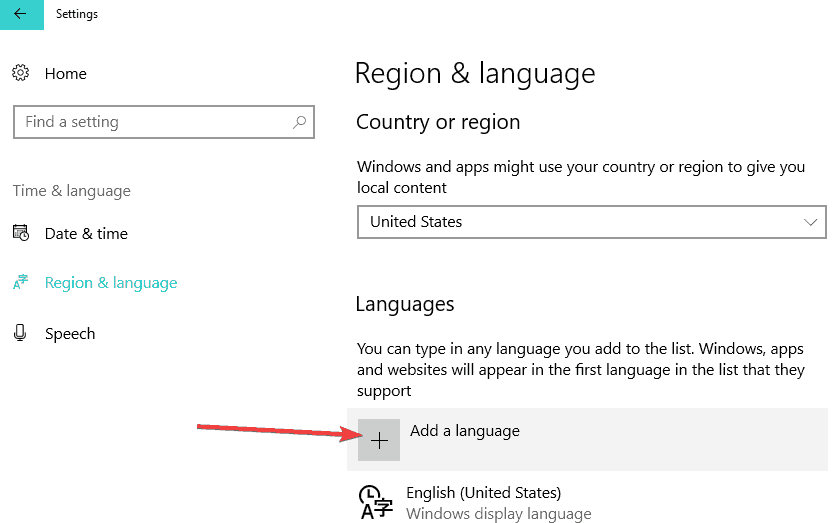
Then select the new language and go to Options. Select Download language pack > Speech > hit Download.
When the download finished, go to Settings > Ease of Access > Narrator. Navigate to ‘Choose a voice’ and simply select the new voice that you want to add.

List of all the TTS voices available in Windows 10
As stated above, not all the voice are applicable for particular languages. Here’s the list of all the Narrator voices available in the latest Windows 10 versions:
| Language, country, or region | Male voice name | Female voice name |
|---|---|---|
| Arabic | Not applicable | Hoda |
| Arabic (Saudi Arabia) | Naayf | Not applicable |
| Bulgarian | Ivan | Not applicable |
| Catalan | Not applicable | Herena |
| Chinese (Simplified) | Kangkang | Huihui, Yaoyao |
| Cantonese (Traditional, Hong Kong SAR) | Danny | Tracy |
| Chinese (Traditional, Taiwan) | Zhiwei | Yating, Hanhan |
| Croatian | Matej | Not applicable |
| Czech (Czech Republic) | Jakub | Not applicable |
| Danish | Not applicable | Helle |
| Dutch | Frank | Not applicable |
| English (Australia) | James | Catherine |
| English (Canada) | Richard | Linda |
| English (Great Britain) | George | Hazel, Susan |
| English (India) | Ravi | Heera |
| English (Ireland) | Sean | Not applicable |
| English (United States) | David, Mark | Zira |
| Finnish | Not applicable | Heidi |
| Flemish (Belgian Dutch) | Bart | Not applicable |
| French (Canada) | Claude | Caroline |
| French (France) | Paul | Hortence, Julie |
| German (Germany) | Stefan | Hedda, Katja |
| German (Switzerland) | Karsten | Not applicable |
| Greek | Stefanos | Not applicable |
| Hebrew | Asaf | Not applicable |
| Hindi (India) | Hemant | Kalpana |
| Hungarian (Hungary) | Szabolcs | Not applicable |
| Indonesian (Indonesia) | Andika | Not applicable |
| Italian | Cosimo | Elsa |
| Japanese | Ichiro | Ayumi, Haruka |
| Malay | Rizwan | Not applicable |
| Norwegian | Jon | Not applicable |
| Polish (Poland) | Adam | Paulina |
| Portuguese (Brazil) | Daniel | Maria |
| Portuguese (Portugal) | Not applicable | Helia |
| Romanian (Romania) | Andrei | Not applicable |
| Russian (Russia) | Pavel | Irina |
| Slovak (Slovakia) | Filip | Not applicable |
| Slovenian | Lado | Not applicable |
| Korean | Not applicable | Heami |
| Spanish (Spain) | Pablo | Helena, Laura |
| Spanish (Mexico) | Raul | Sabina |
| Swedish | Bengt | Not applicable |
| Tamil | Valluvar | Not applicable |
| Thai (Thailand) | Pattara | Not applicable |
| Turkish | Tolga | Not applicable |
| Vietnamese | An | Not applicable |
RELATED STORIES TO CHECK OUT:


Improve this guide


User forum
7 messages
How to I add the Klingon language?
will my computer still boot?
Went through the steps but get the message that voice cannot be played
hi, u can teach me how to build new registry,, on my pc i have japanese language and i want to add Ayumi Mobile.. teach me please..
Works great, thank you. Much better than Zira in my opinion
I keep getting error message: This voice can not be played. Please try selecting another voice or selecting a different audio output device.
Use the reg file they supply in the download, copy and pasting seems to break it.