View Latitude 14 5000 Series Non-Touch NotebookView Latitude 14 5000 Series Non-Touch NotebookView Latitude 14 5000 Series Non-Touch NotebookView Latitude 14 5000 Series Non-Touch NotebookView Latitude 14 5000 Series Non-Touch NotebookView Latitude 14 5000 Series Non-Touch NotebookView Latitude 14 5000 Series Non-Touch NotebookView Latitude 14 5000 Series Non-Touch Notebook
Scan QR code
View Product in Augmented Reality
View the system in augmented reality and see how it fits into your space.
*Currently supported on the iPhone on iOS 12+ and Android 8.0+ with ARCore 1.9
1 / 8
Discover Similar Products
This product is currently unavailable, but Dell offers similar products.
How easy is it to compare and select options for this product?
Rating is from 1-7, 1 being Very Difficult and 7 being Very Easy
Very Difficult
Very Easy
Very Difficult
Very Easy
Please tell us why you rated this way.
0 of 500
Features & Design
Operating System
Available with Windows 11 or Windows 10.
Does your PC know you?
Dell Optimizer is a first-of-its-kind AI platform that learns how you work and continuously adapts to your style to create a smarter, more personalized and productive experience.
ExpressResponse: Launch your most used apps faster. We use built-in AI and Intel® Adaptix™ Technology to adjust performance levels where you need them most.
ExpressCharge: AI improves battery performance by adapting to your typical power consumption and charge patterns. Always on the go? You’ll get an ExpressCharge Boost to gain 35% charge in about 20 minutes. Have more time? ExpressCharge will automatically get you up to 80% in an hour.And if you can’t charge your system right away, it will subtly adjust settings to preserve resources, such as dimming your screen or turning off Bluetooth when not in use.
Intelligent Audio: Dell Optimizer’s Intelligent Audio will automatically tune your system by adjusting background noise, managing speech volume and refining overall sound experience so you can hear and be heard better wherever you work.
A productive, scalable powerhouse
Power through the day: Get the world's longest battery life in a 14" mainstream business laptops. Optional Super Low Power panel gives you more power savings without compromising resolution, color or brightness.
Count on your connection: Intel® Wi-Fi 6 (Gig+) delivers nearly 3x faster speeds and next-gen security to PCs and wireless networks. When on the move without Wi-Fi, stay connected with up to 450 Mbps LTE mobile broadband speeds. Travel with ease with new eSIM technology that connects to more global carriers without having to switch SIM cards.
Room for every project: There’s nothing holding you back from your best work with scalable memory and storage, including up to 32GB DDR4 memory and up to 1TB of storage.
Graphics galore: Stream video, download and smoothly run applications with integrated graphics. Or add optional discrete graphics for even better graphics performance.
Ports for any purpose: Quickly connect to peripherals with a full range of available ports, including USB Type-C™, optional Thunderbolt™ 3 and legacy ports like HDMI and RJ45.
Fast performance: Up to the latest 10th Gen Intel® Core™ i7 vPro® processors offer businesses the performance, manageability, built-in security features and stability of Intel® vPro® Platform and align to a future-proof roadmap.
Beauty in every detail
Fresh new look: The Latitude 5410 is great for productivity with a design that's sleek and modern with a new lighter color.
Ultimate views: The display is packed with features designed to keep you focused on your work with four-sided narrow bezels, an anti-glare screen and a camera shutter for privacy. Featuring optional SafeScreen and next gen Super Low Power Panel technology.
Built with sustainability in mind: Our 5000 series Latitudes were the first to use post-industrial carbon fiber in the design and include up to 18% post-consumer recycled material. We use waterborne painted parts, which aims to create a healthier work environment. Dell has prevented over 2 million pounds of carbon fiber from ending up in landfills.
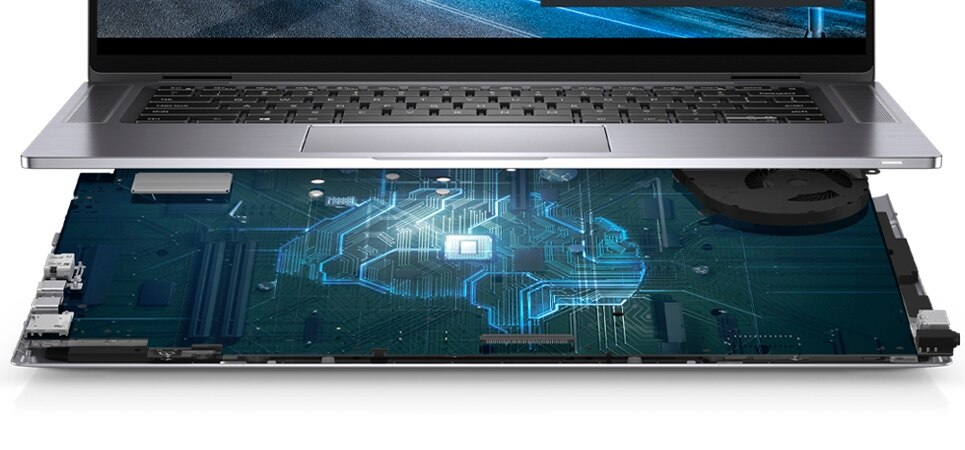
Work fast, stay cool: IT can now manage thermals within the BIOS, which saves on storage size and allows IT to focus on other critical software. Additionally, two pipes are better than one for removing heat.
Experience a new way to work with Dell Technologies Unified Workspace.
Intelligence built-in. Modernization built-on.
We know that having the right device is just the start to a great workday. Employees need intelligent, intuitive and responsive experiences that allow them to work productively and without interruption. According to research, 1 out of every 4 users would question their job and the company they work for if they had a negative experience with their technology. Dell Technologies Unified Workspace is transforming the employee experience and ensuring IT has proactive, predictive and automated solutions to deliver on the promise of a modern workday, while simplifying their ability to deploy, secure, manage and support their environment.
Deploy ProDeploy in the Unified Workspace allows IT to move away from traditional, high-touch, manual deployment, and instead, ship devices preconfigured with company apps and settings from the Dell factory directly to their end users—having end users up and working on day one.
Secure Dell Trusted Devices provide a foundation to a modern workforce environment with invisible and seamless protection to ensure smarter, faster experiences. End users stay productive and IT stays confident with modern security solutions for the Dell Trusted Device.
Manage Dell Client Command Suite + VMware Workspace ONE offers integrated capabilities that deliver a unified endpoint management experience for IT, enabling them to manage firmware, OS, and apps from one console, while also creating seamless experiences for end users.
Support ProSupport resolves hardware issues up to 11x faster than the competition. ProSupport for PCs offers 24x7 access to in-region ProSupport engineers who contact IT when critical issues arise, so you can focus on what’s next, not what just happened.
ProSupport Plus helps IT stay a step ahead and virtually eliminate unplanned downtime due to hardware issues. You get all the capabilities of ProSupport, as well as AI-driven alerts to prevent failures and repairs for accidents.
Ports & Slots
1. External uSIM Card Tray (optional) | 2. uSD Reader | 3. Universal Audio Jack | 4 USB 3.2 Gen 1 | 5. USB 3.2 Gen 1 with Powershare | 6. HDMI 1.4b | 7. RJ45 | 8. Wedge-shaped Lock Slot | 9. DC-in 7.4mm Barrel | 10. USB Type C™ 3.2 Gen 2 with Power Delivery & DisplayPort | 11. USB 3.2 Gen 1 | 12. Smart Card Reader (optional)
Industry’s most sustainable commercial PC portfolio.
Eco-Labels
This product is EPEAT Gold and ENERGY STAR qualified. EPEAT registration varies by country. For specific country participation and rating, please see www.epeat.net.
Products and Packaging
Dell Technologies is transitioning to products and packaging made from recycled or renewable resources, and improving products’ energy efficiency. We are also working towards reducing our greenhouse gas emissions within our operations and with our direct supply chain partners. Read more about our commitment to sustainability and our 2030 Social Impact goals here.
Carbon Footprint
One of Dell’s primary goals is to minimize our environmental impact. We aim to reduce the carbon footprint of our products throughout their lifecycle, from development to recycling and everything in between. Learn more about this product’s carbon footprint here.
Essential desk accessories
Dell Thunderbolt Dock | WD19TB
Work at full speed with Dell’s powerful Thunderbolt Dock. Charge your system faster, support up to two 4K displays and connect to your peripherals via a single cable.
Dell 27 Monitor | P2720D
See more and do more with a 27" QHD monitor that expands your workspace and gives you a better view of all your important tasks.
Dell Multi-device Wireless Keyboard and Mouse Combo | KM7120W
Designed to work seamlessly across 3 devices, this compact keyboard mouse combo keeps your desk clutter-free and lets you stay productive with up to 36 months of battery life.
Dell Dual Monitor Stand | MDS19
This space-saving stand, mounts up to two 27-inch monitors, providing the screen real estate you need to be most productive.
Dell Pro Stereo Headset | UC350
Hear every word clearly on your next call with the Dell Pro Stereo Headset, optimized to provide in-person call quality.
Essential mobile accessories
Dell Notebook Power Bank Plus (18,000 mAh) | PW7015L
Even when you're not near an outlet, you'll have enough power for your laptop and cell phone with the Dell Power Companion.
Dell Mobile Adapter Speakerphone | MH3021P
World’s first multiport adapter with integrated speakerphone offers an all-in-one connectivity and conferencing solution.
Dell Mobile Pro Wireless Mouse | MS5120W
Connect your mouse conveniently via 2.4GHz wireless or Bluetooth and enhance your productivity with programmable shortcut buttons and 36 months of battery life.
Dell USB-C Mobile Adapter | DA300
Connect your Latitude to almost any device with a convenient 6-in-1 compact adapter.
We’ve got your business covered
ProSupport Plus
Get anytime priority access to expert support with predictive analytics (via SupportAssist technology) and damage protection for drops, spills, surges and more.
ProSupport
Get proactive, automated support 24x7 and onsite service when you need it with Dell ProSupport. Let our team give you back valuable time so you can take care of business.
Accidental Damage Service
Enjoy worry-free ownership and minimize downtime with protection from accidental drops, spill and surges. Dell’s Accidental Damage Service makes it easy to get devices repaired so your team can get back to work fast. Think of it as PC ownership with built in forgiveness.
Reviews
Ratings & Reviews are provided by verified users through email, My Account, or at events.
I have used another Latitude, owned by my university, for more than a year and I am delighted to have my own machine at home.
5
DYMO failure
Submitted 5 years ago
By Jim H
From Undisclosed
Verified
Very satisfied with Latitude 5410 Business laptop. Pity that Dell cannot discover why DYMO LabelWriter 450 doesn't work on the laptop.
5
Latitude Attitude
Submitted 5 years ago
By buxdoc
From Undisclosed
Verified
It is fast! I like the ability to have multiple users on the machine.
5
I love it!
Submitted 5 years ago
By Dana A
From Undisclosed
Verified
I am very happy with this laptop. The screen is well lit and the colour are amazing. The keyboard it's a comfortable size. I am very impressed in term of battery life. I've also been seriously impressed with the speed, everything I accessed it's opened very quick. All in one... FANTASTIC!
5
Very happy
Submitted 5 years ago
By Jeff
From Undisclosed
Verified
You make it very easy to design (it helps to have an informed friend). It functions just as it should. I've been with Dell since maybe 1984
5
Solid purchase
Submitted 5 years ago
By Happy C
From Undisclosed
Verified
Solid and well-built laptop.
5
Work issue model, so bought one for home!
Submitted 5 years ago
By Sarah W
From Undisclosed
Verified
great laptop. Fast, compact and easy to use.
5
Quick, efficient and robust
Submitted 5 years ago
By NH
From Undisclosed
Verified
Nothing flashy, just a very sold and efficient laptop, good enough to use for everything from work stuff with CreativeSuite and Office to home based streaming, browsing and email
5
Overall a great computer
Submitted 5 years ago
By Makenzie
From Undisclosed
Verified
I really love my computer and generally have no complaints. The only issue I have is that the bottom of my computer get pretty hot.
5
Stylish
Submitted 5 years ago
By Susie
From Undisclosed
Verified
Very easy to use and lovely to look at
Support
Dell Support
From drivers and manuals to diagnostic tools and replacement parts, Dell Product Support has you covered!
This website uses cookies and other tracking technologies to enhance user experience and to analyze performance and traffic on our website. We also share information about your use of our site with our social media, advertising and analytics partners. If we have detected an opt-out preference signal then it will be honored. Further information is available in our Cookie Policy
Your Cookie Preferences
Dell uses different types of cookies to optimize your experience and enable certain website features, as well as cookies from third parties for purposes such as: improving your overall web browsing experience, connecting you with your social networks and tailoring advertising to better match your interests. Click on the categories below to learn more and adjust your settings, which will be applied to the device you are currently using. You can access this tool on your other devices to customize those settings, and use this tool from any of your devices at any time to opt out of certain cookies. Please note that blocking some types of cookies may impact your site experience and services or features we are able to offer. You can learn more about how we use cookies by visiting our Cookie Policy.
Cookie Policy
Manage Consent Preferences
Essential
Always Active
These cookies are essential for enabling user movement around our website and providing access to features such as your profile and purchases, log in credentials, and other areas of the website. These cookies are necessary to enable the basic features of this site to function, such as providing secure log-in, allowing images to load, or allowing you to select your cookie preferences. This category of cookies cannot be disabled.
Marketing
Marketing cookies are used to understand user behavior across our websites. These cookies are also used to show ads that are more relevant to your interests. We may share this information with advertising platforms to help us display the most relevant messages to you. These cookies may also store information on user behavior obtained through their browsing habits, which allows us to develop a specific profile and display advertisements appropriate to your profile.
Uncategorized
Always Inactive
Cookies that are not categorized.
Statistical
Statistical cookies help us to understand how visitors interact with our website by collecting and reporting information. Any information collected by means of this type of cookies is used to measure activity on any website, application or platform, for the purposes of introducing improvements in function of the analysis of the data regarding the service use made by users.