Over time, I developed a certain google-fu and expertise in finding references, papers, and books online. I start with the standard tricks like Boolean queries and keyboard shortcuts, and go through the flowchart for how to search, modify searches for hard targets, penetrate paywalls, request jailbreaks, scan books, monitor topics, and host documents. Some of these tricks are not well-known, like checking the Internet Archive (IA) for books.
I try to write down my search workflow, and give general advice about finding and hosting documents, with demonstration case studies.
Google-fu search skill is something I’ve prided myself ever since elementary school, when the librarian challenged the class to find things in the almanac; not infrequently, I’d win. And I can still remember the exact moment it dawned on me in high school that much of the rest of my life would be spent dealing with searches, paywalls, and broken links. The Internet is the greatest almanac of all, and to the curious, a never-ending cornucopia, so I am sad to see many fail to find things after a cursory search—or not look at all. For most people, if it’s not the first hit in Google/Google Scholar, it doesn’t exist. Below, I reveal my best Internet search tricks and try to provide a rough flowchart of how to go about an online search, explaining the subtle tricks and tacit knowledge of search-fu.
Roughly, we need to have proper tools to create an occasion for a search: we cannot search well if we avoid searching at all. Then each search will differ by which search engine & type of medium we are searching—they all have their own quirks, blind spots, and ways to modify a failed search. Often, we will run into walls, each of which has its own circumvention methods. But once we have found something, we are not done: we would often be foolish & short-sighted if we did not then make sure it stayed found. Finally, we might be interested in advanced topics like ensuring in advance resources can be found in the future if need be, or learning about new things we might want to then go find. To illustrate the overall workflow & provide examples of tacit knowledge, I include many Internet case studies of finding hard-to-find things.
Do or do not; there is no try. The first thing you must do is develop a habit of searching when you have a question: “Google is your friend.” Your only search guaranteed to fail is the one you never run. (Beware trivial inconveniences!)
Query Syntax Knowledge
Know your basic Boolean operators & the key G search operators (full list): double quotes for exact matches, hyphens for negation/exclusion, and site: for search a specific website or specific directory of that website (eg. foo site:gwern.net/doc/genetics/, or to exclude folders, foo site:gwern.net -site:gwern.net/doc/). You may also want to play with Advanced Search to understand what is possible. (There are many more G search operators (Russell description) but they aren’t necessarily worth learning, because they implement esoteric functionality and most seem to be buggy1.)
Hotkey Shortcuts (strongly recommended)
Enable some kind of hotkey search with both prompt and copy-paste selection buffer, to turn searching Google (G)/Google Scholar (GS)/Wikipedia (WP) into a reflex.2 You should be able to search instinctively within a split second of becoming curious, with a few keystrokes. (If you can’t use it while IRCing without the other person noting your pauses, it’s not fast enough.)
I make heavy use of the XMonad hotkeys, which I wrote, and which gives me window manager shortcuts: while using any program, I can highlight a title string, and press Super-shift-y to open the current selection as a GS search in a new Firefox tab within an instant; if I want to edit the title (perhaps to add an author surname, year, or keyword), I can instead open a prompt, Super-y, paste with C-y, and edit it before a \n launches the search. As can be imagined, this is extremely helpful for searching for many papers or for searching. (There are in-browser equivalents to these shortcuts but I disfavor them because they only work if you are in the browser, typically require more keystrokes or mouse use, and don’t usually support hotkeys or searching the copy-paste selection buffer: Firefox, Chrome)
Web Browser Hotkeys
For navigating between sets of results and entries, you should have good command of your tabbed web browser. You should be able to go to the address bar, move left/right in tabs, close tabs, open new blank tabs, unclose tabs, go to the nth tab, etc. (In Firefox/Chrome Win/Linux, those are, respectively: C-l, C-PgUp/C-PgDwn, C-w, C-t/C-T, M-[1–9].)
GS: if no fulltext in upper right, look for soft walls
Having launched your search in, presumably, Google Scholar, you must navigate the GS results. For GS, it is often as simple as clicking on the [PDF] or [HTML] link in the top right which denotes (what GS believes to be) a fulltext link, eg:
An example of a hit in Google Scholar: note the [HTML] link indicating there is a fulltext Pubmed version of this paper (often overlooked by newbies).
GS: if no fulltext in upper right, look for soft walls. In GS, remember that a fulltext link is not always denoted by a “[PDF]” link! Check the top hits by hand: there are often ‘soft walls’ which block web spiders but still let you download fulltext (perhaps after substantial hassle, like SSRN).
Note that GS supports other useful features like alerts for search queries, alerts for anything citing a specific paper, and reverse citation searches (to followup on a paper to look for failures-to-replicate or criticisms of it).
A useful hit may not turn up immediately. Life is like that.3 You may have to get creative:
Title searches: if a paper fulltext doesn’t turn up on the first page, start tweaking (hard rules cannot be given for this, it requires development of “mechanical sympathy” and asking a mixture of “how would a machine think to classify this” and “how would other people think to write this”):
The Golden Mean: Keep mind when searching, you want some but not too many or too few results. A few hundred hits in GS is around the sweet spot. If you have less than a page of hits, you have made your search too specific.
If nothing is turning up, try trimming the title. Titles tend to have more errors towards the end than the beginning, and people often drop words or phrases at the end—especially subtitles. So start cutting words off the end of the title to broaden the search. Think about what kinds of errors you make when you recall titles: you drop punctuation or subtitles, substitute in more familiar synonyms, or otherwise simplify it. (How might OCR software screw up a title?)
Pay attention to technical terms that pop up in association with your own query terms, particularly in the snippets or full abstracts. Which ones look like they might be more popular than yours, or indicate yours are usually used slightly different from you think they mean? You may need to switch terms.
If deleting a few terms then yields way too many hits, try to filter out large classes of hits with a negation foo -bar, adding as many as necessary; also useful is using OR clauses to open up the search in a more restricted way by adding in possible synonyms, with parentheses for group. This can get quite elaborate, and border on hacking—I have on occasion resorted to search queries as baroque as (foo OR baz) AND (qux OR quux) -bar -garply -waldo -fred to the point where I hit search query length limits and CAPTCHA barriers.4 (By that point, it is time to consider alternate attacks.)
Tweak The Title: quote the title; delete any subtitle; try the subtitle instead; be suspicious of any character which is not alphanumeric and if there are colons, split it into two title quotes (instead of searching Foo bar: baz quux, or "Foo bar: baz quux", search "Foo bar" "baz quux"); swap their order.
Tweak The Metadata:
Add/remove the year.
Add/remove the first author’s surname. Try searching GS for just the author (author:foo).
Delete Odd Characters/Punctuation:
Libgen had trouble with colons for a long time, and many websites still do (eg. GoodReads); I don’t know why colons in particular are such trouble, although hyphens/em-dashes and any kind of quote or apostrophe or period are problematic too. Watch out for words which may be space-separated—if you want to find Arpad Elo’s epochal The Rating of Chessplayers in Libgen, you need to search “The Rating of Chess Players” instead! (This is also an example of why falling back to search by author is a good idea.)
Tweak Spelling: Try alternate spellings of British/American terms. This shouldn’t be necessary, but then, deleting colons or punctuation shouldn’t be necessary either.
Check For Book Publication: many papers are published in the form of book anthologies, not journal articles. So look for the book if the paper is mysteriously absent.
A book will not necessarily turn up in GS and thus its constituent papers may not either; similarly, while SH does a good job of linking article paywalls to their respective book compilation in LG, it is far from infallible. If a paper was published in any kind of ‘proceeding’ or ‘conference’ or ‘series’ or anything with an ISBN, the paper may be absent from the usual places but the book readily available. It can be quite frustrating to be searching hard for a paper and realize the book was there in plain sight all along. (My suggestion in such cases for post-finding is to cut out the relevant page range & upload the paper for others to more easily find.)
Use URLs: if you have a URL, try searching chunks of it, typically towards the end, stripping out dates and domain names.
Date Search:
Use a search engine (eg. G/GS) date range feature (in “Tools”) to search ±4 years: metadata can be wrong, publishing conventions can be odd (eg. a magazine published in ‘June’ may actually be published several months before or after), publishers can be extremely slow. This is particularly useful if you add a date constraint & simultaneously loosen the search query to turn up the most temporally-relevant of what would otherwise be far too many hits. If this doesn’t turn up the relevant target, it might turn up related discussions or fixed citations, since most things are cited most shortly after publication and then vanish into obscurity.
Click “Tools” on the far right to access date-range & “verbatim” search modes in Google Search.
The “verbatim” mode is useful for forcing more literal matching: without it, a search for “foobar” will insist on hits about music players, hiring contests, etc. rather than the programming term itself.
If a year is not specified, try to guess from the medium: popular media has heavy recentist bias & prefers only contemporary research which is ‘news’, while academic publications go back a few more years; the style of the reference can give a hint as to how relatively old some mentioned research or writings is. Frequently, given the author surname and a reasonable guess at some research being a year or two old, the name + date-range + keyword in GS will be enough to find the paper.
Consider errors: typos are common. If nothing is showing up in the date-range despite a specific date, perhaps there was a typographic error. Even a diligent typist will occasionally copy metadata from a previous entry or type the same character twice or 2 characters in the wrong order, and for numbers, there is no spellcheck to help catch such errors. Authors frequently propagate bibliographic errors without correcting them (demonstrating, incidentally, that they probably did not read the original and so any summaries should be taken with a grain of salt). Think about plausible transpositions & neighboring keys on a QWERTY keyboard: eg. a year like “1976” may actually be 196660ya, 196759ya, 197551ya, 197749ya, or 198640ya (but it will not be 1876150ya or 2976 or 198739ya). What typos would you make if you were reading or typing in a hurry? What OCR errors are likely, such as confusing ‘3’/‘8’?
Add Jargon: Add technical terminology which might be used by relevant papers; for example, if you are looking for an article on college admissions statistics, any such analysis would probably be using logistic regression and, even if they do not say “logistic regression” (in favor of some more precise yet unguessable term) would express their effects in terms of “odds”.
If you don’t know what jargon might be used, you may need to back off and look for a review article or textbook or WP page and spend some quality time reading. If you’re using the wrong term, period, nothing will help you; you can spend hours going through countless pages, but that won’t make the wrong term work. You may need to read through overviews until you finally recognize the skeleton of what you want under a completely different (and often rather obtuse) name. Nothing is more frustrating that knowing there must be a large literature on a topic (“Cowen’s Law”) but being unable to find it because it’s named something completely different from expected—and many fields have different names for the same concept or tool. (Occasionally people compile “Rosetta stones” to translate between fields: eg. Baez & Stay2009, Bertsekas2018, Metz et al 2018’s Table 1. These are invaluable.)
Even The Humble Have A Tale: Beware hastily dismissing ‘bibliographic’ websites as useless—they may have more than you think.
While a bibliographic-focused library site like elibrary.ru is (almost) always useless & clutters up search results by hosting only the citation metadata but not fulltext, every so often I run into a peculiar foreign website (often Indian or Chinese) which happens to have a scan of a book or paper. (eg. Darlington1954, which eluded me for well over half an hour until, taking the alternate approach of hunting its volume, I out of desperation clicked on an Indian index/library website which… had it. Go figure.) Sometimes you have to check every hit, just in case.
Search Internet Archive:
The Internet Archive (IA) deserves special mention as a target because it is the Internet’s attic, bursting at the seams with a remarkable assortment of scans & uploads from all sorts of sources—not just archiving web pages, but scanning university collections, accepting uploads from rogue archivists and hackers and obsessive fans and the aforementioned Indian/Chinese libraries with more laissez-faire approaches.5 This extends to its media collections as well—who would expect to find so many old science-fiction magazines (as well as many other magazines), a near-infinite number of Grateful Dead recordings, the original 114 episodes of Tom and Jerry, or thousands of arcade & console & PC & Flash games (all playable in-browser)? The Internet Archive is a veritable Internet in and of itself; the problem, of course, is finding anything…
So not infrequently, a book may be available, or a paper exists in the middle of a scan of an entire journal volume, but the IA will be ranked very low in search queries and the snippet will be misleading due to bad OCR. A good search strategy is to drop the quotes around titles or excerpts and focus down to site:archive.org and check the first few hits by hand. (You can also try the relatively new “Internet Archive Scholar”, which appears to be more comprehensive than Google-site-search.)
If the basic tricks aren’t giving any hints of working, you will have to get serious. The title may be completely wrong, or it may be indexed under a different author, or not directly indexed at all, or hidden inside a database. Here are some indirect approaches to finding articles:
Reverse Citations: Take a look in GS’s “related articles” or “cited by” to find similar articles such as later versions of a paper which may be useful. (These are also good features to know about if you want to check things like “has this ever been replicated?” or are still figuring out the right jargon to search.)
Anomalous Hits: Look for hints of hidden bibliographic connections and anomalous hits.
Does a paper pop up high in the search results which doesn’t seem to make sense, such as not containing your keywords in the displayed snippet? GS generally penalizes items which exist as simply bibliographic entries, so if one is ranked high in a sea of fulltexts, that should make you wonder why it is being prioritized. Similarly, for Google Books (GB): a book might be forbidden from displaying even snippets but rank high; that might be for a good reason—it may actually contain the fulltext hidden inside it, or something else relevant.
Likewise, you cannot trust metadata too much. The inferred or claimed title may be wrong, and a hit may be your desired target lurking in disguise.
Compilation Files: Some papers can be found by searching for the volume or book title to find it indirectly, especially conference proceedings or anthologies; many papers appear to not be available online but are merely buried deep inside a 500-page PDF, and the G snippet listing is misleading.
Conferences are particularly complex bibliographically, so you may need to apply the same tricks as for page titles: drop parts, don’t fixate on the numbers, know that the authors or ISBN or ordering of “title: subtitle” can differ between sources, etc.
Search By Issue: Another approach is to look up the listing for a journal issue, and find the paper by hand; sometimes papers are listed in the journal issue’s online Table of Contents, but just don’t appear in search engines (‽). In particularly insidious cases, a paper may be digitized & available—but lumped in with another paper due to error, or only as part of a catch-all file which contains the last 20 miscellaneous pages of an issue. Page range citations are particularly helpful here because they show where the overlap is, so you can download the suspicious overlapping ‘papers’ to see what they really contain.
Esoteric as this may sound, this has been a problem on multiple occasions. I searched in vain for any hint of Shepard1929’s existence, half-convinced it was a typo for his 1959 publication, until I turned to the raw journal scans. A particularly epic example was Shockley1966 where after an hour of hunting, all I had was bibliographic echoes despite apparently being published in a high-profile, easily obtained, & definitely digitized journal, Science—leaving me thoroughly baffled. I eventually looked up the ToC and inferred it had been hidden in a set of abstracts!6 (One symptom of the ‘abstract’ or ‘conference presentation’ problem is when the academic databases keep claiming to have fulltext of a paper, but then mysteriously error out when you try to actually access it. Apparently they can be inconsistent internally and know that they have it in the full journal scans, but not know where just that one abstract ‘is’.) Or a number of SMPY papers turned out to be split or merged with neighboring items in journal issues, and I had to fix them by hand.
Masters/PhD Theses: sorry. It may be hopeless if it’s pre-2000. You may well find the citation and even an abstract, but actual fulltext…?
If you have a university proxy, you may be able to get a copy off ProQuest (specializing in US theses). If ProQuest does not allow a download but indexes it, that usually means it has a copy archived on microfilm/microfiche, but no one has yet paid for a scan to be made; you can sign up without any special permission, and then purchase ProQuest scans for ~$43 (as of 2023), and that gives you a downloadable PDF. (They apparently scan non-digital works from their vast backlog only on request, so it’s almost like ransoming papers; which means that buying a scan makes it available to academic subscribers as part of the ProQuest database.)
Otherwise, you need full university ILL services7, and even that might not be enough (a surprising number of universities appear to restrict access only to the university students/faculty, with the complicating factor of most theses being stored on microfilm).
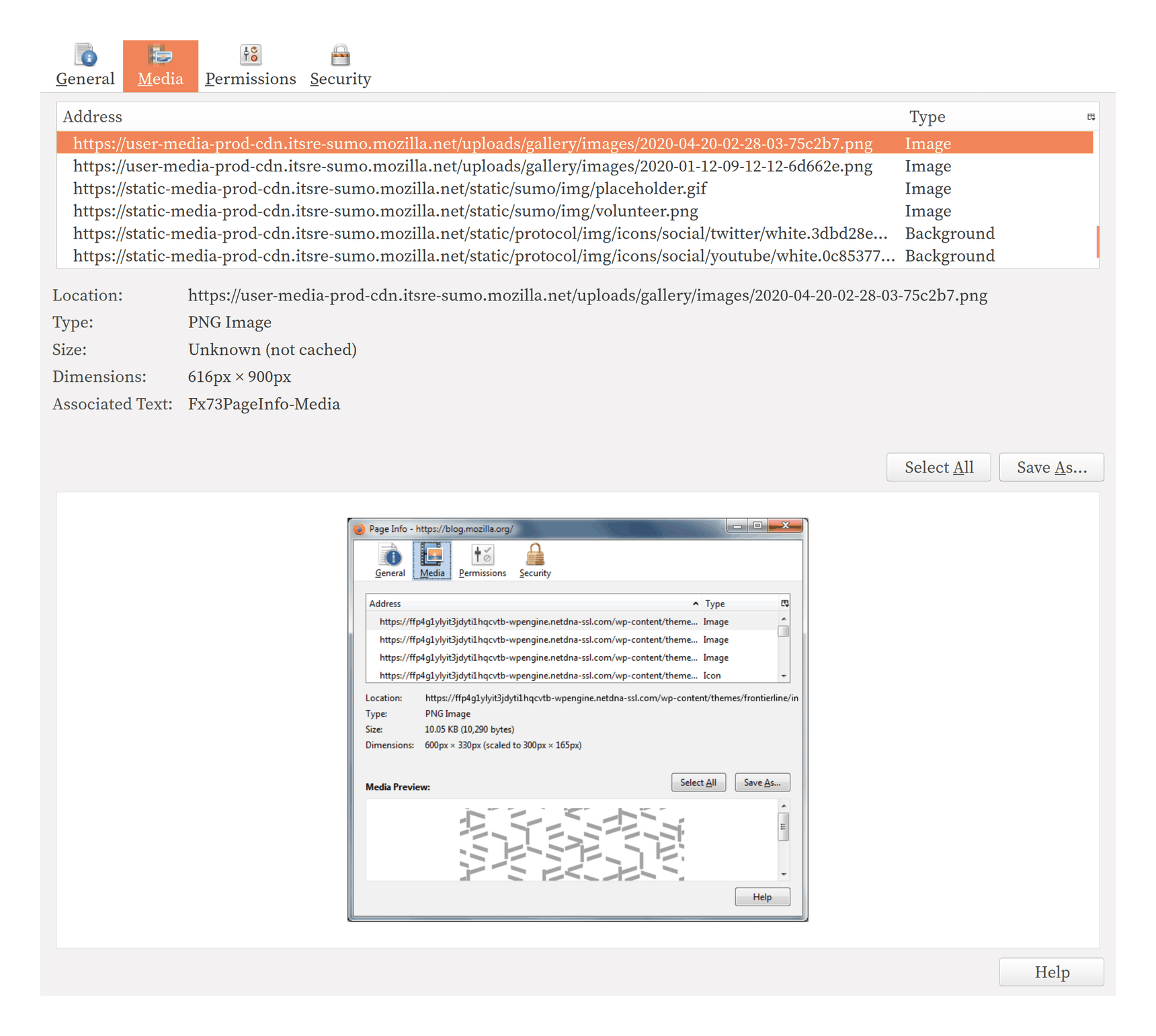
Use Browser Page Info to Bypass Image Restrictions
If you are having trouble downloading an image from a web page which is badly/maliciously designed to stop you, use “View Page Info”’s (C-I) “Media” tab (eg), which will list the images in a page and let one download them directly.
Enemy Action: Is a page or topic not turning up in Google/IA that you know ought to be there? Check the website’s robots.txt & sitemap. While not as relevant as they used to be (due to increasing use of dynamic pages & entities ignoring it), robots.txt can sometimes be relevant: key URLs may be excluded from search results, and overly-restrictive robots.txt can cause enormous holes in IA coverage, which may be impossible to fix (but at least you’ll know why).
Patience: not every paywall can be bypassed immediately, and papers may be embargoed or proxies not immediately available.
If something is not available at the moment, it may become available in a few months. Use calendar reminders to check back in to see if an embargoed paper is available or if LG/SH have obtained it, and whether to proceed to additional search steps like manual requests.
Domain Knowledge-Specific Tips:
Twitter: Twitter is indexed in Google so web searches may turn up hits, but if you know any metadata, Twitter’s native search functions are still relatively powerful (although Twitter limits searches in many ways in order to drive business to its staggeringly-expensive ‘firehose’ & historical analytics). Use of Twitter’s “advanced search” interface, particularly the from: & to:search query operators, can vastly cut down the search space. (Also of note: list:, -filter:retweets, near:, url:, & since:/until:.)
US federal courts: US federal court documents can be downloaded off PACER after registration.
PACER is pay-per-page ($0.13$0.102018/page) but users under a certain level each quarter (currently $20$152018) have their fees waived, so if you are careful, you may not need to pay anything at all. There is a public mirror on Courtlistener, called RECAP, which can be freely searched & downloaded.
If you fail to find a case in RECAP and must use PACER (as often happens for obscure cases), please install the Firefox/Chrome RECAP browser extension, which will copy anything you download into RECAP. (This can be handy if you realize later that you should’ve kept a long PDF you downloaded or want to double-check a docket.)
Navigating PACER can be difficult because it is an old & highly specialized computer system which assumes you are a lawyer, or at least very familiar with PACER & the American federal court system. As a rule of thumb, if you are looking up a particular case, what you want to do is to search for the first name & surname (even if you have the case ID) for either criminal or civil cases as relevant, and pull up all cases which might pertain to an individual; there can be multiple cases, cases can hibernate for years, be closed, reopened as a different case number, etc. Once you have found the most active or relevant case, you want to look at the “docket”, and check the options to see all documents in the case. This will pull up a list of many documents as the case unfolds over time; most of these documents are legal bureaucracy, like rescheduling hearings or notifications of changed lawyers. You want the longest documents, as those are most likely to be useful. In particular, you want the “indictment”, the “criminal complaint”8, and any transcripts of trial testimony.9 Shorter documents, like 1–2pg entries in the docket, can be useful, but are much less likely to be useful unless you are interested in the exact details of how things like pre-trial negotiations unfold. So carelessly choosing the ‘download all’ option on PACER may blow through your quarterly budget without getting you anything interesting (and also may interfere with RECAP uploading documents).
There is no equivalent for state or county court systems, which are balkanized and use a thousand different systems (often privatized & charging far more than PACER); those must be handled on a case by case basis. (Interesting trivia point: according to Nick Bilton’s account of the Silk Road 1 case, the FBI and other federal agencies in the SR1 investigation would deliberately steer cases into state rather than federal courts in order to hide them from the relative transparency of the PACER system. The use of multiple court systems can backfire on them, however, as in the case of SR2’s DoctorClu (see the DNM arrest census for details), where the local police filings revealed the use of hacking techniques to deanonymize SR2 Tor users, implicating CMU’s CERT center—details which were belatedly scrubbed from the PACER filings.)
education research: for anything related to education, do a site search of ERIC, which is similar to IA in that it will often have fulltext which is buried in the usual search results
Wellcome Library: the Wellcome Library has many old journals or books digitized which are impossible to find elsewhere; unfortunately, their SEO is awful & their PDFs are unnecessarily hidden behind click-through EULAs, so they will not show up normally in Google Scholar or elsewhere. If you see the Wellcome Library in your Google hits, check it out carefully.
magazines (as opposed to scholarly or trade journals) are hard to get.
They are not covered in Libgen/Sci-Hub, which outsource that to MagzDB; coverage is poor, however. An alternative is pdf-giant. Particularly for pre-2000 magazines, one may have to resort to looking for old used copies on eBay. Some magazines are easier than others—I generally give up if I run into a New Scientist citation because it’s never worth the trouble.
For quote/description searches: if you don’t have a title and are falling back on searching quotes, try varying your search similarly to titles:
Novel sentences: Try the easy search first—whatever looks most memorable or unique.
Short quotes are unique: Don’t search too long a quote, a sentence or two is usually enough to be near-unique, and can be helpful in turning up other sources quoting different chunks which may have better citations.
Break up quotes: Because even phrases can be unique, try multiple sub-quotes from a big quote, especially from the beginning and end, which are likely to overlap with quotes which have prior or subsequent passages. This can be critical with apocryphal quotes, which often delete less witty sub-passages while accreting new material. (An extreme example would be the Oliver Heaviside quote.)
Odd idiosyncratic wording: Search for oddly-specific phrases or words, especially numbers. 3 or 4 keywords is usually enough.
Paraphrasing: Look for passages in the original text which seem like they might be based on the same source, particularly if they are simply dropped in without any hint at sourcing and don’t sound like the author; authors typically don’t cite every time they draw on a source, usually only the first time, and during editing the ‘first’ appearance of a source could easily have been moved to later in the text. All of these additional uses are something to add to your searches.
Robust Quotes: You are fighting a game of Chinese whispers, so look for unique-sounding sentences and terms which can survive garbling in the repeated transmissions.
Memories are urban legends told by one neuron to another over the years. Pay attention to how you mis-remember things: you distort them by simplifying them, rounding them to the nearest easiest version, and by adding in details which should have been there. Avoid phrases which could be easily reworded in multiple equivalent ways, as people usually will reword them when quoting from memory, screwing up literal searches. Remember the fallibility of memory and the basic principles of textual criticism: people substitute easy-to-remember versions for the hard, long11, or unusual original.
Tweak Spelling: Watch out for punctuation and spelling differences hiding hits.
Gradient Ascent: Longer, less witty versions are usually closer to the original and a sign you are on the right trail. The worse, the better. Sniff in the direction of worse versions. (Authors all too often fail to write what they were supposed to write—as Yogi Berra remarked, “I really didn’t say everything I said.”)
Search Books: Switch to GB and hope someone paraphrases or quotes it, and includes a real citation; if you can’t see the full passage or the reference section, look up the book in Libgen.
Gold once out of the earth is no more due unto it; What was unreasonably committed to the ground is reasonably resumed from it: Let Monuments and rich Fabricks, not Riches adorn mens ashes. The commerce of the living is not to be transferred unto the dead: It is not injustice to take that which none complains to lose, and no man is wronged where no man is possessor.
Use Sci-Hub/Libgen for books/papersUse university InternetPublic libraries too
Use Sci-Hub/Libgen for books/papers. A paywall can usually be bypassed by using Libgen (LG)/Sci-Hub (SH): papers can be searched directly (ideally with the DOI12, but title+author with no quotes will usually work), or an easier way may be to prepend13sci-hub.st (or whatever SH mirror you prefer) to the URL of a paywall. Occasionally Sci-Hub will not have a paper or will persistently error out with some HTTP or proxy error, but searching the DOI in Libgen directly will work. Finally, there is a LibGen/Sci-Hub fulltext search engine on the Z-Library mirror, which is a useful alternative to Google Books (despite the poor OCR).
Use university Internet. If those don’t work and you do not have a university proxy or alumni access, many university libraries have IP-based access rules and also open WiFi or Internet-capable computers with public logins inside the library, which can be used, if you are willing to take the time to visit a university in person, for using their databases (probably a good idea to keep a list of needed items before paying a visit).
Public libraries too. Public libraries often subscribe to commercial newspapers or magazine databases; they are inconvenient to get to, but you can usually at least check what’s available on their website. Public & school libraries also have a useful trick for getting common schooling-related resources, such as the OED, or the archives of the New York Times or New Yorker: because of their usually unsophisticated & transient userbase, some public & school libraries will post lists of usernames/passwords on their website (sometimes as a PDF). They shouldn’t, but they do. Googling phrases like “public library New Yorker username password” can turn up examples of these. Used discreetly to fetch an article or two, it will do them no harm. (This trick works less well with passwords to anything else.)
If that doesn’t work, there is a more opaque ecosystem of filesharing services: booksc/bookfi/bookzz, private torrent trackers like Bibliotik, IRC channels with XDCC bots like #bookz/#ebooks, old P2P networks like eMule, private DC++ hubs…
Site-specific notes:
PubMed: most papers with a PMC ID can be purchased through the Chinese scanning service Eureka Mag; scans are $38$302020 & electronic papers are $25$202020.
Elsevier/sciencedirect.com: easy, always available via SH/LG
Note that many Elsevier journal websites do not work with the SH proxy, although their sciencedirect.com version does and/or the paper is already in LG. If you see a link to sciencedirect.com on a paywall, try it if SH fails on the journal website itself.
PsycNET: one of the worst sites; SH/LG never work with the URL method, rarely work with paper titles/DOIs, and with my university library proxy, loaded pages ‘expire’ and redirect while breaking the browser back button (‽‽‽), combined searches don’t usually work (frequently failing to pull up even bibliographic entries), and only DOI or manual title searches in the EBSCOhost database have a chance of fulltext. (EBSCOhost itself is a fragile search engine which is difficult to query reliably in the absence of a DOI.)
Try to find the paper anywhere else besides PsycNET!
ProQuest/JSTOR: ProQuest/JSTOR are not standard academic publishers, but have access to or mirrors of a surprisingly large number of publications.
I have been surprised how often I have hit dead-ends, and then discovered a copy sitting in ProQuest/JSTOR, poorly-indexed by search engines.
Custom journal websites: sometimes a journal will have its own website (eg. Cell or Florida Tax Review), but will still be ultimately run by one of the giants like Elsevier or HeinOnline. (You can often see hints of this in the site design, such as the footer, the URL structure, direct links to the publisher version, etc.)
When this is the case, it is usually a waste of time to try to use the journal website: it won’t whitelist university IPs, SH/LG won’t know how to handle it, etc. Instead, look for the alternative version.
Human flesh search engine. Last resort: if none of this works, there are a few places online you can request a copy (however, they will usually fail if you have exhausted all previous avenues):
Finally, you can always try to contact the author. This only occasionally works for the papers I have the hardest time with, since they tend to be old ones where the author is dead or unreachable—any author publishing a paper since 199036ya will usually have been digitized somewhere—but it’s easy to try.
After finding a fulltext copy, you should find a reliable long-term link/place to store it and make it more findable (remember—if it’s not in Google/Google Scholar, it doesn’t exist!):
Never Link Unreliable Hosts:
LG/SH: Always operate under the assumption they could be gone tomorrow. (As my uncle found out with Library.nu shortly after paying for a lifetime membership!) There are no guarantees either one will be around for long under their legal assaults or the behind-the-scenes dramas, and no guarantee that they are being properly mirrored or will be restored elsewhere.
When in doubt, make a copy. Disk space is cheaper every day. Download anything you need and keep a copy of it yourself and, ideally, host it publicly.
NBER: never rely on a papers.nber.org/tmp/ or psycnet.apa.org URL, as they are temporary. (SSRN is also undesirable due to making it increasingly difficult to download, but it is at least reliable.)
Scribd: never link Scribd—they are a scummy website which impede downloads, and anything on Scribd usually first appeared elsewhere anyway. (In fact, if you run into anything vaguely useful-looking which exists only on Scribd, you’ll do humanity a service if you copy it elsewhere just in case.)
RG: avoid linking to ResearchGate (compromised by new ownership & PDFs get deleted routinely, apparently often by authors) or Academia.edu (the URLs are one-time and break)
high-impact journals: be careful linking to Nature.com or Cell (if a paper is not explicitly marked as Open Access, even if it’s available, it may disappear in a few months!14); similarly, watch out for wiley.com, tandfonline.com, jstor.org, springer.com, springerlink.com, & mendeley.com, who pull similar shenanigans.
~/: be careful linking to academic personal directories on university websites (often noticeable by the Unix convention .edu/~user/ or by directories suggestive of ephemeral hosting, like .edu/cs/course112/readings/foo.pdf); they have short half-lives.
?token=: beware any PDF URL with a lot of trailing garbage in the URL such as query strings like ?casa_token or ?cookie or ?X (or hosted on S3/AWS); such links may or may not work for other people but will surely stop working soon. (Academia.edu, Nature, and Elsevier are particularly egregious offenders here.)
PDF Editing: if a scan, it may be worth editing the PDF to crop the edges, threshold to binarize it (which, for a bad grayscale or color scan, can drastically reduce filesize while increasing readability), and OCR it.
I use gscan2pdf but there are alternatives worth checking out.
Check & Improve Metadata.
Adding metadata to papers/books is a good idea because it makes the file findable in G/GS (if it’s not online, does it really exist?) and helps you if you decide to use bibliographic software like Zotero in the future. Many academic publishers & LG are terrible about metadata, and will not include even title/author/DOI/year.
PDFs can be easily annotated with metadata using ExifTool:: exiftool -All prints all metadata, and the metadata can be set individually using similar fields.
For papers hidden inside volumes or other files, you should extract the relevant page range to create a single relevant file. (For extraction of PDF page-ranges, I use pdftk, eg: pdftk 2010-davidson-wellplayed10-videogamesvaluemeaning.pdf cat 180-196 output 2009-fortugno.pdf. Many publishers insert a spam page as the first page. You can drop that easily with pdftk INPUT.pdf cat 2-end output OUTPUT.pdf, but note that PDFtk may drop all metadata, so do that before adding any metadata. To delete pseudo-encryption or ‘passworded’ PDFs, do pdftk INPUT.pdf input_pw output OUTPUT.pdf; PDFs using actual encryption are trickier but can often be beaten by off-the-shelf password-cracking utilities.) For converting JPG/PNGs to PDF, one can use ImageMagick for <64 pages (convert *.png foo.pdf) but beyond that one may need to convert them individually & then join the resulting PDFs (eg. for f in *.png; do convert "$f" "${f%.png}.pdf"; done && pdftk *.pdf cat output foo.pdf or join with pdfunite *.pdf foo.pdf.)
I try to set at least title/author/DOI/year/subject, and stuff any additional topics & bibliographic information into the “Keywords” field. Example of setting metadata:
exiftool-Author="Frank P. Ramsey"-Date=1930 -Title="On a Problem of Formal Logic"-DOI="10.1112/plms/s2-30.1.264"\-Subject="mathematics"-Keywords="Ramsey theory, Ramsey's theorem, combinatorics, mathematical logic, decidability, \ first-order logic, Bernays-Schönfinkel-Ramsey class of first-order logic, _Proceedings of the London Mathematical \ Society_, Volume s2-30, Issue 1, 1930-01-01, pg264–286" 1930-ramsey.pdf
“PDF Plus” is better than “PDF”.
If two versions are provided, the “PDF” one may be intended (if there is any real difference) for printing and exclude features like hyperlinks .
Public Hosting: if possible, host a public copy; especially if it was very difficult to find, even if it was useless, it should be hosted. The life you save may be your own.
Link On WP/Social Media: for bonus points, link it in appropriate places on Wikipedia or Reddit or Twitter; this makes people aware of the copy being available, and also supercharges visibility in search engines.
Link Specific Pages: as noted before, you can link a specific page by adding #page=N to the URL. Linking the relevant page is helpful to readers. (I recommend against doing this if this is done to link an entire article inside a book, because that article will still have bad SEO and it will be hard to find; in such cases, it’s better to crop out the relevant page range as a standalone article, eg. using pdftk again for pdftk 1900-BOOK.pdf cat 123-456 output 1900-PAPER.pdf.)
Aside from the (highly-recommended) use of hotkeys and Booleans for searches, there are a few useful tools for the researcher, which while expensive initially, can pay off in the long-term:
archiver-bot: automatically archive your web browsing and/or links from arbitrary websites to forestall linkrot; particularly useful for detecting & recovering from dead PDF links
Subscriptions like PubMed & GS search alerts: set up alerts for a specific search query, or for new citations of a specific paper. (Google Alerts is not as useful as it seems.)
PubMed has straightforward conversion of search queries into alerts: “Create alert” below the search bar. (Given the volume of PubMed indexing, I recommend carefully tailoring your search to be as narrow as possible, or else your alerts may overwhelm you.)
To create generic GS search query alert, simply use the “Create alert” on the sidebar for any search. To follow citations of a key paper, you must: 1. bring up the paper in GS; 2. click on “Cited by X”; 3. then use “Create alert” on the sidebar.
A GCSE can be thought of as a saved search query on steroids. If you find yourself regularly including scores of the same domains in multiple searches search, or constantly blacklisting domains with -site: or using many negations to filter out common false positives, it may be time to set up a GCSE which does all that by default.
This can be vital for refinding old things you read where the search terms are hopelessly generic or you can’t remember an exact quote or reference; it is one thing to search a keyword like “autism” in a few score thousand clippings, and another thing to search that in the entire Internet! (One can also reorganize or edit the notes to add in the keywords one is thinking of, to help with refinding.) I make heavy use of Evernote clipping and it is key to refinding my references.
Crawling Websites: sometimes having copies of whole websites might be useful, either for more flexible searching or for ensuring you have anything you might need in the future. (example: “Darknet Market Archives (2013–201511ya)”).
Short of downloading a website, it might also be useful to pre-emptively archive it by using linkchecker to crawl it, compile a list of all external & internal links, and store them for processing by another archival program (see Archiving URLs for examples). In certain rare circumstances, security tools like nmap can be useful to examine a mysterious server in more detail: what web server and services does it run, what else might be on it (sometimes interesting things like old anonymous FTP servers turn up), has a website moved between IPs or servers, etc.
With proper use of pre-emptive archiving tools like archiver-bot, fixing linkrot in one’s own pages is much easier, but that leaves other references. Searching for lost web pages is similar to searching for papers:
Just Search The Title: if the page title is given, search for the title.
It is a good idea to include page titles in one’s own pages, as well as the URL, to help with future searches, since the URL may be meaningless gibberish on its own, and pre-emptive archiving can fail. HTML supports both alt and title parameters in link tags, and, in cases where displaying a title is not desirable (because the link is being used inline as part of normal hypertextual writing), titles can be included cleanly in Markdown documents like this: [inline text description](URL "Title").
Clean URLs: check the URL for weirdness or trailing garbage like ?rss=1 or ?utm_source=feedburner&utm_medium=feed&utm_campaign=Feed%3A+blogspot%2FgJZg+%28Google+AI+Blog%29? Or a variant domain, like a mobile.foo.com/m.foo.com/foo.com/amp/ URL? Those are all less likely to be findable or archived than the canonical version.
Domain Site Search: restrict G search to the original domain with site:, or to related domains
Time-Limited Search: restrict G search to the original date-range/years.
You can use this to tame overly-general searches. An alternative to the date-range widget is the advanced search syntax, which works (for now): specify numeric range queries using double-dots like foo 2020..2023 (which is useful beyond just years). If this is still too broad, it can always be narrowed down to individual years.
Switch Engines: try a different search engine: corpuses can vary, and in some cases G tries to be too smart for its own good when you need a literal search; DuckDuckGo (especially for ‘bang’ special searches), Bing, and Yandex are usable alternatives
IA is the default backup for a dead URL. If IA doesn’t Just Work, there may be other versions in it:
misleading redirects: did the IA ‘helpfully’ redirect you to a much-later-in-time error page? Kill the redirect and check the earliest stored version for the exact URL rather than the redirect. Did the page initially load but then error out/redirect? Disable JS with NoScript and reload.
Within-Domain Archives: IA lets you list all URLs with any archived versions, by searching for URL/*; the list of available URLs may reveal an alternate newer/older URL. It can also be useful to filter by filetype or substring.
For example, one might list all URLs in a domain, and if the list is too long and filled with garbage URLs, then using the “Filter results” incremental-search widget to search for “uploads/” on a WordPress blog.15
Screenshot of an oft-overlooked feature of the Internet Archive: displaying all available/archived URLs for a specific domain, filtered down to a subset matching a string like *uploads/*.
wayback_machine_downloader (not to be confused with the internetarchive Python package which provides a CLI interface to uploading files) is a Ruby tool which lets you download whole domains from IA, which can be useful for running a local fulltext search using regexps (a good grep query is often enough), in cases where just looking at the URLs via URL/* is not helpful. (An alternative which might work is websitedownloader.io.)
did the domain change, eg. from www.foo.com to foo.com or www.foo.org? Entirely different as far as IA is concerned.
does the internal evidence of the URL provide any hints? You can learn a lot from URLs just by paying attention and thinking about what each directory and argument means.
is this a Blogspot blog? Blogspot is uniquely horrible in that it has versions of each blog for every country domain: a foo.blogspot.com blog could be under any of foo.blogspot.de, foo.blogspot.au, foo.blogspot.hk, foo.blogspot.jp…16
did the website provide RSS feeds?
A little known fact is that Google Reader (GR; October 2005–July 201313ya) stored all RSS items it crawled, so if a website’s RSS feed was configured to include full items, the RSS feed history was an alternate mirror of the whole website, and since GR never removed RSS items, it was possible to retrieve pages or whole websites from it. GR has since closed down, sadly, but before it closed, Archive Teamdownloaded a large fraction of GR’s historical RSS feeds, and those archives are now hosted on IA. The catch is that they are stored in mega-WARCs, which, for all their archival virtues, are not the most user-friendly format. The raw GR mega-WARCs are difficult enough to work with that I defer an example to the appendix.
archive.today: an IA-like mirror. (Sometimes bypasses paywalls or has snapshots other services do not; I strongly recommend against treating archive.today/archive.is/etc as anything but a temporary mirror to grab snapshots from, as it has no long-term plans.)
any local archives, such as those made with my archiver-bot
Google Cache (GC): no longer extant as of 2024-09-24.
E-books are rarer and harder to get than papers, although the situation has improved vastly since the early 2000s. To search for books online:
More Straightforward: book searches tend to be faster and simpler than paper searches, and to require less cleverness in search query formulation, perhaps because they are rarer online, much larger, and have simpler titles, making it easier for search engines.
Search G, not GS, for books:
No Books in Google Scholar
Book fulltexts usually don’t show up in GS (for unknown reasons). You need to check G when searching for books.
To double-check, you can try a filetype:pdf search; then check LG. Typically, if the main title + author doesn’t turn it up, it’s not online. (In some cases, the author order is reversed, or the title:subtitle are reversed, and you can find a copy by tweaking your search, but these are rare.).
IA: the Internet Archive has many books scanned which do not appear easily in search results (poor SEO?).
If an IA hit pops up in a search, always check it; the OCR may offer hints as to where to find it. If you don’t find anything or the provided, try doing an IA site search in G (not the IA built-in search engine), eg. book title site:archive.org.
DRM workarounds: if it is on IA but the IA version is DRMed and is only available for “checkout”, you can jailbreak it.
Check the book out for the full period, 14 days. Download the PDF (not EPUB) version to Adobe Digital Elements version ≤4.0 (which can be run in Wine on Linux), and then import it to Calibre with the De-DRM plugin, which will produce a DRM-free PDF inside Calibre’s library. (Getting De-DRM running can be tricky, especially under Linux. I wound up having to edit some of the paths in the Python files to make them work with Wine. It also appears to fail on the most recent Google Play ebooks, ~2021.) You can then add metadata to the PDF & upload it to LG17. (LG’s versions of books are usually better than the IA scans, but if they don’t exist, IA’s is better than nothing.)
Google Play: use the same PDF DRM as IA, can be broken same way
HathiTrust also hosts many book scans, which can be searched for clues or hints or jailbroken.
HathiTrust blocks whole-book downloads but it’s easy to download each page in a loop and stitch them together, for example:
for i in{1..151}doif[[!-s"$i.pdf"]];thenwget"https://babel.hathitrust.org/cgi/imgsrv/download/pdf?id=mdp.39015050609067;orient=0;size=100;seq=$i;attachment=0"\-O"$i.pdf"sleep 20sfidonepdftk*.pdf cat output 1957-super-scientificcareersandvocationaldevelopmenttheory.pdfexiftool-Title="Scientific Careers and Vocational Development Theory: A review, a critique and some recommendations"\-Date=1957 -Author="Donald E. Super, Paul B. Bachrach"-Subject="psychology"\-Keywords="Bureau Of Publications (Teachers College Columbia University), LCCCN: 57-12336, National Science Foundation, public domain, \ https://babel.hathitrust.org/cgi/pt?id=mdp.39015050609067;view=1up;seq=1 https://psycnet.apa.org/record/1959-04098-000"\ 1957-super-scientificcareersandvocationaldevelopmenttheory.pdf
Another example of this would be the Wellcome Library; while looking for An Investigation Into The Relation Between Intelligence And Inheritance, Lawrence1931, I came up dry until I checked one of the last search results, a “Wellcome Digital Library” hit, on the slim off-chance that, like the occasional Chinese/Indian library website, it just might have fulltext. As it happens, it did—good news? Yes, but with a caveat: it provides no way to download the book! It provides OCR, metadata, and individual page-image downloads all under CC-BY-NC-SA (so no legal problems), but… not the book. (The OCR is also unnecessarily zipped, so that is why Google ranked the page so low and did not show any revealing excerpts from the OCR transcript: because it’s hidden in an opaque archive to save a few kilobytes while destroying SEO.) Examining the download URLs for the highest-resolution images, they follow an unfortunate schema:
Instead of being sequentially numbered 1–90 or whatever, they all live under a unique hash or ID. Fortunately, one of the metadata files, the ‘manifest’ file, provides all of the hashes/IDs (but not the high-quality download URLs). Extracting the IDs from the manifest can be done with some quick sed & tr string processing, and fed into another short wget loop for download
And then the 59MB of JPGs can be cleaned up as usual with gscan2pdf (empty pages deleted, tables rotated, cover page cropped, all other pages binarized), compressed/OCRed with ocrmypdf, and metadata set with exiftool, producing a readable, downloadable, highly-search-engine-friendly 1.8MB PDF.
remember the Analog Hole works for papers/books too:
if you can find a copy to read, but cannot figure out how to download it directly because the site uses JS or complicated cookie authentication or other tricks, you can always exploit the ‘analogue hole’—fullscreen the book in high resolution & take screenshots of every page; then crop, OCR etc. This is tedious but it works. And if you take screenshots at sufficiently high resolution, there will be relatively little quality loss. (This works better for books that are scans than ones born-digital.)
Expensive but feasible. Books are something of a double-edged sword compared to papers/theses. On the one hand, books are much more often unavailable online, and must be bought offline, but at least you almost always can buy used books offline without much trouble (and often for <$13$102019 total); on the other hand, while paper/theses are often available online, when one is not unavailable, it’s usually very unavailable, and you’re stuck (unless you have a university ILL department backing you up or are willing to travel to the few or only universities with paper or microfilm copies).
Purchasing from used book sellers:
Sellers:
used book search engines: Google Books/find-more-books.com: a good starting point for seller links; if buying from a marketplace like AbeBooks/Amazon/Barnes & Noble, it’s worth searching the seller to see if they have their own website, which is potentially much cheaper. They may also have multiple editions in stock.
bad: eBay & Amazon are often bad, due to high-minimum-order+S&H and sellers on Amazon seem to assume Amazon buyers are easily rooked; but can be useful in providing metadata like page count or ISBN or variations on the title
Note: on AbeBooks, international orders can be useful (especially for behavioral genetics or psychology books) but be careful of international orders with your credit card—many debit/credit cards will fail on international orders and trigger a fraud alert, and PayPal is not accepted.
Price Alerts: if a book is not available or too expensive, set price watches: AbeBooks supports email alerts on stored searches, and Amazon can be monitored via CamelCamelCamel (remember the CCC price alert you want is on the used third-party category, as new books are more expensive, less available, and unnecessary).
Scanning:
Destructive Vs Non-Destructive: the fundamental dilemma of book scanning—destructively debinding books with a razor or guillotine cutter works much better & is much less time-consuming than spreading them on a flatbed scanner to scan one-by-one18, because it allows use of a sheet-fed scanner instead, which is easily 5x faster and will give higher-quality scans (because the sheets will be flat, scanned edge-to-edge, and much more closely aligned), but does, of course, require effectively destroying the book.
Tools:
cutting: For simple debinding of a few books a year, an X-acto knife/razor is good (avoid the ‘triangle’ blades, get curved blades intended for large cuts instead of detail work).
Once you start doing more than one a month, it’s time to upgrade to a guillotine blade paper cutter (a fancier swinging-arm paper cutter, which uses a two-joint system to clamp down and cut uniformly).
A guillotine blade can cut chunks of 200 pages easily without much slippage, so for books with more pages, I use both: an X-acto to cut along the spine and turn it into several 200-page chunks for the guillotine cutter.
scanning: at some point, it may make sense to switch to a scanning service like 1DollarScan (1DS has acceptable quality for the black-white scans I have used them for thus far, but watch out for their nickel-and-diming fees for OCR or “setting the PDF title”; these can be done in no time yourself using gscan2pdf/exiftool/ocrmypdf and will save a lot of money as they, amazingly, bill by 100-page units). Books can be sent directly to 1DS, reducing logistical hassles.
Clean Up: after scanning, crop/threshold/OCR/add metadata
Adding metadata: same principles as papers. While more elaborate metadata can be added, like bookmarks, I have not experimented with those yet.
Despite being a worse format in many respects, I now recommend PDF and have stopped using DjVu for new scans19 and have converted my old DjVu files to PDF.
Uploading: to LibGen, usually, and Gwern.net sometimes. For backups, filelockers like Dropbox, Mega, MediaFire, or Google Drive are good if you have no website of your own. I usually upload 3 copies including LG. I rotate accounts once a year, to avoid putting too many files into a single account. [I discourage reliance on IA links.)
Do Not Use Google Docs/Scribd/Dropbox/IA/etc for Long-Term Documents
‘Document’ websites like Google Docs (GD) should be strictly avoided as primary hosting. GD does not appear in G/GS, dooming a document to obscurity, and Scribd is ludicrously user-hostile with changing dark patterns. Such sites cannot be searched, scraped, downloaded reliably, clipped, used on many devices, archived20, or counted on for the long haul. (For example, Google Docs has made many documents ‘private’, breaking public links, to the surprise of even the authors when I contact them about it, for unclear reasons.)
Such sites may be useful for collaboration or surveys, but should be regarded as strictly temporary working files, and moved to clean static HTML/PDF/XLSX hosted elsewhere as soon as possible.
Hosting: hosting papers is easy but books come with risk:
Books can be dangerous; in deciding whether to host a book, my rule of thumb is host only books pre-2000 and which do not have Kindle editions or other signs of active exploitation and is effectively an ‘orphan work’.
As of 2019-10-23, hosting 4,090 files over 9 years (very roughly, assuming linear growth, <6.7 million document-days of hosting: 3,763 × 0.5 × 8 × 365.25 = 6,722,426), I’ve received 4 takedown orders: a behavioral genetics textbook (201313ya), The Handbook of Psychopathy (200521ya), a recent meta-analysis paper (Roberts et al 2016), and a CUP DMCA takedown order for 27 files. I broke my rule of thumb to host the 2 books (my mistake), which leaves only the 1 paper, which I think was a fluke. So, as long as one avoids relatively recent books, the risk should be minimal.
“Million Short” (search engine overlay which removes top 100/1k/10k/100k/1m domains from hits, exposing obscurer sites which may be highly novel)
A 201511ya tutorial on how to do manual searches of the 201313yaGoogle Reader archives on the Internet Archive. Google Reader provides fulltext mirrors of many websites which are long gone and not otherwise available even in the IA; however, the Archive Team archives are extremely user-unfriendly and challenging to use even for programmers.
I explain how to find & extract specific websites.
Note: now largely obsoleted by querying IA’s Wayback Machine for the GR RSS URL.
Unusual archive: Google ReaderArchive Team mirrored Google ReaderAT mirror is raw binary data
A little-known way to ‘undelete’ a pre-2013 blog or website is to use Google Reader (GR). Unusual archive: Google Reader. GR crawled regularly almost all blogs’ RSS feeds; RSS feeds often contain the fulltext of articles. If a blog author writes an article, the fulltext is included in the RSS feed, GR downloads it, and then the author changes their mind and edits or deletes it, GR would redownload the new version but it would continue to show the version the old version as well (you would see two versions, chronologically). If the author blogged regularly and so GR had learned to check regularly, it could hypothetically grab different edited versions, even, not just ones with weeks or months in between. Assuming that GR did not, as it sometimes did for inscrutable reasons, stop displaying the historical archives and only showed the last 90 days or so to readers; I was never able to figure out why this happened or if indeed it really did happen and was not some sort of UI problem. Regardless, if all went well, this let you undelete an article, albeit perhaps with messed up formatting or something. Sadly, GR was closed back on 2013-07-01, and you cannot simply log in and look for blogs.
Archive Team mirrored Google Reader. However, before it was closed, Archive Team launched a major effort to download as much of GR as possible. So in that dump, there may be archives of all of a random blog’s posts. Specifically: if a GR user subscribed to it; if Archive Team knew about it; if they requested it in time before closure; and if GR did keep full archives stretching back to the first posting.
AT mirror is raw binary data. Downside: the Archive Team dump is not in an easily browsed format, and merely figuring out what it might have is difficult. In fact, it’s so difficult that before researching Craig Wright in November–December 201511ya, I never had an urgent enough reason to figure out how to get anything out of it before, and I’m not sure I’ve ever seen anyone actually use it before; Archive Team takes the attitude that it’s better to preserve the data somehow and let posterity worry about using it. (There is a site which claimed to be a frontend to the dump but when I tried to use it, it was broken & still is in April 2024.)
Find the right archive. The 9TB of data is stored in ~69 opaque compressed WARC archives. 9TB is a bit much to download and uncompress to look for one or two files, so to find out which WARC you need, you have to download the ~69 CDX indexes which record the contents of their respective WARC, and search them for the URLs you are interested in. (They are plain text so you can just grep them.)
In this example, we will look at the main blog of Craig Wright, gse-compliance.blogspot.com. (Another blog, security-doctor.blogspot.com, appears to have been too obscure to be crawled by GR.) To locate the WARC with the Wright RSS feeds, download the the master index. To search:
As of 2024, the WARCs have been processed into Wayback Machine and the original google.com/reader/api/0/ RSS URLs are now searchable, so one could look the old GR RSS up like a normal URL and do the normal broader searches like searching for all versions
However, in 201511ya, we had to do it the hard way: extracting directly from the WARC. Knowing the offset theoretically makes it possible to extract directly from the IA copy without having to download and decompress the entire thing… The S & offsets for gse-compliance are:
1316181/19808229791
1326824/19810951910
1404934/19809546472
9467/19812279226
So we found hits pointing towards archiveteam_greader_20130604001315 & archiveteam_greader_20130614211457 which we then need to download (25GB each):
Success: raw HTML. My dd extraction was successful, and the resulting HTML/RSS could then be browsed with a command like cat *.warc | fold --spaces -width=200 | less. They can probably also be converted to a local form and browsed, although they won’t include any of the site assets like images or CSS/JS, since the original RSS feed assumes you can load any references from the original website and didn’t do any kind of data-URI or mirroring (not, after all, having been intended for archive purposes in the first place…)
For example, the info: operator is entirely useless. The link: operator, in almost a decade of me trying it once in a great while, has never returned remotely as many links to my website as Google Webmaster Tools returns for inbound links, and seems to have been disabled entirely at some point.
WP is increasingly out of date & unrepresentative due to increasingly narrow policies about sourcing & preprints, part of its overall deletionist decay, so it’s not a good place to look for references. It is a good place to look for key terminology, though.
When I was a kid, I knew I could just ask my reference librarian to request any book I wanted by providing the unique ID, the ISBN, and there was a physical copy of the book inside the Library of Congress; made sense. I never understood how I was supposed to get these “paper” things my popular science books or newspaper articles would sometimes cite—where was a paper, exactly? If it was published in The Journal of Papers, where did I get this journal? My library only had a few score magazine subscriptions, certainly not all of these Science and Nature and beyond. The bitter answer turns out to be: ‘nowhere’. There is no unique identifier (the majority of papers lack any DOI still), and there is no central repository nor anyone in charge—only a chaotic patchwork of individual libraries and defunct websites. Thus, books tend to be easy to get, but a paper can be a multi-decade odyssey taking one to the depths of the Internet Archive or purchasing from sketchy Chinese websites who hire pirates to infiltrate private databases.
Most search engines will treat any space or separation as an implicit AND, but I find it helpful to be explicit about it to make sure I’m searching what I think I’m searching.
It also exposes OCR of them all, which can help Google find them—albeit at the cost of you needing to learn ‘OCRese’ in the snippets, so you can recognize when relevant text has been found, but mangled by OCR/layout.
This probably explains part of why no one cites that paper, and those who cite it clearly have not actually read it, even though it invented racial admixture analysis, which, since reinvented by others, has become a major method in medical genetics.
University ILL privileges are one of the most underrated fringe benefits of being a student, if you do any kind of research or hobbyist reading—you can request almost anything you can find in WorldCat, whether it’s an ultra-obscure book or a master’s thesis from 195076ya! Why wouldn’t you make regular use of it‽ Of things I miss from being a student, ILL is near the top.
The complaint and indictment are not necessarily the same thing. An indictment frequently will leave out many details and confine itself to listing what the defendant is accused of. Complaints tend to be much richer in detail. However, sometimes there will be only one and not the other, perhaps because the more detailed complaint has been sealed (possibly precisely because it is more detailed).
Trial testimony can run to hundreds of pages and blow through your remaining PACER budget, so one must be careful. In particular, testimony operates under an interesting & controversialprice discrimination system related to how court stenographers report—who are not necessarily paid employees but may be contractors or freelancers—intended to ensure covering transcription costs: the transcript initially may cost hundreds of dollars, intended to extract full value from those who need the trial transcript immediately, such as lawyers or journalists, but then a while later, PACER drops the price to something more reasonable. That is, the first “original” fee costs a fortune, but then “copy” fees are cheaper. So for the US federal court system, the “original”, when ordered within hours of the testimony, will cost <$9.25$7.252019/page but then the second person ordering the same transcript pays only <$1.53$1.202019/page & everyone subsequently <$1.15$0.902019/page, and as further time passes, that drops to <$0.77$0.602019 (and I believe after a few months, PACER will then charge only the standard $0.13$0.102019). So, when it comes to trial transcript on PACER, patience pays off.
I’ve heard that LexisNexis terminals are sometimes available for public use in places like federal libraries or courthouses, but I have never tried this myself.
Curiously, in historical textual criticism of copied manuscripts, it’s the opposite: shorter = truer. But with memories or paraphrases, longer = truer, because those tend to elide details and mutate into catchier versions when the transmitter is not ostensibly exactly copying a text.
The quick summary of DOIs is that they are “ISBNs but for research papers”; they are those odd slash-separated alphanumeric strings you see around, typically of a form like 10.000/abc.1234. (Unlike ISBNs, the DOI standard is very loose, with about the only hard requirement being that there must be one / character in it, so almost any string is a DOI, even hateful ones like this genuine DOI: 10.1890/0012-9658(2001)082[1655:SVITDB]2.0.CO;2.) Many papers have no DOI, or the DOI was assigned retroactively, but if they have a DOI, it can be the most reliable way to query any database for them.
I advise prepending, like https://sci-hub.st/https://journal.com instead of appending, like https://journal.com.sci-hub.st/ because the former is slightly easier to type but more importantly, Sci-Hub does not have SSL certificates set up properly (I assume they’re missing a wildcard) and so appending the Sci-Hub domain will fail to work in many web browsers due to HTTPS errors! However, if prepended, it’ll always work correctly.
Academic publishers like to use the dark pattern of putting a little icon, labeled “full access” or “access” etc., where an Open Access indicator would go, knowing that if you are not intimately familiar with that publisher’s site design & examining it carefully, you’ll be fooled. Another dark pattern is the unannounced temporary paper: in particular, the APA, NBER, & Cell are fond of temporarily un-paywalling PDFs to exploit media coverage, and then unpredictably, silently, revoking access later and breaking links.
To further illustrate this IA feature: if one was looking for Alex St. John’s entertaining memoir “Judgment Day Continued…”, a 201313ya account of organizing the wild 1996 Doom tournament thrown by Microsoft, but one didn’t have the URL handy, one could search the entire domain by going to https://web.archive.org/web/*/http://www.alexstjohn.com/* and using the filter with “judgment”, or if one at least remembered it was in 201313ya, one could narrow it down further to https://web.archive.org/web/*/http://www.alexstjohn.com/WP/2013/* and then filter or search by hand.
If any Blogspot employee is reading this, for god’s sake stop this insanity!
Uploading is not as hard as it may seem. There is a web interface (user/password: “genesis”/“upload”). Uploading large files can fail, so I usually use the FTP server: curl -T "$FILE" ftp://anonymous@ftp.libgen.is/upload/.
Although flatbed scanning is sometimes destructive too—I’ve cracked the spine of books while pressing them flat into a flatbed scanner.
My workaround is to export from gscan2pdf as DjVu, which avoids the bug, then convert the DjVu files with ddjvu -format=pdf; this strips any OCR, so I add OCR with ocrmypdf and metadata with exiftool.
One exception is Google Docs: one can append /mobilebasic to (as of 2023-01-04) get a simplified HTML view which can be archived. For example, “A Comprehensive Guide to Dakimakuras as a Hobby” is available only as a Google Docs page but the URL https://docs.google.com/document/d/1oIlLt1uqutTP8725wezfZ2mjc-IPfOFCdc6hlRIb-KM/mobilebasic will work with the Internet Archive.
Sometimes in research, despite my best search techniques, I am unable to get a digital copy of a paper or book to upload to Libgen. This page lists my failures to date, and offers bounties for anyone who can get me a digital copy of them (often possible via a university ILL department, which are no longer accessible to me). Internet Archive scans are not accepted due to low quality, unless there are extenuating circumstances.
More immediately, you should keep your eye on the ball: ask yourself regularly how useful news consumption has really been, and if you justify it as entertainment, how it makes you feel (do you feel entertained or refreshed afterwards?), and if you should spend as much time on it as you do; take Dobelli’s advice try to cut back or ignore recent news (perhaps replace a daily newspaper subscription with a weekly periodical like The Economist and especially stop watching cable news!); shift focus to topics of long-term importance rather than high-frequency noise (eg. scientific rather than polling or stock market articles); don’t rely on self-selected convenience samples of news/opinions/responses/anecdotes brought to you by other people, but make your own convenience sample which will at least have different biases and be less extreme (ie. don’t go off 10 comments online, ask 10 of your followers instead, or read 10 random stories instead of the top 10 trending stories); don’t have an opinion until you have a fulltext—insist on following back & getting fulltext sources (if you don’t have time to trace something back to its source, then your followers collectively don’t have time to spend reading it)8; read articles to the end (many newspapers, like the New York Times, have a nasty habit of including critical caveats—at the end, where most readers won’t bother to read to); discount things which are “too good to be true”; focus on immediate utility; try to reduce reliance on anecdotes & stories; consider epistemological analogues of robust statistics like simply throwing out the top and bottom percentiles of data; and pay attention to the trends, the big picture, the central tendency, not outliers.
Universal Fulltext: most books and scientific papers can be (perhaps with a little work) downloaded free—the ‘universal library’ came to pass, despite many peoples’ best efforts
In trying to chase down references to obtain their fulltext and the original primary sources (so much easier in the era of search engines), I sometimes wind up discovering that the claims as stated are blatantly false, such as Kepler’s portrait, and the end product of a long memetic evolution (often politically-biased or Whiggish, and sometimes with devastating consequences).
In trying to chase down references to obtain their fulltext and the original primary sources (so much easier in the era of search engines), I sometimes wind up discovering that the claims as stated are blatantly false, such as Kepler’s portrait, and the end product of a long memetic evolution (often politically-biased or Whiggish, and sometimes with devastating consequences).
Drawing on the usual suspects (Google/Google Books/Google Scholar/Libgen/LessWrong/Hacker News/Twitter) in investigating leprechauns, I have compiled a large number of variants of the story; below, in reverse chronological order by decade, letting us trace the evolution of the story back towards its roots:
The archiving script checks the URL. If the URL returns a PDF MIME type, then it downloads the PDF and (like my manually-hosted PDFs) runs ocrmypdf on it to ensure that it has decent OCR, is a standard PDF/A archival-quality PDF, and throws in JBIG2 compression which will often save 2–3× space. If it’s a regular HTML URL, it instead runs SingleFile CLI, which opens the URL in a local Chrome installation, loads all the JS and lazy images etc., and writes out a static snapshot. (In theory, this Chrome instance should have all my usual extensions enabled like uBlock & cookies enabling logins23, but in practice I’ve run into problems and I’m not sure what exactly is getting run because it is impossible to debug.)


![An example of a hit in Google Scholar: note the [HTML] link indicating there is a fulltext Pubmed version of this paper (often overlooked by newbies).](data:image/webp;base64,UklGRqDiAABXRUJQVlA4WAoAAAAoAAAAugUAxwEASUNDUOABAAAAAAHgbGNtcwQgAABtbnRyUkdCIFhZWiAH4gADABQACQAOAB1hY3NwTVNGVAAAAABzYXdzY3RybAAAAAAAAAAAAAAAAAAA9tYAAQAAAADTLWhhbmR56b9WWj4BtoMjhVVG90+qAAAAAAAAAAAAAAAAAAAAAAAAAAAAAAAAAAAAAAAAAApkZXNjAAAA/AAAACRjcHJ0AAABIAAAACJ3dHB0AAABRAAAABRjaGFkAAABWAAAACxyWFlaAAABhAAAABRnWFlaAAABmAAAABRiWFlaAAABrAAAABRyVFJDAAABwAAAACBnVFJDAAABwAAAACBiVFJDAAABwAAAACBtbHVjAAAAAAAAAAEAAAAMZW5VUwAAAAgAAAAcAHMAUgBHAEJtbHVjAAAAAAAAAAEAAAAMZW5VUwAAAAYAAAAcAEMAQwAwAABYWVogAAAAAAAA9tYAAQAAAADTLXNmMzIAAAAAAAEMPwAABd3///MmAAAHkAAA/ZL///uh///9ogAAA9wAAMBxWFlaIAAAAAAAAG+gAAA48gAAA49YWVogAAAAAAAAYpYAALeJAAAY2lhZWiAAAAAAAAAkoAAAD4UAALbEcGFyYQAAAAAAAwAAAAJmaQAA8qcAAA1ZAAAT0AAACltWUDgg2N8AAPCiAp0BKrsFyAE+bTaXSKQioqEks+mAgA2JZW78dFniyN5tq+VIRp/qP+L18Nv/G/2f+Y9J/r/IYV/Xfv9vy2+nv+f96P1W/1H66/3X4Gf7X+9/r38Af9a/wnr4/5P7c+4r9w/UD/QP8d+1v/5+Gb/kf/L/rfv/8l/7N/tf/J/qf+D8gH9V/1n//9l3/d//z/gf+r5D/7B/t//9/xf+t8g380/1H/09rL/3/vL8Jf+G/8n7w/+H5Jv8h/wf/7/5fcA///te/wD/69af02/on9w/Yn+sehn81/qP9y/xX+K/tno7+MfLf2v+2f5f/P/3D/4f6/7EPoX+6/uXiN9D/f/9n/h/9V7Efx367/fP7r/nv+N/e/mZ+t/5D/Afuj/fvRn4b/x/+X/c3/EfIL+OfyT+2/2X/B/9f+7eo3/l/6jupNX/2v/p/wfsC+rPz7/Zf3b/Nf+r/Ze5h7l/pf8j/lv/L/ef///8/oj86/sf+k/xH7p/33/////9Af5F/QP87/fP3q/x3////n2z/uPCS/Cf7b/0/5f4A/51/cf/H/iP9F+9f0p/0v/j/0P+//cX26foP+a/9H+f+Af+Zf2b/l/4H/Sftj////z5Lfz/96796f/+PYZF6Fwj4FwnFGiuDIvQuEfAuE4o0VwZF6Fwj4FwnFGiuDIvQuEfAuE4o0VwZF6Fwj4FwnFGiuDIvQuEfAuE4o0VwZF6Fwj4FwnFGiuDIvQuEfAuE4o0VwZF6FwQSV1r/zE3ID+8Wk9MSonnLQT/MTcgP7xaT1oJ/mJuQH94tJ60E/zE3ID+8URGC0BnFlifuk1ZPWgn+Ym5Af3ioQTnrLRMHzF4nLOq+Mo9dQ7Nz+tYY1zwJ42c2y5QNihzaQ2EGMjbWLgqOfuPlJn9pQpLcVmqMa58//47QmNDsjT5uFcl0ZlE7Vm8tysn01FNj5ZPecZKbNwzbmyiz1nSvTUiiBSO6IF1nfuYPalRLm4l6J3MGSgj4FwnFGiuDIvQuEfAuE4inSGUNY7wB2Rp4CUp3IvQuEfAuE48XIdLSsn44oPOhP91hZJSmrwCvapOHCFAncbjqZQ5eIL+GfrzMfSTsCqF5v3pLcURrKNLSPJk1TXLu6uba3+8NVoj30KrjCILMi9T0EGhf6vcX+ILfINBudkHwYdIlfqJcGylQZAERMzWdPgIpJk0YohrBGJfpGZs6hEJ+frBJHAhtgmwmY2oMNFztuUAfxrDn8BHwwZlJyvbJRiTDx2Udg9Z4s+NMc+rpQR8C4TijRXBkXoXCPgXCcRTq7Fk0b5wfF0u3hRR/sNsWxcJxRorg1QI+i7I3gVCcs8kglHNUKscOp+52jwuy++S52DloJ/mJuQH94tJ60E/zE3ID+8WkzWSgT/7nf56L9z7RFGiuDIvQuEfRHPCaf0n+YXX8f3i0nrP5/MTcgP7xaT1oJ/mJuQH94tJ60E/zE3ID+8Wk9aCZO/PWF/28Wk9aCf5ibkA4+FGwctBP8xNyA/vFpPWgn+Ym5Af3i0nrQT/MTcgP7xaT1oJ/mJuQH94tJ60E/zE3ID+8Wk9aCGDIbcpmpGuqUEug9MI1iYWsmzhp4AbTz7rEW4dfoBNsek9pwJzHZwnFGiuDIvQuEfAuE4o0VwZF6Fwj4FwnFGiuDIvQuEfAuE4o0VwYxg3RU+d+3ZqVveA2P8VshufWR3NKrAdLnIvQuEfAuE4o0VwZF6Fwj4FwnFGiuDIvQuEfAuE4o0VwZF6Fwj4FwnFGb8H37j5O3rSetBP8xNyA/vFpPWgn+Ym5Af3i0nrQT/MTcgP7xaT1oJ/mJuQH94tJ60E/zE3ID+mNTmv2xXBkXoXCPgXCcUaK4Mi9C4R8C4TijRXBkXoXCPgXCcUaK4Mi9C4R8C4TijRXBkNzG7BwNoFmPbPmpRMnUsFsXCcUZLtQTvdGCay9Lz4MZvqZU+an69UhX9FEZ1baCXwYFoPricFAlhcWTovHB6xM7XmfKPMMrJ/uWiTGNgrl3f4HuYwLYMOxSuqT4Sa+0ru4pJomaOd72kmDpXBPo2dI4EVJM4z5vUAnFyVKWsq9C8ecRZiSER2DCjEJ0SW4BOJscn5wdRkVx/J37l5+JcKlXOzgrGUZOFYKlFyZqzWXKigj4FvuJ7sz7+TxDUUaaL9jmi7pa6TLJgROcvFNHAWxZCTyDXDy7WO2eTS4TQtrSIr04nGLJpSKPJ+UtaQFwnFGhgEgN5crekTtXFZ4ubAwOMQWrdJ+KNGW6cCz1cs4DMzWX/fD7XcRARbHC6sVIMu26/XhKlQgVZt+/wBrps+0Nm+iqR3BXXP2EQyZJOOkJ5wU7yLFs9XCo9CMBKV4cCYhE1a039LWZkKAjx/M2dpicHUi/+ILzb6bZTUXgVnZQHjmG5bzcFaw7TeAc2iIQW3Gl9ZuolTlRfcy0RLjuF0rGqJq64oHz8t9f4qUy7nt3MpxwXaKB7ebfHPR/Bdb6w8awiQA69luQ+ZuCTbNJyxV0lHe6bcq8YlSt0UOLgK2IM9K6GBhdHyODw4jNObuu3RKVi15fPe0wEX7Oc6UweoAOC36UjpIws5sFv7mEBLKrVt4q/Ets3hcX+5QmkbaWYgTKv+JkWdlCsQS9lzmfID7XQOuhFVRigcPvh9pFBsCFTkuEP3dO1N95TSGYuTt/l61yArOtta4mPRgc2VBHuvbD+4bdICKnPOsB6AR9mL27ESXtHyad7FsDdE87k4AoLNI7XvmG5YsNIYSeGvz3wlqm+ktT23JwR7p3UKVqqeX0qsu+uDq3Pmi0NdnKqwvKODLiB3RrwRb4mMV3ZIJR0LLMY52t3aJDy5QD27LdZm+Tr884nQ04bZFMJVKutQQznc6KUr4CXyI29PetViHrVPLRGC/MZ7DdcRhxtX9FUm8v2b1DeF7npX1Yg8LLp7JC+J4yqcml4xHtIZ6xDG6/Ed0ODXyILEio6R/KlCUMJt/oa4aSfK+6MxgJCFB1QkYgS0sw1zY9MpYFdaVoP125tJ50Fc9nzS64iVZFS43+dAdh3uNK0F6i1YFKyXeGx+oG1by1zIvP+4HUpc3pcyUv1vLhHwLp9r4ZxPaCs8kPhQjn07sVhBZtHIv6azvl9OMfUZ6LEyCUdC1J0QkLFBHyX4WdUb3QiEhrul2wvJHpp284VuYunej+XJPAPUcrnv1VqL28J9yaqAekZ6j2f/vr6dEz0C/izW8PBpYjAVbgPWpgUi5XfWv6ZhsKHwoB8Qb07MAJ8D7ycF7L3QjaEphEKcpyuHR/H9+lzvBWQVOzw8Fe5KhjyHLrub7wjYvY99XPYkJw6qkYcurChvav72ysI6F/mJAgW7ocBFm+ZCZKWl37Dwyh17rwg3ZrmgblUV0zM+UEIgDqWs8kglHQuEfAuE2yNfJfp2B/7DpQLhOKF3Tpv+M8myRvBBaIThEspOP0i4ObiFyEtZVbI8+Wc3j1wTE+WaxOFGlyL0LhEbvEi4TzJMur8y+oO4kEwZVA4gut7pyzdddhhmwIRK+0BR8ihnhE00nfwErtbUbwMSQv4sb2pAgBUf8QWIen8xT6m8YOoq6bDxUiiDRJ2IxxudlVZUudZ2c9DQx+Nifw9m/oc4lbhSf+YseRUUgu+DTF9pRUJJ1t8kvF2R/EuaXKFiLpynbzcttF4bHLZYcpAWG4wWAb/uxnAjcLS8G4bnFMCFixkBWuhXQKO28wCXyWm20sPrFXFJpKR3wYSQm1A3C1eQiJe5rZJpKGOr1esOhN8g7b4AdZuu92857n9zOMfF+0vC/9xkx/q2WmMhyf5bj1Ag26A9qAiUz/e/vpBYvtPi5OtJUJOVMurEAejaGGMlBHwLhNtHf2K5//ZTHVzI+jja4oi2LhNuge4e9BFhLryYmx2J7cenJEBNXFGiqDFZCH3DJLG8zFybYG9rhZuz5zYUaE3KEvHqlgBJaK2JpejvOy9ZGjnZ8gfhRoyeXBkbj+HS0QScu/l/8BJx8qVnpUInt6+Wq2XgjYm1xqeqpLxN2+DlgqSKnWxPwfz8SeDEA9EgPy50zWB9y0wOG+lts6Grevl7Hbw+QnSCvyFnclVekaLHlf2G5XN3w18hiz9fHOkuxdM6ahy1ECU0ZlKSi46XOxWFaGnWK481KTX3gyM6KZTV1ud/UOlRoRrSLbnqQK0e4OIZznThXL1F7szPRYd+Wcpf3Fi449xkjf07gyL0LhHurMBN3RicjLZzZO2DesU+WSE/kyKuBIht7M5orgyHVwUCxe8xBlxrpmulDetOll5iWq33tKxK35Hla9YQuHM5Az0tbbQNfUglHQd3TpGE3GUNAyXzp82Lu6FZ0wyheBzBjODdM0gM0XXZm4pBThrjyW/OLLP9QOY5iteF5Ai/CccRB1KC7lrn67k9d3jlvu4uNF1+nLXavc5IzkgfVM8uiMlg4mDw3UavprVy7SKfNKQt62Mj59e2D6KJyTbHOlpL82ZNvsUte0ifutfmZcISIleIJ83qC9qNa6VFIgKeiPJEFYya557nhNO6ErVMomUPRDgr+KsPFxz2Nh4dPxUo49GVPtAVwZF6Fwj4G5IG/Cvplsa5d8EOr+FFSXwzGxZuE4o0NX3+AhXFCLXoYF3TeDEakoEG2i2H2zET7KgjutBHR04jJsGjbv4sQ0LAT7ARLrpFOztQEwv2fcgNnrpWH2iPjE53uk/bNTpEHlY1LIm7+1vpVRhiiDWUEdkVivcoKEX2Cbkm0bhXrBRa5/HVUSGB6JrbZDYE/7rySNeBeoJnlG2aFgcYD6I4eordPyRzRxqRj9s5ExIYq/sLqKAo97SjugWmn7CKgLBDyRu585X4OGAg3Tf+dgO+PeFzDfl6Aq9v7k62rTAxn9FO3hGxbw0kYTaKzBnNGUnSmA5HyNRdP88wNTixHoYxWqQk0I9PCqG/IDExqgb5gFbsdV5QPl1V9k9loMR4FDngAyoD/SxOaowFR4oaGogka0qg4bpaM2aKLfQEzzxXYsFU4CxXr2xl6eaLGYAJyL0LhHwLFl2n03XlfHhTSy55JBKOXaR/2ssRKx46yEWCknsczKABhtAAtZ5410Ywg7GvOzaLQw2Agj4D5VQRexDOUUhjiwAKrlncsAMuvgoQMzjTFTUN9lswxgJMx83RzZIYuQ336/FhHwIh6IQlayq6XjQPg+gII2xYpEkRiNUJSqr/kSUW8QtezCSlFwlP3EBybP2hN+iPewpjkk815iQsj/ARNaW7Asbr5H1cEv9jgkA+M8sF9dfaC0aZdqTAyGabhOhyOUkgHqEEAGRT31Zba3+vo0VR7DS6cOVhifWuvIw2Y4tKCDl2RZnUOV71mCPyNTUjMZvKu8p6daHr3bFuP6w+KNnUzq7Tj8R/nPX+rbksKrxyPZt//4oCPrG1JEDeu3Ja0AIVOPgXCcUaK3K7rywYUwnmHLhHwLhN1pywq0w+/ywBLsWiLO/Qaa4hLyDjP1uyRTo8hZCrIauggOJWdIZTz/otUlqT/e3WAiDR57roOx2qjpX0Ci3lKAaYn/xFin09ZzlXdEY/cWxLO0ZS0Q0DU0HkPDnss17F01xrcKxmRTI9r7yuFTJ95W0zlskpzlrLUR/IDQ2AtMVznBH+nQvwAXJvh+J+H0AZW0ALP7BeDn6T7A7AjhdUTGLif20+B0l0njiZNJ+9XZwm7170gxyqBdrqFiSL3vMMqiK4SoqHnWm/EcgPXdRfmofWqZzfawPcBCqG4jwR8C4TijRU9MBbsSAeaOtRDcEkEo6FwkvdZPWgn+XroWaIiiGsrmEfgO8jlO3/VkZUVMeE7sT9zPcJ3tjyuVKsSh/qnw2NjONKL3/8xsNgdlXrE8Qw9MwQFwONwGpu7gQAtFcHGs4enMSRlioaRTzmVRRDWMnum/r5DnDXLtsBt0FjiogWdilaa7bBEj5Mx13vS4BO/uViigMtnTnkhbSV4jglOXiNU5VAXg/rX3tAA1JDN4ytacNP5yPaBOLDRGS15Y7BGH0deItkC5mBDKS4kJwLVyqxKotnCGzwoPieM1iywPWaUbUoF/QOah2ZHYyiwix2cJxRorgw+cME9K3x5nCFXIvQuEe6cylBXtNiv92IMbZs18HbYNWOKwRj0NfxnLj8+BRSfAm1OT75JvAzgGgJRzdLUwGN7qX04KVgFEqnX2Y+mj1WwHVwFFbqjQKMks92fQG4pLWj+7cv2DP6DDNRLBnsHC4iv5ELi7G0p/PpDVKq+GSunvjiCr2cLazYjaFi4W9GTNxol2+3bjPBMT2auJ7BvrnCJBzX7OLb/2jG2GIJjLWqBZUEVRo+y7ovwzHVJ4+xdFFIU9gOcxFVusyrgjVUF+LAXzCsP78XXVh6UErMpapSh8LFbAcFxi2q1McE/bINmYWs++yXwW2FhY5Tef1hYsEY+Rz2eXawiDI9Ad+JopZd1+V1comee0K8peq+foCwakOhLpqdoVbGulEcCODuW+ec5W6A4tO6qPXkOj7LQsUvWcZ1JoPcr1uT3ZVbvho6VXUan9CCYEi2/SrZvE9djR8K3ZYzfWOktk+lLbRjybGwKRctGALjBp3IvQuEfAt+f2h1VzJyQSjoXCOyiNMl+PUBCjWJYy3c1EXnIccuenEHLbmZ5rGQDiP5i0LhAniDxG3VF3k4h5XKLODCut/AdHp8vbKfJw173MI1DP3Ra/caiBVbREUQRe3Ps8m9UCsvfwAOQhZBvF/pYziQ03ij+qVOGtry7DtVW16RedVO5HVAG8rbde2o9JFjFyUEkTws89mMgHxStFlQR8C4TijRXBkXoXCPgWQLqmS5Id4z5Z2iO2MIB2G2TKa6SQE83LVymAIpJ01tkC53jh1mnEinHwFWFMiZygFnQWG/x5VQdffz2xqNlPU4sRibKG8U3gZVojYqMHXOuXmsd8FCDuso1ma/G8tmgECgRt6/rcYtISC5oQLau5mLz9y7wAzY3W3wBzCGH8hPEu0EnD5FkuIswfJ8ISTnS2e2D6Q0/dqkGbzcJMwGktucUaMBORehcI+BcJxRorgyL0LhHwLjzc2euskI6Fwj4F13UaK54We+HIvQwIWeSaKf9C4R8C4TijRXBkXoXCPgXCcUaK4Mi9C4R8C4TijRXBkXoXCPgXCcUaK4Mi9C4R8C4TijRXBkXoXCPgXCcUaK4Mi9C4R8C4TijRXBkXoXCPgXCcUaK4Mi9C4R8C4TijRXBkXoXCPgXCcUaK4Mi9C4R7iAAP7+qAAAAAAAAAAAMqiHR6ZgAOhaFS2eQxqDGzQZxEWiAAKo62fjiS0/P0RMN6yFL/8uIbSgQj/4GXmAS//Ljp0Ce1vpolhgliIU0P/LCEnLzmcK+4hdXJF/h+82UZ//wU4AUilghKUAC2RCab3AuzwNoDsTn5P/DlHp9eVE1jjF+EbJWuXnM5qZr1g0PQsk4/Z6+zZtL6yrUOQziPkyxP3vIi0NAAcYQoYIVmPeyuk3jmFlR5c4HuwK0wzWV91AMoeIpkNxMY+hv7j5NKGwMM5+NbMDkNxb/yAfePJ+H2zyBs5ZucG8IQppEbIvp+NsrUjr1Soz3mQ6fApR28zvZiLdPgUU5MP5x+JIF3aa15WgNHkg9DXYoJ+AfhvwC/gNMcVZTH+cN/SDSi2ishhBf8zzMXTjTHzQ3p2zGdtTMIiVYmwz29MjImDxb11Dvfu3iQLgr9BXmkG6dWJ6rggXvOkDdKm3UDqySl1y+x6eM/8q+whAQtJFWceMHu+Dy1W+4EGct2/a+Le/q+e9kFW+kpa7sTtRnkX6SvyNIvhU2UtBWbKLMFrSD5MEZNdHCc8t+sxuAJu35s+EsF2Rya3j+xzDLUmBxunIiiNXXQ/7/aqR70XpVvCPexa6Mt0eae/4Y6ALsZNJxEHi5/3EQyGhYns4sP/FsOooOkSQ+Wvv5Iy4q42F8ZYdpmYX6DcyC2Qx+jwtOL4zrX8xXf25JZkpwj8OJyRXvX6sJlGAA3ufYTP9KRgeyZt+X6GoSLfwalXUAxspQ+cgQHL5weB26lnKzgav2EpmKYw5QXggYO3Ft2uksXbmVJWv3FImQ32wdVlW/+jtr6JGeqvhS1B/u53sdrTN/gt3uu3L2JzB/y1n6Hwun6baolWWA/j+szuozmzxm5C9mlY8yimMnaaynOKeaV7fTQ10LCUwOpRdgQ1mZd2OqjJFT6ngP4u8h+ttXnTF2MreMag2aWdmjQZqut8/QhQPk302gvUneKfSZkjtaZxW3QV2VgbAd3jsAQ1Ph5YfWJjtGS29pXb9yS0RG0DT+Urs6RIYuAeKk2jrdq7bS+spjdFPDOx/sOwx4oNcvI+TXSQQVkn2UikU5Zj5RTK7K3ra13eV3ox1ICv7t3DUhOll4guRDRN5cwCSTW/f+H9svUJfzL29caSII/4N41G2JomVW5whhVbccuba/Pu/iAJYr6JH/4rfQk+PmTVMU8QcIJf8omAZFIt1fafJUavHU6Ansau2fRvI8WFg/VEy4Srrwlmh8flKzMKIwPZJEyL3/Ph2ZkZ6Wyy0juxg1OxT40P7LWhinctmKr8S7tTtrv4HBzQ9YVma7z9rVB6qF31Jff1/D7vRb9UPn8Vd+ThYXA0ygzty04Eqt1fU2plI5PMV8VKa8g85SWBmI/5zJGlSiM5u8VaiZ/ui1X12fwhAWXAW4NeP7e23pUS/Fi+JMen0bI3BMOjn6049zkVqmT5D05VZqO5CoHAPcbnVp7Xoev21kUEev6MA4P60HrRGb2ucm9Dp4QUs24ThRJ9RrJ/LfmWCT/cBvB1nOQlv8UtYkv5Q/Nj4oY3QgxipvnsFTgmVze+LTGJqwAhKCK++Zy+rRxUCnfkx1cmiUVPZrpDqv1O59q/TCF8ND7AgbsMTy4xmkXkNhomEscGDw/Y/OmspoDtePyCrv33zPRu244n1p7jkwVU4FyEMs7TbT890ibdM4y2PMf/7rZtKxtIRZ1EhvMgiGqAEiaOpYoChbDqRin20sW7BViFs+r2KSMxGoLKUi1xM8LuOP9Mz3C9L3XK+Dl3RXeXrgBjtjx0cUhjOzjw7AqMipfBgE8BVeLI8tSugAV1wpEmEmjll34koPMxmexnulRgb0A4eIOXhtC2zwXa8TdSiyMh3CGTUpl/gl0oj8iFcr0t1GD1Oy7lLHbRRqIRwsN2tPzWNs7JleHYYfCtPU6QgzOWBJ7ZjVpvk5Tu7yPOcI7PVWm4bwPTbrTQxQkz+NPiwzKCHwmgnJ+RZi9dOWdhgQtBdPd/EdZi4K7RMs3oLfOjtpr5PzIiO1CjCmzOHMP7cuiwSRBF9wmSjogcCtADWUqbvnwnN4KDKWaXWfp3hdrp2LajmHF902fAG4MJP1ffHZmIVcwhtTYsXdJ5GRUEcpV3KNbI858hDN9vnb8E/iCJr9P/scPcyOO0OxlWWr80W288DMYLYPnuRnPwnBe99YaZ0isqaiBxCGHP0R4VrTL8Gfgge+Upv4RTpBTrCaVbu17jWuMjMHNBmnQOTh/VLRWDcPAqDNAlm9g/aO72wPIiW2m8D1cbZ9q2sXrgJovrCsZYEWXXjvNFeMAJ5Y9/olv+RkDafx+HmXTHqEtCtjdBy5RQDDtTIy491v5k5Ox+dFuHxKCFyh0BNhXaR0Oe0zwYFukhTFqzVTMXVw+HW6b181QT3TRRLrH7otdtJmCuXdYF2zAbpsbU+OfcbM8OAetgFSzH5VNLK7IN/Gus3SO2l0LjSo45zyZrgBj1PLP5L3SHBe82h2gQNZ6UPfYUfPguCHBsmTk0rUzU95sMGA4xzJITlo1JhitueQyYAzIKeXtS2dS1J2hZoNH5OCtTEKga4lpPhyIR7DOzGzpzbQovJkIrJ2IIuxoMrfYUSInAOxPUOysaQ3wUngXdlLbbDcUmaZCuKhxGodUugMGoggpPtgZi2NWv8ENSnYpuldwYV9JE3Sb3F2CQVJauwp3mwRRhZdbC4xAWuWdX7puumMOj6qjCmOwUgLb2IB1N75dPkBZL1EC8G2AqIgsB5HJzgNny7OwHkGQePOPxmLqr2Lq3KYyDjfVQrKzGvBWkpPVCiVBP1pghqyn0Ts9Ky41sJTqd/771vuz3XutenlnV6z66YUcXVk8yqHBzATyQ4lMR9Qf0WQzuR8BJqXihv8iPS7DbPMm554ASB6oE3A/sKyMa+zTWSkJgBFsmbFVc9GOaQOMcCi+iFER3Y9hqJ587aElpEvGYLgLW6TFIYHMwsTXLxHBihQFaEU+Y+jUhWVQmpHaoE1AHChC99p+L557ZCIRxR4dEh5IDP3CcG/kRGinjf4BwQs7KcudfmX4fDmdMzD/RjvY6FP9prkKxbyhJc3qfUWSm9IOCAj6dvvRljdFq/jOj848yaiaUtH/HhKXZTRWJrc+Q7loTjfu6PDN7GFuujDA/1Gknp6iOUPkcXU3gYVF4R+07cmEjYGVcnRkT+gilEuvmrtr6vIKuu51gJdwyz9j2dF/e9eWEGhR6XF2SQYzEdQAbKwH/XQ0SctDkodHbnn0s7CrwNz7hbcswaTMS7jXB6brOFWFTlB2VUrzoRScPq8/WP9yioFHHMn1GLzP6G6+O72oa1FvGtONs/iX2ka7X+JjD/+Ooj+BztAwIYbDkhVtMqikAWbG/IozYkgOyzSpDlUrz8ws/01Elc6cAz+1dDv9NZTqkCcheTiB+tb6Rlv9NW2cUq9qWM8XgpEddhywigmu5Y6bkP2T6irw7b1ho40cAXfuUwk3MzmembzZR+mwBOefNuR2QgV3Ku9/NpCYnxWxcQWfIn3tAcTU/6A1egyIpCYA7AVWoPeKwjjHQjPAE3pVJyzgoHDaAP/O/cIzaHPHoWnWtdhmPfb/Vegv8y/MmIAejGsub67v9tI9HQJUuWgLFfwvnuzJU47OjqMUs+Y4L/bjg9PekM+x11Ah+ZM6EaOPHvQh+i7QhPL0gRDNvPIgLW0RtLKr5WbWkO4UtYP4oCqT1Vqw2jM0RLBwXkfMk5q80Ab9sRyHf8RpcaLu8QZIc7eFTa8OFVmJOAiFAhL1wZxtaasxxKxBrFoENCZPP2hV6eOU6GvZeuZTSxiLnDPmlXzIHAtQKWj/ZhL6bKsHfxxj3osAOvCv46Huls/hJZXQ8Tzwtrg+t9yjmvZjNs+GfZ1qW5agdp2KtA3QKUPQsOugaUIr1KCG25iysCm2kj2x84hJI4bFWcKmD9Gkq6A1FYeM6fHmhoVev81g4Vrhkmu8YXb1FxFS9BLDmFR7z8p0oFveD/ZR7pFfbIlMOu2Q1MDFb5EHSKNvh8Kkh17iqJIVNNx5AxImyKkbBG3PicvQiPSeXXQvkUOw9T3RAj3BpbFDaGj9PWqnsMq+nhdFpr3EnzwLkTSQzfA6E+tSH/6xg1GcywYtg9HB84SNLU3RSfiwUcdx3OFnAeAoPpfHqYROn3ZHmcHc9lr93HLFt3kMTmXVFUn41bP1zAADh5WEEgy7oGyv2g31oFwxgjtiG0p0kcn4iiqqznZb0YoENlnEjDuDZ7Qlwo2X50JyaMowlV7giV9TDlwuPD4w7tMEwhR4MzOljWz4RSJyma6TojmvKo8otbhHFofF4QYI/bB9nc0NgBvjx7oqfhBuUIGKnJofcbZxSBqhU5g0cobgAAAAFnD93KjuDny2siZYZXVAW3z4okGiUFSfkBR19LUYfZBWt9UFseArKiatzHCyQAAAAAAAAAAAEC4funUZv1KlguwOKbDZulKQk/JEsz2++W5ugQGNvr6+2PvaVoXVEP/mjVqroGtM/JEslnafJU1nTWu3oBg6Y+93GAAAAAAAAGN9NcEA91AAAABDP1bhYlKGackwfYJuXN8+obGSHJkuOuoHvvtJVbaPK4oQp07A6xQlpSjoKJ61Gg67dtCx7hUFrnvDSva9jmfoImz0c2RWNAgCoRLoApxhZPiZASByl9eBh6sMIHrY7C8brPBKqn6aFzWZxazvujAGcEmgA5cL2SmH0crxzRJfceCdmVpEaM3WehOWvS4lsCIOYvA/9zCCfHtRMy0Q12y4gEYGPAkUhabYWciJfG6tFAeby0TdMPsTTcCo0WCakeEHORFmFEgsN9LjZWVUzF7wRDJXW44YVpBoMuEA+QuA5ZiLUEHelL7bS6LLhzU+82JowPrxp9X3p2ySmpjXm+6qDs58YlTuwOlI89SP9OYHpP02zTNDQSVqc2+dmivdFsKK79KrTNSdpw1zPcAOhtDcwDil3p/jNbojxJ7HJsP/xb2Gzms3872A8Jsk5niSjHZh+6KEMlVIwdDXoJ8SOmf2t4MEllRQ9Tt78lujxvzrzTfb0BXwjMQcVzGXu70AAAAAKeFSMTfdKQ4j5SSuIgbAKq5aik5/8BkoGixwb8ikxRPqMOlY4E442fnuO7h3rc4shp6DLKkM1Fon4seHZGgCfpXskeMONlAnYhEWTcL9hLHEiFbrhRtVRX2LHaFWQ+CQKC3bYjamdEU46TYS/GEA76Zkq7PQM+lqSwCzybl19fFMF2ZC9Bvjaozewx5g3QveICZqQqKYU0Wv8Ag+yuAAAAAAAHGh11IS5CryqQT4gICWJlgAAAADB+yHMAAAAAIiHw5OJgn0JlLuVOK1TtJW2cZaWf7KC4SxCQAyevrwpDrlm2wa3h79Sie6pjUgeCqpwA2iYHeNwVMYnD2cH3RLw6ojYBx+ksVFai0SZVtORWajX/ubz5dR801wj4XZkgpliMuIywRO3gAePLrRZcDO0KwCuINlXzOhe744re0+Cm/F6xn53VsE/vWqrxUglOJ9S4RsW+uncc1GbjTVm9XKb1/XKMoXK3xZ3QuXKmnIm2rzevXWoXWsgBjU3imKZoSKab3sdbwYcHoeZT0hDSBMeLctBmocQ5Ly6toHNMSRAqIAg6WkNnSB88x/3Pf445hJ7eQatd9+P798mvk4cQLO1OVTT3kiPSLxsgxE96XrKIbEzqO8huC5ysI21j9Jud9ZCZora4Y5NmZE6zpJ2vZ4Lq8GBx4StNsi3MO826ygy8lCYidRoe1qQYvffQ2biXafijrrxjwvF+qET90gTZlk59PKFONE4E8tyDvGV84DS3SkfDwaznDM9dTwv2xJFuTwGQmK6UKXoxzDIGU6Ud2FYmY+06XUamCILKE5c5Q9iuWPpxmjtOFoSig6fGvDVuTtBbZeV1oT5u6zxbfJstuPBT0fMUw3+AmPLxwhA9N7EBnFBW8O02q6cpRy2TSASKHzCwxVKKw5IGMiRWR7kitW3YTUQf5lmR3QZoQfhh+YjRiMnlSliO0Ai4kN4KddQS/56e916xy0dJXinq68BVBWJ83h5B1Zp0gMv+nJufqYFuBbXmErfvE1WPCytBG2P+WJA39ztHFPDgJoAVk28r1X9nACATf9bUp5kE7vdCNnfV162usx86p1Uh8osWNn1jFcdddH9ouZhlg/qWtETGk4Axggzpci4Nni8om85d6OPA2eIuKYvzkDWxnpMA7SF8omm5Xb0Ut7UJoXZ/ng+9Pn4LIra5mq6+6msCN/oCrSVjOFpyM9Ews6UzSiM4km1EA3NHsVJ5GPf+8tCKG3ew5n1dYxEOzurXPvevRPT87IHzHp6qSs9H+quAvmBhdCNTfcXy8ELD3hHY5lYxUxMGRXVm4Y39lu4Tx1nnvWxkFOGJg+1a+Y6IO5a2E4eFnO8oJNsoeLpJEkUmAwu4kJstyiBPSMROHQnVx7m8qVikXL3fQtYgH9g9Ysfz2/Q99Nu39em/b34AfInlyZg97GATmL8W23vgG0B1U1+MwssnKgWtec9okwq5hd2S3a2cK6VK9lGkwS98pD71zUlTfZUM/HHlIuDOZe5YClQ5S09ogEgBRHyM0T4gwyZPVE7TJPsYok7yA6AKOYVFcA1bu2KKfhh5HKJ95fitdhx1r+9OM9gKrGvXG8J83Ybwu0hULhBbNuGr3xtd8+zBjmrrcRgt88XcQ2RCYp9ClKuKsp+ZzruI8hwYxP8sPBdacOIF+kDVK5IpwbHnsQMyPYSdnjeyexuMJugh5UvbF6RriYlJwbNUkJXZla2tpYEAEsgYqiLqA+EJ+oE76KhuQotu1VNAh1GfVFu7rw1bcX51WUFK4pCqr81pAHd1IwKJD+Hg8aPZm3ShDLX7Gh4HKqXYLwHcxp64OTP2AEduOZDECEOr6OtA72mSzRQC6h9SOR/b4uzElHpHFcKLNkgjyCkSWKuQoFxsGvq84QIDUzd8/r/YRgzvCxdlWYSZgcNCdH9Gh6wZjBF6+SSIzFkiiZbQ0dCT28C98LV1BBSslvFjPez/MpQD0kNL9SXwtXRSR451EYy8x5CHoom9dyYLgCgiKl1ehtjfF+bfjbd/Rr3yZ/RaEyCRO5dOfK9TRf/NhNWucBpDC6RoFB5BJfN/iVY28tW8v1sTInxgCxhMAzSMC4wxS9qMKkOdXOtmotFu94tIXbA7FUFzN5KRnoRMOtUBoBD4jAaRB0/4Myr5GZouuhzbamXcSOeojcYbjuyidW4XRs5q2rdXvPTky3ItbuYaCu92+WBb5eDQ3HwdpCoXCC1VP8ZvqJvEl1Ch3nm3t9+Op9nPrMyRjWlOJqbnHiYR9NQiB5o8l+cpDEW9ZAK8AJuwrWoHlrTmGlyd54RY+Ilomkmo3315L7t+miUxQT4Nqe2+XaEzY9IxXQByGdidSvHEoOJZOhc4eyMuTFsjgqg3uaiXFrtPnOXvr8TYPBj9zjrPOBUEFsJQf/LeKT8WtUx9RzJEmw7dA/qp6Myxfdm6EBcgAuH33GIffVHvYkmRMYveNT5O8YEAUFUDPHRvHKSkwLTCmwwy0fQYQiW2xrkTuQ8KwAf07gO0m97SgxNCW9m2kPdaSHRIfPTVukQfn+yHo0JustKNI/b09b7cGnaOng/Yclu1vZq+kLdYMgp2VHFjOP+5iu6ibm9JRFTtn9RJDhYhmealX3c5P4epCswn5k6+ycHz4ayA225IvtGWxyGtRp6FIujpbTllTptu1ut0m6ZjlqSoSfVhn7h6VJ39S8gfgYME6Q15HCwneZ+sqMqHTRNAYhTyEkGyi7vzm7M23oRq/KjZQd3REApCp641WoxjJl8+fOvjg4rLaHi0hXVHmcPvuPd2gEQq45W521RBWo1gM8fJEpy56yAoMLHy1YqvOrPwjNf5h3PreZn4aQbwqNBcyFON6SC8jIYltRwVERPFQs7bG6Jv0+6i727RkRo1Q54gZxeKsF2MAI9tl0ZTyw0MFnHkSgQ6BDRFJojfftO8bP+duLxrcW49imNpP1LvcttB8BNHq6ZeV1WZPLSpNRJOyb0NCs0JR4pmUZ15jOkFPjwrcZ+Aogp88eg+RD0raAl1hSiCzAHvqasughwL0VKi2MInink/QiqvVHoJCf/L+UQPyqjOYhM7Q26PfJGZ5T99REt4kUCdOap9zmKyDAVkCEQkvKQl3JwI3nnXnxRI5ke1F/lI77GKR/Aq3d/vLLQzU4PJf//xff6tvzdihSinpKT8PWFdDr0JORnUjsGgL+LE1A3xTr5fpNrkq7jepT8O28aR3EjyY996Wa/Lwr9pMYp18HKnN2ho2bAhJkqUa3xLAF5OfLJQI1z9oobm6Bzma8HRaZ+AJkfWxtvSQqXqa+C0BW1BhOOLkvedAjEkhlErKWOZJIYPWe2HZ/CY8C1roKG7mHKA7Cb4LYN+bSeW/M1q/YDXNhzsNNbbWdKzbRCm+vpa0Du51AajTJ6vnCJ8zyxhACTFvcc8XCse8mwHgJEkZegNJKp6H63+heDPnPVZ8NkQAYrU66Ok2C9NyBSWwHFVxJTWhSNFxwXtJY4Iiy4y30GubyMEH/gGTnKYBuiCgWaNt8lYrd7b3/f3M24W28oGDb17/tuCsx75shuPudyZnw18QvUZiopCWRfkTM3FCazp5pHtsqdAF6J5Pt0CGeVlA2JKv4T31WFGJ0uiNwI5qOozx8koNO2efVFAJJ5km8RQ02JFx1uFFaO2pU7c59jPVZmj2n1J7G1Voj0wddh/+h72jaOLMgdT6/C/zyk6tP5hPuX9UfaWQLCnrEpNcnhqTRu3xVUJKJAjRTfwtNaBul1rpajo1pK6WdR2QEAZ/mGNSEjc73rUQvlrUXqfG9o3wBt6hslDoQ0Juf4Oq0kqyps6uBD7XXwUoVx2mdYWIr7O1VZfRO3MF5Pnh78RoXCtXrULLE+6ZTybOAE64kzlyqp64WGFxNClDJ7WPk/BfF3BngkchBfnUrKkLo9J6+XRN8JMWVK8+xv4fFPYq3o1CGA1qxJ0FL8SgF4Llbx4+GjzBShmJwFVNFBN9iZpbxxQGbo5P91thvVeAJIkKf15rmNxROLxwKITIF6raC3C2ke7qo+qyt+v3pF9u3/COiuzG/B7eGW3Tl2xqHlKbMzpZRN2YD0IlQrX/c+t64/g5VYPdCq3tUXtYmG4T9NO+2DJzGV6KGM1ZMwUE8n3M7fnPCwsStloDlV6e0ny8gB+pNthZ6cf0j+geBTMR0Tj7GePhSZAoMZOfBKowkB8zYLh/u+84B4mkyLj266Xsi1TlMWcBwv9flLKPk3PZGYAdcHlcZx2hpcjygS6izAMleeOsa2zG17Zk1BkfS+UaMiO5dmT/vVaUEKmqjvzt4DYjAQL9uEEug1ILSlJEGorYWrZ/jO0dCUiZaUsmtsckHDpfIAX/HKAVLbIyc7r1lMUwoONfXwycQBq3BqiRnMSSK91EdAmdayvI4n8rPA/w+faviKs7DW17q0kfbLKZdN+OvJ9AffBSklc6nBwHL9jckAlqOQytM9VEOfDOHKfWDckZyyzjUr8aMG0dkUH3KTV6tgioe6xP2efvfjzu7yjh37wSCm+AeFT+UOGHOWK2CEciA9v4vv69swhmYn61JCzYfGUjU085Ie35ZEh0QqLt01msy2wxF2zVABPUW2ESfme5cNxVL+kjdPj2dSdl4ZDQaG/yzQAQPXdlhlagx35o/FeKRbg6aXGmeVQ416Z51acyiXi6cIE3mIODdaF8DZj13YZjZFob67BxTwu5oVpeTJ7p1L+Ap+EGWVsqJTFHfsOyou9KlF6+UYRoTT7/VrDOJcKi4QKKWImW8ssz5uQpUb8odutG+IyorQAHOtCLQWyRQiRimRxX4Z9Exjo583aSUzTx/4GMu9c/FAE04ulUmzdOknyvrEap85DbhaIYcPAROxMtLq174jm9XGKwvvSvJGhJ+FAiQ4MuSieg7X03m+IKe/SUm07CPCzWV1LU7ydfgAdwVtwGGm3n3I+q/HWWPH/i2SMssd1QR2sZ9vaHVCMIb1ywjp0YMyxOylkOevguPBdMNqyyErKpm7TR/ekxdXiu+pkhJDNSCjaPCezklnf9KIpJqCXws/5FgZrk2pFbQY4+fQBHN7L77rW74i5oeLPj15851V1TKc95rgeNXM2Juvun6vFX5mci6wbg9FWgRrlvrgVJohlLjginagsueX2QOlQBXfwy+LH2uY6byD9aOA8Gu5x0T+mfjIIg8RNjnMzex/NECdb4vXT+WeTZSkU7HkT5kwBQcdoxxwPVK2acUpXADljahGdBA01gFTIDS2lKCM1lPMxnpp1hCUXvKlLXD/L2yHiDXkfG+QImBaDV3JWiC8DmVpKPHb5oxvrjvzT/zQmJI/G8aA3IPVrcZWXxF2LgFVfwhPaWuST2v3X2OrvDnZmkPWPgbHeIHw3nURTW0OFKuRjvzwQojUnEIXRC1rkuefQ/KA7J2XrrK3mKC8KX6qdNSoSfkbA8gCWXGVORKhXNUi4lTcHCboJd71NLsBVXbpJBPFRc3zUSqR4MrB0ynOP6AdwEXxCodUze2mps8EseKC8JdRsEEZEPuSIbcjVWCvpt7n4wkRRVtchEOXgfiV+Uub258X0COidhL7ZuiK8qGnmzqwJQCt0tZ+7f1600v+cLL5bTqfVR53amkIBHfFZZ5R4jGYJEKV2bOGumNNG+wJxQ4dXAafwrhlYDVLYzzZm01+FitFZPLBfYpizXRZR6g4gbU7vdGMYYKRh16LMdzBsz9guHKzVG0pFJ6dOvQNBq4k8Fwkh7Fp3j+UEFN66ByxMOhgXT5YIUygDWHwSUUUbxGzHL7h7mtUbDi95RNIdjHnB7I9IfYOX1VMxloqxdoYXYSAhAZ4vElWI1hYYYOovS1yISyX/OIPGb2pmYO1VnPkwB4Atc97MdHtzm180v0k2bBndrFQcU/3+nKUugBiYXMN5UU8gjLQ/khXEYfEHRT/aInRfnXzftku3yj5osWChaUCNKwo+qLezqv1u6JCpgNudTu2i89P2TvQ6+cj/KfnFzwRlrN6jIBbvYxNXmiOPjUrj7janmLZ5rJgbK3aiR+uBqN4Rpvvzg7tJFmCLL/CzJbnFHrdiWb7397WhpuQq3W8Mi4r+WGYnZugQf3ItbHpSiEyWqzi331XYuW8AWUlTJwYqi6j1Yxdd+l8vCSBqv+rbKfHJr60t/Ge+uPTY+mXHwvoMmIp9jRNRJ5pyo9b9GINTY1AnMIOhzq4CbnJmkLaNKAlQhluX2miP1zSLKIEbp2QwhVXJKZrywVzHpT9yqjOfIsRZYopID4BmrGQ8StGr6pw3ZB7cnM5xwzenAD8FjiKuE5uMPiMPoxnhCH+RQa65oS/CZ6UBaQm/D5dUhILRRKbM3IcqqciW3Dvho6Kon/XSn0R8CpxeeE32Z5QGGLzx/7Dyjl91LwuL69eLCOKvWvz4vBpfttSQNyZmrLaFjjyvb/KOT3MI69muPSj0bOlg3uFFYO7UpbV4v6y/YihiOdTNlU22ukoP1GVqMcZcjLMKEtBm2/usDByoWCyjGq5gYYyuY9pWSm8Cduod5ow4x+/I8be+Nl2VUgGyu4/tKFo6QwhFdW64gbj8o/OeQQTxPwK+G8HNnPukou3MyHjFodZJ8lfesAEGF8+XFmbJPWHYh4iVzbvjQLqjUd7t0aEa6hPap8HQm5MYf1BAn9T/vU0/ZtQfoc/VAEyWIjv637GD7dEddq5s7KhS46b3p5/pidF9vtw7ujF/wgsepey04S7pQF5Z28UPjFdgYtXLU05g1jRxdoFKF7P/9bc65k95H2c8H5dLtJHd69IUlS5330fHRnZGJ1L89VAZr6RviIGUiqkKo4sk5RchI6Xm9vFjlQIGzp7AfiGqiXTDeqmuZ8IKhumZs+Jw+6Aa6DMDazUhUePqWNuASSGOCYZWivHpA+qRSHNmCVhRDZcagTFUPxi6tgHIaa5IxIbY5BJoS6e7CRcT5m/oXjRXDHyZ+x8howPNo0agSybD69SdEt5XDxHcpFEbYcS+bx3G0JbfPFemtNkk3Fgdv/MbIWwtIzCAfXKMsJXlLVr7j1m/B6EizIJ12VblCU8GMvom0bu023sojKuVHpkTIUwRC4NO63yG7OhtdDMqdD3p9JApaVgXwbg8ngEtZwjjmIqjoWE8gjCJzvjIcudAl+Xpw5H9Sr3czIobQtCuOIJ3RtxtAZLlNyxR3gQz7qHzirni/IfZd5HixEPHRyYZ77VpI5HPceiOUpx5Xv1bUl9X2XEH5ziGm5mP6xXI1aFgkXXvGgXAwtqbjg9hhPT32SJVXXpO7azfIdIpxxmWRemk9Z0cq2nqW3FQ4BjkcAnU6d3RtvjzsSHZ4TmtI7Uaf1yFExgDFBb31uzAkhR1BOjXt5fwS0n5MsK8SOODVDLFw2UrxdCaynmJuLL5Muz2RPXJ+cK5KREH7+B9qqLlsf7YmYHTx1hr9XsKw/JFAlRQJOXdFXoPB/Ri50XebGkyRsrycuUPtoJhCvnVc/kcPfmcSBlDrNiPWcpCzwSYt32IdIUy1/ynLGZ7L4WxnxPrCmp05XGz60D3Qe+dHGPvSQ2oOQaz8Bgs2yxXPEXpqSIITUjIn9VCPAywDFW17w/iqRBXFmxom7RLzp115aX+e9GTYA8p+cL1TyXtncsHg07/rdt9LJN5hfZyEDTTmOWjGUPwvCs28mL3gtYmgOYg8itPQLTB6a+R42yq768TgNtH13LUQWkQ+t2UX+KwGie0nnLCwqPeHRhX2pZOOqgxTx4logmEIivMl3IDPT5t14KGzCtrf+kpZ0UOStKa1QNjyMXzxfyx3j0EmLOa3jcSQrTqFUXAVABe4oKVrORtPsjzgctA2cwTskizoOilxvm/wTlLaH0OlTYagdMYaVBLi0SiP+F84Ax/JMOZGpF4+jZYwzTYyBP55kb+99NUFb1wXBXDGA/T5HnreV8sgCWmrHI7SRwUrOEtr5nsKv/PQyvB0EtUjlZwlIotBhb1sOzEkU8sg5DXZFNqzvije1rXL6t/4vdCK5EJV3jNmCxwjqWY6BObLc3+hqX0FWK4EY2dqRlFwHZiukPdwQ5wPn5OoenEDQ8S/6XT7d/LY+qUfbU9OYHyoYJJ13E89LUJ3fvJMFHNTlKPZzvcwcJoyFgUXdfgF97LB7EtyqejfZwPu4xnQLqC1e33IljRZjnUJheCAgfsS6jaihdU0DVdW/k6rLFWDx0nGu6Lhm+7HCpW0zGCDkz4CJDTYct+nP/F2YZFFFbeuCQAT6ySKd3oNZXpF0mhcNT9btGtwuKWHGhfOD3LSV9UIj+zBHC6I/A36uRipCDq/fqcz73ZVfjLsc7Dw9Nym0dWdM/ZLUFg6QIOMaTghJOwRkktiZADamOxcnI0/yzRb9vSCGlVeHHitn3QcVvlcvdmr9j2o6M5hyQ3xIuKDd1W01AfeuE46RPygFUQlvewFFNcrHbZZTqy+pU6J/kstMsPiOABRt9Jey/iE+agQcR7xsKmvwxG42aPdjQNUc8GOCMUL1EUERGbqSSXH5dGnR/VPjMedoHi3kr4wTO5ORl+tJYwfVZBJof5URKFwEJg/1xb9rgnOWK0z0zp/j9X6h8GFly1Fb7NxPkmvEj6GDwzpDiG5LOElG35crCTKtQFa0CtdPRfutBGEwTjBwk66vAiRW/faYHRJyawu34ntvWrWGrs02ozm+epM/YERCPoYoh8SYOzY53kY3ah/Uz7PpbY6hNkc/JLaPbzVwAJMsNDDaNGJmjK3dG2LnuDfKw8BPnhLGRvpcscf8ixurmHoR+5bRdaIVV9BV6w0l+JhBIBHID0lfjf+2NqSpPFm1TfqiBNJiTabYYlZDcL/p6cvqdoQEVb+KJ7jpTJomqTE+SPi2l55PdNjnUVSF7O2Z4sJlao0F+e20yp1Y39kpYkZIp6BvE9Xxihh1J6UkfO92uvmAkJI/5WfKwQRY/A3I7MgLgf8BBb3tOk/4aPY9Sn9Zbx4GWUhOFXhJ/Ukc7RXWJyHHPYh+ztNeAPUt8uEXTpWg4mCjmGvR/5POQiSXAidRHvh9Rn3x1G5I8Z/ePbcq4tft2PjQM7xtrZZ5kcbD8DQce2KvVPi41J1KJRpZRebxI4O2oPcu0sZhyTW/M5Vo8dGw+zxdyEWjAgE0Jtfvj4BWWf5gJD7t/kLyDoHJR8LvvZ/ETRXekHJvxYcjLra4TShpMpXXvXdaD2rO7FLwJnJXxhIPP4KAmAai+YeI3/ImtQxRACO8N+387yk2rC+Lc80w6HijkfUJRRT8qrvcNM8qS4qd9vMjbBCqHjqq7FjM2mxTPSRRjoJASq+aw2/tQvs96oZdVy3qIB2ED90jrqyIxOlpYkGDwYkkBaoX5V6dK2TZ9h85wZzNFK91NQDh3aYt46p/YjpuOrWbIAHHrCobhtUdVgqGgw1UbetvozUxDjIOPSuxu0EVZp/MG2fqW0Kh9PI99VdGQ1Y3UxXauyO7Bvse0+H9zQJCY/FSVUaVwoiKOYKrGT9dc+W54U797P8NtZrosJWOp+OHBf/LmUSIEf7eJYQ6Yen+rA0vFVO/Rh25+yQMUW5u7o7pvk3xst2fELKvBPlj3oIt4VVjsQJ8bZ6d4u2h0PWVO2BFaeZDP/pk0faLoA0tsejcAKftLX4r6dKWmxKZ9k6wjJ7RnP/gLGs/70mL0/lQO+8ZQZ2hLySOxBZwA87yOAwhWvVgQpWcjnlzNN0OweO1Y1PFNqUBH5nYMYMCQLslNd1hEpoeaaG3N7y49ziVPG8M0tu9K5Lq9Y5xdf4VfCglktqt02icq92BzOTw93CBLhNPzUi+Gl+A6ZPZhqAkpN/k4VumUX48kdsZvgmnz2bRuN5y3iTBNMEZKpr9nM/ZBM3Ic3rPmlg5ppZCs8TOpVzPJNC6fZ0kG/cta5dRdRhDvC4ppXSFIulg1bkrz9bXV3rNfCO8lKNvNmgKrrxoX0pLU92kuUZHBd9YFdceszSeHCw0biFlNbptad0yjqv+5Ft0paP1K04Y5qgO0P+Uf3oTLzPXQog0ZtBVUPnyl11jan1wtdV59R0qDZS/Q2bycGL2jdhTD66b6IIS5DGEosaQcq74Y4/ukY+ZEc0DafDAGO+DTd/yMVn7oHY+GHAfQs+gjkNB4zEtF3TwLI2/SwARGAnPV7pQaopfraey8gYpK888xCHcUhLJlYA6UYmZKU2CUbrCXhNbPvcC0mzp5JS9SMm2fbg3x0ca+FVnFRWL6q2AnwFEn6rM3QOdUP4WgfcufCL7gCiBP+EbHj0VZO/6sm5hPL1Zn02cHQiMHeG6AzK5rU9slY9IQ+e/oMQu2kpq4bPcqm7SwGCaQY4BQS6yB/PvwmgxuXqSkMZESM1yPD+NBcwTjzpZtcqfpxwJulcMOMwxtjcQ4m0JfR4m45fb4UJB7xUCzVDn/nKr3phrTCSALbBn16MvYCw+RZXmkW/tCBnMFPTqWkEf5fKYlFFZOw85H5vuouIgf6WShEW1hrxH3wT0xnNEF69bQ68/wnfzuFFYIhUpWfez/c2XaO/iDrBnmLA0xPYSaYYtvXS+wbQ670UupYvPuJjBJwBM3UxwqqMZ8ePFQxuZOSb97HVgBbw43Vo2JOjMTeM7vQaraHNuAed4ox1JiWb2cA3frmUaQwpfEcDTtC2jklNOBGXQLyfoUbILd9LZNYVVpsgWRwgR1U/7O942e4iLMv9uCOs1CjPg9pN3ctQa4/cV3af9G+/vH3yC/F/bSE4h8uWFyR3ph6Z7iYrr2JDTIXselkZwqmmn3bfKuQuqlwyEPKC08Eh94MF7vjF8OotlvtlB0yIjr/m+oNNZIUC2GM1UI6W9GfeIhd6V/Sfqo+6qdLbWHtvyMBNo631N9xKKaLIvGotQHs569StlBoxdo95/qNchhGQNzRuJtrl0aulDC/BMJSeEEZ+7yyDgmtfytqHTqWtdS9k0/SOPLiqpdeWfKHWQSla6FOxLNYf+MuLifZYkf5g54WeDisGS3Mbq4RayAUKXisLduguk3CGF+PuMzOimGovvHYiOsSUcPfCZSOO7x+/em4qmUe2lWblhD7cGsn6GEc/Tcmm5EuxUJPHxOWTZN7XuGlyzLvo11MERjKVN1iLB9n+180PbFopaeC4ASlhf1x2EBnyjSHBZsoLST+Sj2enFpQnHZ3WL1t9L+R6Y/DyIPsVxu2T5j20kkbEDx9W58YB3zTp0ZGv5lnwFu6I0LibIziXio2ZFE7QkdMfND74AruO/WI7tQLMmTK5gIaPLiVzaa5q2sZjo6Lut7Wv+R9LY2apmYcptBdkovvBL8L0RGX/oeie3CTx43IBPrB4hk8d6PRUGowEls5DX1hrHSuFaQaVr4UQg3TZNMyab3XYMIY6IVVYprXTHyE0AcyZBDVLcZgB/KqhjeSaAAAPUq/5TW7J2kZ2Rbe0CMo0y9qDW1IhvEfwe6um3ysCJ0d+W+a8zHT4QRXcbNZ8sT3nXC9ZSZFRypf86Rw7UE/nDjdv3lpc8W+rNCA0Hf0IPi7KMzNlQbyG5b4ye3TMRCpjbp+G9mggbKdFYGwIHxYOnyumVYgsDvQQat5pdVGwLLlWRUa8/OSFRRE8c9ClmwXR/yvzZrfvtn0lAQ82Cj9g/4aUN+42Baoow5PBXS/1OG/Hk0BLii/0Wepc8y+Y33iHPkfdFt+YvS3JiVi3l3An6KikeQa56xtl7+XBBf4WGrznKhvuJTnGOLm8y+zeu5B2betROlcQOFkGhQpMWBQGle9Kvz6zcSyKfJ/5GAWeuFAEsZsbNrmoVXmx2y8qGrWnt0gbsNiDx8X8oCWnh5IXb6JdZgthzdjuTLbL5VEWrKHmAH10HxSYNRFiwxvahjr/1DZqjIrBLNi9K6SXmsS09BDkW5fTMQMNK/Ytx3jMz8qh9akr/DhzsHWq7aoYpDJPPZkAv7i6u2UayqRMtqIwv4nFAtpx3OEVwZMp0EUUHNFrCqStLHMS+WjJBVhrH7Cue2l6XCK1XRjop0WGxboINFinw/NsvEDvUcw0FbI6TDhUVkp1FOHiCh4fy7FCCv6EGE3jK/m5WHN4x5ztx4+oKj37P+oafhNEeFBslbzMKt+MQ1ViobVzBii8nnIcWW5m8/PPQ1ugKRaRbxqCLHigThbWjEUZmYYd33+Z9W5w3Ta7fr/pgswDs/zy9Wxy/bPry5w3hRidAdNxNeimO3XBZY48S1nBPO3ZhMjqMU9Tv6wWN/w3BJDIkUpZUj2UTiOsWBEybbrX23PM6YvQHUkFXXH/sFmrE1hH6ulzASs2oVagJkgKuldEC9A3efr7IYYj7NMk3ydBvags6jwsWzIUcXEnVKK9RtfARGpIXk9hYUMfIyd/X4Xu4BSamCKCikcRSGExksLAcWmu3pry6VquS7r6bZB2vySwFsrKsLSMI9VnQ8AlPH4CD0k8tRi9tdnm+GEdXq/PCu5O2DGH8bigZ+LbnbYMJ3riuaTwkwByIpLdutDR2qSr1yOrFEeA+b2HjgFqFk4XNYRqwguCqMNySHQeI9+gz6UcE5upLFPR3DXjLp0BHwqqhUYQGWsX0pMuq/wEbPPMl7O0MYTmZUywTcK5kV54phWq1Fir35lRE72iHUrvw+qA/3gS53ojN+JUHE2R4VhOFpFRs/Q+6FkSBQ2rSUN6JDpDfnIQpBDlfUfBYa/j/LsNzVzgIc6pe/aP/Mj68ZhZ6Dd2/1smIZ6L1KFgxdVibC48OC+aKkImh66iWjLTyTf3gJaH6uGc1VYNZI35drX6KYDdRdzdZ4gqGNZNzgzOJZy2Mbtjm/RNoddUKfiWIq7uH+z43TCvrztfQlqHoO/eAh5Y+tkUPJjyRnccAoKYRkikcbARsPDzuTqFwAUOPtMiXZv0jtFtrs0S9Qoraz0q9oX8SEG7CYhW7CdyH33ee1E5vrNVjftmojMznAHEGcvTxlednvbJ3KQjpraQUnSgjaXVSuhrhdSiyGxY+HHPNIAAfMLlN5xKUonkOtT8skYIKAHQIeVmizVHx8p29Hz/xmSQ0O7oe/0HWoe6M+Tq4oAqHUzoKXcdPke835xaqbq7m4hX2D2ZCU6c9JP7fSmA6mnz5xts5jEqE2e0KNlJiKIWqrNSL8/3Iyg6kEVP3eK23Em0V7N4vW5l9P0eGxqcm21iaaPMDjfNI9dG0fgOLE+F1kSRXp8byZ8XvMu54z29+Z/IcJPwe+fqWAcG+csZsoWdRLEWpYWBpamqVaVYWbfQI4cBelUEgUyxcFbc7N8+u6MPM2m2U0X89tLa3xnblGkOv6FvagMcjqV0gllgeDpl+KM2z0giYFmFKnEaDVqJOfwZezPABavYJHDBoHtWQnUegCTykSelw+E7a9Iua55lfqwGWWOVrm+Sba0Chssqew9dQJGHmFyt5udUpHFWTW+IcG9C9ZPDOnPIDkzN2Aiwwi2RjadJS2TtipXLYPfKcyvCLT/WKY4fTg8XKOCa5sZVldlkJNr5366lXagRSKQRN2B2FMK2hCcAyzod+OiMdoh6D11FFFq8efKVcIlunrpnCq0BZjXgEznMWqWSIgOg1YqcFmdUgilRibz2ul9Wvhs0vgoqgFUVCMBiCglh0ec27TmhV1CnBQvum2C8iHSiEgvWxQxUO9NlVGXZOTHwCXJM4qXdsCcQdgXehkEArzutPqwgRe4+yT9NdYWZx0WH9HUwwJbVWzM/qIKatk1FLHU+k/2x1MMm1ZNGpFpHdtPju6CoG1RkSE/AzZV7YA680TaGADk8k3fvO0hYu/A1pyhsYBRXm7C6rQZ1vXytqy8qzZvYuQTKfmz3ofJJZT44QwkdInZZd2l/G9ykunZCGwhu5t64pogLCoYySIjYZrB4pxjvwSW1C1yHfBtVvGEytZyYQyFFXzUDfOU/svaqChlBpx5gPsR0zKXqOVbkfE07b8WziNmb6HfisX7u1ngVZUEVxtXschulry4aM2FuevIlGRXdC6LzZlsrqnaEMoCywVXsHYAm9eywjTDKRqaLEAhEik60I0tkACgolSGfUgu+QHEyMf2Ghl3dspWYHRMrPW6f5lEH8Cj5NvqssaG/kJEqrlQiJEDxMkpJlsU4GTkwvpBbZWAJBZzuLVKjUYXHiql8ajKAc4YMdUJvyr3SUBQD8YlmQcUf7TrKp8rx75KpvuSv+Osqn6uQF3s5/68lsL5D4WWmjccnjkoL2XAhkmr1x/3hqIbA4q4MEmSmiz1O59b8lx1m9oeumeAHhZOlKxsyvPiJujIMLmonXhRZjVE9i82gW2SgJD8uyhxS+BaKfzOdtfq1Waw07quuH/PSfydicBszpTZB2oY35Qa2B1zJYFscpDKEvdEPQpTisahT2ZFb+MMTv4ljTEWAV6cmoeGMbta8d0xKBInD1x2UrrWn2kpEaPFW5RO4NPFBVT6MPH5yyqKnqhWUsXiBMmMgSLVJBwqVVfTjuAtJX1xXclREBcXagREVyLx03jZ1NORZMi787IQpbhKylg2EIKAEToNDGsrwUE8m3MG0+wk4NQUDXL+eMbdQg1TJrhN06u4PRM4qGI0q0MAV9zX4mMAIuoxIp4dd8l2b9I7Ex+7DfHYlwThYhyHm9dc/JmKCog3QwZlltw7A2xQ7n2Gztd73JqgdHERwXANj/vHXHEFeb7N4mgnzrSS5Kge7DgqYxVnohca5RLzdvWs4zFQrY4JhlGaz40I4a5713KRkKNZ4wIJeiPLjoIIgPB49gNcB6dq7IXQwJqJdYs0N5woagUKbrvKb0GSWmKUm/0t131lij3ob9cla1yuI6KLDyd+XFiX70uBb+4we/CYgaRH+LdeROAP6AlbXUHRR4H5NtpnUzjvqOrVaX8hjUOIPOg1+WDBUzoDxyw3WV0GtpiqsV9RqYazhVNIoc7vcrZjsB5VHnr3wfdq7MTkaygl6BQ7bwyPZBFAVClf7LohIkyWuCBpuECNFLhGBpGh5L0uuCjJWxX9TmdO0h+xvlcjwAAAAAAAAEV7RN7PAAAAAAAACroS753U1gOPvPbpu8xAee0rbDuAysWXtAuRQju5RZ+udu8zTOSJXzxd30H1bYSOcpsI6P05DSX8OWo1K2fYuUf1mKzlEn5u2KOdXeg7lC9aVsOD/zuGybxoZbJVewmUFisTirf8P7BQkuC1um+xergMoOwqhPDksn8YBw7rE0sWf9zo66TPYuGMuufH53SaS2jEWX4DTrKDzM/QTJG6j0oqtKI2QSf++6aoi7dKtfu/ToX3+oRXTa4ITWPSswj3D63gKjeg3cILgK6ClF39PDuG2XHlftzV3TwQto9cA2DF5ElsQBqoVGmlwAx7GVeVOK5C++ctZWOLT88PMeSVWSdxaMr3+jKS41SpKGKrs5rJqN3zOd1InywdnbEXqatgY8OaakS5JUftPDXUCnWz0HlMSF2pxq8mGK7Vwd11WO4e1zYwD+StaVTzraFXl4KcqjHwYPqzL74fjLJzyunwTK31WCznWhJ0qtfb7FZ+zmNx4pJLn777+yEJkLYpwbjz7Oi5wiwuzktqrHREtDSRMIeehekXDtY/q8rS2PTQtJjqOTYE7vYFM8/7V7R7A80LjNqf4A4TWHLEYpSVrnngAzf44umEJT6Ntdu+1P2sS+X9f1klHpL30rB7A8JXLPOkdQraDmrGL9sXx3D4f5DAjvmEE4oJg/qwEMUXdQv3Wp0T/QDEgMJ0H4vTjOGxOugsK6ZgGhXbkCQI8MVd7eZb1az60i0Wo7gaDaNZWkJsSzK86DT3I1OkpGdWhJejcLUQz1j3M54FS6yDysE0kv5CJcJsBdkD1k78Xzh6T2LQRLTkLgOuZd+Qw4TpSNek+8Wje2KROrSoK4EXetZEsBE4hgj34cu1b1AmLq4cMw3Z6KsNMR+DDmd7a55x7V5FuJ1yEtnmFrka66jGRMN2HO7gbTrWktffX2QQunbpoFr9bp/SSdAPtqTaBfjgxTmXP6zZbZivHG4Zbj4EyaibW+fGC0iZ/5aHZAsn+R4+zp2ZKzNIl4Kjrfu6r7cOTnDHJ8/UceT+NmhssGlkdLxZLofopeVBEUwGvUwRak53l7lEW2rChHRURIv7ZBAgvS/Ygxo2tahPEb4Vg646DHND1CnOMr43FB2kzVIYvgl48SSCrogGI0SEsJ67qmdj0e6pTjH/QR9rD5NQrcw4UYs/z1YFDascySAKYpd/6l/sCGNq09kCEtSuQF6cgyHfjdq7n62wgbEOXDPWmojZoMRO5nz4bm7fRJfyF9J0WJn4tSTi2DrKNZcTrD5qLTCn23CML/61WNvEJhmI9KBgr6pWrkdXNFhrvNwnWQaBPtDigB+pfw5CA8vUMgPpTtoZjZETESjygAywt01I2cRsLLzajGeSkVimO8Bu3tc14sdJYMGsF99Ia5NAMtkKTznkQo7Kk4cPfu85pBZGLWQ7Y9koPeFZrsONVQxAU4XZ0NsWEVFaMNi4Qy13Gh/9MuLQsgAXKuECyd4fc5qU0+7Hlztv1MWSqKCBCl70kHABuZp0nif0P8DFvsFizdrXD8FuxxIZ70vbU4erJHp4T6wFZlBTaLz4boae+WYKz+XVw8vpzDjK+nWSc7S4GxYtTeoJS6FehKcWtIf5k6S0jDqjv2Pm/0FUEAo3mQa4owrk8QDBqLZ1Q0gCF1r7Kt7SPEiaMzH5DG0ozCoe88pfvdDx8PLU/M46dxO6x18QZt4l36u1gkCB0ssWDqRsqb+OkL7OZ7Vob8mYywmqhggDmySOZbF2jKu2zRbm1MVZ096MkWwpWMbJ/TlEMhprCUBMBJFaGqVhc/6fpDMG6fl3/m2DbycObwn1po6WbKUppg+A+nv6uNh3hk6TMc246CAHEH2RtpwCV6EajavJmpp8QC19/8BsUkOTn5fOmh9f1kFzZpiVQyPxEoTdErp/iEuNTc6KKsTXpm3CAMIJH0uOX1GEiWWIxSxIz0EEDNYhJlafVVwIVqtvkhe55kRcEcdHjbm5LFqHJjyUxEBwXkPN+7N0gTDTUSZ69nw8c8YMgpb+I3QAl/avvVh5dxJrlNvXUxCboA6CVcHSUkTicL1DXqUMoY675Ei/DpT60UHN/h3kNkzPchy7Xc4JCve9/Htjlh627VLQovtVKX3HyumuW1hj1sK51VD+pdPoszmtatsCnW4hQMJkexx65msa5DY22I0DIrTyvIWlzyVftf/CQ6LHOw9tiN/KhX+58iQ+oCUiHKEPizDXbXfFYqeX7Jgq+9jlO1+UtZoLiSwLAjMAhW8J7ZQrc3n+DrqqZc1KoY82Nw6gmvVqrL0XnGFNrmO7zVg2j1AFA1FsMdjDtya8f+20okF4IcZGi/ignYJH7/CbjtSJOKMbjKA+xCc2mqobIiGULGPoi2a4iBE5XW/sn+MPsHzVzrxjZ6DP0CQh42A80D/oUCgWzGk7x6LSp1uqN7P08ZM7BNRoTPAC0ZtQhX6f8qwOYXgR4dRSNoSfiTd8DIwxqc0yxgOlqbhxZF+wpCe9XKhBv80sAzgIWgb7E1sB73uQlZ+TQeEqH+q4zzVAZ/97uJsYrso0VdubwMjXsVt7ER2H1vIpCwjCS0c/m3CziA62lZXpe3L7FQC9DP4vMphQ8XfucZeDqQ5xxqT1ap3LHvfREIcTzzQVUuCD1ps4UTdEF81nXo+wBbV02Uj3k9nzDQUFNS3cXKKmPx/umQI2z6OuQul8pw+WFY1gaP0eUCD1LMinqJvS2XP2UQGLjSfM3VeWVtIAg5+KmGyXrN947TjdpLgVdZ24f+1KuAIDnrojrLvMUmXXu8TYgISwJjw4Wa6XThP7K0F8Mi457TfbOo9UxNegXE3+WahFI2FOoNsAru76oV4+slYyK2mnAmCwSbSPtKTeyt/brzJ1lK++2Q+ctndbPRhhymoPZbNiEQDjjaOzATOd75B7fg/1VHGdcUYGLxJqaZ2+s/7p3LI1l27F3UOFR/OzQe4xtcNmk39cltNbEgTnYH/3VoVbtAJxItOcaxASao/9n58R38eX0y7z+GEtkphfLilokDgcShKxBleVARmmCEXDqQbkdcbEgBXwKF5WI2Qa3sm99Hvz7wH1DyHtA+SR6DTaw2dk//A+ufcp8mnjmXejcwP0yG/fHRikFLilNn7SS7i8CcNcA4D0ZYRYttL+KfRp+O1qF0Ad7dWDbyPBXE1jkeNszWhysdv9tabl3nE1Kt2vI5m1l5cTgM7gNUncHVB/QmJWqkREPRXw8E0tFGrpTkDKKxwP6j3QHKxJx2Pu3uwZAxEOzT13KrJd8/Hl84DfXBxh4ltzRcPasyHSixBrZTjFb7GxR7vMKvSk4zNM4g6o1V0lo29ms2xqrJiozUMvc0qV2yt0HoZx1QZ55bY5dC/c99jD1282xy8uhwHu5/b3lIlYQfHDZPn5jU91G6K8N2wr7NytjmG8P6ESmm7nGhoi5oBzIujhnsCiXhXZ/NRCvn2aBUHZ87l9+cshy+yQyQ1wvO5LQVYkAn+AgMgFYLNnVC9ENYl0N+v4ZSPqEs48M3kGZE5KPzjX/poBCwPJ7BVd7Sbei2Eqbk0iM0IFWMu4/Q9JONG52gD+dovPObyIRILE3n7c5mYosDajLMh1Vd9p7XSqwzGrS+hisJMreO8EIAwVyQ9C2Cj4odsbbv5KzZo1BhCuohKVPVMMLU5kp8efWuZQH22usFGwjk3guj0zzU3Xb6fx8cVbB/MvBwsYIbmbPe+/TUvM6cNIKc8grlgWq6ZwOY8fLQIyO1VKdiffBWzfuKRAT7J4E4BR4mn/wBgLmkv1zQOri6ciGpmj2QHNVjQradTWDJFTX1XrNBf7ffp0oIYfjZGwnEUYqF5QwUlmC47JUE53Ig8ISq8D1BUy6bjFOR2zikqKbuDaxx8wScs0ok9NKgJKeqo2bix208gIVdWA66jDcTHJ3PmBDNpHd33W9rfatJxnVxP6iDGwLMt0OIDRnvq+TfeEqZlP+WLItP6UDUVol6ro0+g4+2jn8gX7dtxNP3rwK/8tt+t/0gS/cNZd6pWFCpPxZONTb92aMLfuU4lqiBXRI3z6g8qn0I7p56BzMuCy6eUXbLm9VgZhyxyIAIgXic4vrwVOhU+K1aubKPeu7uq00nTdnEdFgI+dI7ZoQajtO09g2PoZk5uch1IZFTY+yUwWnnmsB+bmdKwUfRsdQQuBvAppqMjUArgWPRUJaE3oyCWhgzw4nciGLCmF+ifwCdwY6NUPcmxxaFldvEsy8shNDf6JjTfjHdwO1PbmvJKVX6w3sQ+uOMObxSko1029Bg2iD+DsBRKHVgdcL/PMwKhT17xpHA4U8pOwitoM7Dd7zmAdSVGKokTxAnaIeOh9N6IPr6XlxY3isfgoSRtSTVezLgfLzwPQMVuYfx9SirJ5fB6zOwqtZiNY5hZ7QDwyzWKxajEf1CLxIIoag8ckaNWCipXQXuVs0pmKSSa1B/5gWAVjRdmHddEWWU+E8Q+Y/N2IlgKwEZVwb+6eONCGnMz8xWGEVLRaepoWboiiMbtuzlubIDK/cWilvx3tk+be87t4uSnmabgEGTDwX9ICVXsMCZVcpN1hz6QxcyK54hVUdeUdc7vC5dxB6112lGzeB8oLuOcoM1b473Smn2hS3JbDlqY98jRQcOipWFZeR2aiU6VvZpvYASUnvc6q7EO/kEIzmeHlywIYFvZSm3Jnt9uX850plr3RP0xf0kX1m57jHgE+vcz5ygRwMXAgdywkQoqV+qUVmAcc6DFH8jrdkiPZCU+0ZDtPK9UyHehIz3pNNOJ9/JLeivKRjB3OhsuOQu5YEE1Qsk79xKR4jaSjJrWe8QZJZ99rbuuU+qKrjfhDXRYF+ainsWObC6q5K/GtnWhJjII7brTrFfL1AWPPCgTCRvOkkNuHGwn/hKft+ymHFJUw7yl+Uhu2NxgoARGgAq775c27MJzFwebCaFK7gKK03wWXBlYrdCWv/esXPnQgpZbNeVOVnWk36adsfUNjhHzdDIKmxsGZjiU3IHBvQJE0CIvxu2PYuJXGAcUCbrSc3koivd1a36y6oF1n0iMI7j4IM2JIVfSXMLOKv+TfRUvDSX77nx+Ze+++VCr6H5AYGYwF2QereJ47u1ig10BnTROIW6JyaNJ97J602wau5p+cxLYjj7MPQMM1zGFrEvDD09BNNJKfbeMZ5FM456r6i1HMNIWGi4VCaZwQIrVcKDUWMH045iZ48SEKKFlXddtBM0tLlP9TbiC7q+Twj0dWTDV85Xq2R/MZZ1WvYPY0SP7mbb6+TrIhfLq+iHntxkuUiBTTZsYnqvekkviV5DAAT8AQqmW0Dh+XmPhLJKamBZUBTma9JtX4HdHIKkAzs+P7u2tCBBubJpKRRM7W38gNKIewVFPwmJWbltoPowYww2cSLh8xlOZZKoDXuQ0K6erYNQFm25sigqHnzir1wxIYdLUhfl9fhVVULqLhSxPScs5cBKrh67dMEagZx34v6Aoy/eFRIjHITIVSvPbb/irYltCWMq3M9O9av5o65Jxaf5u1AY1w4pHkID7TFdQOYPQHbQQhnZ9qQqb4Ajmiu6cO1BJLjJrAawi37vRArJ5Qtc8oYtyC4Xgbs8EyuVpXtl2u208q7jKVbuHhuZ3ZtVw0bjxMMqH2saOxgRE2CsfuTP9ni4hclAUNg0LIUCMm84fl5INpZ/8pT0TSd6KYXyjKfJbeisl7SaCdGtBPw04HrnfHM8J4LzczerQiQ4b/T5EegomBHPmSsuy/IsfS7ZDwftjoS/lYCvaSgWup7Aao0GnSgnABl05TYEQ2yYSeBg46DN8YUVJxrwIMLlGWBgROxvdxh7TXb4moAiGaJ+tWOZAo3deOy6DD86rtk3nR2wvj9O0OtpeU22Ri255YejvokQ/7ePDk89ro7nozTnhXRexWJhuX5YMB9DMaIEsJA+pLM48ClxvynGig221u6+V1ZquMclYz4lmyrkQdQZ5Ls3Wyo5++iTwkSHkBD9S8pC/16ROLxFs4ufgWkMPnXDFhcKs4BbG8LAR4O6H0c/kfxDmsQe7AE+3vFMojKp9+kwqVMyFfzvoWfH0RcFpRgZ4PsM6i/pM1yjmW8lHNVpb6u3e+i6W7Ym2XYWy6dwTNR3tSdPu9YC1Ofp2V+Y4o8Zsq0Bx7ajV+cA8+0tVVagMiEKsT2vzoEmcZSZ6H3dAy267xBqrKW6UmEz6tK1tyq+NFDR6rRdnYPBEWidK0hRPkcmYiHJ+7Tn4Bbw7utbG4aJ5lErsyTXP8YPCj5GJB62CGSpz7tO7G1Z+Gj0u/bk41NOJ0uesib1J2rQiYsl3u494sT50/JDYwVaYpiotP7tRhpoftjfTr5cLH9JE8Y2M4D5Fma4mmKiAfylkAfqHF3SnVlzebKJ3+fSWx5wkZrt+X7fm/zloMZA1MwkP07+EsM2SynrTZqi5VArurEUeqlH7jaR7x40aI+D3UHUAmHB2FQ0yOQA2i9dMjMLF7u/a/Pv0AQ6MhRyFhkjPi0B01H6Lg+ZEiSRmaF1UAxJ2gNSGZIySN2xQs06gNJBBjH4n4RyW4ww5GRGvVmjK3WBgNJ+IzvYqHf9ntCvzEVDP4kwT60DJ7/o0bTMXMv/DL1yAqSiuUZCC01ZDhTQrQsf9zzuyVjemL572ApLZVTEm9sENNcQx55uFKUS7Ah8cgaHcCXWPXFmT5mpXl74khMCsRVrdKhYWF9XXkqA35Q5MZnzVwxOqIrTVv079EQTcLV005HyUuVNFbjSb5boyXlcL1MTtoPUd1XpH6+SgS75nfCpDooe+7l/JGkK3jpURxgnpn8+XdEaeY55XFgZWqIWA8nRlPi9+Jm2j2JziGfgVpL0tLqQH50zKfJ7B0FZy+Z2ogSbAnjZwtEnpFQwZ7plmywhX5oopdsez/JS8Tx3P9QX7RWkyGyRQHEGcK/LGadw7tMHuSvD6ay5RJpvprSchXpP3PQpnk1aPfi2cUSgvK3eBOIf3ZKtoZZc2yS0qLXIvN/ZBTjltm38AZkNPtBpBH9tOyrNrsyiqHzS1jHw9okChRfUHu5cp0oZoK7KrzLUd55FWV4pPpo1G64nxicAUUiYYmaEMApjoZ1668v/KqkHf3jBIPBx3s7MYsDKYN2jrsHGGzQPgYwp6wuzI3InUlf62f2QOcdWUOT0ygNR+uxPa/2fxAT0lWHW786CWrSDjZxBj+X57yFog3YFEGhWV7va/Laxx/gUMZMPmoFX7gR/dB4Ba6/PubpSmk2h1ZTzW6bJYvficNO8f80iIsSzaoJi9M+eihyakPsOhjoBmwxDiG0hR4a9u1SsGa4SkZnepGe8/SRaAlZ2rzl22brzkqYs6rSaG+moCWMIxfRd1SPlcopGybd9NQEqFTpuSPPKmfuRrWQLjarSPcjAY0pCSmQIlI9ChXrw6nGdMy93fWhcTgpbtC13cMjQMjT2hoA4FpZyNwzUc2D1/esqTVIpYcLcchOL22SF2uwV7voRaovqtp69N96xv0p/0D+Nw4ktRAv63aYsdo3R3DBvp1ChSbqWYT3EP00zg5R/OTs6bQGfEv9lplIXGCLgandY2Jq1bGWuOaapSyNhK0U4qgMnwH//T1W2L5viq/TQry5frWgyQPhFyvYRdNq6/hH1ja8nk/zQ+WfG4Bt22RfPzDdfCrLT8D5w02GVXH/h9F1XaC+8ahGju51/0jmcCWacPkJ1BHApUB069SuBkBuuW5mJEy2mRh/X5RM8zfaDtpnSXaLRxAjwghBa0idVFD665CIwl08jeURnz5svgkMGngZRkXFJV+wabelGcdsaC/KxlhZa4fFkF3c0Qws5W0mAQqNSZXt2YFzsjCDkhBc09ZfgV67IihfwUumyOJy90wckq1cIaAEObI3SfcxnFihjBpfm092QsaHwhg4Lp5gB4B96QyKoemU0oXGRR8/X+3Eyb2YYjxUpDDdvkBmj4GUBICHzBHb0SyOr6R36jgsdPvEKzwQRw3nlYThnkNn2hh0nx2o5BpphM+3XRcHOta0hxgrtR0ndIE3sd1E9olW9c0rUjaSEB++KJFhkun19AVF8RZO0TVto3F6j9Cl32rZaAVwaqOux7E7QQF7ECAlSsuWet89JQl/2E3UUDKhFPnZ+wEPX0QIk4cme3tc1loJ2mxzUyr+f8JYD1Pw/qH6N7d0Xa1n+oudxQ7IRh45y8NjOe/F50PAnVXbGPnPJc5hZXswId3fJcDzdNJLkK6yCv22JGJzQMZgWhcANuWLUo922BmPpQk1k0izfXn7U5vlKJgFRxs3y21BoTZ/qqR4Gu+grYCS7plcEnq6I+KZ+R6STN38LTJcNfyzQMiE1SR5eoHZCvzAFgboJ7e85FvgwpVmuL8NNWjzR9fCdJyhcLeEunXvze4iXKcbnCuG3LLcGNsIGsHFCL/uUxLxgWgvNoTzgKea/5IvslEkBAlk8zePxmwFF0CdE+gayXPmrroad9ZqY2e557csLrFfkFFTHM0zNzyOeIV+7P1AOj4uQP8hlDWzmrvvQ/ICiS1ytDf4vGzKKMUsjCowGLwWgaCiG2hIeY8qmQpVWpCVuhzczVhgBtZiCRZES/YhRwbYab0CtWZGrnRqwxdOHNT9iniuVLlsdnsRXDFWGaGJWiBQJcwhg4NjVm5xN/JrCgxS5ULUE7lh1P14ZGhaJvn9uqebF91fAWI5/ByBtps+YMVpPhdBwuSmNAc54s8R5KxfwSX767qTCQPwJeyXJbT+4CF4mfHNbfXvkhRTcKEb5JDFCbj31NJnk61f5Y9WNRHyhWddLDlF7zQtxTYrExfTumyddy2sONGaf+W604S6XcPKvyV9bkeq0r+h4rl6HnGq7tVmHSfHY6MoLEN2JpCogvy5yFMn5+zxiS6w2w9xkoY6SXVg7nMvfiuTgH1ImzUcSZI+MMy2gmuLFxJDcrU+Omi1EFQjbSPMhDxu+CgxRGnvw6oFsBq9b3maRIGMYVQZMejeEkzU+ETdj/Iz3V+cV1gSsXrU9DFL/Uhl3Ke+x0Jruh7WKQUR9dz91DJD+cQrB9lreCgp9Fq/3TUpEeEWqT2oqRyITuNETzvE+XxEeYCTVWL5DGjRd7W5Pc0ytTxzAhEDAhOoJ0bzj4LHxqkZhCRErb+HHIkSdOLl3ujFlu5ffGNtlQcFwlbmjA8y3BjR0eXqWgpXyYYSh+bB4CjbWMAmrzoFBGu59ZNG9vbPefHxhAnSsmGCQ7P0qN62jgl5tAVMDsm548nNi9DQBs17u0Tb1jcS5pDx/J61AaIbGBG/jLDEJrohNCY8dNrKtRD4WjXogQn8tLQJXDYz409/pBYXL3YFR2NwPEYRfaeIQEuim5J285jhUfNjtb+5e03JaqtsdzBE3QHagtKBEpzzzqad9uekLpRkjdRLWcAlJYpFhZG2FGlrOpHFIh5IyYQcDvQw3LV/cQ49aJWn3aQ5O1vSnByjrvwWZ8XFwyM/gTJSXNdfwSkWeFVUEMpj4/ir4wG7+rR7eWDJkwUnvMz9BsC/7+ws/BvmC3ZfAtsYDhlWlTZKwBHkxmLGqje9qw0sJUTr1Alp3iBvHHqHmUZk6FNenbc4FsFGBjOqqZ+hz37Y7EUCe8XmgdyaPZWLrXVjkoNSLjoldf9BeMCtRanVPiL0JWlTCzXEfBjHnvOff6xvZQhwTt3Umm7eBmcKULxDL//xZWYqFDgIE1NDZYTzPrZlJWh+YvycGDE7gK28TaqAc45r58ZtfoviTt1Cp/cafik1CSgvXoR5HEc+piXeOlKY8b9x4q6L/v4kyxEXcEakCjRQjK6s99Fj+QgMY3UBGDQh/ur3pSG4FIv/830TdpWPmE+js/r+sJ4Z1k9ZhrSQtKIw3mIbhB90sB5MFXd3v76uOdpa9ZK0sRNYNyCvShGODW6rD4ueonaZ4AMEhK4jpkDTU6jkZsnvNagbXhvvoG2IspyFo6J6ClJ0rnPtMn8DzXIxLDJtd7UfZ/BUcutaFb2hCXFo6IeJfCcjsMfopwB/WruJBWRzokHVRQqX0JezQjotjsYWfPqmL9sm+7QvMriVtJ8+xA8yiK/ALhPXD/quA9P0A28fBgU0k9mugAXs1PpPYQDOvYKdCMtSuAU4hpTQViqTRz4VKtmiujYkML0jXMdtx1B2fdXsPEAGAzvhm49IKEWHqWF5qHFnoOQBt5JK6yF1J9CqKmI8gUEr5RoOKDz4PiUVlTFM4389Rm2G6L+Pg/l7qpAs04j6bKD9+jEdnoenSzHjIONcCkLrcpbrXv+uAlqXbQ1BhzjWcJ6yvwpM0myH3C7f8otJPUA2OvP5Fsftqd+PeoJB/PRPkMDDbGm0G4LiaUjC3aE7Smd9YNGJEYufv6W8yjE7k73iQ+LzXbd+dflfpi+n/TxdUQT+IKIEcXob9BFPhStvyhtU5vQOlmOdUx/X3X0YhBYIc69fBmVQaepk0RaZd4rNJajOcucY9TTdfvW1RGl9TnWfOvLmBH38+ngWz1t2KLNUfUkl9utcEV5qtXKnaaQxILoPcA7pj/vYk3FhepcMSYcoMGcgPrny57zOeV3rS0px2Oh4IUldbv35D++cvqLAXTij5O+5Q35q7hXUMGpCmSJHJoUcSO5dfRyUhpxX3U3ELkRoCrqD3PuxGKXvDWty1xim6MYXd3Xs8dIILsd9b59WutkguhL7xsweZQvgSc/3s/VHTCcYkMSDeGALWeIyj9/GUBYIv2pp+VKAdaRZ67fAoM+aIF2L0RSEcA+DYtyhOQVuvdZ1Szd330qKho8cXdDPcadFyS2Iu0iCVN3kMa1HGQ+LtE2k9rjaIb+22Bx+Gz+IgPy5MGHs4j47gehK/XPkTg18d82veuduqUcWBHqXKoa5nAzLcbTT1XaOSzdOyHIOzsLDPPJMoWOhyEJC7tMzwFZk4oHHdhiLK+hA4R9jUOuEYjzTMAvBGfRkjEGu4dec3Hj+4XSA0ouZkr7+Gjkg4kULRGlR2HSFPR2NWAhvo9+tko09TbmbwqWR7wFVkvBFD++1C/nGidpH4ScSrJp1o/vy2FE9eNpv/FqdRxs6jTDd1Wwx+kL7Bq1eb8cOxl99qdJA32XVXs3Kvf9OE9YF3AqyLTn68RD3aO3ij+L1VtZmKq/gjyDe8pA4FfNzhHeSl0vvPmefUF8fw8MHZeXaJuMre4fk2hf2olNpAOs1/FEaDh+UDHXjTaBCJWUJfOFeSlPuZhC/FYlzPkiGRu1dV25Pi6mE1X6pBQMF73kDvmzCXufdDtbswNxjMRX7FXvqYAZpFbMJWQtqiB0oXkLOcKosffVPlWuBp93jZpa+FpOTDjAUxwT1DZKMGDKyGqcKdwW7KO3ngrNfs2kAE39QEI9LWjQNNpVNFXc96O9+/z8TfgSlb8KBuXraojt2UiehCn8BpRL5HakL+68yJ+U4pgM07a+Pcv4XdjQ/IwQTXE8mjhpJRsFejNUEi2o72XFZo6qKyTV+Rd5esnysrmM3d45KfCBmdUj/zIygpRVYgSEvqQo42BAkgsiuQt/pa3E/zxwzcIFtb+LAWhKRCcmhQlA/Q08+N2NezVa9ahlcp3X8mHDtfpjzQzOLz2EnI6Z8fFAysdfFjZIyQZ1qr0qoRnh83mmCafhFtqTS9KkpBu+7t4LaUk88Jd0Z2vMxvYnYeSzPNllEKXAio3+BGhTawVN+ZheKlBfq8GB06OVyg6PDg2oJJy5dSF9IDWe1hVOdcay7IHfG+AeZMAEVH329jBRqhjw3pTI6EKUDAxxrYMwVRGSGU2UK6CfAk4P5YICzwF+sT2vyJkT2AT9zmx5czUJUtLzcIeskBg59YHElCp/Jug/RrlSgFCyih0rN7pMw8pq2R0ms3DQ7OkSGLcpZjtXG+6pCQ4YdQp1unrDI0yBC2JF1oHVMD7CVhcCr8VmiGdWmWrcWmBSHv6VIAqIIwA/jENpczmOGNbut2B1gpX0w4CwDNR7Cb1Z6BdWwMKa6xzrC2Yh5jB0FBg0Y8jJTLZKY9aOAk7nV2KO713P7YT7Jg0el1J/UGt+QIpSRMLmQAKmizPuPxP1GNsETCSMmjCPYA3WupkODdQBCEsrrUbSUAK2/DenFLtW0AdGDyHdBzd4JA7auM4FqXdbhmp7NNKb/sOAvccNYx0T5cCR+g+oC2WUewgGGHry/K7gUbiw21f6FrvMp1bJvuSGv9a4ER+rpFvVxHXNlh6fhVmbAnsxV74Fit40vQEvKPFIXJwTwbf0Y/L5o6Gypx3pNhNi9Kqabmg4+Low4011CSEbpJVjxE4ReO1qpkEtBU696WpIbqRaum9HZKTtkDR36AjMCG9ct5OHfadc44zkGBDoQexhgHeVF2lO4fcUcRMv9qY2CdV83wwb1KKwd7waXRFmQVxg18TlR2ekLqm3ori5y4rNKTsVaGvCKBqH44OCbBhp+O/TWAgTv4lAIXKO1DA++v28Kc7u/2UMLCGPOKfKud2lfLRcfmmmSVUCoeH7ApbKTDZt5PhryjIrvX0n57wtmRRUB3dhUCQFAM8qcX4uDODm5qRS0Bp5HSyq/w+7cLmb7dJ7evb0mZxCHv0yajnrZRnpMj8JRgfTV4K9+UGUUAeod72Gp3LAhslrDQs303bVGThe/EJExAC0pzWDUvSb4LdP7tI4iBtlxS6h+M05AlOUwa4hQWDex1qUiqOr/QnCudqkLLRFgcM/PyKt54D9/SMvR+Ui/ESLrpZvMRA1fEy9FWra6cqOB5jhHo3LwTvcyHziBpc4qKzMWXrXan8E7iKTGtah30xzoDDF9GUR72i01tSbpj83GlL5eXV/YJ8PAsRQwNCGuVlx8icj56UEqlzwM74o52OqZReBI0E+g+HdfE/ucjDeYMmcY/OfsecruRLSSuLoY1KtOZYpYnYLK0lxn5y4SK0qS52PIWRacyf/DQLL54f6mGA0EJV1PHlzm7ppMn1fs/y+7v51VFsGYhoF5qNs5YQ47dJoOtOJfh4+fVakZMglp9PbOQGCUzOLaP9iRQZha3AZQlpWuWl1agQKyeqCV6va/fwTJpO4yXNvm4oq74Sr2TN4TlpBLIL2N5LpwEIRslUS8BvD6PEPCu3asT0U387PhIlucH5tzLhkFcDN1eBKM+MHnwfYcVPP/ZY3vTj8s81uovhk/46sPo4cjy2kWEOyy4w3gP8ZnAA1jZ4CMAFNp2TMWGPA3b7sm+Xyt9zpfZ01+ay4/Iz6JORcgCZRb67ZjyRboy/C8UyOhGskwk/nuSzCU+PFCFFk35yOsu6sb3B+aI5XX012g9rXWq1zqO4SGsymn533mwb9rWr0TJ6RVldMzHquUWmlCkjpY2P0H5tUFUAWvDGNYw5ERHtN3DOHqMmZanNPxv4jvxk0LkjIzMlqiIShnCvGD7LdsWBUvwx/iXOujGZiGutaxl32/fHIqkxWGwf6/GwDeGGgLzyBCkJPx6iVS0KUqz1Yd2IKve+B3Ql1zzok0et8UswUJnYQtNCNs21O7BDl4C+YoDdw0A12MWCud7KY0t+ZTXTdiBxBvXCiAJxfe2nIRshojXvRTMGeFZUCrjCcNTddmhVNUlOcn3zMQ3MUEom+8uDoDsy6hwMSWWzkRL0E2YqkVcgSnKX+Do9e2mY3zbqymN8K3tbJXK6CBJs+xmjpf3jzKvPFV33wGaN6IqSC4dqN7OyNKoqPbCH2N+ru6KEtnGMHWUNlNsWTTADfPQMBGqJiJZdBmc+GqKp7RR/z60dtAdwvBpe9UHXH/QQyG/UnxEs0bS0I8RlV+jmtVm/BS13okN04DzIwSls+JTHxR1g80hDQGp1ceaZHQcL09hxJFp+ULlMY1OTw38XfRq+Mi3atKzDYqRnKDFAuWre0QZ8j9TYVfv6ddvmyaxsOpgFHBJE6N6wAQ7kTwx0dxl/3tvGXfPCCqrMke0Nlbx0Wegmj7PGQLQM8ueeu5ZmYYliKS+gLjBlYOyeBVqzHuYKxlVkwHzktOjcYN2f051bLBjvV9nmIz7OyltyDneYtTRXVw0R0BVMPexDbkjYLr22t4LP1qiMJ/OA3b7fH1EOPSwxfXU677l36CBVBpt3ze2pLCDlD10ihCuy1Rg71e5y4wXXfLhPbE2y6Oe57e6MgSvq+SQdORrsEegDQLzkiwofyawyIQr20BkeOCZs4ZYOH4BqX59oORDI9QICWtAagxTbbyQjLDXbPHVRyxzhAZVN5gpn4dw0HAYQddBiNH9UvKkzwHFpi6BYzJFvMQtJAJ5dUd3FlJgQqj1p+m6nsraltrhD1AAuhp5WFHJyvgyGX0EDzkFwgIbzX/GL3ScoKQXLU431q1pcSUgIUS+iVOEYNBzmCWm5vJCbPqQTSVdIfLPvxN2rOPhmwhXq+AiiWagQ4bKrF2zE54hM+KRqPU607GVsslEDNb0Djr+HUYgzvwQATwW3QjpHtOu0WemggLKgkKsfX5CrvsB6do8RDkRkl6pBv6RKn+o9lQ/nQJm25kUrhZRHG8fPYjD+NHX3c2LAReYzyLmI1snPDMRiLdPbJjuf1vJqT1RufN4KFgL6ddbv5+ckHV5JcTx+pzgxrBEWH8btfL+R10lE8xvaBhTr+9hDGKlz2YMWwskTln+ZrEcHtjrob+O40pXEiD5SB2PFJVFzFCAbMzkME2442kiyVJzqiEdDpvaGkAANZf3G24YGSTf7hpVbxhJwKDRs9soiwcod/P3zzw6Gjq5vEi8heIT3ucE+wTni7RBN9pFmWTfqVg7ncRgNCwgSjpGcuLb/lm1Io73r0S1HURO37e8Fa1WZ/MB0gwQ0I+1l/mfCdGHZoCtDL49I2dTbuB3YuxlTQU1FO/5eoXwzhgKaCwGCu4OukBKq4OHodXFT1QJh8Itg1M1zMKcbcC5pTRl9haoQyvre9otFeYmP3+malW2VKJha8QOYe+ETzOW3WnvmLicexPH5fSmxISxrcPESWYLr7CICsvPRM49trhe19fIGsyrimyqua6ddq34gl/oOlgV4+dxxLVUxUCZJcWoE8ijzmmmpCVtMyGZrWAhxE7dlPIiF4hFAGF1g8F50Sn2ytx2uC85dOwl9eFy1iPVVBND/EGR5zz6/qYOu91ETPBSiL/j4c1kfxo6cDLIZQUMMo01nJ53gagHJIAXV4h9eTXdz7tC+UO9yJwkfkin7aZqHA3V4pL10pvY9Huz2pITPHE4xycBT49q2JQGKXj09WBUQbhQSc82aBGezsr/aER730xGkh5REkWJenL1hgOQOe6PJfbJeYK0RJT6aF4I6HYOGbxOQRlYKpp7S63ehIrk/1WTejW2zHwt0dT6/kUBSThAsRBYdQAtvjP8jnou0ar2BIFaDyztSJHNxEyhCIkvaDbN+y1kpJPX/GLOzfyruYKpq6udmah/XTn8zXVRTHAXzYhfc8fQpCQHnKQIKWT7vMoRYMlw6CslbMyG7lqHa1Ax/zo1d8dvnodNOejG/uyTc9MtTIOK4avHMVvyxN1Ye+smrBQz8gOvaMbx1wIBEEOAb+OpPC0lQ5Cess58OS2klBIBwSaJB5D0UM12vDVohFT3i9gZDfu6FLyaFVe3MC5ucfJLYmwtri5V3NM4O6wqM3z14kxaijYbJ6HMo7iiEGuirqYOHi6ybxdnOtQIBgi1dVUUVe6T7sI1XvopuPbhChd1T0PNdE1FaWqDlkXDRcI9kS/+L0lxVkf54ZbF2feVJX4WCtnvHcu895IS1YGq9uXQ4BPX78GiPuhAn50JPqRGGWKcVXyozHKiEHKJaKQyVCc3GO0QJkMDT3vMBgiq55DJVVKNAfVPkMEBhIUPH4ol3gottsio3lgb1ogx3apoDi28QNmjcqqfJVVE1cX1cSTxBDf+5P8rJw0ghXpR0Qt8/woagvwvTbAC1vcozL7bYu6+1jro6ul+Hpeh0OpC7yUXQJhCa63mJ3RPgmiqZumO42ZgojPhEwQlkPB7M+NaHZXepR3JVCX0+vZvLu6qQTK1owMArt4zJeR9+HSc01JoQ6C71+xhj7N+5uqOlGR6I2RBThf58tCpHWBuvP6dRuybPHafvjG4x+/ktB9J8Vuyw2QOVAIeh+P6he58fOW6OzAnoQlcJ3IRqspuUFzwWwIVF116eTnoJT0BfLkfKl51elh9J3yIWNFYdtz/hwTCRmB+7rMaVLbKii8FfJMMM8BmpOQ1AlSIDkuMeWpwFfP2ue2VkUIloW/KgUENSKc9T2lA1n3EkucUYVGFWfwKE9EGktJKAP09bAcAGOCfnlldajuPaJ3rsHfG+jJSd+gR/7RhC2XR/em2kPquzX0/CUjIXhPl6gsZ5wQaaqsGM83n92e1HanOVpQd1krJiJKqYYOx4ng6EW6AG6+YTRXS9iNQzXhqUCC8A2uB3hLrXRVY24S2L9OBJIQ88z9sSrr9NU/zirtZAMzigBlQNZy5cA0d8b4bov2mSDzC69MS2iM8Dd16r4XBPfkWq5W02kjl2YOw+Cn7iCdHDoL9HsY+An+mPAObzv/iZ5y+w7gNGR8Q1mkrCm9V0yo+zxhBgd+09AG7DJFZdRlQFqA8sFjLJmSkIaHmD9VpIPNAExfDwdssCQ4YbzjIcsBKwMBsOvS3Mjil2XpX9YDZydUjyvvUQAgXmKdrhlsAg9vrne2Kv0TfKngtqA7q+7zNFi0gXTwfOGvfmIn5UGI7WZIGS4rBJgoyjCyPNol817zfbaLBCJZb47CF3BJnE1LnYsz1jNaRt6IUAg8z6xn92g0yVaCpeo/x/f8Or3TtZcPTUGN6H44owN/3Qbf90EKsE79SSrPDGH0kjuMHJBFr2/B8Wm3v890KhyRRKuYew8ZMqwqg+REpM61Xpk19PHpLBcpFdICV4oVSBlDGuwEQ2C8PNp1MrwFPKpmwW4No3ksIFEA3SgbSKbLeoVsDTN3Hn39v6bb4N1ETGqpHItsi1C8Ju6F1epoVK4PTLAMnTCGgO0Rqt1cMK8/X6GzZz+1NMBMQsZc678HV7761dDVK9k7Z8CHn42++tdetnqyCIY7pdpRcyuUgewqF8V7VPctBhCKtm42wwa4inwoBMkd0mxN7kV6mfOXeWQEI/G7APAulp089GX12Fpq8Ccta2HJ4OGZeu/5W5Fe1jegE61TeocDwxDB/A90PK9mURgpsEuhpZghpXFRS0VeszGSuAtbHEhu9P0kIeXRlJ8tTIyznK6+SBoSV9N4Drpvufne4z5mBdt2ei4aPHxzZnl2r6lnOMlYS6ZhMPBc5BkUeATE8dB3Gw1pA+oKwv5Qd6NBP5VOsO+mtimJRwpL5uNjgGgg6mB3i5cWbkyMo9GBDbP6TLAsGObUyaLc+zimEENmSV/YRwDs9Hlof9k+uv9oNuRCGI/nGRQ5ekjs8RLgxeUrvPF+ZOGkSwVTX1hMxBLacJmwaNgK1fehiq2q5De9OvvnoiTAc0x0FgCLCHQsnOfEEWLSZjcpWyIYdrhctWADxwJ/vWfkqi5XCoEp4Y/2HzOLzqnROnXkMdO7apWm7xN/Hm5L1x0dLpt2Nj6Kw3y1Q1HO4U7K5ZVBOJ1w9UYzvRm8BbvNBjFG5FwkZ+0LPytA/r+9Om5Z3GrEHMufAlT77oz/ccWodHF4RVHbwrhydX+k5G9tnBJ5lJFjDW6BRXVc/4gq0XQkttsiiDkVr836w20QN2/+PmeZX3cK4YFg/NjVlBXSK/RicAcyfIgM0LbO3CbWyjYQiFDuEldfP6I9mb8VIPaoah6/DSOlFBTOvQ+EHDaco12uEwYN04c2BeoaPSNvrsW1kGEtC1Q5iza0UX0SbluASkZYr8FbZXIpk3lh79U4QFAzaautX3MTBz6w2/Aahd2KDdRZ8eAtQncAEQhgqz1B9BIF0ziwscAWflwNiEsmjfzOuJhElHIilViUHI74LNB1cCbvFIyq+LkbgEPQ/8KLTb72CKYWYCem8MlLElF8fgfUN1EWrGUqz7LQYJXLV5Q3x9XzRmafngNTIzr12KCAp3RdIBqhXj5BK+4IenBlG38iYuaYWrB7rQrnW4P8791UIAQPew5zW5ReqbDiZ5i7e5fq6RY81lRMfZDu+E1GNkDBPlSfcrwBVQmLNgcGc4mxyinlmEtBjO+5XotAW8dkmD51mAYuU00C7pmwaFKW43dX10BTFOD45cElVT1Gi5JBs0D4G4F3sf/LdRvNUOPSN6kICdkR+Z01EWk60Y4Isxjk9jv1HMySyTDlk1MtaQL8GP93W++wAGXhKwIGmLkJeutmbzVO3KsHcd44bBDE0GM6EPYXD5uQzlEwQXX3xY12eAkbLjmB/I8FSXtEA4HD5y4kV4gLdGAJJbnTPjLcfmpIsiDqr5Bgy8k2FX87bAOHRuo9OwDJ0zY6Upv4fAyLuRLU1vmBd7QXbcckqOOyJtR67l2UoYF8534YJszFvxOv0x9IBiTbMePSLriMHviwWranOkHTWWQZeo+y4nznj1qmipkFQL6HK3YLzuhqJbCtl1a61L4g9XyqwlmajMKdjMdCEX3NF581KBWOabk3ERVnF55kTKqRfY9j57dx1JFpHXQ1Q/uuvyhKs50ID3JI8MXagEg+xw369Ke2NXjZP4M2DrIAhJvSmGVZ1IbJauMJnXZT8fA3IEZxat5TkQ0Cxk0wBjBxQ9XxnoDrBy1t4ozgj50Ncz5aKskRqSVgqlhX1oqD4XnoZzKGVnA5Y4qRrk3KeCmeWS3WROHNLh0M9CqJPoM7VjeKLlZadDgHjD46Uz4SNM+fco4lMjYeOhT4/pu4eMYM5QArUAWKRz8fKrTPr/k3qi9yERFpRswegLhTP9hxAfN3qr3PBydinmls2DiIhv5avzFgaUOu45hKHlFPc233qhRf1SUv2hk+Mcg45tExC7ySvGG0i8GlTmnSy90QyzBmNYesS9K93kDqRFoPPYQsPpjPqHpAPjUlW/YmMBzM4omyJhh5S0OL/pHQ1pb55exKoYswdwRkEdhjkeVMriSIvjwL4sYtjWsYD0PX8fqaaz93FuKzNlSm/ecGLdNLAG7SJsrHjMkGFjHace4VJXl1otnSsxFTnqHw8NrGCL4XQdhOPPSQDRGns1U1T5JzWrbXJjRhISEF/4w6QkRzIN9kVjiOOPaKIOR7inM9gsTGd2wQSlyzolBwQktX1paD8+F9Fc8zd09hJvmcvgfT8sBJtpps50T/7u9okqDM3V/YQmHlK4cSwTOUh1D+3UFXlXFOL/ygsJSByTzcg5mCr4V4uoMk0D6qaRcDhvMNqU7u7nxjxEtFgZ7O6bVo2f0sMhOzQm+v/tYoUh57kFwhPiMCZh5EDaBxdCKL8B2K5WY1dMZQ7ImPureHJiOMHnBTyS0LQEbxcFVSTtJ5T3O1hzsDUEmaanAIUtLVqmzQ+iJRR0HWuH6OvR0Yc1Lf7F7Ioikin7kG3pGBuz9MfN5IWFULnNFo7KfWGyhJZJW/e3SZzrCXYNp65GzW7tQGN9LVLrAbKWOF5aOzF7iSIOL43QHfRxfVd4divoEymPvxYdvqOtUeHQ893OaKeVkkE5C6wg2KyfnOjdB5ki8lioKEJoYoVBlz8buHuOOmuma4dZp4yA1/ezwzZKstv2IXWRqz/vU9qKP2pL6tfj7yMn5Cce23KG+MM0qZsmJta0O21GnBopSdrb1yAUgy19m2L3MGQYc0htKTT92apTy71/vDgpOA0nVdYXY0bkUvrBRXl5+zc5sddOleCnbujrq6Nc3Ki4qbn4uA03jwLR4qFhU++DHxb/BiUnVfkKdXsl7WZXnsI1LLx0kuGDRIFDsZsI/UR2rDCPHb2oE1x2GvF8HMX5Z5H8iZ9ImsUMlYilO30DO6bsvKacrv7aBS7RkVD+zCzfsF9BTu2xg4bA4IlYkFDpJXZOGauF5UQEAQGrRj7b0Alvw9wZacH5qrm/i5oI/IDcaepJPSwMziVMSgpC7XR1KDCfh7kvafs0bFNNZpWaOsEvJwkz5rOHy5xZ52LA3ea/wABRCobXZPgBz5sDCzM84WSW/3bxbkGXYrnygse54VvC8dupJKBRIHmlazOt14fvCiSnTNAR8s43FWz9JCMOHDlW8X7fRCFvMYRs7Q0Ixg3ZyM1qOsRwCSzu4ws0o2of7ATaSOzsdnwZ2I+Ziu5pJqfzWybsnDNcZ+BLMIeN5nNl7dvO/NujE9to1wSJ7MqFds/Gn4+CqtJRI61EFHwLFR49RioAMf+GeJQuZvmvTUhpKmZ/VM28MkHh+k8ZY4j2cVgBnO7H52UJKrO7b4DpJfnV3hX3D80BvIZ7ypsVtTVZcnIax3Z3WGnd82IztD8fiGdyLBJhuogxefc403TO4adN3/OsJkBjQCgR5mbgUdDMuQOfzmcFoFKa3IKdBf3kGidQGPngNhEPzkH/4iJFiOcWg+KBXHtRPDvFSpADGWdWftptAd9cSr9tw0baExYOq9h3tZw3godXjyWZs/GmG5dn66qJtKvMMxrlWlHgKxTzOtKnoWQekIxCQg/iBxvyAqcBuzTyLaARqlZQTZNSZ8uX2+jGh9ayZPBqPSfVp9jIV7E20f5WAhrUUGk8XnIdF8P192wiCoY6ZHGczqa1F2RwWZQbmXq9+r4PxidoGiWwhimGV8YrtaG7L+DrUvVRUfYja2ZpXkZj8BnjsB6Kz3tPy9RKjVP5/tz9q/kz8A69eDTam3eHwMb39AYqmuYBx7mmiG9qR4XeuKo94xkL7z0i5dIHojvwgGmAUjs1XyesxuQ8koyxQghdPzkzTze6WSMNOSULlb9RZ/hB0nnH1GLS2svr0yFnuqRBGrazah5ddbZVw0vzOQfAIIte25aBu6SuhSL8+kT0rblnfUEOXFlfYbYvQQbtI2fGypVXigp1MJPs7KcvHDm9NQVvm7K9goOA95CbwHcAbZW396HGnq0SyM+7Y6CtpdIdml/9Tqe0n01ObCKbXM5XuACLWGVnemHo62rqv4+F2T3kMO2mW0Dj2vKSSv8wPzig6Z9XkmLn5QySw3vHFYBmbnV5OSKLcNPENtNqoE7Jt02yusbpU0KQrXMLvX3nu75MEbK4jKZTuEKNF8qr2UxXyhUn7Hw+/A1fEyG5RYtU21wsGvC02fK7CosYKjQdDyYCdnnE5TTjxVjUrzrd4O1KW09SKAijWALd/fGRxii4oD4Py1w74OabJqGZVkialS43KA9ComQtd6phePHn4SPtpLx6+ibmhV66OeITH+4myNtXYPlIiDltJcL7GRufIPoCdk+SpSBI7pRZViTO2ow/+KfYOJDEm/TD3lMJMsKrZ8rY6rQhHwZgNG/ytnXGGTVy1f9sDD/nHFBE3cuGbYKKFhezFBFqmH+m3t7kFbbllvTR3lF5uKeHokKl5dMr0qKbf/QsFweI9OKoorCNxPs/pHzE3LMh+9fSN3UVO3D5dmx2Qr0tzgfyZEMvBTCy7NXbCqofI6v+hoMmiNyf8Sfal4bqJcUvVdmB447mqYqJGU1sefww3IIfH2w99SSvnjiGMILV7b8at5Hwy9COqETICsQnozQ68dXXp6HxIi+TYz2Xg/UtMSzMbGUKqhFvh9BIZRqqTMlyCFCeigFb1O4DfxMgW9nLF/S6djgtjV51eKt3MIRJfguQIpl7xIfepfKWqMgUAYQD3Qqa+bcPsY9Hp4XaOhL8od9B8KZ2BRsuMtojyzh2nFg7jwxjfJ3H6AEas31RQYlliDmezCXv4scfpsNbyKIHBbOm66NshCoog4iaz4ZrFYj1bzGbB3MulhA2RLqe9mFHwPzjjHPOizsnMcIjMuY3kosFu0RPboQSIWOnhMS2xyouLjcdYZIDrQPLkK3DG8Nsff9PnGADUQ7bA7Mfq8dyKaF/Gx6mb3CgXeBSBu8f6xIY8/4u8EFG1nf2qDSQ6F8M07+w1VUnpnj6h1VsE71Fp8UlNn5xIbm45rKOoe1sZtTH6Xodv3RCVg5bnX+knSkNyP/nJP+04V6MWu3/vG0jseXpGKQfY3G+Ay52Nzrn4W7zURLwqQsrkQ7rPCaheg1f1n0VM1AY+SUIdhARKP+ibttCphBRNV17YCKZJ/fxXIWo0UAJ3C9+uYj7eqb0D4cgj12/YmLtIVo/qdNTRKWlK/SgGq3XlftCAaxiy/HgYkI1OKgQyYDhikv9MJLB/QieVmFDH1Vpvsa6poKd7gjn0zUM8AYzQUjh+/Vcr3DJzhirmP6RDJnhE/bt79XXUIclYiOf2Yuo+1R/k6pgMRLbUibNw58ap6UDSYIZBAEd1TEk7ib/o9BkXKwYpdcWGQrHyiu7Il4Uqw/cYhV43YzMVwYoCQS3GOt3cTXnu10/HrICDNyNUkU+OqAGYTEdl6TW/LKQDpuevYY0vnvkQKRdRrluHoQSDQavV2WS/ofQt/gh1y2KmaJxEIM19/dPaalNz6A8BF7r/Z5WgkxmhDikafUR5ioa1I273+qU8Ynj5gZDYlZJy7d5zltTLK/gO26RC1rTsJ0zkzXUirRNyQtF25lIfG1WuS1SmB7AHLqgaEe8OBAEMPiUl7SgW8oBouFASjCKwUYhV/Bd8xgCTxuUruYKWrkD4p10wqTs80YnrH1YMVLdQH+5gNtUZix9QllesVcil5cl/3Jkx2nXbhAt/jNglLMnNrpBSb+BdnqpGtU3bIyp8KD2bVDseVBAWNeTqZJIEs+eoYKrXiqhFiIOw5286PluFnHYMhpjUE9Sh06KwwhhwfajvS1kUpQsdGNJYwIlrIV2lTvksnWabvRrIH+uT64NdBJYQwJTSnxXc5PvtTCmV5xzn3KhwAlhm9PS6NJTBDWzqWudrM/M9JKc/S4CLtJHGwXTOShO9KqAjFA3u/rl5rQG4aEzioIuu2i/y5B/FoeKePb9Cl+zz1tsJthSMeOze6g5l/6P+MTtop9VShqxcWg75n1TKfXNyD53BojiD9yqfbk9n24iefm+DmU5yo1M8lgG7RaKnsYhgTi2Wevc1kgZxFIEKL/SmY1V+WiVeskXaINDm1u+zwpAvWaB4SyCjg9zbVN6l4QgcFm3HbrF9GyUzsG+gGi89o6HHoiqIcSOv2F8UjGHbPIaqJfNN6okOH3sWDVQZPzC34Fx0MsxqnQNqMuSIcV9bh+P7fq0HSRPU++Ntwy5RbFVG9EYXu3X0kaUaDGKYmUXY0mCT3pTc7p/5C/QtVUGnu6iYSjxEkbUO01ASpqowFvzvuzcsnV964Ou4CVZmRcmL0PAyLErYliVvi6MWzLikM4yNWa+P4Vm8+ICg+8uJZwxzwFEtGlyeWGdX25CC550ArpFHvTQpg5sqoj7u3HXTjzLpcXEp5+0he0Z65AVtP9mhFiE1IN+EsaSTmgd70JGIL1JDJfcCIAXe061dBE8tcZs8pIjLq6KRmi/mERH+2nv98FH77FajwA/AM8Wqn0MQe9huipKkB3aKeg3svXJvnVv/F40rbBKxEZUkJqKRHUnQzZOFMft9XE2kO+Njn33sjCLbzAhDXLyoSrXUAdpP7aMLYx3I6skwPB71PHh6AxWhBqF8PTGps8KYzqTkd210SJRr82PoK0O3N1mleG+dPkjFDA0kpte/wVBeEyBvyjtvo/NGgTMXANQUWyXf51UUWR89KIp6wpAiAzbwmx1xxItPEZjOyMVFqhAcQ86OPa4eQ8U0GoPOBLU8U087qyNpubPTHZty1KAeQV2EHLiopFjpB7spLLFPWK1h98azOECOtEwsSyb8YUIl3VglDNwvlEKvBeoDaFHjdt6W/pbLQqV173rnyMnvqfEo1dnd6eqribEdpdEU/DG4TXQmYga1uXzzLWkI7lJ3MYJQ7D1dI6Xhjyk05UqbSYD1+nwV2amzmmv19lxOSGAsUazXQ8MbAU8KJpyy+4wbf9OowsvloNGqmLuN4CZHAfO2xkv5QbO7MaX7445fWsfHZEZtkBtcXb9Peu6nDG+G0YvdDZrnd/0gVCRwnINAY9OwKI2DH/U+wBL4idhqb/GR+Y2X/UD3yKkqr+260HxW4Q94B1hy9Y3gac6sxyebAT+ZgJc4TTUjnqnMF1lrwjHj8Mt4WNeOnjzDTznvGzuClO3cdYt1/LE4SzrC4cvNQryTrtlWONqtvdMny72fE0Lk9QjrSBzgG/3jGYACd8ggkbE0nT9mcmM9miz6jCocmEf9/nLgbXU60ecokoHQ+BHoEYKX6BJwAeT7IMR7IVi3hoVT40JHkIJ+OXLtEwxu3yfxjbabHv59TDjbZydEKyBOJqEumP+Cu5bR51Fd9gocNMW9Qp/9VWHHFuJDEoDghya3wlp++qriZLAkHA7VBdfsFCoWENjySV6ggCSrv5lG4kbWokbKxi75UNTV0dhvmnMxbYvUM/Y2LgVUUWweXontF8FcSxOJ09haAKOEzb6MOIig14qF8l+Mo2nd174g43aE4bofLGPXWtsjVyeP1GPQHyfC8rnOaeH2dTWTriHgnoa4PgB/fAhiAncKPsUCCEEsp1Eab+e2WoEQQo2rUhH0Bzf0Hh7OihYWDYB/ogjIjBe353zi7huO4cRfqr559/7knTY0oRaMBn6rlyYUglsfcnHYwu9z8Vhfe2/FYk5EArgT7OZYH10Ni96tOu6qFQJRQ6cHVosHSMN6eavXbgLt1NmLGVCRfRi2fP3aW+Fi1mHIBbtyy5Kz5l3Tj+QUl5P3l3K0KcspMiqbV0pbSMBbjZ6MgO3+tpIp7A1T4gmRdp+/zebU9sjtbMJ0Mv//Ahh79mgcZbVnYv7xpbJhwABtEV0odrp3X58ypklvi0NnZwq11jPniSon734aX5xbge6W3Id6dUjBWrhjdnTz8yyVn4Vksj3mkePfij/VVl2BLePCocKw9Ij0Xp//aVx6otHkcfp2OyBPY97COyYFbG1idIa/jPWjSJycJ6MdQUHpGFSzdiDekwcOKs9VYw+Nds+m+YWEb7riGXaYLzuVDAbpFIt5FGfvnkzz1az8ICERiAEFsFC3ZlE6uTuUclIVTGdZ2azjMiTSlPAv52oFQ23DxmV5rnZK199o8MCvEUUDWMjtxyoFobdYdaTMvB/lpNuaxjC4WmVDGhlXbn6Z7fNqYSQTBkvbvjl2iD6XBg5ktPVqiBpHPqxEBHf5Ak/lDc+V8x+Z3+1H8Pf17SvK4iBhD0Gai9yNFfMikW3C5Gqech29TOAzjzfhomACbXdTI0QPEnZxPH0nDMt+561caJTg0TFXMMx7WPW8B3uKBsZxSpSyxQ5lIeNTqg9UwL3rcJoPEEGjyeQ4vJGPthLgfIiLLvUedKFLELlX2LNsNWGFsKbasopGnok8xcAJEZ3eUMp4E6MfVqsoh0QljFCnfibeTY/vJZU+0pXerLAIeBXCYZO6stX5pyKztMZ2zPHFCfgYLZbsELMd7sm3tPnUBvyAaKuxNxgxVlejihXeoy9T2/YbI1L2Irqj0R5WRM6uIkO/1hM5jFC0brK9hyqNxu0UYcEeWLXPUZE9P71Qcg9zwml4pdwzyxSxiVKR8d9ZP4l3DfLb+cK9JavOG8um2G96CvEDT/9Fi6DlUQ/xrqkkZ1sGPnhlk0y5rANnjUiVrqgy8vZbjrY97h6bCqzG7IAk56whCgk9ijiTnpAat90BgZ+zNl4MSO8i1s3MV/d6MBkCdrOR1uJmJhK4E2ag+PpzfKgCR6//PHWn78eBF9NEBzDjUouQuBr7P5pH48Tw4jNDNrx8zZjPLA8RmQ5AtILt5x5tgCUxlleWfUV9wtR53/WrB1j0ENWOb7VZ/ao2ENZ52FUPn23XPFycoIkjfTmM1irbsuNi5htr1woURuyfSTIQM1algbRgpc+slGr3ha+fazkc1sF1MrDJaJ6XhzFLviVYV9qQlYP7Vf1eB9BrQrqPnpMYqeJPBTHgmxeIoOQU9HQHWhJNygR8PfscgzKE58YLEVqRpoowi4bJV4jVt5+CIGRZ+IhnSkzklYNioFa69N+pJU6kakbgpgTud+7V3fknmSiS2w3tRO/Jnd3AQA4WGnS4IZJxix93nP6AC8hspLOQP+d7fnP/tSZx/UgI+0SPa1naDDAr7M4inJbWqjvjVTPDqdGeu9tf2r3qBjoma4UQc88IXhAOIe3cdlkZ7IrfDePuv1SLgz/KVkHV/+TXepotbDJ5Vn/Kv2TsypkgTzKnxZWrB/trduaPLYEVZDOrtOnwH8vNY8HpDwglEPAqSl0p2LstTZnVfQleGRv8u5ZrCOn4w+/r/1MXKEmgfR17gpIqdRltTHxkDYRwoqEewS5eu1IxCp3nEzQYltuCdFz9JaOI2XwzWCzK+EMr3kL9gNPiUNQejdVOhnJUYkvqGpGsRG16d14EGpioqmhtNhYllMnn20owAxfx8J62z3af0l/4jjdVV9a05E4+4bW2h79P9ogS+ppvcCxPM0Vuyp6yTEwxGVQ2H1n7IKUtpO7wo3X8pD9T12VZvZlrXa/5IwBj82uKP4iFgxl86k5HnDtxw8TlLn/FfHw8BnTq0TFy55dNOc9KU9I8ownrvbX9q66x3Ti8FbVMWdfuzsHmOjrVGxfpAGkQIxExpMBHgmBPYrORlvDrcqjPH/hpSStHq2d9b+xN2ihSO5F8wh8mdgL8idsvsKPctfdPeDjafWD8irJJSpdxxlCLkboWXvmdpxUVn+Rjm7wtlcqdAMD9wDaCOJqHuEdXmPStshyMDND1dN4CHvf6dUHVQZHY7FJrAzmgows+pTvlxa6r7mOFnnBtwXUm0Vv0awRLBejpwraY57uUi/dBBhbEXLi/+OZbhOMhqb/Zur5VDamaUBDBJpa8VcMElL6Gu9EimfDPIlJ4bX740mCqxkj+E7Da8Ksl3VbENYjFfYi/DIwJnQUs+VuRx2h3NZdd9P6wH4xDDLq7Wuep6wTiDj5O6afrqQHqSoePPSclndC1a1Y1HtQL1Npq100Q9OHMGLQa9Kx3fC/02ZnM5/gDxR4yBCsoC+Fq3yd7cn/tRK0bPsM2eTwSosH8MYfDpNQYz9IXz6+M96FVU96TlEkQqkvPPCpIu74kQPNVYjaXxKSzi2zEc8+Cy0iIp4tmX9UR2WZDKkXCk/dz/kiF2mSTSyXB9+YG+PR/ruXDWRXkFHIsdZ37sXFDiBzQlB3baD04RkCKwAynHX0clbSF4fEbLUWnNzU2/rlYqccrKqVJXBsAYSPtDvZffIuB7YaIBCU+vraZu4DwR5xEJXt79gd0MVKh1YKJOcjDKO1jxwVMwa/H2SHlV1HTTjZfZs2UO1M7H5HkgEJ3MFAReZn4SdigwmA/CT7XEC89lebOUfBY5pGqbNohFyfWp9XymGEMg0Uq8/14CVXJlGKv2xepCydf/OsKZWGnr6SMwKkDKSV8l+JYM0ep5d412D1N1T83h24sbw6iqUPTcfWP3oFjH4Z9yLoCky/4fq4vKfSsE3Zdl6au21xstpKaHIMAwcU8D/Q/5HWXgptlktznkXg7WqVYoFEe1mxw4RuUdS+RVqSeB0N4OSmt8N6b0Ft1Mu/0yOx6w2BXgObkLzkMA7epcuxLWaJ18PGXaGMY64QApMhNgultiDjq7yJPEJHbNOJTbd4O+d/la9T1nCcXAyI8yiLiRzGXCbDUqOedOcwc7u/gVs1fFoffEMg0PvVGzro4dOjTKDHETOaTbsp2eZJ5/VhQqqkxz7h9dM/ec/c7O2yVgtbReMLNHoED5pURZyz1tRuSyDrhNS3nTHhG2ulyfBj+DjPOkiQ4+FuBP8XofEYiYoWoVVGwmfE1oqcaWIPf0lZFAI/jCZF7gOUA6N5Ekq9k/1q6sMk5oFvKDo5BBKy2e8UHSz+FSPXi+MhwfaNnAkbsEi/qRea7bjC6I8/PT7pYB7f5jWTjTBodb3fu3ApGX+Y6C8KpMd5rkM1cg+vPWctYc8HT+ZZf7EXqaBuuWpSTG9ylXseal6lVbasSOqIL5UaY4xbjIYC5ZhC3eUYe2lrq2fGsk0eIXL3H1lnfkVr1cRGmpFKC2HU50r/IHZbCsn/Kw1e4wr3lJvxMMTVqLPfdAz5STppWI8FHdtVAN7MeO5EN7850K9NBkl5djPzV5qDVriGVReOvnYLZtUHfS4BgcL0Sk2DFpXVp9HgELiIxJG7l5qb7ebmwpC6ZIK4tFG1w+SJUwecz/AQmWgQzfTkMVE099eG/+AuO4nTb5TOvlAy6bqGn1X7MZ7pogUDAIqDOD4xVPi15Z30dIF8FMAfUCoidzp1dfKji/7OzCJtXGXCHrJ8Cj3RQfAiyljoizsk8KWrE4k5YQ82559Ef9+1lxeGMC0yei3ArmQLMOsviIf+NXTnuXm6zrK4yLGsFpvM2WYqZSjrO6LepyAq7TtzcPR7kAYdBYf56lOicV+bH1v6dmFkkgKBELsO0BK+11vFO4fqyeKf5lVJIYR5evGewKdSnD3LYqZDksnCZKWkpR8wkMKj6PTaSPoagl79X9z0ffndmAUp5HWwkbVD9pqP10SRx9h+jYOBs5TA9gLjhHbrp4rsweXFicfd+CUcwDi/yqtqdslKmUwmZeqZTp28MRteYXi1CHp3Z9LUSt5KX2QdPVgYCsS4ufzdrlaTymNH0KmYQmlp7VKXS5L6DZTPxr/vsYmhu7dclA2VJBx8aTmk7LWZLaccjor7FF7N65tN9dh/aEuRDlZdn7ZoaqmZkkMzUj0B8BWIVyoteWHIUUfHMIF7s29zpvaMg4ZLDk+U5MQTZFn+NBBr9EP2oZg5PUDT8eRuwihLTrhfRb4GjT3OSNogl8qzXUEsesufp5ucrr/LS9kl7UHkjSX9s3OilCF9D2tTktUY0Pp+DTqmV8/Jbc+z84D2u5cNwRvOQmjO2mwXEnSWX9KSUx8SMVF4j7vHhQG+/v2RPT/NQm+9Ykv7sZU7H3dq3B7cirdiPMDY6wf1u5KjpfPlkcAjDIEo5CP2KhyQli8FdjKCOu6tm29i/dqrFyoIguVYVt+bKwIjZn5TxP5IZ4d12nmLnPBEQWWwDocP9obl5CKVIPBel7kjA63Mnb2RjkcA8OvV6GXeQULVUcidEp/3CXvt/bFfRI146DSiNhqctgyqn4p+3nywYL67X6K82qvuBKReHSr1vzATogwJgSU5DR6KsNHnpjo2mTPaQiILclXf7vzv0O6X92j30X4BAZaxzmr77rONawmUWdSCn7/FlTjkhI/jwoXlPwOJbDZ7zm6zNjfTDyAkF46fwaO2Q5Qvml5FXvTz3l0AoibljuYPeyUdoj9aHo0j2RKImARm1qSS+FRMSdTPP0bBU2lEb6Bb5qP4ev/10jClT14jEDh64FNFrRAyCAC0cj1ozjuuPUArIq4FvYDAdnk901gsRvKOJ28J+4iIIcksHQdCUwZAcr+qAiB2n/zdRn8EK/9KsHfAIKCIX5zbDi003TJZU74JeX135ePfT9APMOmD87aMt0U/sDLej2ffU2F/UAvRA/ZGt1BiR2WNvLuRdchiNKgM7bv1Nv0HarZOqeoEQqOhRg+6DnyZ2reg43TgEWmw5Hjn1lwwFNUxliWiVGi0Jjxa+EsAJPx7GlHw31tvzFGQVyZt1iryuaErdqkQCZ3Vf1x6kez1RN2teEkydI0wYRkWUB0Pe8zyuX94bcIfDTxE0w9Ns4IbN7gR0z+KkvyevMoessHao9daGHI9z7L/FTxeka1HGAN/HATdVE3fLe1BbgSvnhz6SVmNYXsf14HtfDP3ZmnErWAe8hJPyPU5CBP51sKGRU4WymW8rMrON3j1vcmZQ2An8Jmr9NswWPU8a4sXYAAJVBEbP+H9Fp7JfgFQE8AVUYez9qnfvzQGP/1/MbWsbHbDmfDrL15iJGpqxdRAiRLJrKoOYTbWJEZh1DqbzjZZv4N9xzX3d5MpvQgAB09UOgkVGU9jxlu3N0kUVlxHhKt+6LHMHmE4vRzKiV+Plm0MXwQpO6TjeomoAJE/ks94CCSRq61wYsD3W5q8atBw+sbwID9qA0HynDIt22vMNGirZQA6/Vfq2Cnsfzdp12vOGeauQOb5WjUqa3MLZ0NYzb8SF1o2HrWI+jJ8QVXtFjqYl8wypwdvYEuZKzvQQizGMLlpnTBsuKaWB5z7IbT4rqHYVVSr1Kvq7KI9LUciLgH9I/F8QT0NeNDVM2lIPN5ewT/q7PQokcAv8+uNk/byQ+QwIiKMeUB0IG5F/a26bmQmvdRug1o5p4S6IB4AY3qOV0NlpTjmY8+dStDOdND+RD8VB2DM1ep3Sb1ZSoqFYp5Snk6S+nOQ11FEWBe7lLS6Z4m4YNKZKNIAsdggdIGFWzacTNmomQgS3W/60MFiJCJvVrg9/rtAnngDSawvOnlDZtHzEVWszKhUENFDBD3ZjkLPdewEWDDsV7T/eUj1fyo2FwMgbpZck71D6Vz6/AJb1QTYW3yoo3FY1ju4wdkPqI6cor48qCP0F1LPqAcIUESGUzOIHfatyRvKRro4LE0Kk/kPxHhVR8yZyLHGuPUyVZmQZ8ZzMPHM/UfoQVmQg4otZX6epjwoP8X638C3ReNHgj9XHFnxY29j2KFae1aq3gM34DmZ4/mp7kx77Avdf6F3fp3CNSKipeABdaNXi9mTMJO0/KBTHJ4NXRXKpLSrT6bNJuNCIp3b01Wmmn9Zup+vY/NzvHKeqFc+LgG4MBf8xHrd6YM2rdqUYYm5b6b/vuwkhwKaRx7yAWb/1afdA6coNK8CDmg6r2D5HBFQ6A3M6C3MNKBsDC/mczPDbe+XM/EBVOFS6K5VXTwZvDXxNCLl7cCNXWlUtXoGEWfE3W5TnDl/HgDzOqypdTXclCKAN70g59gZaBLY5Hef90HTxm0LlWuUhd0KFsQF6XvjZxHXH5zlk91XusTpd1u2ZrFjBdejek9uKOa7zJJ/N4Xj9B/fBZ5uJREWk+iW6SqoJM9on5TPeHJpnWSmtMV+twGFk9lHPd6TA6lz97jNFw8IxYs6g9xZMIBrDXBarkmJ/I0MbJCNvkYeMpmbEAaRF4o1DV6SYmoYAdWZ+iSl5o8KYFauARnKeyKV7nMusIgbmX+oYFlPqevsLiKs8ksKzevwgRKdE87S67bVgqgAO0ZdMICWfAI4pG+wQOguEFzud/P1Frsks3vd5p+HvPXUZ2FKk0SIydqUQrNzT5lRgJbELYQbya0fPsFz9DvpaMEXY/CkSnAOWNBRP7nsY7fk6sv2UPMOx+3NKluqnZi+KoQY0bgp6Ok+y8pcvOA+8A3x23u8V8PWiSXAe7eZOOy+Ia3ahF6OfKtlym/FZtSCVJ+Y9dVt8viOowV39FYXpd+t0RGRib7IiqyNI3u5ImeyyqnbBvodd2SRbdnY2LIdFdQfkv+dXxM3IV/oqsBGH3Y+/4gEtTbMUW8Y/eGUUWPPB8zfBh3cjBqkW4fooC3b/qOB8OhEAVdbg60A3pUcbRoHPMlM3ZWEBK3WqZ0X9OtFKhjupQNjELx9uEknAcsAK4Rin2/XkiVn/vPgKg8GkL4Z6cefVrnNoEBjVK70zMA0usnhca/Zpij1fNw3rhvHV6U2fhB3p+lSqlv/RRgTAWnuLxRCAM+J46CrTWr8uLrNj+vRfUKQBVxW002q+bPFCry7KcV5nYg9UHSOewqMH08GY8zBuAWzaOwcsUa0XT1SoYUaCNMsmqKYrNfH8Im7cu4lgR+CFp2PQqqBnEYgp9zKjlW9jC6qnQE7EfPVXpVkwxjlSCbYMeLmXKiVKm2d7cS8G60urdHYu+EdTCkT3nlFzBWGb8IXbVDpPL7ZSZm/Uc/WeYLiqlYdKMIuEdlBr6BnNbXs2Bf4Ii6qe4QzyH9ygfDlTllVbZcuwZvWssqaQayHVmDVZCxi2Z/V5uoPXbMyBXxy6T1G+qjP8NBYD1XYVoPq1CyzUJytEIs22rW3YmovlLupOkJ44FleCOcLtEYVDsVarX4SLGk726gyW2drFyu0O/SUEPYRs3mHq2U8zxZsMTRb0xMCZju52YhP659FybcukEKKFNPPM+KpoGWrLwhR6oj0SjUPrOJQC15nc3gysDKDKounZkF4gGwfNXyV/YYb1SsZe6y8IbAFVSyonOZl0tkfDxj0Za8nY9adlhrVVOndBte/vu2b42O/OOON62RGqkqHNLDeaAW/C+q4P9R+KfiXeynaVNTo3AelU0eye/YUzvujV8xBWbJUjkelgOwXDlK85tyYS4mszZDMFD0OHPY5/KrCwmDbvnX744ki0L1PHIbaXq7DchNpHQWy3ZsvhYLTJpEMhWFTZbopcjLy5+Xlq0HhKDjV4+bx+ZIK9Toi4hzNDCCuCDUzb0BjXH8bUUsMq7wCgH6AIoN0oD0nkULnfN6TtCL4iCI8g5FDFRwXycyhKDPzzrLW3JQ5JBaybyuv9MBq5wUzqC/93Ya7kHHSP4CR9pnAxmtamCpp0T0a5YiHW17ojrvaQXg7vUmPcBiz6iTI8PH/UDcWIZZHt//7uhRVApWgUJhC425kbzYoE8LAmcnql8VS9h8SAx+GnLR9HDlwBypKLyWh1McqlPfKQxaolEE4btZFN0cu8YWxLVZ+MNv6o2pfKAQYIrpORciEZ6qWImJpz27qVB6ekjeFKIYFZjnf+0zyWBU5YMDlebodD9IIxKdPoor8ECORjW2GYPCt1UD5Xz8hG7VB4PCjhs/YdtyN2WI2VMbJa1KXUq8YxchVehpGDHyEZoYki7JZbWPiOBpth06qY/fzJFaAPvBZrt8w1mQGfaWVue1qW6F1dDz839IPDCuG2OlWCt6Gvt+pofomWaLkebv+8H1y2MLFqRDhuMJ2mFb1D/I1ZGrobOF4UVLsHVpwsjQ/6fZwjmTG9ixu89BX26I2P8H4WZqXV0pTLbWCIyMOHre3LwbDzX6q5IRXLdrly3NiWl3GIIHk6vtYMFA3DW9yS7xkcueoE7/fqHkHl1wLBTAyQYF3DN+drqG93N4+WasQ//i/j8j/DvtliF31Kzqi88vYRfcEavruvDaWUQu18FoJqD3XYpDkJopBMPkykDd3ELJcuEmHwG1R3jwhV0tILh72NmLCysdlhEvWgCor/d29WhyhGa9KxfNYCgb4Vo8b9AmpNWFjjdKXaZlEtbztaOv1tsRpCrZhNKb4rSN24asRmmXVKe+2Frf5k5gJZPK0yZfTIClDJj0WFZre0NODqFgTKOKjJ/tAj12vDVyvyy3gsZ+F5nNYkDqsmKKl+sxtXu7TTS8NBLgqubFmOzvnFKr7AqTiu2QotnDr9Bjp7y+Gxl0WVHRXBqI7tmIJqlQYgGA+DGBy5aGKpdiC5emN26gWg+7ZkBxNLHRcFqJ+jzKemwwSEriHvkvYUUEtgsxBH1t5X9lgiEnMYZDMQGixayBGHk7J/Gtrb4ADRrdwPSyNKWxUXt+6Uj68UbFNX6Im/kg0sN/XUkcMNAMZEPUdOcw7ayCChy0yPmVsFR2/pTS12WOO6NHMNHG5dtZ36VJ5fnpoFFHvHzOVhCFiwgqycM/TUFEghexNIPZ0zl2VjJC6o3R9xxBAkHFzGnn4tN/YRUe88ZRdvyguH4bgeRJyMZcjN4K7BXfpms6LuvBFiFVY6y2kMz4bI9BvHwMYzN9YxRYZKLDa90WVDQHlwn/1lowJsosgJJmfwrQsVpqTMhUdi+NcTVIfaaHhYzyyes9OJgcoI4kGfHQAKXLjQ/kp8ivz2wVty3Hi5ttQNdoyhgh+e25US1w2rJ1sUISZO6yS+aMJvm4ENsUZRileDQkWNJJiZCz5ASMkx0mtlrwVe96Z0KZfl6JxvYdpJz4KX4cMjkSXxjVbURFNPCYSpypeSvCaNfq1jqf5e0OAsLx1/KEvxEhF9eWb0d9TLKEZVnPrt3FRYfafZQ6xa/ZLmG+OCQIjXesyV2+bwFn0KwZ72KKJ0q+NDtcfsbCmvLC1gD7bx/c8VdyWU7gqwgXH0AJiAGilivEwox3OQP4FbYwGKlvmQ0myDEB1uphGYy9IYmYM8INzyIaSr7Q9RFHn+K3YaYQgk750qz3xv1wn//nbepJOU6ymbVi024iJSfdDyRCk2EWvfTfNu+3uBTIi7QLhUBeZ0rfx/HL8nJ9Fa1nkgFED0z8odphWWhlMhvCwpWbY0kDutSPplPBHlPL+rRhF5RQ8EHTO4ewzeirAtcxP9mUJCIFl5M5csTH7U9S1/5ewZYTY34urpOt5bGDnOlWkkKaaQTLE/MmT7XhbQhHAxLzwO8fNPAs4ReXrZ0nn6RPIDX3ZZN1n4RU6ST6CLtHvR+saMbjxS03kyWo5aP8aNJsCL5sEgZfad+538YjzgfJ9ZDCKaJoii8OiM2BbTIchwKwaadQo8Dxbmar/FDDbQ5xx/KxWZI7l0oZa2jV9Qn0oQ7Pf43C/kJWpU43cvshbBY4DSZ9Q7Axb89stW3J+8AZ/f9QAkHGr36Up1nkD0U06oUArNknzWyOQiymIwb0IEGMGYiAN9+9PJozjMN+fYIYmOPth52mTOMpSY8/Tl3XLjybLgfOzLtt2VMlO85LTGwZfHB43tYWVXhPmIWvl95OyrZneh8nO6G49yPOJiJVgZtAyIodAtoFKYe2xRt3HaYrFqeNBgm2RrQ5v/SIX+/w34wrDNIh4WdyTEaWnWDYaWspcZ5KFUj69bApig6u1ahOQgLl449NedKmFJ+O5Z8qOhfHqlQtFaaK2gSnmFZ/BrjRufRpqmSUOPUFEqOBLcaVaVzSZ/wdVyUDDibfCqFJy8RrSzgDRa8Bt7b31BeQIquR9gvkDgjBJild5D/FiDV0mKEsk7qD2zjgIj094HzS55WdWuOjH2P9VhlPud/gjYxev8RdVAx7qwe0hlQWXmvyePiH9s3k8EdQwa5q7sbz5IonuBssZIGRApi0uDAfS+jWedbUYbp66ytXZCX52fEYEeLF03406rcK3ywwWdHwthyx5xqWKZ6pY26d1y7Eq84A6DmNoisiEAQhrl/WI8nwmlRUwSHpKuszMM4Nj5e/hFwKQOZVL5Bcr7k7WBwaMA6+8UX6rCB2oJjKxVDZLbdXrD0XummypMmOPhKxS00aZZXHBx4M/4aEsWukfJDgzjS+dUJl0f45UOB978G5WtDtmZcTrY4/kjICRGhAMmwIjHHF0IZeVYHue+k64v/wNec6Ab19NxWYW+vqgANy8cFo/u2ISl1Q6NkTZavYZGziIBz06/RHxttCSUusEMAbBwyLJ188hhtfge+6hjmTPw1BTmRcd+vlYWiRcDPgW+Zk4NuanwPEx46RdGxjQDqUMoVeaF5cPFPY0sEcW6zJ5ThtxXnTPXk1tHUGzWaobjGxTY5LER8LdMc+xLBJLmnlf5MXM9sbI3KQ4uVwG4gxAWlVS1BID4ntRQNN6gePvnGLjdN1p4VV0bOyydTqC7f/3LjnrxlCoY6MjynuWoAwciH/ydRAZ7Is3YP2VI/VtIRDw98gw+VdVDefdJcTta6mWmt6RbSxCViLT3KNSe/xydUimYgdCo7dza/ptl+26hSN1eUA/Xh3xVNpPGcEPLhwzRXRXMCEYouLFYmylyGEW5PyK0erZC6UF3AkZRFFZtsvqaRE99Xy3klEQdaxPEmCiup1X1SCbP6sF7UP2XdBchC1itkGxWtAbJmU3zemKpV05wDAiqiZJwN1dFtQwrHlVepkOSi/iLHxfkvE/Ss/6SvjMl6sAL24GUGx9W4qFDqNBH3qqUm5iyJ1B6WrjJg3HT6vEtqDzLPBRy4sIobzfs7LFAZLFXHd1PH+xw8z/373amsBaSssemGrsXJTH5tajnUGLHGs9wZJ6p1E4DE9NChvOGGzE+eBoDmc6sQ4Pmrp/pDYAJQOPLDtDTCt9nA1PA9EEr62xL2Cl/ChiE2AdC/Dlee7GCemXnJ2BGG15gnDmLF+v11LqsPFy8mdcbeBSzWOk70XYNSKkEhqlTAczhjEvcQIi0mNmH/wSJEclOIwSgO4DUORWCA3XcHSBqcyDS96dDN2RiFIihyU6BN2U56oulEdcJmrcNN+o/uRkZs0CNX/WFeIHrKeFJeyTF2/kJDqcpMJoqKWKpE9gxXv3Y3XITJ57HnOevUSiXu3Qmg5Smy2h04+iMk2r6VUVvf/7itKKQaLmoFFsZYEyd284bBPl/m3gpNN4FDG41qcII5nYLYM8gSyX4Kx2J/2L1OoL83UFG1a9orE/0AXYtzOq3iwQ37jYjq6HIRoYL3AmQh9WFs0Df/vE66LIeoB9kmesY3HwhYuksvV2fwq2t4SbVX2cgo3clWTGRrlmoneinOgg/ZdnlFPVwWW+NsrEeuwEblebpUSSVbTl+yCKV92BwGTbd2Xg/bRqEI2UI76Dx5sG3sC9Ch07tr9NYJjiGk2KYP1sGugCdBU29AX+nzm6MUH7Bd7JPuldiJrDNiipDGmwgErM2sL3ChfLrSdSSD5RcWCNNsZDvUxX/8PYzg5rLmIqkY/hjY4p4iAxSAP8a4aDbVKQ6Br31CBxtJ5V0lBjcVTtIfceU5Y2ySCNvqJQ52wQ5o/a50IFYj8G1k/hAiXhTy1ZypI8dqMsSJBt6nnZzEW++yjEyzXSNz9/gh2GUGGkEz975eYv1vKtQ8C2FALbXdm7LWzeLSihxPqdJEW4nj34NRgXsnDjLMiSnjowYmqP2C8faqDhFoMYWQ0B7CjahTJ+qaPgUYdLhjMUUkd1jxWO3mpOsXjGvMHX1Qeb44/1nNL3RzlAOdYYuVepF/ZW5aX3arNGhiccUJLh2P5Vb2Ci6ySEFdOlpN6KtexpXChMNGbegPMZ2lg7M9LpAstMkInuXV6L3PbqG/pqMfYaJxpBsEiZXnsLqUbFQgxzSDpp4P2J4c0NXYsqmgiSSqn1fsxYFDQMxq27pjmVdqIUz26SeDWHLRsOR+E/TMZB/ockuN//YXQWqI2hD/rbORoUIfoKxr5cjYK9ZxCg4OjAxqk2C9NUN8+Dc+w5REaHZxvlm0j/je9ditKCOQsuGTyJVTAp6CVkDSdIp9cJAnQjmamyaTQIAQjzvjoSUw3Hyfpk5Q19Esu/4BEHTPN7ftU8SGOj8Dujfpgq0YBdCDBgXZW8eiwV2a45PJNzU0xCXs7qjwJ0nyE7iGQbs16ppCOm+TB+QVF2Hel8mY8efOBHl1sRjZk6nKFl46ULHyXcHeapm0r5l8qSTn4Pe1No4d2qrzGNfQC4Y0LB+HDPy4WcE7FaDy1iXLQppjyzt+BPE2gyIq7odprlamcXhHVD7oKmX2g4GjGA0xj0L6CnCFj3/hOwU7TDXvmw9Vf7xEyVHkeD2Ef0ZM9vr0DN6GmR1OvMk13q7Ql0/iep1LKkVBpl3oo8s3iC5Vt2excXuwsd+BbIgbr/4wl2XXYwNHoGusdfJjTRfodMbdOA5QQgu1jcuVX/yQnllGtxtJXOEIK46+OCgrQoH9c7DFWObGb6xJ4A6G+KLFCBh82PRx4jsL3mJA9m/xzKIorjfcZtml3YFh3fxmAr4moS2ip5VDeyuHkUJOZTYQ91WSS7d6vh4SOZxzYfICYnA4ovzXYenmOf9MEVTHVMIDY+HwFR/0DcQgcq2bXKZ8rw1JKQcEZXNyXWhHBZgNGV+c33sz7R0HJClvAO8k7uAHXm0cSpM/Cdsecqg0pMCUgJA5fX7mZGrKgFsQzm1rObrtgE8BatEmTOCJ62TU6oWSUoQmzKi04D2+6v2D0Vcjz/5donEr1sjyf2c6PKo7rxa+dgjKrNZhBtXAf2ILxENYv3nYFeAgsTCf3SvZlG0hQlsM7R7gKYGnSX9gY5xVUWsXu0OMF7xwdrbClBf9/7ZcixbL86m6YAbQo14XzYEXvEjrtLRg9NcqTEkFzch8FQZuBJOX4KiTX0yS8aa60GcWTZ9Gqx+hVbXU/klhS6Ab4nmfMYa1IBcyJtEDPXyBu+psWohGnOZIuBfAl3cQB/7Q002KuMEwh2yFjb0zG7sFk7sUyXy26s0Xuq8aNJKPZRMuZSLMCopYXEm7/thLCVr7hMIn5kX0u7i/pyhZ97o6Crxb5Kc8OazniZWcWApZL6Reg50/8RvutUwzzEMtNTCLZ2SZ+zk0QLGKYXfXYJkGpSvbAygpuhF2kW2D4IjpEvdgQKuvw32BPnN9mnYBx4M3KTLhLZxpFPZwbDzGgmdajzFrUPErBAoW3TW3J1rvj9aqziz4Q5jG+tTU4ijPttN7miFUUVWenuMDXPW0wOITNzI5wkYc7LuRoXTqsETj62c7Z+htrz5y+1cHFRzTTnBfgkp9tzqjSq0sUhCj/ZG7tTydISPl1bvlYfydrddixyfFf2JLhr2uJj/YwO97spCELUdTDBDOobsWVFMUyAdp3PzFuwFGt9FZFp3UOB63ImVgqg7J3U5Pp+NlgxGEswIbU0bImujnh14yio5Dhn5HYF965QtaybsJSx2f/xm8b0XY1LkNKQ9S0Ft6GKW7K5ixDcYkUOUEXPyPhiYdXf1CePA7ONyawsBAm19KtZ/psUCUQ9FXHQYemxHXQ+6rGnKRCQMlbHL6dIvU5g4kOSndddIRKu+o7JzERbGyKgKjej7b3H8JMWa8IB0XqAvpivSarnRrlZZHAocYCN41RGERSe3vlyO1WSu1UT1vzDrYl+JigTzo1OjE2W24VwfYpxRkTIF5yiJjr1U6TQojVHaXus838+CG+KOXLu7vp8wEz9G0VwGVSNhmp3R30yNANZgKgln0HNcN6T1XRfrIYXj79dRJp1fbEvfU2t3s6K/fN9QNG53/J1FVrw0mz51AkqsBtrYWVK6lPAd7/VWf/TG3CtK+NPGrfyVwAFB36jWgN+IKCbnDAJ98sdc0tK/JnU0DLJa5d34cDTZWYWup3kpIt2WrAlwRWJMLhEJl6+cCDqL7Hh3I4HrTZvvmT4x3NnRfs7T1Fc6AWrFpqEVHHStReuiXuf0fU9+G/qerBaL3WX7JX1vo8w8ZU7ZhN1cQLO1VV+v9otxju2erKfWQMPAUp0dEmKIflGFK6kHQbJMoeJ7YpYw2lpraUG8ujs8jn53fN23HtWcVVmjmVNQGJ61IzLEb71zvzFGcs7iJHKtP2aOKifgCCja7v5xbL/XlR1sJSKRv7OnyoWm3TQgMBRbRsTzYfuqkKvgs3kTGIAvWGDn1TWMkR2HWCiGDh2sx2BYRID6bDrs7B2br5ERxbcck57DRF6FttlbkkAXx//zrSUQpeLljDgvFj9ABlamuL+llhYwnEs5UjWG6U6MW7XJsHeC/WmwFiMryH6Ns6IvSHCEE/ge88gCc33vU7z/6iN+hCqzBXlbdGKShwivTqosyKZOpJKDoNndgfBtp1RysYr1BYLW7TgrR7HC/m4TXnvJxzqrSvM3RwbJV8qrGukL1ulDy7cV28acMXeseFwivsBisclcSyj3K5ouTZyQrSWTZSzz8ZuTh36rDqkWnuqNpIVlo73fpVFGZMBho3H62678RKWg+M87EcqhoIMlc7kdowhSvRvqbkLW3cON7erQVGb6Owf4633/f+2+A5bhP5UXiusI8jGkvxOvaGoWi+ixr5MikqjvvtaB4u3hVWP8MHpjC3Uyo25rzw9cnz3ctDmpI7eiBcnNhpR34+vQeDxJU9XqJnSug8dEJeSeNp3658eQWJ9pwOOza8JsAMouciSSusvWJ22lMpflvLLWCX9D6AiqqRnyjyBCXwK739qGH6DWTdDtPyFfKY+T+dwgjIYfCP45WoYMfiLW2rLJAuA+BCsOw3ixcEFM62XgBF6kHF+NHrJSsSCtWGnSnRkEfV9FgZviUR7mClkiozBRU6M9YItAN2mM7kOl4VZ3m6UBueMZUScXEzzWwVkQ2TjARvGqJsUkFHP6UZdiWbvP4quZZ/nrkcksD2/peBbiUnOe1VYqFkpBIW6+aqNH2uP/TUj/TM8/fUXeG/6W2d8xq3o1uXVBgscKuNKLfbXC5tE/UxLg41evjz97Dju+lFKlHHwHzwRDx5ekQz3Ex4Llw3NB9uiBcpGbDURcABgTegCEWibHtRuW1GFBnAJZNzA7mYr+q/MOhwse/RR9hs6UmYqvXv6T3RPAqJ/yD06e3XBxSo0DR6X4OjcQ2FVKBTaOEhHToWdElVqGYUAw7c24GDZV8641LVDiSiml19YDFw4tpZlbPHBz4jFE2Az5M4SQ9nTyy5l7RZl9O1k04Fybt5hMsvbwLkN8iFbVAuXNeMGM+IkvM6eGRqE0wPHNCfhHmHrO46lQPxIChnyUV6qWN0EZi8KatTLphiJF5knRsGkT3ESTN4OticSFkunrWyqHA3wIHLQOnR29tHVUJv0VOWirA3+HcfzQv24e0ZKB80HP5VtoYOdR8PjZQIZPE8ufLqsbIUhq6tyQAGvTINgfhkF6lFuz3Tx7h6AkR9NTnXJUSsRNJ0O3pk8ycUNE8pBmZm0rXdPkhIBccP/XgDtUx//TYSaEMy0BUheXyaxA4a9wmWpJRnR3qfhILEtVXRQm55FEATXt+4/xc3C2kIToy7foMU2LasMpnWZgcb+rLRCkwH/nkqzKii2fBjw1/wTZV1XA7dMYRiwO8gcLpywI8D4fNk1YrDthEOpNRdbx5e53cktUL3p11klltowf9N3QjosfsQSD/jr9jibKhTfV/caXnVf2hn4FY61paE3ZUL0iZ9ASN9hz0sIEH4rykYH6BIy/4qfw6jDhkVV7/ae9LEq9QaNFHbL88xQaoT25h6z0KHA38uEArmKI5kM2HgsZGcjTTSr9/Aw7pM8CkY9sxdX1orPfjswRDQV7y3hlIVPQIrdX7kVSKPEhXpvezcUB49/3pGHKCkMHq0nMIQFICXKWDn9Br0j5/4svZiBPomAJ7rAGI3Tlqgkc99j34jDxDZey0RILJI//F+hfwGRny4KgK8J9hini6L+vMmrC77BanS18575sE0mxRR68VVTp5JUm6irFluMejXP2El5Ki8gh8dDeAFihuURNxe6uxyeUsa1HoNAa1G3uVlZDK7Nrk/O611GLLfcZrITw+TUX/f+t6EeTZ6uTIAbEqbwuKCVfx0uxIfZvy3qAmUoL10OL3P8AqSvD/5mh+zZtxjG4Oha0Hx1jnf4iT+D0e62hJY+R5n50EoeN3tNrjv6ej91/gbu4Me2FS6nel1LO357YfTePgnY/3V8ZfHAsalqKVUARkE3WBjwuvK2IuWnI1P0Da1rw57epXyJ5BtsyRB9fqOq1SE7s512q4yAYPKfoma9e61yF1TVyHegOljrUDAtykQ9VRpNXvFwhQ74eI49Q1E1O+6IFhScmgjW/pgNeb8uM8W3rwxBFpMJNhT1kB27eo1k47N9hYoGFkyV9Q1PfD8XWa0Mw8vNOX56ggNxJGfGRyEw3tCZ+dPwkL6Y6IWJ6+XruSKKRG46RDC/0L0Gh+uhgMDf/rBWP5mt2oT1H1Xt9aA4eiavQQJvfblINSTcgGzDwjdJnEeZtQAro59kn7tM8alat1sjLONwWbLTzMdMOXcmMmU9FMtl1RGLJZX+/LyfAEA0i+JwXw4AUL63FbQuIg8N/fjfdaXL00yEuXZtR9QxkkYPz5SqxGiNWyZ1PABYtAiaPqPX3V6SfS/Qznctbju3jQbAGgGFI8tZiywPdPI4KQXpS8ezNyXs4TclzJ5clLe8pD7UrftUkkY0SZhaQh4PoXtEmLi15s+NZMEz0r1GozrjSO4QLex2HBXDolOdKGpVCwSg2Bu7KL6zdpQz0X74u4OG/RdPBzst0D2KsLotzWvWzetzXSQ2xjOz++2wGja+4eAFH3bgwBYaJ8JJUDohjrndFvmfOCHy/Z4QHu2czKn+ANnKT/zP9VzHLlWIxRBbuFHK/xLiEcyywS7JpBqzksqz/hYB4e9U3LxmLa0oafMa1iULLVZMt2pHOQwo7kXu7QfQOgLchoEWKawR5ny9cKCOeFaM+hskJJ9FCCZuly3klBABNbd4H+FNbZLqNf9ECqeHlMcdB06tsXl+H4/tIcbh0wGFG9tUSPjKhJv1J7H+eF3Hmuy8N7S55o1Btb9S96a0X/1fz95BfI7slgmF9PzcrIkPLHQr84paInxPw5qUqAIcN+/ZEtKZ6tPuIoA4E9yHBkOu+ExaPHhQq+eUqpPLo1r27yjnz3FiPnLMJqMqMlMe2bREZh9dpg8x0rrr9QJuOMV4kENAU3aX8hwgOEiI2wtUtcrY0fdNKxsjEOGl03CHkg8gMFSEj3HUnNzXjrIU4m55/o9X7LnKNt5lqpQB9KkiOAIgP0RKSRwor8D+pVI0G5moclBtGoHu7FHxVxWPs9PdDRx66o4AtRHfHrFQNo70tOlTycNzyL3+7WkIEKAMYcI4uVSvSReViJeVbdkuurjw1mrv9zytIwR06WiBCn7Sn6tkmm0g5Ytmb4G5sAJ2TXvyzb7sKTqKU8hhpW/JR7wUbCPkjdlxla4jrWaWspNkDYMQSz8iqAjgrHhN66pBwCIkIaCKKnHOSdpnmPUxvLJOfwyJZUyQ8BG4+KSaCJ69eXcJ8yBe0wWmrjmXu8tlnzPzzmzCHHcYu1vkuBPIXgm5Zl2MrNXXnSrp7YRwaO8nB3r+z036JeImGaay0LuBycXxQutKY25ysFbmXR+5QXwpIKXgzCGaq/xpf5W9dAIHHjARNylnK9OqjOsC6CELkSUovy9s3p1sce2Xrp3FG9Src68JoXwY+U8J58ezUHvPRAR0WPM2gKFEW4cgCc844THdhEyDFHgXudof3cS5zqcMXfQKzFHIeq/Ojq4bld3i+yDB1RC6NR6Nx+Cwms0W2uiCqD/vd5uBoxsu64sTiK9fuv3h6GvAJG1+CWCoUUeTkp6BEwl+O9cw7yL+pITWgvBNzjJPmXEufMEi8/drSboGFALxGVACLwvvx659esjaQjnwyduJ1WohgxOTOTchb6qCuX7fqsNj41+ggN6hCGD0a68KR1nL7JVtIDcWOMYmQsrb+ncJsC2NIRmknIw9Ta1WAN7SSmS/JQCvZLi+pDZqxEx5d/lg6n6xh7NvoZPfIpXP9Lg79K6SFOB2Ho3EFwFAsrEKWtFsVOBAqK67Gr83hH00w6u6mZ7d/U0udfpvbpHVkph6WgZGteSBKgjFq7D1vGa6iomEF2KF274D1iqGdm3oSdSMSgum1BxkwIPp71FdZjzmV5Wb/f2J3QTQ8OqvgwurKVNnPVlJriug6tKTeK+LEXGjZQOa/I1qYGix5BEqUwlMB1qAEx9ghISC0wef0C1CeFOcpfM5Jp+0w+nh/b9+xpobxwSqKMNXtxCsLFdvwH2J61uH8JYbyQpf14VCgQjGCXiWS67JGK+Xr1q9bzoLxWF8sUxJAaxp/A1Itp+Uj2kgvxMfA0IZePFfUiiFQBLVeXOvA6AIG5dxvy6KBma3lZEvXQ6pcgRPQe52y7D+wvjMlL7iDDKzJTnA/e70F7t8yxR8obnHbo1KkbDrtpgnLAq7ngpYAE4fqZ7VUR2/c2BzR83gtUcoTuqt47JQoSML3jFt4r1p3XO7UBSowGWWe7kCP2L4kDZG9cdCK9n/Iu2ZFeifg4T8K2GJYDH65kf4Ly5vDz/AIRHOaEeRp7zdqxg8AEW6DBV6OETFWos/p+bxZ0BSfJccqDe0Hg6jQ8aVPGSw6ioa98Ok/OS1Ra8CMgRbwextfMQo7mUJVWCH/JFm6Hq2bzGNA1uW9nCSP9TJs+0jWYbU3tHcVaRxp3BGDkx2o2KD2Pcdf1MpalsjcdQ0k7IoITcCZ4B1ORhLvfgikWxF4amIM/GsvxyN6qwkQ1M5bybMnk3Ho09AMFqWditeS8g/JvfUdP4H5y5hC86VLIHRJAb1eSOA0jJqr8xfrHQoQvPpdmJBBgYPJgfXbs8eF1Om0dTbVLdGPUlxGBr6M+/giTDx9GPsfHAKpNT/mqlng4UYqLnbpdmFLEmOBvGNPXJmd4F7nAqbovYYv7TbMySFMNacOVSEnMhS2ea1Ns0xyKfquxclxXBakdFFdmE10KU3PsRBF+IboSnXJO4km8oKBylNrzTGt9x83BrYYC96FMz2mj0+ycl69o2Alm46Q3ULrkN273ZNlkXrD2zH+qTA/1C/835BtEiABck6lj9hEQL8clKh5D3cBbMlOQlG1Xmsd/M0lQOVH54bRhA2fT1aTMS1gxy04eUR5UDepRNApgUV9aJmy6f873mOYiy+OmGoTe6Ii++G59gjUsBis5wXqeqK1ENRcMc1TLkwWgGn1p3WMRG2ezXLqYm2om2Z9OnTyKJMsDu8e/YXDtoNhJUDw+oeAi1pZPv5errwwbM4FOzI4uXHMg5/xl5YSOTXpFqv5JCy5crQU5a/137XHV4/+Zat25k6zz1802F56Ky5mxf0ZIvjnvdPQQgXYIbdJu1TpM+uDr2TJoiIDX0JUNEJdMFUyd9Xno4MHJkkexzGd4DA4HC60yKXwswgcU4tNsZNM3iCKoETWX8pCTVYkko966lniF+C2DKvd2J4yZmNcsd6E0Dygd5Ecz3xBYQqlWn9oBlbX5lkDPAZfunS6jz1BJ2X+grQsHf3lUdz16HN82HAzgBLMiNkAI03Ly5SqA3zgh28YpXNGVAI8ch2hGrqafuILEYV8MSBvnwmjiSnwgUuyZepD20dHhfI9yI3JMoqzdQKbN/kKI27k6mHT7v+eBjdnnwERW5Gt8JrjxbS3Ly7YBjobVbWfKPvtFdC+FZtEeYWhi3CaWo+nQMhhR0CV+fEVjVaucMkdM/2O9iJNyKTJ4sv5hI9N9GcZwasqbzcCSW7itXFnils932pWeEMGz/b9yvnG9LGWIxUH9ZijEF7L0kyZGiiOPHx49xKuhIiQ0+FHOuTUhTHIOTRH+V4mw9Ema7fj9UCM4eEW3FtTGPnc0mX5h8L+E70POmr5mo6Qq02ObvdNU0fTtzhNm7Sj5GY2dBzw+6AjQDCZ4fCuwY2s+V0vuVFZMy5qY9ckmfXHBTJJb6g6K71uGLQT/pzLp7YZqFecR7KJXqWfTL2WiGpTxMVLei2LRBwD5QwOaOes8sQLoNP4vpSVK9CXsDRp+z+XOHejhwvwEFwa7NeO70ROoWe99kq0V5kcN7z+J6c/VT0VM9q3VlbaAUrn6910UCgtoamjrAxilrR5zTyqPbBNyt0fJIqyfeVuKbTtoGdf1VcoxRHH6tO7AGzdHnpetQx4eFxFh/AEQ35Wruv3xw5wrOkyAc2RsQ4CL/3+453T4rnRR9CxV9zvsPnheOndtMk792K9klko+WIBVhtXL6L3Vo+wO/VwUWp3BCVxRByjoEgae8kAaJ/3WLkmODwTnMFGIs0OzkNAnPpk1ikKuWnHEKQJXXbPIOF9tfXPPR7kWW/lk1usTgCv0fzitF4Xptr04jHCHjwZu9w9qjJVLDuiXWuwiqe5KnhTAM+PoLzIE/F27BsBBo3bRIQonITruyq74bxndQEdvjBQPq4VC3JX4iycWiOmggze5GqkuBC2bBhI/baAIh7Hb16Q2halqQKRCZjLKon3imqu7is/H/qXIdZLTJb7IH5bulGpvqI4x9wf+k/0GZLDIB+6+ZwErCX2rtTsEaNNU875az4ernFti0PiS6whd38BihEEGfv5YAG4+DtBtdwtACBKK58eXSFl6jo7rmWApQYt8PED2IkcXgviyLTnCwjvDQ1615IVBhyGwfi223j5m9NXbYFx1uQ8iCUv/lFm2I8ZCuh1Tp+RWwhGrwaOxr0IFM7AMrrpd6S55Fi7FvEdMOiFWtPTNFcMRJgyuLArYjYFjml4DWAlv7Seg6nT/c+Fo1umIGothHKCj8PDBxN8PqUTsTuYEhqu6G6Fa1ngMn4XziJU+C/Npi0r//WQQb+IFg76PUPgFfFJNP2GM3DlAhnigE69ruYP6Z2668h+tFyGxWUjb9R/gnSCSmRfHLTjLTCFmcPkwIOfX+/X9hgY2fGz8kg/NbbeROejUc32J0uvmACnupu7N9cVex89/maZ5gKHtt99ZqyjTM+WxCceuD9vXVQu/xKyewI4nRVLocDplTk8r+saupRSrWorpKCppKq6FskvOQK5MsXilWiTeSSeFc4ai/WVyZ+aaxtY0Zax77//zy1eSJLRrHnSBiOHXSyyqVzE2RR/BByBNnT7QMRUXNTft//aPjlrvkzqFU1LMELI5MOWmBPd0GDHoeRKsFM0DZqnjHTO5MxBcIyBY6dQ4RVnqTITaH9TAX9x+oAAAAwEFDvGEAAAyeR1PCkngADgWRXwXA0AiSkAAAAJlz+qUg1yu76XnPffPqhOuAzgpSsirz5nvPLnV+oAHmvBD02gWXNtZd4xNOPJ8IFy21d54VMZx+1F7IqCZGIwWUJkZ7n4S8W+mrVPVLRk2zHYr8U8cNl3S16qB7YCj9tWm31fqouobXyP/ksPDrLAB1iakN5fO0cICvfm1EC+DnJ6EWOb9ru3j+F39V/zjxCt/gvXTEGnZfWePgsaj6BOKaSKDC4B6vA+QL2dAsaVMhmyCCX5U7eXJ0xxg8mj6TafjnW0+GOIWT52H6SC6BIqyJCIEhXDbEq7udu4VobVyWN9e4qnyY4B9dw7HkBIAkvMZjSH4p3D5k9oGYbuSC1+nh2fJVyEGWeM0e7iLA377QLrQtf2FvegfVV2I+jJJ79nP3TBbD3315OSmENa4x3IgVkuJ8JIDqegZIETpQD4Ehlz8U27HdvCVfn9indBKgEZj0bn0cjxrZJHH0AHM9X9srRej8wx2OWQVIUaCyVfGuE8rsg1veL/WJ4tidlXt9SkMZ2vZIUeLA05hd1q6h0oJqm6rhhJBNZIKoYJsbH864uSlQ2cl0W3nafcMNBeg1NY9+ijK+UMmNzyxcR//0QtDvIWHrWlLNLwramBwwN50XEPg9CNfEn1CfK9LOjqVgbVREf2aDPC/clGlHJRY1xc3k/WYcygppI77u+AExLoVURrGPd58qdbSxW8Vx6oI8aEDJW1R2rXrxaXVYjh5WtEYLBHnTFElDaYAnXU4eTZy7caVjuI2N+zVseuUYsUQAGjMH2c9KflhSjSkGwImsE31dalZj7SR1cUSlRT1H79J7ZcLJwsYhMevCo23qa2LnVluoupI/uCWvGUiRHfkuC9ZVtaFQ+26av5x5cyaQTaHhnF3FZYVseSptFnNts8WCaIe+FDXNUmNjEIs2oN/gVejZBs7WPrQybGsiv9WC8w9PhtR/kCh1n2VsaKxE0y/W44kGDgUU5Gx/RJG9RfF+/9530DIHPYuI54RWDjxGr2JsBO5PkXenfrVLOHp4lBGa7KCGFmYhjfI3XhsrUzulXerZzgw71RrRA3xooWEu9hjmJPuv7mhHyXj7AAuQibGjDCZtorr3XuGfTX3f3nROeuZKxlhSLJs/HfK94QPGmoEXdF6KNb6O/9+jogV3l6ysm6zCj2DKMzNWLIeuMGq66HnKnDZajyopMgdfaO2P0kVWqcWWQpp+OZDnrjdQdYWv0SUa7wBDuZSu7qy839a5UgD2nXztu5cs8+msTszcwWsLKqAK95mXKEXRls3pgD7oc+bhv9nUrVmNP3s0kEpQYWfnnEJS4FwVra9he6lJLA2MNajj8ZJ+if4jgOCxEmx2ueF4tD9byrTOm9ak135hVHrQUBwU8NEZIS4e9ZfJSYqRYiHZ+7iIHxnVn2iKTOoOfEt3E45LcMCHVizws47CskBhylmLuMiNVR6H9cumjmSsA5/bSSXSdZu+9/e/AevhtezyAkxuCXkoku6dFi7vem53P/kWMvm2MsPhGNDk7/4YNzAdwpc58/u3WNGoOfRL4SlI2HQQubOG19Wg0gORPO7QgMMVnLhgD/sE3TuSoevT+MB3xs7LyC1umRWoIlUXnNywKq5WezOawAsU8aaVw9UMwM8ZYz2a9hrB5Ou0H7PNuE19EWfigXwIjmXVj35jD2p/UEAJgxMMFZ+mmmk9BvJ/5Knkxxj16+3zybf/5BPzPab5qJHvoMCkOftg5GpkUKU9WJAI7HruGYV1QqhKePYbYpPr+vyq7qxctek5BDAJaAT4cFxv2U15W3y/6K5j9DXD4uEACEJNmYLOpOjID6i8Gan8KHSeGXz/OX8NBlqivXcDooqL74dJD7aLxpf7XlNp/syFxr1imcXfaqOLeZbQL0tIE2ahmlkEHJbTt7HPlr3Du9oh6n6cCU5jf6H0Qteh3rxhrgx3CN0cwKP13ki1INgqB7G3t/dIq8fscBKvsVhOKXPUpmqQfqDxxl6zFAbNqAQh2D5vTMHDo6FUmHBUu22xyPFO5q9Rr5dJCHVeawXXxMyfqLCFh+oc0dFdodcPX+Cjj8UFi98QOAyj0jH34CGV5vMtNeSV8eFTF/cFe2t3m2mI1Voui7EEK55XthlkupqSy8Rx3i0GjkGbio2cd6TrDaRyO9EYdophtgPDXoneDKmtIds/hoKdm6i6w8e3VSCM2aRPxTsVlCm0S8ubduzfrDOv5YNHZklZeJdKzDz8u/sJRXxLkxMUFSovqEgKeE+uBjlAhjNWq2y3zHvGBj6ZTA96nD14dXwBv53+FVXSmrbv7Gcph2fX1Efn0Cpmg6QPQByK0e7mC0ADCZVjE6FKyEoSYuWcg0ytNRS8GUJl/re2IDfpAgeU+DCvu7rOAewsbqlMKwZk/IWp19i9h3HcjNuNP6LVz0HnM5ztExvKuwHg2LJYc9e+AlOxjyJBQgYmNp6uyM4YRhrchovgbVV2uOUHtpDdbX74oPPQIv6aGn+yJtq43G7xT0uP4s/6QIFmv6rvcsWfAjdF1BYQSvbwO8KOfmg2F1hCdkzlwYSAyAHiKEwOU0KB7fiAlSGUxx4XdPmOPRD/0sOBD+BXypRcEX3u1857pkHv2pz3sqkpTt749wryzaztCJhf+0oAjVnFxqQoaij0VXBXl/ZgROs++GQzsyOEmq+2TRnl4kJ/JlczqB0i6ci8sExqEIs6roNnPBCQV/Dyl6EaVaDUsW2kfwXogqKsNaIKbKIVj/NcqV43RGR0NZjlQ/VI6XOlBaIhSwm9+07HNlM3hJJFnVBwYMXsPJVirBOwAVomlS4x6cM/Jm1W9MwH815klcrUojBRkFyNOk+EMTgrV4s+C3x4zoREAXXEqdcmKjk8sSjl1dAiACcMnzFqChYQOs9pB0td5BzqNZesXz3hmNseU4Sb0JbdjS0m71k7qfKUwZV1L6DZL//zGSiqZrPbSJaw5E/Y8V6sHxxP/RnEGrBISmbZm87HNO16smAe6lsOcrE7KxYKPSLAO8M/6CnWUwX/+AAAAATRGwaSR030WBdckfp9ujZGlIAAAAAAAAAAAAAAAAAAAAAAAAAAAAAABFWElGugAAAEV4aWYAAElJKgAIAAAABgASAQMAAQAAAAEAAAAaAQUAAQAAAFYAAAAbAQUAAQAAAF4AAAAoAQMAAQAAAAIAAAATAgMAAQAAAAEAAABphwQAAQAAAGYAAAAAAAAASAAAAAEAAABIAAAAAQAAAAYAAJAHAAQAAAAwMjEwAZEHAAQAAAABAgMAAKAHAAQAAAAwMTAwAaADAAEAAAD//wAAAqAEAAEAAAC7BQAAA6AEAAEAAADIAQAAAAAAAA==)