Why not login to Qiita and try out its useful features?

We'll deliver articles that match you.

You can read useful information later.

4
4

Delete article

Deleted articles cannot be recovered.

Draft of this article would be also deleted.

Are you sure you want to delete this article?

More than 5 years have passed since last update.

Powershellでパスワード入力

Last updated at Posted at 2017-05-04

PowerShellで簡単なパスワード入力方法と入力した文字の確認する仕方を調べたので、
記載します。

PowerShellでパスワード入力と入力文字の確認

$secstr = Read-Host -Prompt "Please enter a password" -AsSecureString
if ($secstr.Length -gt 0) {
    $intptr = [System.Runtime.InteropServices.Marshal]::SecureStringToBSTR($secstr)
    $str = [System.Runtime.InteropServices.Marshal]::PtrtoStringBSTR($intptr)
    Write-Host $str
    [System.Runtime.InteropServices.Marshal]::ZeroFreeBSTR($intptr)
}

重要な処理は、以下の2つです。

  1. Read-Host -AsSecureStringで*付きのパスワード文字列の入力を受け付けられるようにする。
  2. PowerShell上で、入力された文字を確認するために、.NETのMarshelクラスを使って変換する。(確認し終わったら、すぐにメモリを開放する)

Read-Hostの入力画面

PowerShell_ISEとPoweShellでは、Read-Hostの入力画面が異なっていたので、メモのため記載しておきます。

PowerShell_ISE
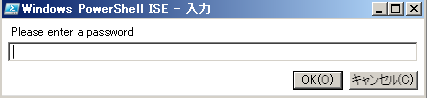
image.png

PowerShell
image.png

4
4
0

Register as a new user and use Qiita more conveniently

  1. You get articles that match your needs
  2. You can efficiently read back useful information
  3. You can use dark theme
What you can do with signing up

Comments

No comments

Let's comment your feelings that are more than good

Qiita Conference 2025 Autumn will be held!: 11/5(Wed) - 11/7(Fri)

Qiita Conference is Qiita's largest tech conference, dedicated to engineers in the age of AI!

Keynote Speaker

piacere, Tsuyoshi Ushio, Esteban Suarez, Takuto Wada, seya, MinoDriven, Toshihiro Ichitani, Karaage, Yoshimasa Iwase, Matz, Minorun and more…

View event details

Being held Article posting campaign

4
4

Delete article

Deleted articles cannot be recovered.

Draft of this article would be also deleted.

Are you sure you want to delete this article?

Login to continue?

Login or Sign up with social account

Login or Sign up with your email address
