YouTube のチャットファイル(.live_chat.json)をニコニコのxml形式に変換する関数を紹介します。
「好きな配信者のアーカイブ動画やチャットファイルをバックアップしておいたのはいいものの、チャットファイルの再生方法がわからない」という問題に当たったので作りました。
動画の一括保存方法はこちら。
説明
チャットファイルは、youtube-dlやyt-dlpなどでダウンロードした形式を対象としています。
YouTube のチャットファイルプレイヤーが見つからなかったので、似た機能であるニコニコ動画プレイヤーでチャットを再生できるように変換する関数です。
ニコニコ動画コメントプレイヤーには commeon などを利用してください。
ダウンロード
convert_chat_to_xml_ver1-0-3.zip
使い方
このスクリプトは元ファイルをいじるような処理はしませんが、万一データが消えても責任は取れませんので、実行前にバックアップは取っておいてください。
- 上のファイルをダウンロードして展開する。
- convert_chat_to_xml.py というPythonファイルが1つ入っている。
- コマンドプロンプトを開く。
- 下記のように、スクリプトの.pyファイルのパスと、対象の".live_chat.json"ファイルまたはフォルダーのパスを書く。
- エンターで処理を実行する。
- 渡されたパス内にxmlフォルダが生成され、そこにxmlに変換したファイルが作成される。
実行コマンドの例
python "C:\Users\sdt\Desktop\test\convert_chat_to_xml\convert_chat_to_xml.py" "C:\Users\sdt\Desktop\test\_video200210 - #03【デモンズソウル】KUSA TABERURU!!!【鈴原るる_にじさんじ】 - [HZavcqYkXfo].live_chat.json"
python "C:\Users\sdt\Desktop\test\convert_chat_to_xml\convert_chat_to_xml.py" "C:\Users\sdt\Desktop\test\_video200210 - #03【デモンズソウル】KUSA TABERURU!!!【鈴原るる_にじさんじ】 - [HZavcqYkXfo].live_chat.json"
python "C:\Users\sdt\Desktop\test\convert_chat_to_xml\convert_chat_to_xml.py" "C:\Users\sdt\Desktop\test\_video200210 - #03【デモンズソウル】KUSA TABERURU!!!【鈴原るる_にじさんじ】 - [HZavcqYkXfo].live_chat.json"
仕様

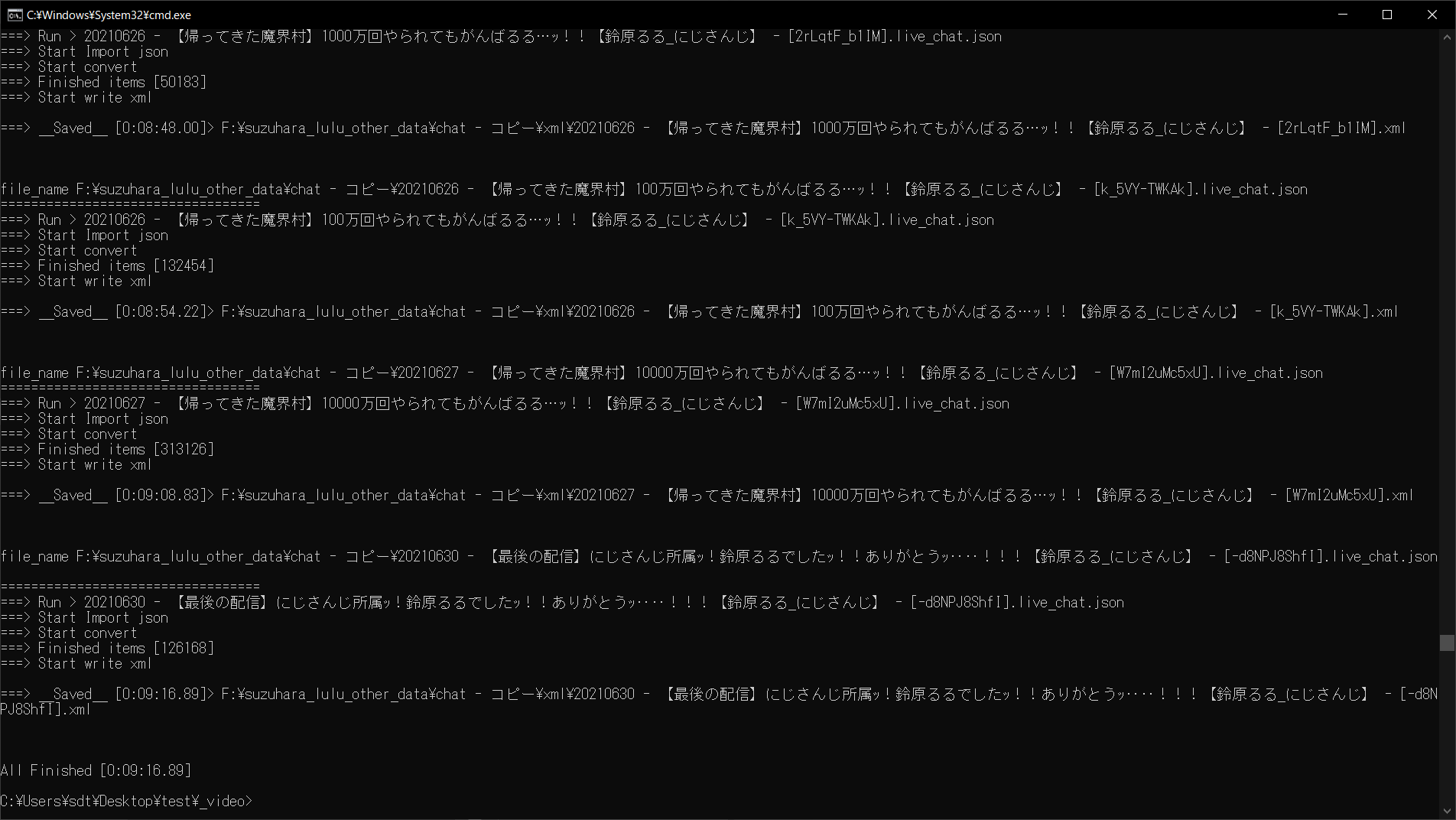
処理中はログが表示されるので、進捗を把握できます。
現在実行しているアイテム名・現在の処理内容、終了した際の経過時間が表示されます。
タイムスタンプ・ユーザー名・コメント内容を取得して、ニコニコ動画のコメントファイルの形式でxmlを生成します。
それ以外の情報やスタンプなどは変換されません。
途中強制終了は、ウィンドウを閉じるか、Ctrl + Cを押します。
コメントプレイヤー
ダウンロード - commeon
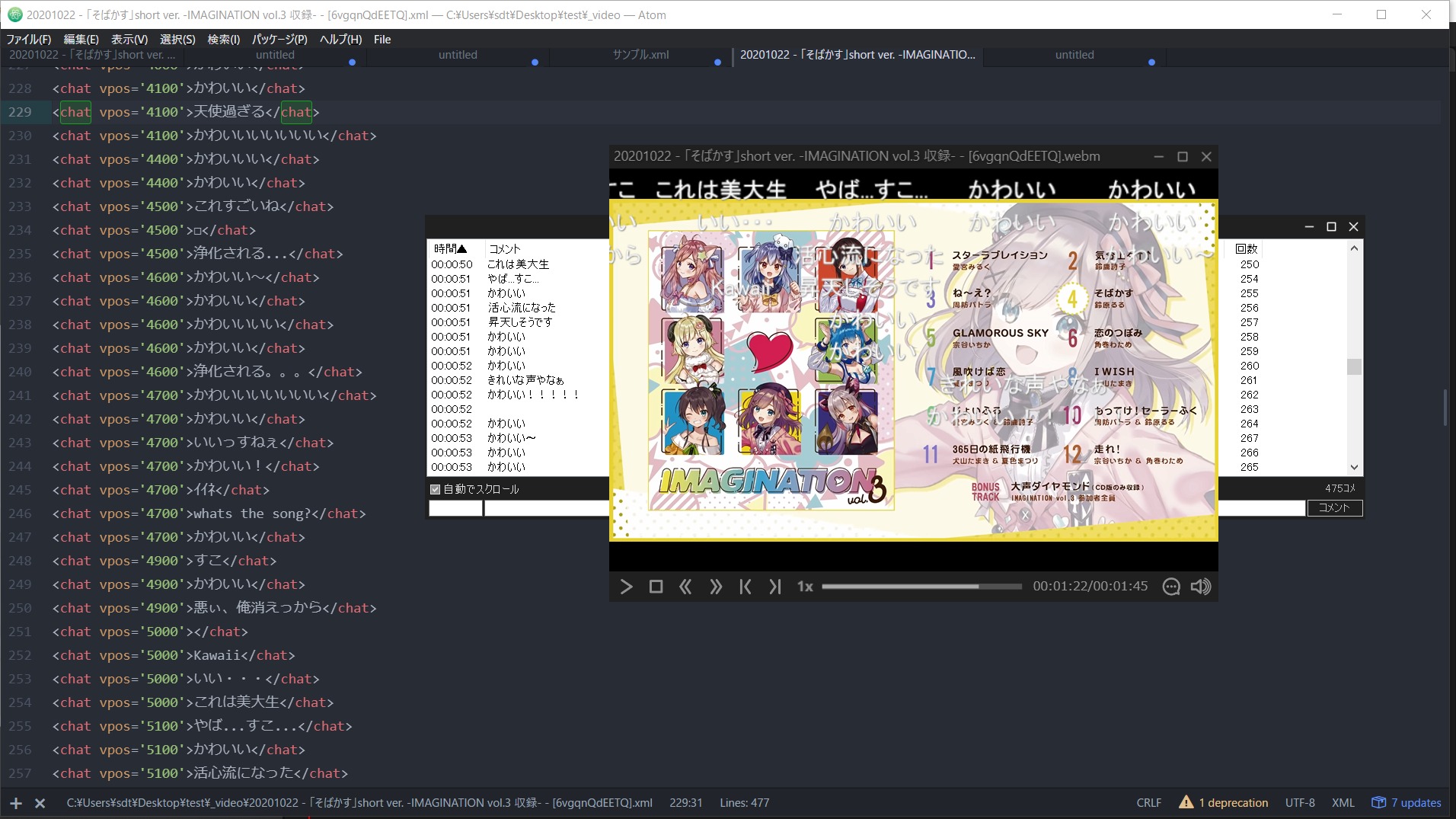
作成したxmlファイルは、commeonなどのニコニコ動画コメントプレイヤーで再生できる。
commeonの場合、xmlファイルを動画ファイルと同じ場所に配置しておくと、動画を再生したときにコメントも自動取得される。
ソースコード
# Convert chat to xml ver1.0.3
# ウェブサイト:【スクリプト配布】YouTube のチャットファイル(.live_chat.json)をニコニコのコメントのxml形式に変換するスクリプト【Python】 – 忘却まとめ
# https://bookyakuno.com/convert_youtube_chat_json_to_nico_xml/
# Convert youtube chat json to niconicko comment xml.
# YouTube のチャットファイル(.live_chat.json)をニコニコ動画のxml形式に変換する関数
# チャットファイルはyoutube-dlやyt-dlpなどでダウンロードしたものの形式で動きます。
# YouTube のチャットファイルプレイヤーが見つからなかったので、似た機能であるニコニコ動画プレイヤーでチャットを再生できるように変換する関数です。
# ニコニコ動画コメントプレイヤーには commeon などを利用してください。
# コマンドプロンプトで、下記のように実行します。
# 渡されたパスがフォルダーの場合は、フォルダー内のjsonを一括処理します。
# 変換されたxmlファイルは、「xml」フォルダー内に保存されます。
# python "C:\Users\<USER_NAME>\Desktop\test\convert_chat_to_xml.py" "C:\Users\<USER_NAME>\Desktop\test\_video190530 - #05【悪魔城ドラキュラ】諦めない心ッ…!!鈴原るるは戦う!【鈴原るる_にじさんじ】 - [Sbh6TXCxs40].live_chat.json"
import datetime, json, sys , os, datetime, re
def import_json(target_dir):
json_open = open(path, 'r',encoding="utf-8")
decoder = json.JSONDecoder()
json_load.append(decoder.raw_decode(line))
# タイムスタンプが0:00のようになっているので、全て秒に変換
def convert_timetext(time_text, user_name, text):
time_l = time_text.split(":")
second = (int(hour) * 3600) + (int(mini) * 60) + (int(sec))
print("ValueError > %s「%s」" % (user_name,text))
time_text = str(second) + "00"
text = text.replace("<", "<") # 小なりの記号。タグを表記したいときにも必要
text = text.replace(">", ">") # 大なりの記号。タグを表記したいときにも必要
text = text.replace("&", "&") # アンパサンド。実体参照で使うため、記号として表示するときに必要
text = text.replace(" ", " ") # ノーブレークスペース
text = text.replace(" ", " ") # フォントサイズの半分のスペース
text = text.replace(" ", " ") # フォントサイズのスペース
text = text.replace("–", "-") # フォントサイズ半分のダッシュ
text = text.replace("—", "-") # フォントサイズのダッシュ
text = text.replace("'","'")
# <chat thread="1640883302" no="1" vpos="704" date="1000000012" date_usec="2" anonymity="1" user_id="hR1wp4m-xxIaU2RgsVMr4zPyzeU" mail="184" leaf="0" premium="1" score="0">うぽつですー</chat>
def convert_youtube_chat_json_to_nico_xml(target_dir):
info_start_time = datetime.datetime.now()
if os.path.isfile(target_dir):
path_l = [os.path.join(target_dir,i) for i in os.listdir(target_dir)]
for index,target_path in enumerate(path_l):
print("Create 'xml' Folder")
os.makedirs(os.path.join(os.path.dirname(target_path),"xml"), exist_ok=True)
if not os.path.splitext(target_path)[1] == ".json":
print("file_name",target_path)
print("==================================")
print("===> Run > %s" % os.path.basename(target_path))
print("===> Start Import json")
json_load = import_json(target_path)
print("===> Start convert")
for index, item in enumerate(json_load):
if not "addChatItemAction" in item[0]['replayChatItemAction']['actions'][0].keys():
if not "liveChatTextMessageRenderer" in item[0]['replayChatItemAction']['actions'][0]['addChatItemAction']['item'].keys():
render = item[0]['replayChatItemAction']['actions'][0]['addChatItemAction']['item']['liveChatTextMessageRenderer']
if "authorName" in render.keys():
user_name = render['authorName']['simpleText']
# テキストを整形(絵文字は別の模様。ここはまだ調整必要)
if "text" in render['message']['runs'][0].keys():
text = render['message']['runs'][0]['text']
if len(render['message']['runs']) > 1 and len(render['message']['runs'][0]) >= 2:
text += render['message']['runs'][1]['emoji']
time_text = render['timestampText']['simpleText']
time_text = convert_timetext(time_text, user_name, text)
line_l += ["<chat vpos='%s' no='%s' user_id='%s'> %s </chat>\n" % (time_text, index , replace_text(user_name), replace_text(text))]
print("===> Finished items [%s]" % str(len(finished_l)))
print("===> Start write xml")
new_path = target_path.replace(".live_chat.json","") + ".xml"
new_path = os.path.join(os.path.dirname(new_path),"xml",os.path.basename(new_path))
with open(new_path, mode='w',encoding="utf-8") as f:
date_o = datetime.datetime.now() - info_start_time
date_o_l = re.match("^(.+\.)(\d\d)\d\d\d\d$",str(date_o))
date_o = date_o_l[1] + date_o_l[2]
print("\n===> __Saved__ [%s]> %s\n\n\n" % (date_o,new_path))
date_o = datetime.datetime.now() - info_start_time
date_o_l = re.match("^(.+\.)(\d\d)\d\d\d\d$",str(date_o))
date_o = date_o_l[1] + date_o_l[2]
print("All Finished [%s]" % date_o)
if __name__ == "__main__":
convert_youtube_chat_json_to_nico_xml(target_dir)
# Convert chat to xml ver1.0.3
# 作者:Bookyakuno
# ウェブサイト:【スクリプト配布】YouTube のチャットファイル(.live_chat.json)をニコニコのコメントのxml形式に変換するスクリプト【Python】 – 忘却まとめ
# https://bookyakuno.com/convert_youtube_chat_json_to_nico_xml/
#
# Convert youtube chat json to niconicko comment xml.
# YouTube のチャットファイル(.live_chat.json)をニコニコ動画のxml形式に変換する関数
# チャットファイルはyoutube-dlやyt-dlpなどでダウンロードしたものの形式で動きます。
# YouTube のチャットファイルプレイヤーが見つからなかったので、似た機能であるニコニコ動画プレイヤーでチャットを再生できるように変換する関数です。
# ニコニコ動画コメントプレイヤーには commeon などを利用してください。
# ■ 使い方
# コマンドプロンプトで、下記のように実行します。
# 渡されたパスがフォルダーの場合は、フォルダー内のjsonを一括処理します。
# 変換されたxmlファイルは、「xml」フォルダー内に保存されます。
#
# python "C:\Users\<USER_NAME>\Desktop\test\convert_chat_to_xml.py" "C:\Users\<USER_NAME>\Desktop\test\_video190530 - #05【悪魔城ドラキュラ】諦めない心ッ…!!鈴原るるは戦う!【鈴原るる_にじさんじ】 - [Sbh6TXCxs40].live_chat.json"
import datetime, json, sys , os, datetime, re
# 変換したいjsonのファイルパス
target_dir = sys.argv[1]
# jsonファイルの読み込み
def import_json(target_dir):
path = target_dir
json_open = open(path, 'r',encoding="utf-8")
json_load = []
decoder = json.JSONDecoder()
with json_open as f:
line = f.readline()
while line:
json_load.append(decoder.raw_decode(line))
line = f.readline()
return json_load
# タイムスタンプが0:00のようになっているので、全て秒に変換
def convert_timetext(time_text, user_name, text):
time_l = time_text.split(":")
if len(time_l) == 2:
mini, sec = time_l
hour = 0
elif len(time_l) == 3:
hour, mini, sec = time_l
try:
second = (int(hour) * 3600) + (int(mini) * 60) + (int(sec))
except ValueError:
print("ValueError > %s「%s」" % (user_name,text))
return "0"
time_text = str(second) + "00"
return time_text
# テキスト内の特殊文字を変換
def replace_text(text):
text = text.replace("<", "<") # 小なりの記号。タグを表記したいときにも必要
text = text.replace(">", ">") # 大なりの記号。タグを表記したいときにも必要
text = text.replace("&", "&") # アンパサンド。実体参照で使うため、記号として表示するときに必要
text = text.replace(" ", " ") # ノーブレークスペース
text = text.replace(" ", " ") # フォントサイズの半分のスペース
text = text.replace(" ", " ") # フォントサイズのスペース
text = text.replace("–", "-") # フォントサイズ半分のダッシュ
text = text.replace("—", "-") # フォントサイズのダッシュ
text = text.replace("'","'")
return text
# さんぷる
# <chat thread="1640883302" no="1" vpos="704" date="1000000012" date_usec="2" anonymity="1" user_id="hR1wp4m-xxIaU2RgsVMr4zPyzeU" mail="184" leaf="0" premium="1" score="0">うぽつですー</chat>
# コア関数
def convert_youtube_chat_json_to_nico_xml(target_dir):
info_start_time = datetime.datetime.now()
if os.path.isfile(target_dir):
path_l = [target_dir]
else:
path_l = [os.path.join(target_dir,i) for i in os.listdir(target_dir)]
for index,target_path in enumerate(path_l):
if index == 0:
print("Create 'xml' Folder")
os.makedirs(os.path.join(os.path.dirname(target_path),"xml"), exist_ok=True)
if not os.path.splitext(target_path)[1] == ".json":
continue
print("file_name",target_path)
print("==================================")
print("===> Run > %s" % os.path.basename(target_path))
print("===> Start Import json")
json_load = import_json(target_path)
print("===> Start convert")
# jsonの必要な情報を整形
line_l = ["<packet>\n"]
finished_l = []
for index, item in enumerate(json_load):
if not "addChatItemAction" in item[0]['replayChatItemAction']['actions'][0].keys():
continue
if not "liveChatTextMessageRenderer" in item[0]['replayChatItemAction']['actions'][0]['addChatItemAction']['item'].keys():
continue
render = item[0]['replayChatItemAction']['actions'][0]['addChatItemAction']['item']['liveChatTextMessageRenderer']
#
# ユーザーネーム
if "authorName" in render.keys():
user_name = render['authorName']['simpleText']
else:
user_name = ""
#
# テキストを整形(絵文字は別の模様。ここはまだ調整必要)
text = ""
if "text" in render['message']['runs'][0].keys():
text = render['message']['runs'][0]['text']
if len(render['message']['runs']) > 1 and len(render['message']['runs'][0]) >= 2:
text += render['message']['runs'][1]['emoji']
#
# タイムスタンプ
time_text = render['timestampText']['simpleText']
time_text = convert_timetext(time_text, user_name, text)
line_l += ["<chat vpos='%s' no='%s' user_id='%s'> %s </chat>\n" % (time_text, index , replace_text(user_name), replace_text(text))]
finished_l += [1]
#
print("===> Finished items [%s]" % str(len(finished_l)))
#
# ファイルに書き込み
print("===> Start write xml")
line_l += ["</packet>"]
new_path = target_path.replace(".live_chat.json","") + ".xml"
new_path = os.path.join(os.path.dirname(new_path),"xml",os.path.basename(new_path))
with open(new_path, mode='w',encoding="utf-8") as f:
f.writelines(line_l)
date_o = datetime.datetime.now() - info_start_time
date_o_l = re.match("^(.+\.)(\d\d)\d\d\d\d$",str(date_o))
date_o = date_o_l[1] + date_o_l[2]
print("\n===> __Saved__ [%s]> %s\n\n\n" % (date_o,new_path))
date_o = datetime.datetime.now() - info_start_time
date_o_l = re.match("^(.+\.)(\d\d)\d\d\d\d$",str(date_o))
date_o = date_o_l[1] + date_o_l[2]
print("All Finished [%s]" % date_o)
# 実行
if __name__ == "__main__":
convert_youtube_chat_json_to_nico_xml(target_dir)
# Convert chat to xml ver1.0.3
# 作者:Bookyakuno
# ウェブサイト:【スクリプト配布】YouTube のチャットファイル(.live_chat.json)をニコニコのコメントのxml形式に変換するスクリプト【Python】 – 忘却まとめ
# https://bookyakuno.com/convert_youtube_chat_json_to_nico_xml/
#
# Convert youtube chat json to niconicko comment xml.
# YouTube のチャットファイル(.live_chat.json)をニコニコ動画のxml形式に変換する関数
# チャットファイルはyoutube-dlやyt-dlpなどでダウンロードしたものの形式で動きます。
# YouTube のチャットファイルプレイヤーが見つからなかったので、似た機能であるニコニコ動画プレイヤーでチャットを再生できるように変換する関数です。
# ニコニコ動画コメントプレイヤーには commeon などを利用してください。
# ■ 使い方
# コマンドプロンプトで、下記のように実行します。
# 渡されたパスがフォルダーの場合は、フォルダー内のjsonを一括処理します。
# 変換されたxmlファイルは、「xml」フォルダー内に保存されます。
#
# python "C:\Users\<USER_NAME>\Desktop\test\convert_chat_to_xml.py" "C:\Users\<USER_NAME>\Desktop\test\_video190530 - #05【悪魔城ドラキュラ】諦めない心ッ…!!鈴原るるは戦う!【鈴原るる_にじさんじ】 - [Sbh6TXCxs40].live_chat.json"
import datetime, json, sys , os, datetime, re
# 変換したいjsonのファイルパス
target_dir = sys.argv[1]
# jsonファイルの読み込み
def import_json(target_dir):
path = target_dir
json_open = open(path, 'r',encoding="utf-8")
json_load = []
decoder = json.JSONDecoder()
with json_open as f:
line = f.readline()
while line:
json_load.append(decoder.raw_decode(line))
line = f.readline()
return json_load
# タイムスタンプが0:00のようになっているので、全て秒に変換
def convert_timetext(time_text, user_name, text):
time_l = time_text.split(":")
if len(time_l) == 2:
mini, sec = time_l
hour = 0
elif len(time_l) == 3:
hour, mini, sec = time_l
try:
second = (int(hour) * 3600) + (int(mini) * 60) + (int(sec))
except ValueError:
print("ValueError > %s「%s」" % (user_name,text))
return "0"
time_text = str(second) + "00"
return time_text
# テキスト内の特殊文字を変換
def replace_text(text):
text = text.replace("<", "<") # 小なりの記号。タグを表記したいときにも必要
text = text.replace(">", ">") # 大なりの記号。タグを表記したいときにも必要
text = text.replace("&", "&") # アンパサンド。実体参照で使うため、記号として表示するときに必要
text = text.replace(" ", " ") # ノーブレークスペース
text = text.replace(" ", " ") # フォントサイズの半分のスペース
text = text.replace(" ", " ") # フォントサイズのスペース
text = text.replace("–", "-") # フォントサイズ半分のダッシュ
text = text.replace("—", "-") # フォントサイズのダッシュ
text = text.replace("'","'")
return text
# さんぷる
# <chat thread="1640883302" no="1" vpos="704" date="1000000012" date_usec="2" anonymity="1" user_id="hR1wp4m-xxIaU2RgsVMr4zPyzeU" mail="184" leaf="0" premium="1" score="0">うぽつですー</chat>
# コア関数
def convert_youtube_chat_json_to_nico_xml(target_dir):
info_start_time = datetime.datetime.now()
if os.path.isfile(target_dir):
path_l = [target_dir]
else:
path_l = [os.path.join(target_dir,i) for i in os.listdir(target_dir)]
for index,target_path in enumerate(path_l):
if index == 0:
print("Create 'xml' Folder")
os.makedirs(os.path.join(os.path.dirname(target_path),"xml"), exist_ok=True)
if not os.path.splitext(target_path)[1] == ".json":
continue
print("file_name",target_path)
print("==================================")
print("===> Run > %s" % os.path.basename(target_path))
print("===> Start Import json")
json_load = import_json(target_path)
print("===> Start convert")
# jsonの必要な情報を整形
line_l = ["<packet>\n"]
finished_l = []
for index, item in enumerate(json_load):
if not "addChatItemAction" in item[0]['replayChatItemAction']['actions'][0].keys():
continue
if not "liveChatTextMessageRenderer" in item[0]['replayChatItemAction']['actions'][0]['addChatItemAction']['item'].keys():
continue
render = item[0]['replayChatItemAction']['actions'][0]['addChatItemAction']['item']['liveChatTextMessageRenderer']
#
# ユーザーネーム
if "authorName" in render.keys():
user_name = render['authorName']['simpleText']
else:
user_name = ""
#
# テキストを整形(絵文字は別の模様。ここはまだ調整必要)
text = ""
if "text" in render['message']['runs'][0].keys():
text = render['message']['runs'][0]['text']
if len(render['message']['runs']) > 1 and len(render['message']['runs'][0]) >= 2:
text += render['message']['runs'][1]['emoji']
#
# タイムスタンプ
time_text = render['timestampText']['simpleText']
time_text = convert_timetext(time_text, user_name, text)
line_l += ["<chat vpos='%s' no='%s' user_id='%s'> %s </chat>\n" % (time_text, index , replace_text(user_name), replace_text(text))]
finished_l += [1]
#
print("===> Finished items [%s]" % str(len(finished_l)))
#
# ファイルに書き込み
print("===> Start write xml")
line_l += ["</packet>"]
new_path = target_path.replace(".live_chat.json","") + ".xml"
new_path = os.path.join(os.path.dirname(new_path),"xml",os.path.basename(new_path))
with open(new_path, mode='w',encoding="utf-8") as f:
f.writelines(line_l)
date_o = datetime.datetime.now() - info_start_time
date_o_l = re.match("^(.+\.)(\d\d)\d\d\d\d$",str(date_o))
date_o = date_o_l[1] + date_o_l[2]
print("\n===> __Saved__ [%s]> %s\n\n\n" % (date_o,new_path))
date_o = datetime.datetime.now() - info_start_time
date_o_l = re.match("^(.+\.)(\d\d)\d\d\d\d$",str(date_o))
date_o = date_o_l[1] + date_o_l[2]
print("All Finished [%s]" % date_o)
# 実行
if __name__ == "__main__":
convert_youtube_chat_json_to_nico_xml(target_dir)
アップデート履歴
ver1.0.3
2023-08-23
convert_chat_to_xml_ver1-0-3.zip
- エラーが出て失敗することがある問題を修正しました。
- チャットコメントに絵文字情報がない場合があることが問題でした。
ver1.0.2
2022-01-03
convert_chat_to_xml_ver1-0-2.zip
- フォルダ内の一括処理できるようになりました。
- 渡されたパスがフォルダーの場合は、そのフォルダー内の.jsonファイルを一括処理します。
- このスクリプトは元ファイルをいじるような処理はしませんが、一応実行前にバックアップは取っておいてください。
- 渡されたパス内にxmlフォルダーを作って保存するようにしました。
- 一括処理できるようになって膨大なxmlファイルが同じ階層に作成されてしまうため分類するようにしました。
- 実行時のログを表示するようにしました。
- 現在実行しているアイテム名・現在の処理内容、終了した際の経過時間が表示されます。
- "authorName"がないとのエラーを修正しました。
ver1.0.1
2022-01-01
convert_chat_to_xml_ver1-0-1.zip
- 実行時にファイルパスを引数指定して実行できるように変更しました。
- 特殊文字が原因でコメントの読み込みができない問題を修正しました。
一部記号はエスケープ文字に変換されます。
ver1.0.0
2022-01-01
convert_youtube_chat_json_to_nico_xml.zip
公開
あとがき
鈴原るるのアーカイブがついに全て非公開になってしまった。
動画は全て保存しておいたものの、ついに視聴する方法が自分のPC内でしかなくなってしまったので、ローカル環境でチャット付きで動画を再生する方法を模索した。
その他
その他の方法では、「Ragtag Archive」というサイトで、様々なVTuberの動画とチャットファイルがアーカイブされているので、もしかしたら自分の推しの動画がまだ見つかるかもしれない。
鈴原るる【にじさんじ所属】 - Ragtag Archive