mastodon.social is one of the many independent Mastodon servers you can use to participate in the fediverse.
The original server operated by the Mastodon gGmbH non-profit

Administered by:

Server stats:

230K
active users
Pinned post

Brave’s built-in VPN was updated on desktop and mobile with new features and improvements!

There’s a lot to cover so let’s dig in… 🧵

Continued thread

Using the new Brave VPN is easy. You can begin a seven-day free trial in seconds.

Desktop: Click the VPN button in the Brave browser’s address bar, and click "Start free trial."

Mobile: Open the Brave settings menu (“…” on iOS, or “⋮” on Android) and toggle on Brave VPN.

Continued thread

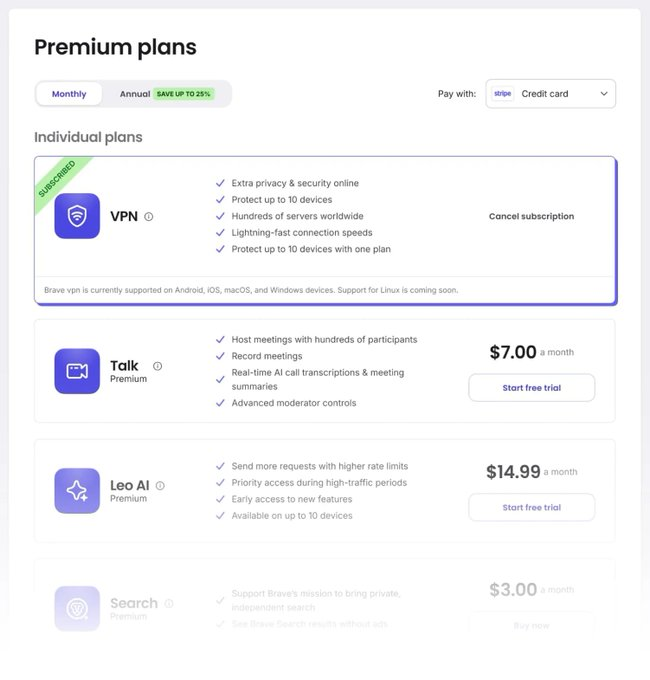
We’ve also upped the device limit for subscriptions! Your subscription now covers up to 10 devices across Android, iOS and desktop rather than five.

The redesigned account portal on desktop introduces cost-saving annual subscriptions as well: account.brave.com

Continued thread

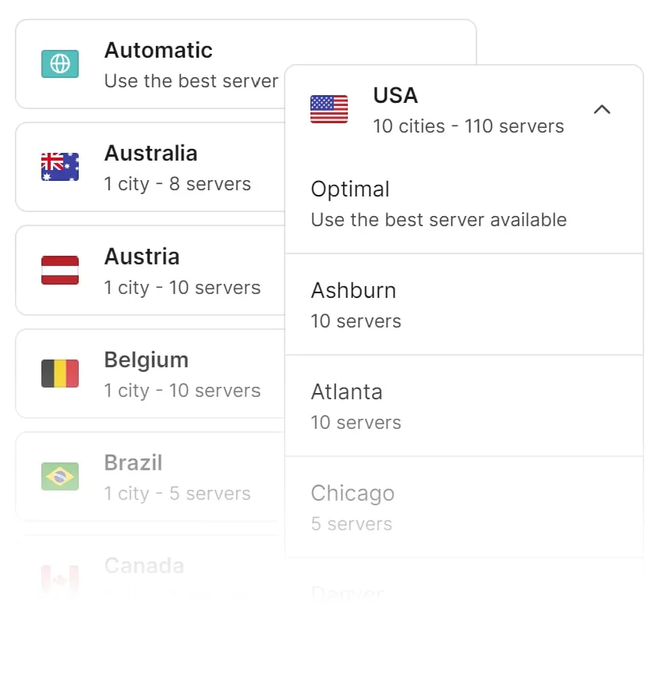
The newest update adds hundreds of new servers across over 40 countries and regions for our VPN.

An upgraded interface lets users on the latest version of Brave choose servers down to the city level.

Brave<p>Brave VPN adds a layer of privacy and security to any app on your device.</p><p>It blocks trackers and encrypts every connection to the Web, and helps you access your favorite content even while traveling.</p>
Brave<p>Brave’s built-in VPN was updated on desktop and mobile with new features and improvements!</p><p>There’s a lot to cover so let’s dig in… 🧵</p>
Brave<p>This feature is now available through Brave Nightly on desktop.</p><p>We plan to roll it out to all desktop users later this summer.</p><p>If you&#39;re testing it on Nightly, please let us know what you think!</p>
Brave<p>The BYOM feature also lets users connect Leo to remote models on their own servers, or ones run by third-parties like OpenAI&#39;s ChatGPT. This gives users easy access to the models of their own choice.</p><p>Details on setting up remote models are in the blog as well!</p>
Brave<p>You can use Ollama to run AI models like Llama 3 and Mistral 7B locally and analyze web pages, PDFs, and other docs in Brave without any data leaving your device.</p><p>Learn how to set up Ollama and connect it to Leo here: <a href="https://brave.com/blog/byom-nightly/" target="_blank" rel="nofollow noopener" translate="no"><span class="invisible">https://</span><span class="">brave.com/blog/byom-nightly/</span><span class="invisible"></span></a></p>
Brave<p>Brave&#39;s newest AI feature is Bring Your Own Model!</p><p>BYOM, now live in Brave Nightly, lets you connect Brave&#39;s AI assistant Leo to your own local or remote AI models for added customization and privacy.</p>
Brave<p>Want to try out Brave Leo? Here are three ways to get started:</p><p>1) Start typing a question in the browser&#39;s URL bar and click &quot;Ask Leo&quot; in the suggestions.<br />2) Desktop: Press Ctrl+B (Cmd+B on macOS) to open the Sidebar.<br />3) Mobile: Go to Settings -&gt; Leo</p>
Brave<p>Unlike other AI assistants, Leo is built to preserve your privacy.</p><p>Chats with Leo are private and secure. Leo never uses your chats for model training and no account or login is required to use Leo.</p>
Brave<p>Leo answers that incorporate Brave Search results also include links to search results pages for further reading. We want to make it easy for users to personally verify information, especially for critical topics.</p><p>This feature is available on desktop and coming to mobile soon.</p>
Brave<p>Leo, Brave’s in-browser AI assistant, now uses real-time Brave Search results in its answers!</p><p>This helps Leo provide more accurate and up-to-date responses, especially around current events.</p>
Brave<p>The mobile release of Leo was just one of many goals we announced for our AI last fall.</p><p>You can read about other upcoming Leo features in the full roadmap here: <a href="https://brave.com/blog/leo-roadmap/" target="_blank" rel="nofollow noopener" translate="no"><span class="invisible">https://</span><span class="">brave.com/blog/leo-roadmap/</span><span class="invisible"></span></a></p>
Brave<p>Leo respects your privacy, too.<br />Our AI doesn&#39;t record your chats, or use them for model training. You don&#39;t even need an account or login to use it.</p><p>Read more details about Leo&#39;s privacy protections here: <a href="https://brave.com/blog/leo-ios/" target="_blank" rel="nofollow noopener" translate="no"><span class="invisible">https://</span><span class="">brave.com/blog/leo-ios/</span><span class="invisible"></span></a></p><p>You can use Leo for free across all platforms.</p><p>If you subscribe to Leo Premium for $14.99, you can enjoy higher rate limits and other perks.</p><p>One subscription covers up to 5 different devices across iOS, Android, Linux, macOS, and Windows.</p>
Brave<p>We just launched Brave&#39;s built-in AI Leo on iOS! 🥳</p><p>With Leo now on all platforms, you&#39;ll have this helpful and privacy-preserving assistant available at home, the office, and anywhere else.</p><p>Leo on iOS helps you get quick answers in any situation. It can help you win an argument at a bar, get nutrition advice while grocery shopping, or remember a movie name.</p><p>Thanks to Leo&#39;s voice to text support, you&#39;ll get the info you need without even typing.</p>
Brave<p>We plan to add support for other document and file types in the future.<br />For example, we’ll add GitHub integration to Leo so you can quickly review code changes.</p><p>We&#39;ll share more details on this soon!</p>
Brave<p>This new Leo feature is available now for Brave desktop with v1.63.</p><p>Try it now by opening a PDF, Google Doc, or Google Sheet in a Brave browser tab and then clicking the Leo icon in the Sidebar.</p>
Brave<p>Leo can analyze PDFs, Google Docs, and Google Sheets to provide quick summaries and answer your questions.</p><p>The AI can also help you create content. For example, it can suggest alternate terms for your Google Doc or formulas for your Google Sheet.</p>
Brave<p>Brave&#39;s AI Leo can now assist you with a range of tasks involving PDFs and Google Drive! <a href="https://brave.com/leo-docsupport/" target="_blank" rel="nofollow noopener" translate="no"><span class="invisible">https://</span><span class="">brave.com/leo-docsupport/</span><span class="invisible"></span></a></p>
Brave<p>Even though Manifest V3 doesn&#39;t hinder Brave, we&#39;re concerned that Google is moving forward with a plan that hurts user choice and privacy.</p><p>It&#39;s just one of many ways that Google is harming the Open Web and putting its ad business above users. More here: <a href="https://brave.com/web-standards-at-brave/6-privacy-sandbox-concerns/" target="_blank" rel="nofollow noopener" translate="no"><span class="invisible">https://</span><span class="ellipsis">brave.com/web-standards-at-bra</span><span class="invisible">ve/6-privacy-sandbox-concerns/</span></a></p>
Brave<p>While Brave offers leading privacy protections as soon as you install it, we also want users to have as much choice as possible.</p><p>That&#39;s why we plan to support uBlock Origin and uMatrix, without restrictions, even after Manifest V3 is rolled out.</p>
Brave<p>Google is rolling out new Manifest V3 rules for extensions in 2024 that will limit the capabilities of ad blocker extensions.</p><p>These extension rules won&#39;t prevent Brave from blocking ads or trackers because we built these features directly into our browser.</p>
Brave<p>We&#39;ve seen the headlines about Google killing ad blockers.</p><p>Two important points:<br />1. Google&#39;s changes will not stop Brave from blocking ads.<br />2. We will support uBlock Origin and uMatrix even after Chrome stops doing so.</p>
Brave<p>Leo is being rolled out in phases with desktop release v1.60. Users should check back soon if they&#39;re not seeing it today.</p><p>The feature will be released on Android and iOS in the coming months.</p><p>Read our full roadmap for Leo here: <a href="https://brave.com/leo-roadmap/" target="_blank" rel="nofollow noopener" translate="no"><span class="invisible">https://</span><span class="">brave.com/leo-roadmap/</span><span class="invisible"></span></a></p>
Brave<p>Brave Leo is free by default.</p><p>Leo Premium subscribers can use additional large language models, such as Claude Instant from Anthropic, for higher quality conversations.</p><p>Premium benefits also include higher rate limits, priority queuing, and early access to new features.</p>
Brave<p>Your chats with Leo are private, anonymous, and secure.</p><p>Leo doesn’t record chats, or use them for model training, and no account or login is required to use Leo.</p><p>Learn more about how the feature protects your privacy here: <a href="https://brave.com/leo-launch/" target="_blank" rel="nofollow noopener" translate="no"><span class="invisible">https://</span><span class="">brave.com/leo-launch/</span><span class="invisible"></span></a></p>
Brave<p>Brave’s AI browser assistant Leo is being rolled out over the next few days to all desktop users!</p><p>Let’s talk about what you can expect from this powerful, privacy-preserving tool…</p><p>Leo can help with all sorts of tasks while you browse, such as:</p><p>- Summarizing websites or videos<br />- Answering questions<br />- Translating<br />- Rewriting pages</p><p>Just start typing in Brave&#39;s URL bar and choose “Ask Leo” from the suggestions to get started!</p>
Brave<p>- 4:20 PM GMT+2: Anton is speaking on a panel with other browser engineer teams about new developments in browser technology and adblocking.</p><p>You can catch the events live on YouTube here: <a href="https://youtu.be/-KkMWUaajhU" target="_blank" rel="nofollow noopener" translate="no"><span class="invisible">https://</span><span class="">youtu.be/-KkMWUaajhU</span><span class="invisible"></span></a></p>
Brave<p>Wednesday:<br />- 5:50 PM GMT+2: Ryan is speaking on a panel of filter list maintainers about what it&#39;s like to keep these lists accurate and up to date.</p><p>Thursday:<br />- 2:20 PM GMT+2: Ryan is giving a talk called &quot;Breaking Adware Chains and Notification Spam&quot; about recent changes he&#39;s made to EasyList to break chained redirects that lead towards malicious sites, and also to generally help users avoid annoying popups when browsing the web.</p>
Brave<p>Want to learn more about how Brave blocks ads and other annoyances? </p><p>Watch the livestream of the Ad-Filtering Dev Summit in Amsterdam this week with talks by Brave&#39;s Anton Lazarev (<span class="h-card" translate="no"><a href="https://fosstodon.org/@antonok" class="u-url mention">@<span>antonok</span></a></span>) and Ryan Brown (<span class="h-card" translate="no"><a href="https://mastodon.social/@fanboynz" class="u-url mention">@<span>fanboynz</span></a></span>)!</p><p>Here&#39;s a schedule of their events....</p>
Brave<p>We hope to release Leo on Android and iOS shortly after desktop.</p><p>Some of our other planned improvements include:<br />- Brave Search, News, and Support integration for answers<br />- Cross-device sync<br />- Image generation<br />- More languages</p><p>Read the full roadmap here: <a href="https://brave.com/leo-roadmap/" target="_blank" rel="nofollow noopener" translate="no"><span class="invisible">https://</span><span class="">brave.com/leo-roadmap/</span><span class="invisible"></span></a></p>
Brave<p>While Leo will be available for free to all Brave users, we will also offer a premium version with a higher rate limit and access to more large language models.</p><p>With both the free or premium versions, your inputs are anonymous and your conversations are never retained.</p>
Brave<p>Leo, available through Brave&#39;s Sidebar, lets you ask for article summaries or video transcripts while you&#39;re browsing the Web. You can also ask Leo follow-up questions like other AI-powered chatbots.</p><p>As with other Brave products, Leo is built with privacy by design.</p>
Brave<p>In August, we released our native AI assistant Leo on the desktop version of Brave Nightly.</p><p>As we ready Leo for full release in mid to late Q4 of this year, we want to share more details on our future plans...🧵 <a href="https://brave.com/leo-roadmap/" target="_blank" rel="nofollow noopener" translate="no"><span class="invisible">https://</span><span class="">brave.com/leo-roadmap/</span><span class="invisible"></span></a></p>
Brave<p>Forgetful Browsing is another in a series of upcoming Brave features that protect users against first-party tracking.</p><p>We look forward to sharing more about these features in the coming weeks and months.</p>
Brave<p>You can enable Forgetful Browsing in two ways:</p><p>One site:<br />1. Visit a site.<br />2. Click the shields icon in URL bar.<br />3. Click Advanced controls.<br />4. Click Forget me when I close this site.</p><p>All sites:<br />1. Go to brave://settings/shields.<br />2. Click Forget me when I close a site.</p>
Brave<p>Brave&#39;s Forgetful Browsing mode is live on desktop and Android!</p><p>This feature clears first-party storage when you exit a site, so that:<br />1. You&#39;re automatically logged out.<br />2. Sites can&#39;t reidentify you across visits.<br />3. You avoid rate limits. (e.g. 10 free articles per month)</p>
Brave<p>Help us improve Brave Search by sharing feedback on search results. Just click the speech bubble icon at the top right of your results to get started!</p><p>Another way to help is to opt into our Web Discovery Project to anonymously contribute to our index: <a href="https://support.brave.com/hc/en-us/articles/4409406835469-What-is-the-Web-Discovery-Project-" target="_blank" rel="nofollow noopener" translate="no"><span class="invisible">https://</span><span class="ellipsis">support.brave.com/hc/en-us/art</span><span class="invisible">icles/4409406835469-What-is-the-Web-Discovery-Project-</span></a></p>