


Guys, I created this post more than 1 month ago and we never received an effective solution to solve the root of this problem. I do not find it acceptable that we, as users, have to be changing so many settings to fix something that the developers should fix. I personally switched browser a while ago. It just doesn’t seem acceptable to me.
Skip to main content

At this point I haven’t been able to use WhatsApp Web for over a month. 2 days ago I switched to Opera, because it is absolutely unacceptable for Brave to not do anything about this.

Yes I get the same - had been working fine for over a year with number of updates including both Brave and WA) and started 9 June 2022 after a WA upgrade (version now 2.22.3.77). So naturally had a go at WA/Meta but getting any sense out of them was useless. 10-6-2022 they replied saying “If you’re using WhatsApp Web, please restart your browser.” I mean…
But something has changed now because using Brave 1.40.107 it still throws this error BUT now using Chrome it works seamlessly. Looks like whatever happened in the upgrade to WA 2.22.3.77 broke something in Brave AND BRAVE HASN’T YET RESPONDED. You know… couple of months n’ all that…
Moral of the story:
USERS: use an alternative browser
BRAVE TEAM: for goodness sake get on with it and “work arounds fixing settings” just doesn’t cut it tbh. This is meant to be simple for mere mortals (like me) not hackers (also like me but I don’t intend to make it my life’s work diagnosing splurgeware that has a paid maintenance team…)
Please go fix the default settings…


This is sad… We made any comments and pointed many issues about this case, but nothing happens, even with the updates rolling during this situation.
For many, the solution was to migrate to other (Ophera, Chrome, FireFox), it’s sad for me see this, because i beleave on Brave browser…
I think the staff coud inform us about what they are mading about this, any news, even “whe know but don’t know yet how to solve” serves to us…
The resolution propose (informed by us and not the staff) in this topic (about reset settings to work and repeat after some time to work again) it’s not the real solution, it’s a placebo because works for a while and stops…

This is a common issue by Brave team and has not been addressed officially so far. Different methods are working for different people. I have found a simple method that worked for me.
-
Disable Brave shield for Whatsapp
-
Visit brave://settings/content/all and clear data for Whatsapp
-
Restart your browser and try logging in to Whatsapp.
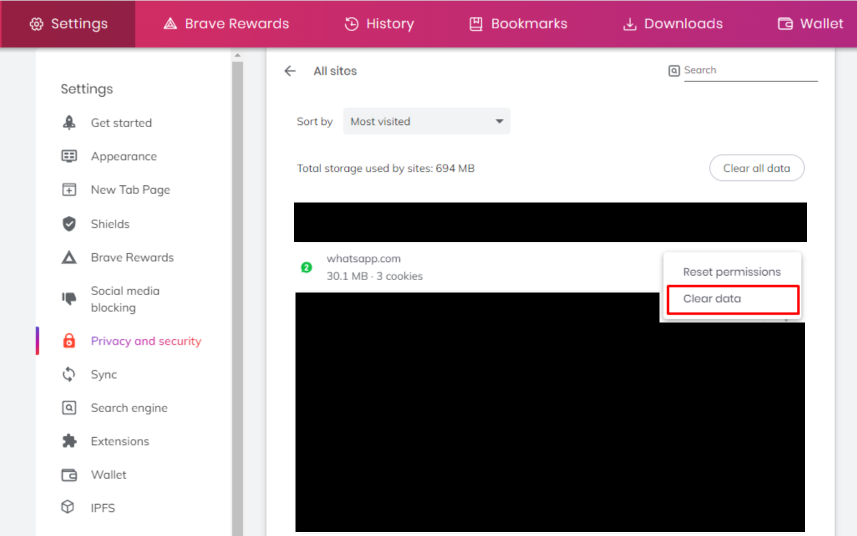
Hope this fixes your problem. Next time you log in and face the same problem, just try enable-disable once the Brave shield for Whatsapp.
Thanks.

Should we just move to another browser ? i have this problem EVERYTIME i restart my PC! please help!


This sort of raises the question about “why use Brave”… because if the maintainers won’t maintain then why bother? This has been a trouble ticket (we hope) for 2 months. This is a show-stopper for the user wanting to use Brave for WA-Web (so isn’t a show-stopper all round) - but, when presented with a show-stopper, an absence of response (at all) from the developers sort of says “not taking it seriously”. So if they are not taking it seriously why are they developing?
Please Team: fix this…
Thanks guys

Just thinking out of the box here…
WA go bugger around with their code and make a change that breaks all but their preferred browser (no connection with MS Edge I don’t suppose?) - noting that the phones are using IOS or Android.
Google spots this, gets their monster team to work and bodge a work-around or a default config or whatever that brings the exchanges back to life.
Brave team lags behind…
Time to get Wireshark out, I think.


Already tried most of solutions here and the only way work for my macbook is to reinstall the brave app

26/07/2022
Still not working.


09/08/2022 still not working


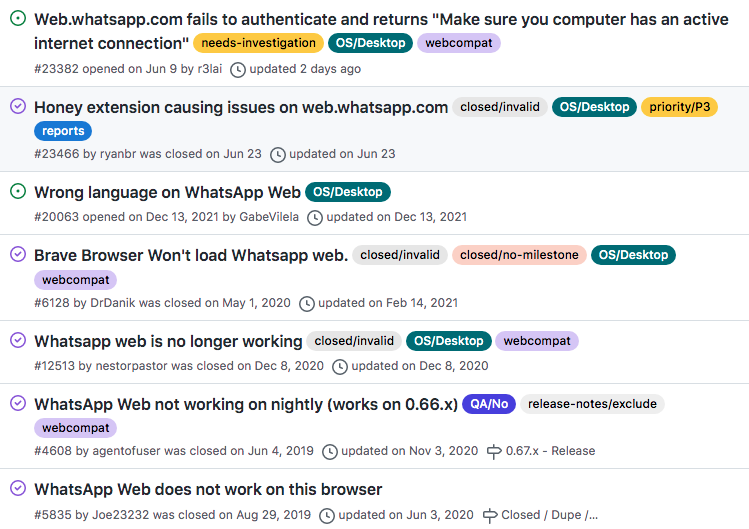
Latest from the GitHub issue report linked below: Besides disabling Honey, may want to try disabling Use hardware acceleration when available at brave://settings/system.

I had the same issue for last week or so. Enabling the background sync seems to solve the problem and when thinking about that could be the one thing that is different with other browsers, Brave being the more secure alternative. I noticed that after restarting Brave whatsapp still works but the background sync was reset automatically back to “block (default)” which may explain why some people see WhatsApp Web not working after some time. I assume the background sync is only done when the device linking is confirmed after some days / weeks(?).

Hi every one
I signed up to post this.
I tried every single solution here and other sites but none solved the problem.
Did my own dive and the problem was “Internet Download Manager” extension.
Disabled it, cleared all browsing data and used CCleaner then Viola every thing works as it should be.
This is really annoying, whatsapp is always having problems, either you cannot edit pictures when using Brave or whatsapp randomly stops working. Right now it will not start (but it does on Chrome). I cleared the data and reset permissions on whatsapp (I have no extensions enabled), and now it will not even show the QR code. I think this is a deal breaker, I feel I am always wasting my time to see how to fix something that is broken in Brave but works perfectly fine in other browsers. Also, I do not really understand the point really of these forums if nobody from the Brave team jumps in to say something about a problem that never goes away. Is their philosophy “let the users figure it out, we do not care”?

exactly and now with uphold not even supporting every country, brave is pretty much worthless, going back to google chrome or another
Right.
1 month ago I posted this:
BRAVE TEAM: for goodness sake get on with it and “work arounds fixing settings” just doesn’t cut it tbh. This is meant to be simple for mere mortals (like me) not hackers (also like me but I don’t intend to make it my life’s work diagnosing splurgeware that has a paid maintenance team…)
Please go fix the default settings…
… with evidently no response from the Brave developers.
So how about this: either the developers respond HERE saying that this is work in progress, or I’m out.
It is pathetic that a developer team cant even be arsed to look at “customer” feedback.
Just not good enough guys.

Brave is open source software. As a maintainer of smaller open-source projects myself, I find these demands extremely entitled. If you are unhappy with an issue, you are more than welcome to download the source code from https://github.com/brave/brave-browser , fix the issue and either run your own locally built version of Brave or submit the patch back to the repository. The latter is preferred so that all users can benefit from your contribution, but isn’t required. If you are unable or unwilling to do that, then you’re at the mercy of other contributors to sacrifice their time in order to solve this, but there is no guarantee that this will happen. If you didn’t pay for the softare, you are not a ‘customer’. Even if you made a financial donation (if you did, thanks!), please check the terms and conditions and you will note that you are not entitled to just demand fixes. Keep in mind these are real people working on open-source software. Each with their own lives, families and careers of which priorities might change at any moment.

I tried all of the above workarounds and the fix for me was to ensure my laptop and phone were on the same wireless band. This will be more difficult if you’re using smart band or equivalent where there’s 1 SSID for both the 2.4ghz and 5ghz. In my case, I have my wireless split into two SSIDs so I can control which device uses 5ghz and 2.4ghz. Once I moved my phone and laptop onto the same band…web whatsapp connected instantly.

What a nonsense, why Brave team still cannot fix it???
My laptop is connected through Hotspot on my smartphone, anyway, none of these indicated methods is working.
OMG, you saved my life!
This is only solution, why developers cannot indicate and use your post, and change text here: Allow Facebook logins and embedded posts
It’s should be: Allow Facebook and Whatsapp logins and embedded posts


Still not working on my side.
I made Brave my default browser today and when I tried using whatsapp web then I faced the same issue. I fixed the issue by clearing the application data from the developer’s console.

One thing to note here is while getting started with Brave it asked me to import browser data which i did from chrome so that could be the root cause of my problem.

this worked for me: (simple, 2 minutes)
- go on web.whatsapp.com and delete all cookies (clic on the lock left of the adress)
- go on facebook.com and delete all cookies
- connect to facebook.com . Accept all cookies (there is an other option for just minimum cookies. Don’t clic that)
- restart brave
- connect to web.whatsapp.com
For me the only way to get sucess with Whatsapp web and Brave is:
I Disable all extensions, open the whatsapp web page and make the process (smartphone and QR Code).
After login ok (into whatsapp web), I enable the extensions again and when the sincronism stops to work (sometimes when I shutdow my PC or after many days working without problems), I redo the process.
12/09/2022
Whatsapp web still not working.


I am having this same issue. Has there been any updates yet?
Bro, I posted this over 3 months ago (June 8), and still no solution. I switched to Edge. It’s what I would recommend you do.


I logged in in Edge first, then in Brave. That worked for me for some reason, and Brave is again a linked device in WhatsApp.
20 days later
Tried today 12/10/2022
It logged in successfully. I don’t know what you did, but thank you.
Whatsapp web works for me only when shield is turned off. Try that.
19 days later
Faced the same issue.
Potential Solution :
Disabled VPN, and cleared whats app site data.
Reopened the tab and it worked.
It happens generally after whats app pushes an update for web whats app. (After these steps, it opened and I received the update request.)
Please note I have cloudfare as secure DNS service and didn’t need to change it.
Shields were active with aggressive setting.
1 month later