 Mozilla Firefox®, Portable Edition is the popular Mozilla Firefox web browser bundled with a PortableApps.com Launcher as a portable app, so you can take your bookmarks, extensions, and saved passwords with you.
This article lists two methods with which you can register Mozilla Firefox Portable Edition with Default Apps or Default Programs in Windows Vista through Windows 10/11.
Register Firefox Portable with Default Apps
Method 1: Using a VBScript
- Download the script firefoxportable.vbs.This file contains bidirectional Unicode text that may be interpreted or compiled differently than what appears below. To review, open the file in an editor that reveals hidden Unicode characters. Learn more about bidirectional Unicode characters
'Registers Firefox Portable with Default Programs or Default Apps in Windows 'firefoxportable.vbs - created by Ramesh Srinivasan for Winhelponline.com 'v1.0 17-July-2022 - Initial release. Tested on Mozilla Firefox 102.0.1.0. 'v1.1 23-July-2022 - Minor bug fixes. 'v1.2 27-July-2022 - Minor revision. Cleaned up the code. 'Suitable for all Windows versions, including Windows 10/11. 'Tutorial: https://www.winhelponline.com/blog/register-firefox-portable-with-default-apps/ Option Explicit Dim sAction, sAppPath, sExecPath, sIconPath, objFile, sbaseKey, sbaseKey2, sAppDesc Dim sClsKey, ArrKeys, regkey Dim WshShell : Set WshShell = CreateObject("WScript.Shell") Dim oFSO : Set oFSO = CreateObject("Scripting.FileSystemObject") Set objFile = oFSO.GetFile(WScript.ScriptFullName) sAppPath = oFSO.GetParentFolderName(objFile) sExecPath = sAppPath & "\FirefoxPortable.exe" sIconPath = sAppPath & "\App\Firefox\firefox.exe" sAppDesc = "Firefox delivers safe, easy web browsing. " & _ "A familiar user interface, enhanced security features including " & _ "protection from online identity theft, and integrated search let " & _ "you get the most out of the web." 'Quit if FirefoxPortable.exe is missing in the current folder! If Not oFSO.FileExists (sExecPath) Then MsgBox "Please run this script from Firefox Portable folder. The script will now quit.", _ vbOKOnly + vbInformation, "Register Firefox Portable with Default Apps" WScript.Quit End If If InStr(sExecPath, " ") > 0 Then sExecPath = """" & sExecPath & """" sIconPath = """" & sIconPath & """" End If sbaseKey = "HKCU\Software\" sbaseKey2 = sbaseKey & "Clients\StartmenuInternet\Firefox Portable\" sClsKey = sbaseKey & "Classes\" If WScript.Arguments.Count > 0 Then If UCase(Trim(WScript.Arguments(0))) = "-REG" Then Call RegisterFirefoxPortable If UCase(Trim(WScript.Arguments(0))) = "-UNREG" Then Call UnRegisterFirefoxPortable Else sAction = InputBox ("Type REGISTER to add Firefox Portable to Default Apps. " & _ "Type UNREGISTER To remove.", "Firefox Portable Registration", "REGISTER") If UCase(Trim(sAction)) = "REGISTER" Then Call RegisterFirefoxPortable If UCase(Trim(sAction)) = "UNREGISTER" Then Call UnRegisterFirefoxPortable End If Sub RegisterFirefoxPortable WshShell.RegWrite sbaseKey & "RegisteredApplications\Firefox Portable", _ "Software\Clients\StartMenuInternet\Firefox Portable\Capabilities", "REG_SZ" 'FirefoxHTML registration WshShell.RegWrite sClsKey & "FirefoxHTML2\", "Firefox HTML Document", "REG_SZ" WshShell.RegWrite sClsKey & "FirefoxHTML2\EditFlags", 2, "REG_DWORD" WshShell.RegWrite sClsKey & "FirefoxHTML2\FriendlyTypeName", "Firefox HTML Document", "REG_SZ" WshShell.RegWrite sClsKey & "FirefoxHTML2\DefaultIcon\", sIconPath & ",1", "REG_SZ" WshShell.RegWrite sClsKey & "FirefoxHTML2\shell\", "open", "REG_SZ" WshShell.RegWrite sClsKey & "FirefoxHTML2\shell\open\command\", sExecPath & _ " -url " & """" & "%1" & """", "REG_SZ" WshShell.RegWrite sClsKey & "FirefoxHTML2\shell\open\ddeexec\", "", "REG_SZ" 'FirefoxPDF registration WshShell.RegWrite sClsKey & "FirefoxPDF2\", "Firefox PDF Document", "REG_SZ" WshShell.RegWrite sClsKey & "FirefoxPDF2\EditFlags", 2, "REG_DWORD" WshShell.RegWrite sClsKey & "FirefoxPDF2\FriendlyTypeName", "Firefox PDF Document", "REG_SZ" WshShell.RegWrite sClsKey & "FirefoxPDF2\DefaultIcon\", sIconPath & ",5", "REG_SZ" WshShell.RegWrite sClsKey & "FirefoxPDF2\shell\open\", "open", "REG_SZ" WshShell.RegWrite sClsKey & "FirefoxPDF2\shell\open\command\", sExecPath & _ " -url " & """" & "%1" & """", "REG_SZ" 'FirefoxURL registration WshShell.RegWrite sClsKey & "FirefoxURL2\", "Firefox URL", "REG_SZ" WshShell.RegWrite sClsKey & "FirefoxURL2\EditFlags", 2, "REG_DWORD" WshShell.RegWrite sClsKey & "FirefoxURL2\FriendlyTypeName", "Firefox URL", "REG_SZ" WshShell.RegWrite sClsKey & "FirefoxURL2\URL Protocol", "", "REG_SZ" WshShell.RegWrite sClsKey & "FirefoxURL2\DefaultIcon\", sIconPath & ",1", "REG_SZ" WshShell.RegWrite sClsKey & "FirefoxURL2\shell\open\", "open", "REG_SZ" WshShell.RegWrite sClsKey & "FirefoxURL2\shell\open\command\", sExecPath & _ " -url " & """" & "%1" & """", "REG_SZ" WshShell.RegWrite sClsKey & "FirefoxURL2\shell\open\ddeexec\", "", "REG_SZ" 'Default Apps Registration/Capabilities WshShell.RegWrite sbaseKey2, "Firefox Portable", "REG_SZ" WshShell.RegWrite sbaseKey2 & "Capabilities\ApplicationDescription", sAppDesc, "REG_SZ" WshShell.RegWrite sbaseKey2 & "Capabilities\ApplicationIcon", sIconPath & ",0", "REG_SZ" WshShell.RegWrite sbaseKey2 & "Capabilities\ApplicationName", "Firefox Portable", "REG_SZ" WshShell.RegWrite sbaseKey2 & "Capabilities\FileAssociations\.pdf", "FirefoxPDF2", "REG_SZ" WshShell.RegWrite sbaseKey2 & "Capabilities\StartMenu", "Firefox Portable", "REG_SZ" WshShell.RegWrite sbaseKey2 & "DefaultIcon\", sIconPath & ",0", "REG_SZ" WshShell.RegWrite sbaseKey2 & "shell\open\command\", sExecPath, "REG_SZ" WshShell.RegWrite sbaseKey2 & "shell\properties\", "Firefox &Options", "REG_SZ" WshShell.RegWrite sbaseKey2 & "shell\properties\command\", sExecPath & " -preferences", "REG_SZ" WshShell.RegWrite sbaseKey2 & "shell\safemode\", "Firefox &Safe Mode", "REG_SZ" WshShell.RegWrite sbaseKey2 & "shell\safemode\command\", sExecPath & " -safe-mode", "REG_SZ" ArrKeys = Array ( _ "FileAssociations\.avif", _ "FileAssociations\.htm", _ "FileAssociations\.html", _ "FileAssociations\.shtml", _ "FileAssociations\.svg", _ "FileAssociations\.webp", _ "FileAssociations\.xht", _ "FileAssociations\.xhtml", _ "URLAssociations\http", _ "URLAssociations\https", _ "URLAssociations\mailto" _ ) For Each regkey In ArrKeys WshShell.RegWrite sbaseKey2 & "Capabilities\" & regkey, "FirefoxHTML2", "REG_SZ" Next 'Override the default app name by which the program appears in Default Apps (*Optional*) '(i.e., -- "Mozilla Firefox, Portable Edition" Vs. "Firefox Portable") 'The official Mozilla Firefox setup doesn't add this registry key. WshShell.RegWrite sClsKey & "FirefoxHTML2\Application\ApplicationIcon", sIconPath & ",0", "REG_SZ" WshShell.RegWrite sClsKey & "FirefoxHTML2\Application\ApplicationName", "Firefox Portable", "REG_SZ" 'Launch Default Programs or Default Apps after registering Firefox Portable WshShell.Run "control /name Microsoft.DefaultPrograms /page pageDefaultProgram" End Sub Sub UnRegisterFirefoxPortable sbaseKey = "HKCU\Software\" sbaseKey2 = "HKCU\Software\Clients\StartmenuInternet\Firefox Portable" On Error Resume Next WshShell.RegDelete sbaseKey & "RegisteredApplications\Firefox Portable" On Error GoTo 0 WshShell.Run "reg.exe delete " & sClsKey & "FirefoxHTML2" & " /f", 0 WshShell.Run "reg.exe delete " & sClsKey & "FirefoxPDF2" & " /f", 0 WshShell.Run "reg.exe delete " & sClsKey & "FirefoxURL2" & " /f", 0 WshShell.Run "reg.exe delete " & chr(34) & sbaseKey2 & chr(34) & " /f", 0 'Launch Default Apps after unregistering Firefox Portable WshShell.Run "control /name Microsoft.DefaultPrograms /page pageDefaultProgram" End Sub - Save the script to the same folder as
FirefoxPortable.exe. It’s an important step.
- To add/register Firefox Portable with Default Apps or Default Programs, double-click
firefoxportable.vbs
- In the input box, type
REGISTER, and click OK.
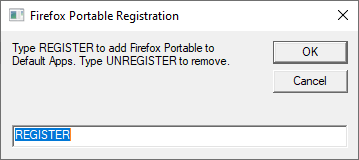
That’s it! Firefox Portable is now listed on Default Apps
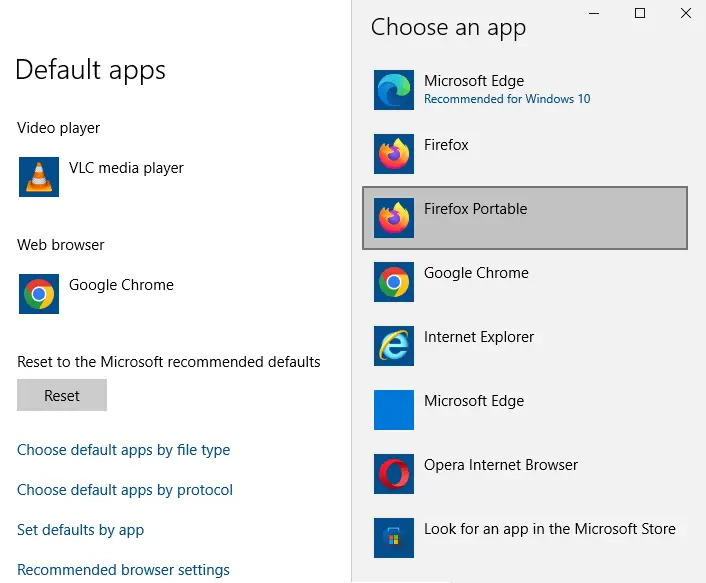
 You can customize the default app name by which the program appears in Default Apps or Default Programs. To do so, use Notepad and edit the
 ApplicationName value data in line 120 of the VBScript.
Method 2: Using a standalone utility
This method was originally written for Windows Vista but works on all versions of Windows. However, you need to install the legacy version of .Net Framework on Windows 10/11 for this program to work.
- Download registerfp.zip and save it to Desktop.
- Unzip the archive and extract the contents to a folder.
- Double-click the file
RegisterFirefoxPortable.exeto run it. - When you see the User Account Control dialog, click Allow.

- Click the Browse button and locate the Firefox Portable executable
- Click Register
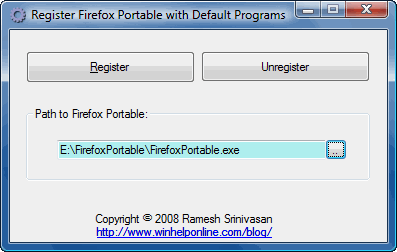
Firefox Portable is now registered with the Default Programs applet.
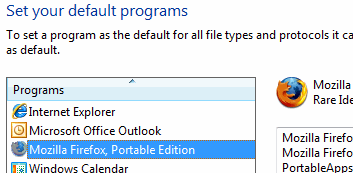
As you can see, “Mozilla Firefox, Portable Edition” entry is now listed on the Default Apps page in Windows 10 Settings. You’ll need to manually click on the web browsers entry in Default Apps and select “Mozilla Firefox, Portable Edition” to set it as default.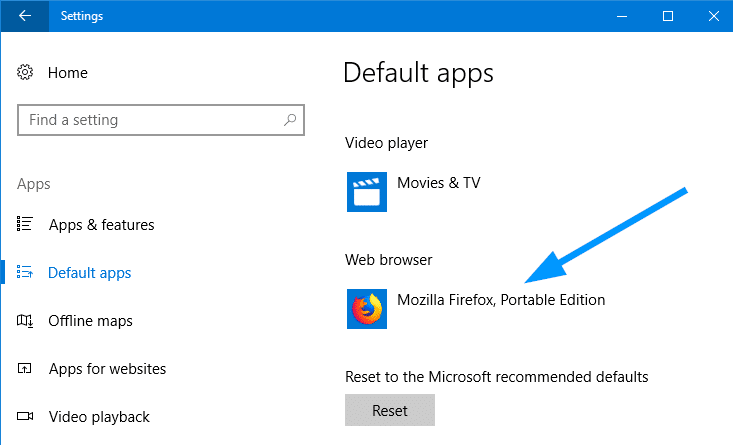
Editor’s note: If the drive letter for your removable device (which contains Firefox Portable) changes, you’ll need to re-register the program using the above script or utility.
One small request: If you liked this post, please share this?
One "tiny" share from you would seriously help a lot with the growth of this blog. Some great suggestions:- Pin it!
- Share it to your favorite blog + Facebook, Reddit
- Tweet it!


worsk even for Opera@USB although the description still reads “Firefox portable” 🙂
It works great for me on Windows 7 Pro. Thanks for building this.
Someone on the portable apps site suggested the following. If this is the case, can you update your registerfp? THANKS!
Did you perhaps make a batch file that uses %1 as the input parameter?
If so, try changing the %1 to “%1” which will force Windows to NOT break the
input string at the space (which is how it sees it as two parameters).
| Link: portableapps . com/node/24299#comment-154531
Very useful.
Now if only we could have a program which could do that for all portable programs 🙂
very useful. thank you
Windows 2008 R2 SP1 + FirefoxPortable 4.0
After using your tool, the register process is ok. But when a FirefoxPortable is running, clicking the link from the 3rd program (eg. MSN), it prompts “Firefox is already running but is not responding”. How to resolve it ?
Woo
You have to point to the launcher for the portable browser not the opera.exe or whatever app, so using say orpera portable you choose launcher.exe not opera.exe, at least it works for me.
Great. But what about Thunderbird as default Email Client?
Would be a great little app if it did both
Thank You
@Pete: For Thunderbird, check out this page:
Register Thunderbird Portable with Default Apps or Default Programs:
https://www.winhelponline.com/blog/register-thunderbird-portable-with-default-apps/
It works perfectly in windows 8 professional 64 bit.
thank you very much
It doesn’t work when using Outlook 2013 when I try clicking on a link in a mail to be opened with FFportable on W8.
It still says “Your organization’s policies are preventing us from completing this action for you.”
Hi, this is great app. Please can you do the same from Thunderbird Portable.
Thank You!!
PD: Sorry for my English
I have used FF for almost a decade now, and got used to browse with my session saved – tabs, windows, and tab groups. And I would never use my main browser with facebook for example, because of tracking etc.
Also, it becomes annoying if you just want to open 1 link you got sent via instant messaging etc., in which case I use a installation of Firefox Portable, but had to start it manually before. Also, program installations and updates like to open the default browser unasked.
Your little tool fixed that for me, thank you very much! 🙂
registerfp.zip did work, but the minute I open crappy chrome it makes itself the default browser
It does not work correctly because essentially it doesn’t really set it as the “Default Browser”. When it does is only associating those files and protocols with ffp.
What it should have done is instead associate ffp with htmlfile, http, and https in classes registry.
It works on Windows 8.1 too.
awsome!!!!!! works in Win 8.1
Used it on Opera portable (just point to launcher.exe in the directory where you keep Opera) then the Opera icon becomes available to associate file type (.htm/.html) and protocol (HTTP/HTTPS)
Works in Win 10 with Firefox portable, thanks Ramesh
Is there a way to do this for other portable apps like VLC for example? Or maybe you could tell us how to do it in the registry on our own.
After using your tool, the register process is ok. But when a FirefoxPortable is running, clicking the link from the 3rd program, it prompts “Firefox is already running but is not responding”. How to resolve it ?
@ich: You may try this question in the FirefoxPortable forums.
https://portableapps.com/node/8546
Thank you very much. I have been using this for many years, working with just one Firefox in a multiboot environment.
No doubt you have spent much time and energy to find out how this works. Could you perhaps use that knowledge to make one for ThunderbirdPortable as well? I think it would be greatly appreciated.
@Rick: For Thunderbird Portable, see:
https://www.winhelponline.com/blog/register-thunderbird-portable-with-default-apps/
Worked, thank you!
Download link for registerfp.zip is not working anymore, anyone kindly enough got a backup will be able to upload it? Much thanks!
Old app an still works on all browsers
when i use this to open certain links, it will says instance of firefox portable is already running, but it is working when i use chrome portable. is there any workaround?
If you run this through VirusTotal it is detected as malicious. DO NOT use!!!
@Joreka: It’s a false positive!
In VirusTotal.com, only one engine “SecureAge APEX” (incorrectly) flags it as malicious. It’s cleared by all other virus scanning engines.
And, I find that the “SecureAge APEX” (a new AI engine) raises false flags for many other programs, too:
https://www.reddit.com/r/Malware/comments/g7rhuo/app_is_marked_malicious_on_vt/
https://www.reddit.com/r/antivirus/comments/et0h4p/secureage_apex_is_fp_or_i_have_problems/
https://www.reddit.com/r/antivirus/comments/iboews/secureage_apex_will_it_give_me_problems_how_do_i/
https://www.reddit.com/r/antivirus/comments/hpmylb/secureage_apex/
https://github.com/molenzwiebel/Deceive/issues/11
“If you see only a handful of positives you can assume that those are false positives.”
I’ve anyway reported the false positive at SecureAge’s website. Shall update once I get a report from them!
RegisterFP needs needlessly an old .NET which needs to be installed. For simple Reg hacks like this no bloatet runtime lib shoud be needed.
Thank you so much for this handy tool! It was indeed the only one, which does the job.
Inspired by this, I coded a new one, with configurable Names, types and protocols, to fit all required needs of you portable users.
Check it out:
https://github.com/sil3nc3/PortableRegistrator
This works!
Thank you for providing the solution to get Firefox Portable registered as default web browser.
You’re most welcome, DJohnson.