 |
| TZ110 |
Panasonic
released the TZ110 (a.k.a. TZ101, TZ100, ZS100 and TX1) and
the TZ80 (a.k.a. TZ81, ZS60) at the same
time, March 2016. They are very close in size, have the same general shape and
they even use the same Operating Instructions.
In the past Panasonic would release TZ series cameras
in pairs, one with slightly higher, the other with slightly lower,
specification.
But this time each model of the pair has a very different
sensor, price point and zoom range.
The exercise of this post is to show that what might
seem at first to be minor differences in detail between the cameras can, and in
this case do, have quite significant
effects on the overall user experience.
I have been working with both cameras side by side for
several weeks, making several thousand exposures with each. So I have become
very familiar with the holding, viewing and operating characteristics of both.
It quite often occurs to me that there are
similarities between the analysis of camera ergonomics and aircraft crash
investigation. In each case problems may
begin with a decision early in the design of the device, leading to a sequence
of compensatory decisions ultimately resulting in a crash in the case of the
aircraft or ergonomically suboptimal
operation in the case of a camera.
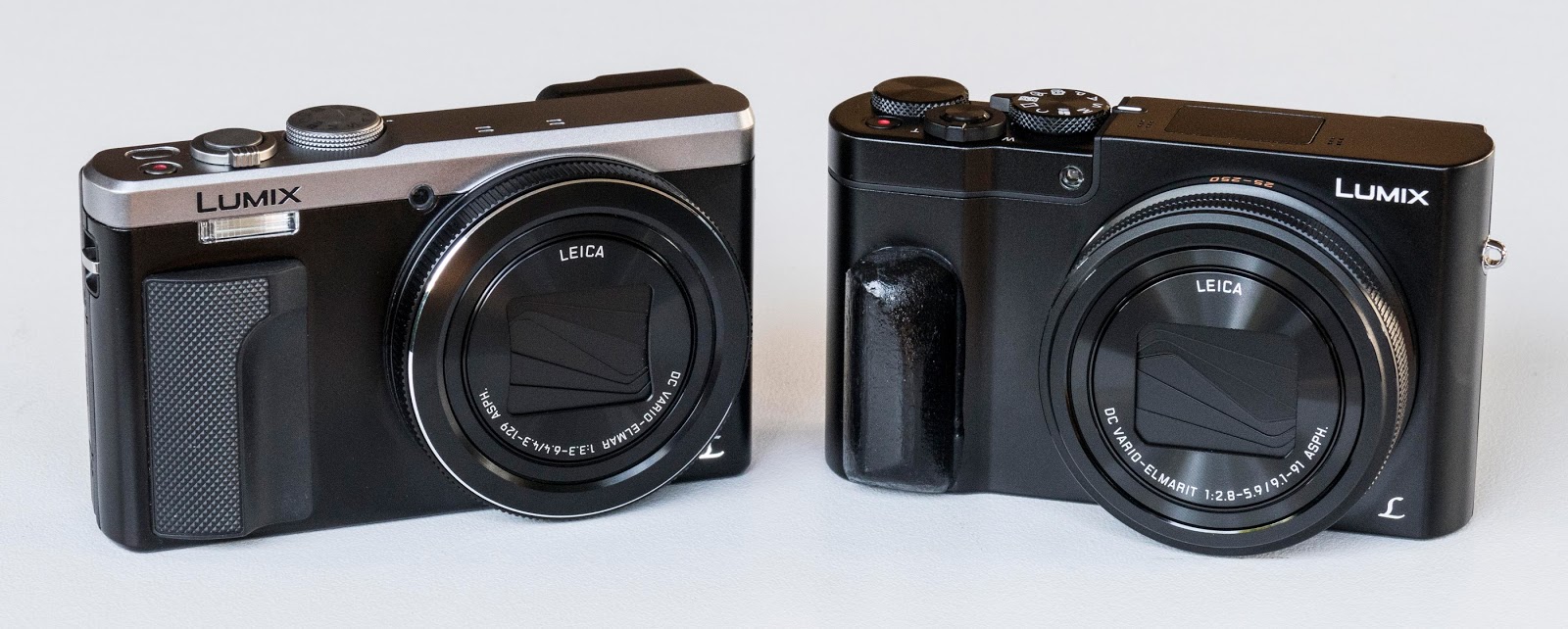 |
| TZ80 on the left, TZ110 on the right. Not quite identical. The handle on the TZ110 is a custom addition by me. |
Dimensions
|
|
Width
mm
|
Height
mm
|
Depth
incl EVF mm
|
Mass
grams
W/Batt,card
|
|
TZ80
|
112
|
66
|
39
|
280
|
|
TZ110
|
110
|
64.5
|
48
|
315
|
The TZ80 and TZ110 each fit easily into a Lowe Pro
Portland 20 belt pouch (first cut out the red divider with a sharp knife).
There is room for several memory cards and one (TZ110) or two (TZ80) spare
batteries.
Let us examine some of the design decisions which
affect the user experience of these two cameras.
Some of these (like the curved ends on the TZ110)
might seem trivial at first glance but actually have significant consequences.
Others (like the non- handle on the TZ110) might be
more immediately apparent to a larger cohort of users.

The
handle (or lack of
one in the case of the TZ110)
On the front of the camera to the right (as viewed by
the operator) of the lens the TZ80 has a small but useful handle. It is made of
grippy material which permits the user to get a decent hold on the device. If I were the designer I would make that
handle a few millimetres deeper and a
few millimetres closer to the lens for an even better grip.
The TZ110 does not have a salient handle at all. The
front surface of the body is smooth and slippery with a soft vertical ridge
2.5mm high between the lens and the right edge of the body. Many users have
complained about this on forums. There is now a thriving do-it-yourself mini
industry in solutions to the problem which Panasonic could and should have
avoided at the design stage of product development by the simple expedient
of providing a proper handle.
 |
| TZ110 control panel showing custom thumb bar. The curved end reduces the width of the control panel so much that there is insufficient space for a thumb support. |
Curved
ends
Someone in their wisdom decided to bless the TZ110
with curved ends. Us mere users have no
idea why.
The TZ80 has part curved, part straight ends.
So what ?
The curved ends encroach on the width of the flat part
of the rear of the camera.
Therefore there is less space on the TZ110 for the
Control Panel. This is the part of the rear of the camera between the monitor
and the right side, host to most of the control modules.
The Control Panel of the TZ80 is 25mm wide. That on
the TZ110 is 19mm wide. That 6mm difference might not sound like much but this
is the most crowded part of the camera and every bit of space is important.
In particular there is insufficient space for a thumb
support on the TZ110 whereas the TZ80 has space for a decently functional one.
So the TZ110 has no salient handle and no thumb
support.
When I use the two cameras side by side the TZ80
clearly easier, more comfortable and more secure to hold.
I wonder why
the premium priced product was given less effective holding arrangements than
the budget model.
I wonder
whether anybody in the TZ110 design team actually used the camera before
releasing it to a distinctly unimpressed user cohort.
 |
| TZ80 control panel. Sufficient space for a decent thumb support and better button spacing. |
Rear
Dial
Both the TZ80 and TZ110 have a twin dial control
system. This is pretty hot stuff for compact cameras, allowing the user a high
level of control over primary and secondary exposure and focussing parameters.
Even entry level DSLRs often have only one control dial and a lower level of
user control than the TZ compact duo.
Each has a dial in the form of a ring around the lens
barrel.
But the FZ110 has a rear dial on the top plate while
that of the TZ80 is around the Cursor Buttons (a.k.a. 4 way controller).
Is one easier, more efficient or in some way better to
use than the other ?
Before going further I will say two things:
1. The optimum location for a rear dial is that seen
on the Panasonic FZ1000 and GH3/4, that is; embedded in a broad thumb support.
This allows the thumb to work the dial without having to bend and without the
need to shift grip with the right hand.
There is simply not sufficient space on a compact
camera for this configuration. So the rear dial must be placed somewhere on the
top plate or around the 4 way controller.
2. The controls of both these cameras would be vastly
improved if a JOG lever (a.k.a. Joystick) was provided. The purpose of this is
to directly move the position of the active AF area without having to press any
other control first, without having to use the 4 Way Controller and without having to use a workaround such as ‘Touch
Pad AF’.
The optimum location would be right where the AF/AEL
button now is on the TZ110 and centered on the F of the LVF button on the TZ80.
My strong view is that all cameras would be greatly improved
by incorporation of a well designed, and well located JOG lever.
Getting back to the rear dials:
Those on the TZ110 and TZ80 are multifunctional and
mode dependent.
In Capture Phase of use their functions include:
* Changing aperture or shutter speed in A, S and M
Modes.
* Applying exposure compensation if thus configured at
[Ring/Dial Set] in the Custom Menu.
* Changing size of the AF area. This can be done with the touch screen but
that is awkward, particularly with eye level viewing and requires the right
hand to be removed from the camera altogether.
Neither dial is well positioned to carry out all these
tasks efficiently.
On the TZ80 the right thumb has to drop down 50mm to
work the dial. But once there it can
work the 4 Way controller and reach the adjacent Disp button with no trouble.
On the TZ110 the dial is 50mm above the 4 way
controller and 60mm above the Disp button. So if you are using the rear dial to
alter AF Area size and the Disp button to recenter the AF area and return it to
default size, the right thumb has to travel from the 4Way Controller (or middle
of the monitor screen if Touch Pad AF is used), up to the rear dial then down
to the Disp button. All this disrupts the flow of picture taking, forces the
right hand to relinquish grip on the camera and requires eyes on the thumb
because the Disp button is difficult to locate by feel.
The rear dial on the TZ110 is the easier of the two to
use in portrait orientation.
After using both cameras side by side for several
weeks I find both get the job done, neither in a particularly elegant fashion (see
below for further comment about this) and on balance the TZ80 arrangement is
slightly more user friendly.
Bevelled
edges
The TZ80 has bevelled edges all round. The TZ110 has
sharpish edges to the top and bottom plates.
To the casual observer this may seem like a mere styling issue. However
the TZ80 is more comfortable to hold. This is partly due to the handle and
thumb support as described above but also partly due to the bevelled edges
which are easier on the hands and fingers.
TZ110
Recessed AF/AE Lock button
This button can be handy in several situations. I use
it to lock focus and exposure before making a series of exposures intended to
be stitched to make a panorama in Photoshop.
The TZ80 has space for such a button but does not have
one.
The TZ110 does have one but it sits in a recessed area
of the back between the monitor and the Mode Dial. What the right thumb wants to do in order to
press this button is swing left from the basic hold/operate position and find
the button without having to flex the interphalangeal joints because doing so
disrupts grip on the camera.
What actually happens is that if touch screen is ON, the thumb touches the upper right corner of
the monitor sending the AF Area to that position, which is not the desired
action , but cannot press the AF/AEL button as it is recessed.
So to press the AF/AEL button without sending the AF
Area to the corner the right hand has to release hold on the camera and lift up
so the thumb can flex to put the tip of the thumb onto the AF/AEL button.
All this is unnecessarily complex and could easily
have been avoided by better detail design of the controls.
Flash
Both cameras have a built in flash which can be handy
at times.
That on the TZ80 is fixed and located just above the
handle as on previous models in this series. Presumably this location makes the
flash unit robust and of low production cost. Unfortunately it is located
directly behind the third finger of the right hand. So to use the flash the
right hand must change grip completely prevent the fingers from obstruction the
light.
The pop up unit on the TZ110 is more user friendly but
no doubt cost more to produce.
Cursor
button module (4 way controller)
Panasonic is forever changing the design of its cursor
button modules for reasons completely beyond my comprehension. They have two versions which work well:
When there is a rotating dial around the cursor button
cluster, the design found on the TZ80 and LX100 works very well. The raised
edge of the dial with serrated upper surface is easy for the thumb to locate
and operate by feel.
When there is no dial incorporated into the cursor
button group the ‘rocking saucer’ type found on the FZ1000 is the best type in
my experience. The sharpish raised edge of the module is easy to locate and
operate by feel.
Unfortunately Panasonic does not use this design in
all the cameras where it would be appropriate.
They experiment incessantly with
modules having 4 separate outer buttons and one central one. The latest version
of this is found in the TZ110. This is serviceable but the process of locating
and operating the buttons is not as positive as is the case with the FZ1000 and
TZ80. The module on the TZ110 gives the thumb less tactile feedback. Thus when
using the TZ110 I am always less
confident that I am hitting the desired button than is the case with the TZ80
or FZ1000.
Touch
screen operation
Both the TZ80 and TZ110 offer a range of touch screen
operations and they work the same way on each camera, with the same advantages
and disadvantages on each.
I will discuss this in more detail in a post on
setting up the TZ110.
Monitor screen surface
This is not exactly an ergonomic issue but I had to
find some place for it. Although nominally the same, the monitors of the two
cameras are actually slightly different.
That on the TZ80 has a very smooth glossy surface
which resists picking up fingerprints and dirt. But the TZ110 monitor has a
different surface which picks up fingerprints, dust and dirt more readily. A minor issue no doubt but something I
noticed very quickly.
Strap
lugs
This is another minor issue but these little details
do accumulate. The strap lugs on the TZ80 are of the ‘handle’ type almost flush
with the outer surface of the body. The lugs on the TZ110 are of the outside
loop type which protrude from the body.
Zoom
lever
The zoom lever on the TZ80 is twice the size of that
on the TZ110, with four distinct lands on the upper and front surfaces. It is
easier and more comfortable to operate than that on the TZ110. Again this might
sound as though I am quibbling about a minor detail but when using these
cameras that zoom lever is in constant use and is just one of the many design
details which make the TZ80 more user friendly than the TZ110.
The
vanishing zebras
Both cameras have zebras which is a wonderful thing
for evaluating highlight exposure pre-capture. They may be the first compact
cameras to have this very useful feature.
Unfortunately there is a glitch in the way zebras are
implemented in each of these cameras.
The zebra display vanishes while you are in the
process of applying exposure compensation and reappears after the compensation
has been applied.
On the FZ1000 for instance the zebra display behaves
the way you want it to do which is to remain active while exposure compensation
is being applied.
Which
way is value up ?
Human brains develop spatial cognitive patterns and
expectations. For instance we expect that a motor vehicle will turn to the
right when the steering wheel is rotated clockwise. If some vehicles were
configured to turn left with clockwise rotation the resulting carnage on the
roads would make a war zone look mild by comparison.
Cameras have the ability to control many exposure,
focus and other parameters. Each of these has a value up< >value down
dimension.
For instance as shutter speeds change from, say 1/20
to 1/30 to 1/40 second I think most humans would regard that as a ‘value up’
transition. Even though 1/40 second is obviously a shorter exposure time than
1/20 second the ‘number’ increases as does the ‘speed’. We say that 1/40 second is a ‘faster’ shutter
speed then 1/20 second.
I think most humans would also regard a progression of
apertures from, say, f2 to f2.8 to f4 as a ‘value up’ transition for the same
reason. The numbers increase even though the actual aperture decreases.
An ISO sensitivity sequence is more straightforward:
progression from ISO 100 to 200 to 400 is obviously ‘value up’.
Similarly zooming from focal length 20mm to 40mm to
60mm is obviously ‘value up’.
These values are controlled by the lens ring and rear
dial.
I would expect that to produce ‘value up’ the lens
ring and/or rear dial should rotate so that
the top of the lens ring and rear aspect of the rear dial move to the
right. Ergonomically, the finger working
the dial moves to the right.
But on the TZ80 and TZ110 the opposite happens.
But not always. When the rear dial of the TZ110 is
used to adjust exposure compensation it works the way I expect it to:
Pushing the rear face of the dial to the
right produces ‘value up’.
All this is confusing, inconsistent and completely
un-necessary.
Again I wonder if the people who produced these
cameras actually used them before release.
Summary
The TZ110 and TZ80 are feature rich compact cameras
with a level of user control greater than many ILCs.
With practice the user can operate each efficiently.
However there are several ways in which the ergonomics
and user experience of each could easily be improved.
Some relate to glaring and silly faults such as the
TZ110’s missing handle and thumb support.
Others are the result of minor but cumulatively
significant design decisions all of which could easily have been avoided or
rectified in pre release evaluation of the user experience assuming there was
any.










Add a comment