
はじめに
ディープラーニングによる画像認識技術が、人レベルに達するかもしれない(一部では超えている)と賑わっている事もあり、身近なところでその技術を使って遊んでみたくなりました。
自分がいない時に庭がどうなっているのかふと気になってので、自動撮影カメラを作ってみました。
制作物
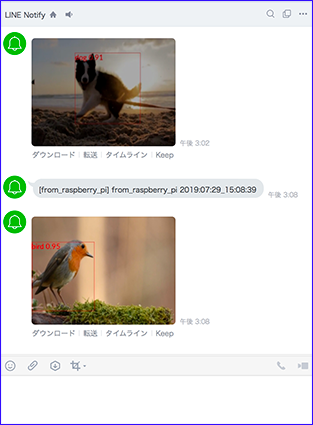
カメラを24h起動し、設定した物(今回は、猫、犬、鳥にしました。)が映っている間だけ録画をするというシステムです。録画が完了すると、録画したファイルをメールで送ると同時に、そのサムネイル画像をLineで送るというシステムです。その後再び検出するまで、待機します。

カメラに複数のカテゴリーが同時に映る(例えば、猫と犬が同時に映る)可能性があるため、画像分類ではなく、複数の物の判定が容易なObject Detectionを採用しました。
- Object Detectionイメージ

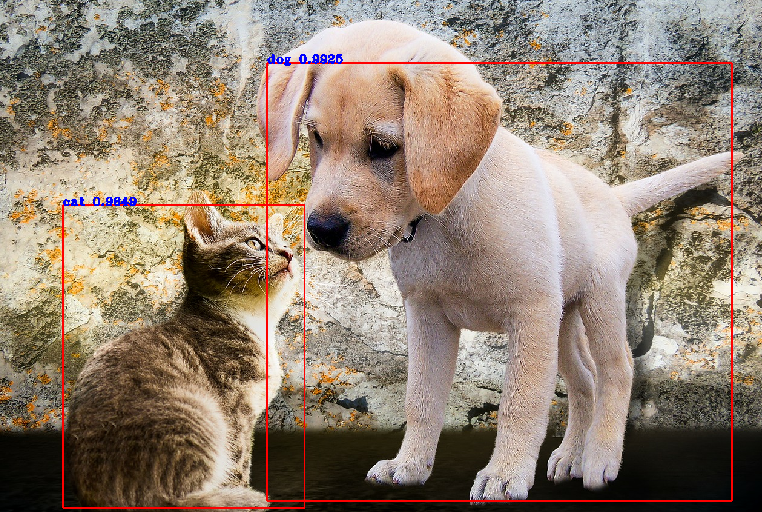
映っている物の認識
ディープラーニングをRaspberryPiで処理すると重すぎてリアルタイム処理が困難なため、Googleが開発したTPUを外部接続(USB接続)するタイプである、Coral TPU USB Acceleratorを使用しました。

また使用したモデルは、COCOデータセットでトレーニング済みのTensorflow LiteモデルMobileNet SSD v2です。
部品構成
必要な部品は以下になります。
- 部品一覧
| 部品 | 数量 |
|---|---|
| Raspberry Pi3 Model B+ | 1個 |
| ロジクール ウェブカメラ C270 | 1個 |
| Coral TPU USB Accelerator | 1個 |
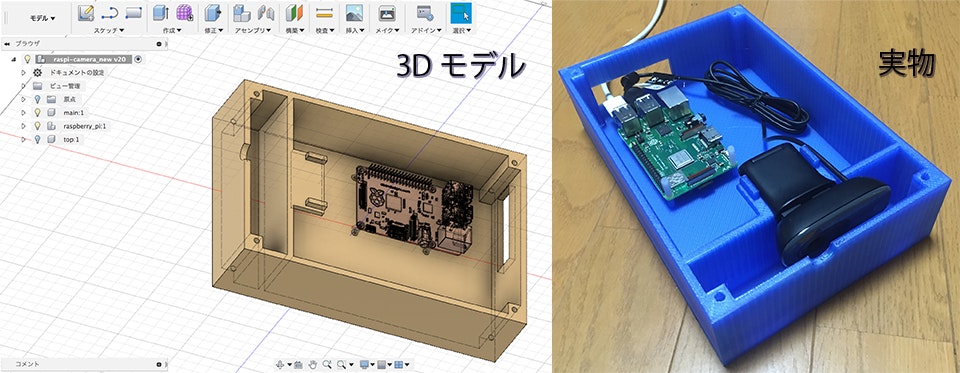
| ケース(3Dプリンタで自作) | 1個 |
- ケース制作は3Dソフト(Fusion360)にて3Dモデル作成後、自宅の3Dプリンタにて制作。(フタも有り)

クラス図
- プログラム自体のコード量は少なくクラス数も少ないため、アーキテクチャー的な設計はしませんでした。
- コアであるObject Detection機能とサムネイルや動画の送信は、将来手段が変わる可能性を考慮し、デザインパターンのStrategyにて設計しています。
- またサムネイル、動画送信は、マルチプロセスで処理しています。


主なクラスの役割
- Detector: Object Detectionによる画像判定
- RaspPiCamera: カメラから画像をひたすら取得
- FlameImage: カメラ画像等のデータクラス(DTO)
- FlameImageProcessor: 画像処理関係(録画したり、メール、サムネイル送信の指示したり)
- MonitorController: 上記クラスのコントローラに加え、カメラ画像をモニターに表示(単一責任の原則に反してますが・・)
※ 作者が把握しやすいように、Javaみたいな表現(List<?>等)をしています。
プログラム
コアであるObject Detection部
インターフェイス(Strategy使っているため必要) detector.py
Pythonはインターフェイスがないため、クラスで抽象メソッドのみを記述する事で代用
import abc

class Detector(metaclass=abc.ABCMeta):
    @abc.abstractmethod
    def judge(self):
        pass
継承クラス object_detection.py
from edgetpu.detection.engine import DetectionEngine
from PIL import ImageDraw, ImageFont
from detector import Detector

class ObjectDetection(Detector):

    def __init__(self, flame_image, threshold=0.5):
        self.flame_image = flame_image
        self.threshold = threshold # 確信度の閾値
        self.detection_class = [15, 16, 17] # 検出したいクラスを指定 犬、猫、鳥
        # Initialize engine.
        self.engine = DetectionEngine('/home/pi/Downloads/mobilenet_ssd_v2_coco_quant_postprocess_edgetpu.tflite')
        self.labels = self._read_label_file('/home/pi/Downloads/coco_labels.txt')

    def judge(self):
        detected_classes = []
        # カメラで撮影したフレーム画像を取得
        image = self.flame_image.get_raw_flame()
        draw = ImageDraw.Draw(image)
        # Object detection 解析
        answer = self.engine.DetectWithImage(image, threshold=self.threshold, keep_aspect_ratio=True,
                                     relative_coord=False, top_k=10)
        if answer:
            for obj in answer:
                if self.labels:
                    # 設定した物のみを検出する。
                    if not obj.label_id in self.detection_class:
                        continue
                    else:
                        detected_classes.append(self.labels[obj.label_id])
                # 検知した事を表示
                print('Detected Object: ', self.labels[obj.label_id])
                print('score = ', obj.score)
                # 画像に、Object Detectionの情報を書き込む
                self._draw_detection_information_to_image(obj, draw)
            # Object Detectionの情報入り画像を記録
            self.flame_image.set_flame_with_rectangle(image)
            # 検知したクラスを記録
            self.flame_image.set_detected_classes(detected_classes.copy())
        return len(detected_classes)


    def _draw_detection_information_to_image(self, detected_object, image_draw, draw_color='red', fill_color='red'):
        box = detected_object.bounding_box.flatten().tolist()
        print('box = ', box)
        # 検知したオブジェクトを四角で囲む
        image_draw.rectangle(box, outline=draw_color)
        # 検知したオブジェクトの種類と確信度を画像に表示
        font = ImageFont.truetype('/usr/share/fonts/truetype/lato/Lato-Medium.ttf', 32)
        image_draw.text((detected_object.bounding_box.flatten()[0], detected_object.bounding_box.flatten()[1]),
                  self.labels[detected_object.label_id] + ' ' + str(round(detected_object.score, 2)), fill=fill_color, font=font)

    def _read_label_file(self, file_path):
        with open(file_path, 'r', encoding="utf-8") as f:
            lines = f.readlines()
        ret = {}
        for line in lines:
            pair = line.strip().split(maxsplit=1)
            ret[int(pair[0])] = pair[1].strip()
        return ret
Object Detection部分は、公開されているAPIを使用しています。
DetectWithImage(image, threshold=self.threshold, keep_aspect_ratio=True, relative_coord=False, top_k=10)
- 引数:
- image: PIL.Image
- threshold: 確信度を閾値を設定(これ以上の確信度でないと検知しない)
- keep_aspect_ratio: ニューラルネットワークに入力するため画像サイズを変更する際に、画像のアスペクト比を同じにする(True)かどうか
- ralative_coord: 検出した位置情報を0〜1で返す(True)かどうか
- top_k: 何個、検出するか
- 戻り値: 検出した物の情報(DetectionCandidate型)
撮影されたもの
3週間撮影しても、何も映らない・・
寂しい庭です(笑)
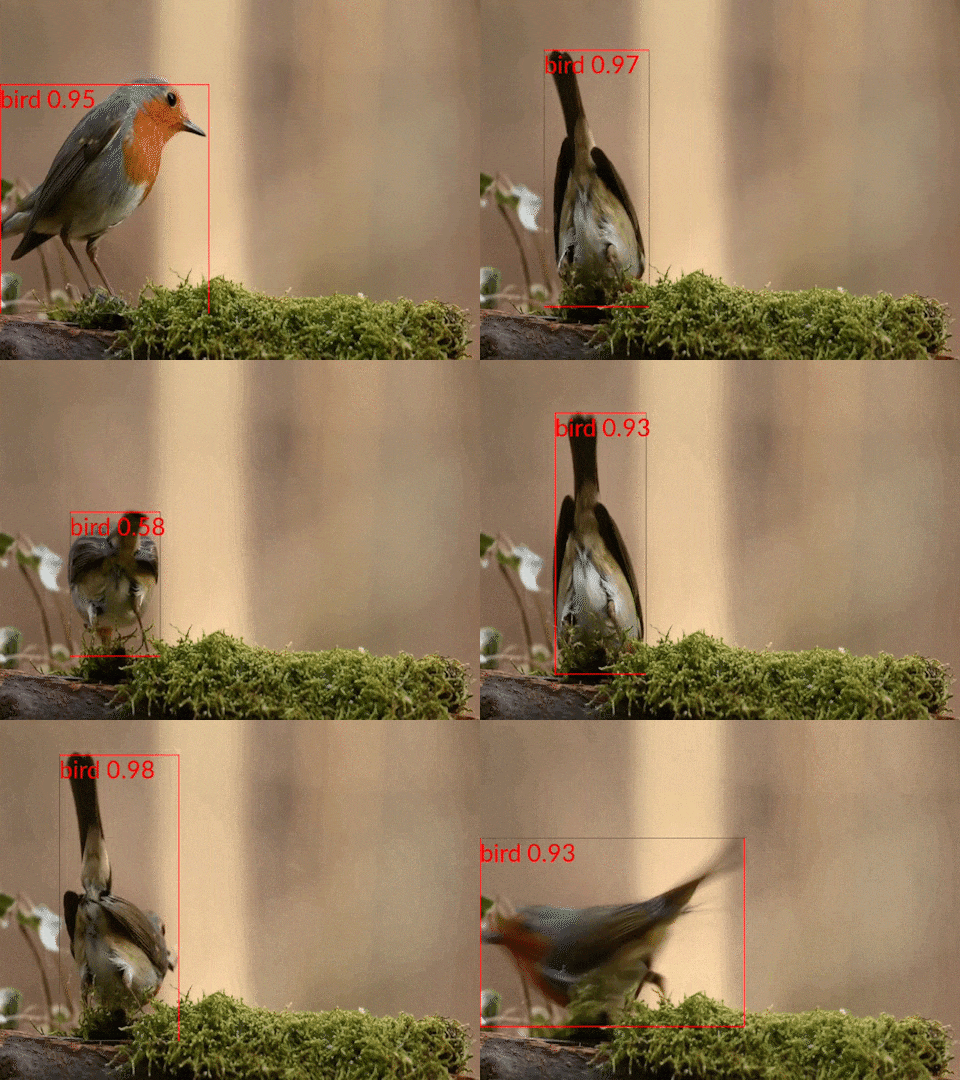
代わりに、フリー動画サイトでダウンロードした動画を本装置に入力しました。
(下図は、「Lineで受け取ったサムネイル画像」。「メールで受け取った検知動画」です。)
さいごに
このシステム、人間検知に設定をした上で、カメラを外出中の家に設置したら、そのまま防犯カメラになりそう。
