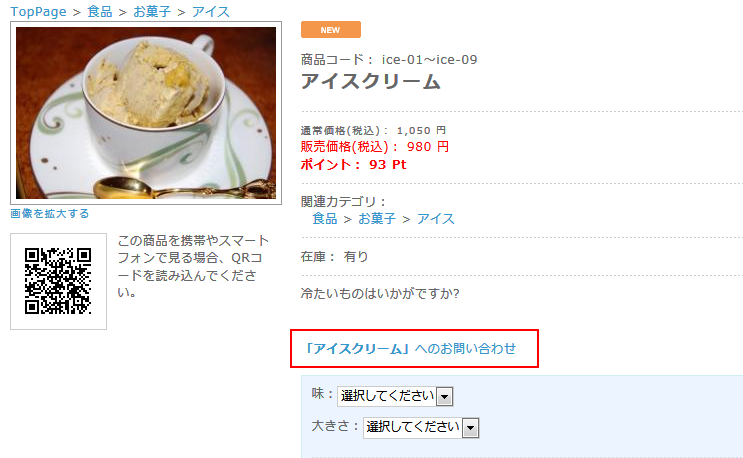
商品詳細ページに、その商品へのお問い合わせリンクを設定し、クリックすると商品情報が入力されたお問い合わせページが開く。
ブロック配置されている「お問い合わせボタン」をクリックしたときは、通常のお問い合わせページへ移動。
 商品詳細ページ
 お問い合わせページ
1 商品詳細ページに、お問い合わせページへのリンクを設定する。
■/data/Smarty/templates/default/products/detail.tpl
2 | <div id="contact_product"> |
3 | <a href="<!--{$smarty.const.ROOT_URLPATH}-->contact/index.php?contact_product=<!--{$arrProduct.product_id|h}-->"><strong>「<!--{$arrProduct.name|h}-->」</strong>へのお問い合わせ</a> |
2 ページクラスに追加
■data/class/pages/contact/LC_Page_Contact.php
function action()メソッド内の最後に追加
2 | $objQuery =SC_Query_Ex::getSingletonInstance(); |
3 | $this->arrRet = array(); |
5 | $contact_product = $_GET['contact_product']; |
7 | if(isset($contact_product)){ |
8 | $arrRet = $objQuery->select("*", "dtb_products", "product_id = $contact_product"); |
12 | $this->arrRet = $arrRet[0]; |
3 お問い合わせフォームに追加
■/data/Smarty/templates/default/contact/index.tpl
(1)「
内容によっては回答をさしあげるのに・・・」の上に追加
2 | <div style="float:left; margin:0 10px 10px 0;"> |
3 | <img src="<!--{$smarty.const.IMAGE_SAVE_URLPATH|sfTrimURL}-->/<!--{$arrRet.main_list_image|sfNoImageMainList|h}-->" alt="<!--{$arrRet.name|h}-->" /> |
5 | <h3>「<!--{$arrRet.name|h}-->」へのお問い合わせ</h3><br /> |
(2)お問い合わせ内容のテキストエリアに追加→「商品名:」について
1 | <textarea name="contents" class="box380" cols="60" rows="20" style="<!--{$arrErr.contents.value|h|sfGetErrorColor}-->; ime-mode: active;"><!--{if $arrRet}-->「商品名:<!--{$arrRet.name|h}-->」について<!--{/if}--><!--{$arrForm.contents.value|h}--></textarea> |