[新機能] Amazon EC2のコンピューティング最適化インスタンスC5が利用可能に


ども、大瀧です。
本日、Amazon EC2の新インスタンスタイプC5がリリースされました。早速試してみた様子をレポートします。
C5インスタンスとは
EC2のインスタンスタイプは割り当てられるハードウェアリソースによって用途別に分類されており、今回追加されたのはコンピューティング最適化の第5世代ということで"C5"です。 コンピューティング最適化では最新世代のCPUが搭載されることが多く、今回もSkylake世代のサーバー向けプロセッサとしてIntel Xeon Platinumシリーズが採用されています。他のハードウェアリソースも、従来のEC2とは異なる新しいものが多く採用されており、旧世代と比較してベース性能のアップが期待できます。
現在は北部バージニア、オレゴン、アイルランドの3リージョンで利用できます。東京にも早く来て欲しいですね。リザーブドインスタンス、スポットインスタンスともに利用可能です。
タイプ毎のスペックを示します。
| タイプ名 | vCPU数 | メモリ(GB) | ディスク種別 | 割り当てEBS帯域幅 | 割り当てネットワーク帯域幅 | オンデマンド価格(オレゴンリージョン、1時間 *1) |
|---|---|---|---|---|---|---|
| c5.large | 2 | 4 | EBS-Only | Up to 2.25Gbps | Up to 10Gbps | $0.085 |
| c5.xlarge | 4 | 8 | EBS-Only | Up to 2.25Gbps | Up to 10Gbps | $0.17 |
| c5.2xlarge | 8 | 16 | EBS-Only | Up to 2.25Gbps | Up to 10Gbps | $0.34 |
| c5.4xlarge | 16 | 32 | EBS-Only | 2.25Gbps | Up to 10Gbps | $0.68 |
| c5.9xlarge | 36 | 72 | EBS-Only | 4.5Gbps | 10Gbps | $1.53 |
| c5.18xlarge | 72 | 144 | EBS-Only | 9Gbps | 25Gbps | $3.06 |
前世代のC4との比較ポイントを示します。
- C4では最大サイズがc4.8xlargeだったので、もう一つ上のサイズ(c5.18xlarge)が追加された。スケールアップの上限が上がるので嬉しい。サイズは2の階乗ではなくなった。
- EBS帯域幅は全体的にアップ。小さいサイズのバースト幅が大きいので、起動時のEBS読み込みがバーストすることで起動のスピードアップに期待。後述のNVMeインターフェース対応もパフォーマンスアップに寄与しそうです。
- ネットワーク帯域幅はR4世代と同等になり、こちらも小さいサイズのバースト幅に期待。ENAサポートもパフォー マンスアップに寄与しそう。
- 価格はC4とほぼ同等。
新しいハイパーバイザー
前述のAWSブログでは、"new hypervisor"という記述があるので、以下のAMIで試してみました。
- リージョン : オレゴン(us-west-2)
- AMI : Amazon Linux AMI 2017.09.1 (HVM), SSD Volume Type (ami-32d8124a)
- インスタンスタイプ : c5.large
$ sudo yum install dmidecode -y :$ sudo dmidecode# dmidecode 2.12SMBIOS 2.7 present.5 structures occupying 233 bytes.Table at 0x000F9E30.Handle 0x0000, DMI type 0, 24 bytesBIOS Information Vendor: Amazon EC2 Version: 1.0 Release Date: 10/16/2017 Address: 0xF0000 Runtime Size: 64 kB ROM Size: 64 kB Characteristics: PCI is supported EDD is supported ACPI is supported System is a virtual machine BIOS Revision: 1.0Handle 0x0001, DMI type 1, 27 bytesSystem Information Manufacturer: Amazon EC2 Product Name: c5.large Version: Not Specified Serial Number: ec2849a8-772c-298f-4730-78fd83b010be UUID: EC2849A8-772C-298F-4730-78FD83B010BE Wake-up Type: Power Switch SKU Number: Not Specified Family: Not SpecifiedHandle 0x0002, DMI type 2, 15 bytesBase Board Information Manufacturer: Amazon EC2 Product Name: Not Specified Version: Not Specified Serial Number: Not Specified Asset Tag: i-06e06031406842fc0 Features: None Location In Chassis: Not Specified Chassis Handle: 0x0003 Type: Other Contained Object Handles: 0Handle 0x0003, DMI type 3, 21 bytesChassis Information Manufacturer: Amazon EC2 Type: Other Lock: Not Present Version: Not Specified Serial Number: Not Specified Asset Tag: Amazon EC2 Boot-up State: Safe Power Supply State: Safe Thermal State: Safe Security Status: None OEM Information: 0x00000000 Height: Unspecified Number Of Power Cords: 1 Contained Elements: 0Handle 0x0004, DMI type 127, 4 bytesEnd Of Table |
おー、DMIは前世代では一般的なXen DomUの表記でしたが、よりEC2独自という感じになりましたね。メタデータでも取れますが、インスタンスIDやインスタンスタイプがDMIで引けるのは何かの役に立つかもしれません。
$ dmesg | less[ 0.000000] Linux version 4.9.58-18.55.amzn1.x86_64 (mockbuild@gobi-build-64010) (gcc version 4.8.5 20150623 (Red Hat 4.8.5-11) (GCC) ) #1 SMP Thu Nov 2 04:38:47 UTC 2017[ 0.000000] Command line: root=LABEL=/ console=tty1 console=ttyS0 selinux=0 nvme_core.io_timeout=4294967295[ 0.000000] x86/fpu: Supporting XSAVE feature 0x001: 'x87 floating point registers'[ 0.000000] x86/fpu: Supporting XSAVE feature 0x002: 'SSE registers'[ 0.000000] x86/fpu: Supporting XSAVE feature 0x004: 'AVX registers'[ 0.000000] x86/fpu: Supporting XSAVE feature 0x008: 'MPX bounds registers'[ 0.000000] x86/fpu: Supporting XSAVE feature 0x010: 'MPX CSR'[ 0.000000] x86/fpu: Supporting XSAVE feature 0x020: 'AVX-512 opmask'[ 0.000000] x86/fpu: Supporting XSAVE feature 0x040: 'AVX-512 Hi256'[ 0.000000] x86/fpu: Supporting XSAVE feature 0x080: 'AVX-512 ZMM_Hi256'[ 0.000000] x86/fpu: Supporting XSAVE feature 0x200: 'Protection Keys User registers'[ 0.000000] x86/fpu: xstate_offset[2]: 576, xstate_sizes[2]: 256[ 0.000000] x86/fpu: xstate_offset[3]: 832, xstate_sizes[3]: 64[ 0.000000] x86/fpu: xstate_offset[4]: 896, xstate_sizes[4]: 64[ 0.000000] x86/fpu: xstate_offset[5]: 960, xstate_sizes[5]: 64[ 0.000000] x86/fpu: xstate_offset[6]: 1024, xstate_sizes[6]: 512[ 0.000000] x86/fpu: xstate_offset[7]: 1536, xstate_sizes[7]: 1024[ 0.000000] x86/fpu: xstate_offset[9]: 2560, xstate_sizes[9]: 8[ 0.000000] x86/fpu: Enabled xstate features 0x2ff, context size is 2568 bytes, using 'compacted' format.[ 0.000000] x86/fpu: Using 'eager' FPU context switches.[ 0.000000] e820: BIOS-provided physical RAM map:[ 0.000000] BIOS-e820: [mem 0x0000000000000000-0x000000000009fbff] usable[ 0.000000] BIOS-e820: [mem 0x000000000009fc00-0x000000000009ffff] reserved[ 0.000000] BIOS-e820: [mem 0x00000000000f0000-0x00000000000fffff] reserved[ 0.000000] BIOS-e820: [mem 0x0000000000100000-0x00000000bfff9fff] usable[ 0.000000] BIOS-e820: [mem 0x00000000bfffa000-0x00000000bfffffff] reserved[ 0.000000] BIOS-e820: [mem 0x00000000e0000000-0x00000000e03fffff] reserved[ 0.000000] BIOS-e820: [mem 0x00000000fffc0000-0x00000000ffffffff] reserved[ 0.000000] BIOS-e820: [mem 0x0000000100000000-0x0000000130dfffff] usable[ 0.000000] BIOS-e820: [mem 0x0000000130e00000-0x000000013fffffff] reserved[ 0.000000] NX (Execute Disable) protection: active[ 0.000000] SMBIOS 2.7 present.[ 0.000000] DMI: Amazon EC2 c5.large/, BIOS 1.0 10/16/2017[ 0.000000] Hypervisor detected: KVM : |
OSが認識するハイパーバイザーとしては、KVMのようです。OS要件としては後述のNVMe、ENAドライバが示されているくらいなので、なるべく仮想ハードウェア構成はXenと互換性を保つようにチョイスされているのかもしれません。
CPU
こちらはスタンダートに/proc/cpuinfoを見てみます。
$ cat /proc/cpuinfoprocessor : 0vendor_id : GenuineIntelcpu family : 6model : 85model name : Intel(R) Xeon(R) Platinum 8124M CPU @ 3.00GHzstepping : 3microcode : 0x100013acpu MHz : 3000.000cache size : 25344 KBphysical id : 0siblings : 2core id : 0cpu cores : 1apicid : 0initial apicid : 0fpu : yesfpu_exception : yescpuid level : 13wp : yesflags : fpu vme de pse tsc msr pae mce cx8 apic sep mtrr pge mca cmov pat pse36 clflush mmx fxsr sse sse2 ss ht syscall nx pdpe1gb rdtscp lm constant_tsc rep_good nopl xtopology nonstop_tsc aperfmperf eagerfpu pni pclmulqdq ssse3 fma cx16 pcid sse4_1 sse4_2 x2apic movbe popcnt tsc_deadline_timer aes xsave avx f16c rdrand hypervisor lahf_lm abm 3dnowprefetch fsgsbase tsc_adjust bmi1 hle avx2 smep bmi2 erms invpcid rtm mpx avx512f avx512dq rdseed adx smap clflushopt clwb avx512cd avx512bw avx512vl xsaveopt xsavec xgetbv1 xsaves ida arat pku ospkebugs :bogomips : 6000.00clflush size : 64cache_alignment : 64address sizes : 46 bits physical, 48 bits virtualpower management:processor : 1vendor_id : GenuineIntelcpu family : 6model : 85model name : Intel(R) Xeon(R) Platinum 8124M CPU @ 3.00GHzstepping : 3microcode : 0x100013acpu MHz : 3000.000cache size : 25344 KBphysical id : 0siblings : 2core id : 0cpu cores : 1apicid : 1initial apicid : 1fpu : yesfpu_exception : yescpuid level : 13wp : yesflags : fpu vme de pse tsc msr pae mce cx8 apic sep mtrr pge mca cmov pat pse36 clflush mmx fxsr sse sse2 ss ht syscall nx pdpe1gb rdtscp lm constant_tsc rep_good nopl xtopology nonstop_tsc aperfmperf eagerfpu pni pclmulqdq ssse3 fma cx16 pcid sse4_1 sse4_2 x2apic movbe popcnt tsc_deadline_timer aes xsave avx f16c rdrand hypervisor lahf_lm abm 3dnowprefetch fsgsbase tsc_adjust bmi1 hle avx2 smep bmi2 erms invpcid rtm mpx avx512f avx512dq rdseed adx smap clflushopt clwb avx512cd avx512bw avx512vl xsaveopt xsavec xgetbv1 xsaves ida arat pku ospkebugs :bogomips : 6000.00clflush size : 64cache_alignment : 64address sizes : 46 bits physical, 48 bits virtualpower management: |
CPUのモデル名はXeon Platinum 8124M。ググってもIntelのカタログは引っかからないので、AWSブログにあるとおりAmazon特注モデルのようです。数字から類推するのは難しいのですが、最大サイズのc5.18xlargeでvCPU数72、/proc/cpuinfoのphysical idでは2CPU、cpu coresが18とあったのでXeon Platinumの最上位モデルよりはより高集積となるバランスの良いスペックを選択したのかなぁと想像します。
EBS NVMe
高い性能を誇るNVMeディスクのEC2でのサポートは、i3インスタンスでのインスタンスストアが既にあります。今回のC5では初めて、EBSのインターフェースとしてNVMeがサポートされました。従来のEBS(Xen仮想ディスク)に比べてドライバ面での性能アップが期待できますね。一方で、NVMeは比較的新しいテクノロジーなので、OS(AMI)がNVMeをサポートするかどうかは確認が必要です。
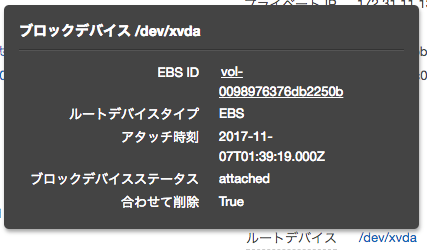
また、NVMeのSNにEBSボリュームIDが含まれるようになったため、インスタンス内部でルートデバイスのスナップショットを取るといったスクリプトが仕込みやすくなりました。
$ sudo yum install -y nvme-cli : $ sudo nvme listNode SN Model Version Namespace Usage Format FW Rev---------------- -------------------- ---------------------------------------- -------- --------- -------------------------- ---------------- --------/dev/nvme0n1 vol0098976376db2250b Amazon Elastic Block Store 1.0 1 0.00 B / 8.59 GB 512 B + 0 B 1.0 |
ただし、AWSブログでJeffが触れているとおりSNの桁数が足らなかったらしく、ボリュームIDのvol-のハイフンが含まれていないので、実行するときには付与してあげる必要があります。
注意: HDDタイプのEBSは現時点で非推奨
AWSブログの末尾に注意書きがあります。NVMeドライバはSSD向けに最適化されているようで、HDDのEBSとは相性が良くないようです。問題として認識済みとのことなので、今後の改善を待ちましょう。
まとめ
EC2の新しいインスタンスタイプ、C5についてご紹介しました。仮想マシンを提供するクラウドサービスは様々ありますが、元祖EC2も日進月歩進化している様子が伺える新タイプでした。
そういえば、試した体感ではインスタンスの起動速度が速くなった気がします。新しいハードウェアコンポーネントになったことでドライバの検出やロードが迅速化されたのかもしれませんね。起動速度を活かしたインスタンスの新しい使い方が現れるかもしれません。
脚注
- 課金は秒単位です

