Karwai Pun is an interaction designer currently working on Service Optimisation to make existing and new services better for our users. Karwai is part of an accessibility group at Home Office Digital, leading on autism. Together with the team, she’s created these dos and don’ts posters as a way of approaching accessibility from a design perspective.
The posters
The dos and don’ts of designing for accessibility are general guidelines, best design practices for making services accessible in government. Currently, there are six different posters in the series that cater to users from these areas: low vision, D/deaf and hard of hearing, dyslexia, motor disabilities, users on the autistic spectrum and users of screen readers.
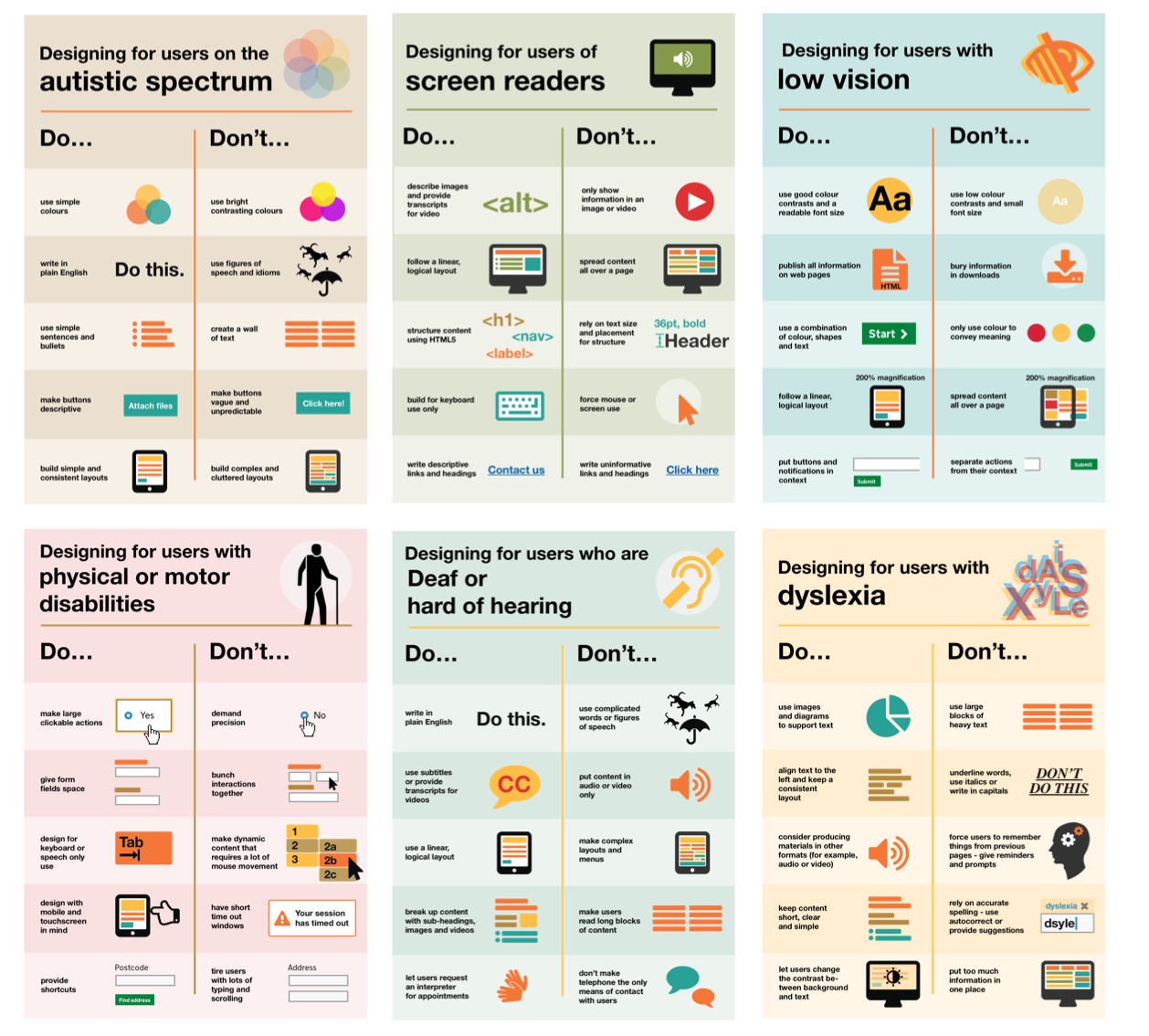
The dos, that run across various posters, include using things like good colour contrasts, legible font sizes and linear layouts. So, aren’t good design principles applicable to everyone and not just those with access needs?
While this is true, the aim of the posters is to raise awareness of various conditions through good design practice. We need to be mindful of not just designing or building for our own immediate needs. For example, consider designing for keyboard use only. This is particularly helpful for users with motor disabilities where using the mouse can be quite difficult, especially with precise movements, whereas keyboard use is much easier.
Another aim of the posters is that they're meant to be general guidance as opposed to being overly prescriptive. Using bright contrast was advised for some (such as those with low vision) although some users on the autistic spectrum would prefer differently. Where advice seems contradictory, it’s always worth testing your designs with users to find the right balance, making compromises that best suit the users’ needs.
The team
The content for the posters came from our accessibility team in Home Office Digital. Led by accessibility leads Emily Ball and James Buller, we are a group of twelve, each specialising on these conditions: blind and visual impairment, dyslexia, autism and ADHD, D/deaf and hard of hearing, mental health and motor disabilities. Collectively, we learn as much of the conditions as we can to better increase our knowledge so they can be shared within and outside the team.
One of the challenges we faced with the posters was gathering information from our different specialisms and reducing the vast amount of knowledge to ten principal dos and dont’s. There's also challenges surrounding content and graphics. I worked with Nick Cowan, a content designer, who is leading on motor disabilities, to keep the content concise and ensure the graphics visibly represented the advice accurately.
Next steps
We’ve shared these posters across government for feedback and they can be found on GitHub.
We are constantly improving and adding to them so please let us know what you think. Understanding accessibility through design means we can build better services for everyone, whatever their access need.
Update: We’ve been asked whether these posters can be reproduced or translated into other languages. In keeping with the the GDS ethos of making things open, we’ve used a Creative Commons license which allows everyone to share, use and build upon the posters provided they are used non-commercially and keep the appropriate attributions (Home Office, Home Office Digital and the Creative Commons logo). It would be great if people can share photos of them being used on Twitter and can commit translations of the posters to our GitHub repository so they’re available for everyone.
What the posters say
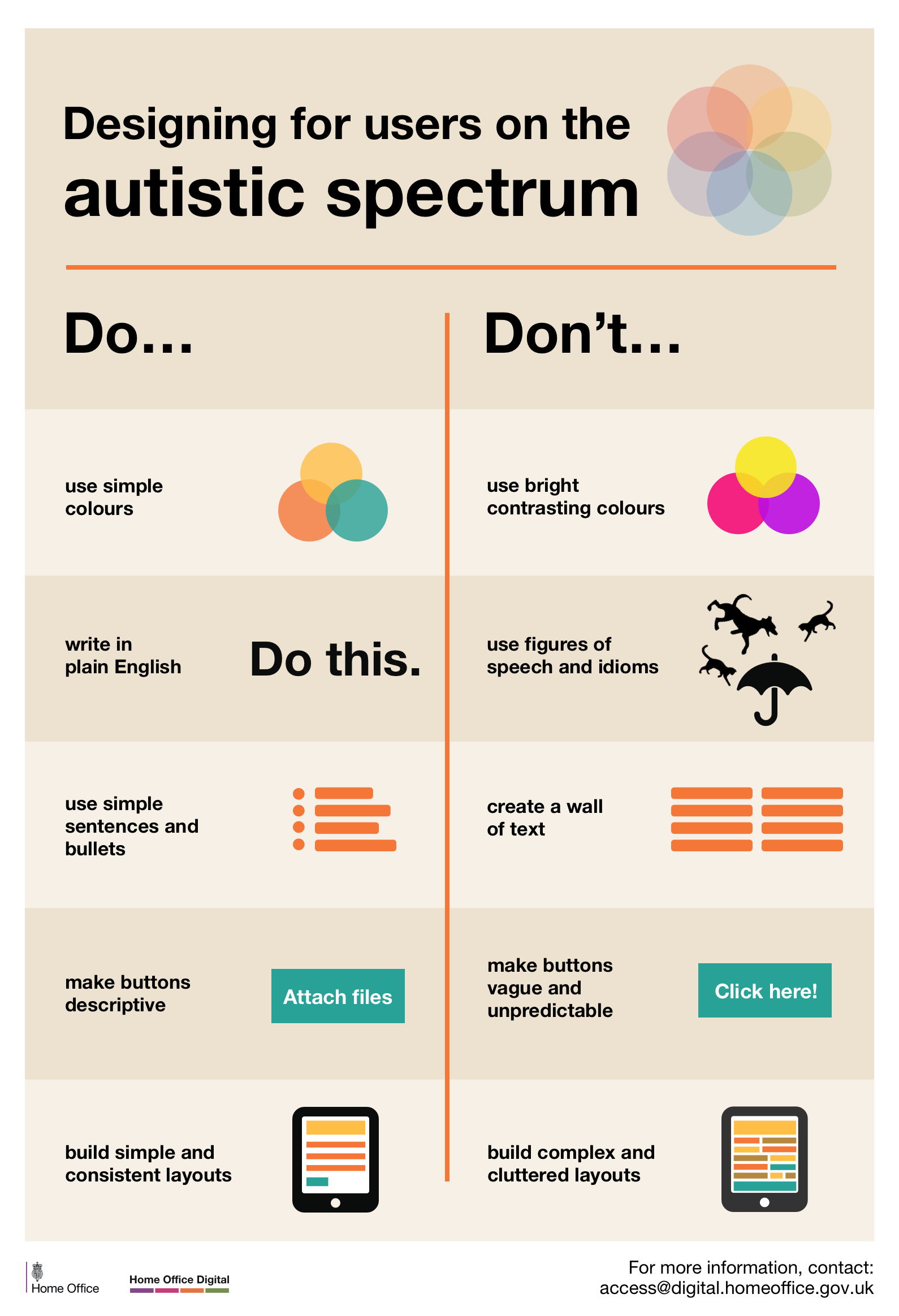
Designing for users on the autistic spectrum
Do
- use simple colours
- write in plain English
- use simple sentences and bullets
- make buttons descriptive - for example, Attach files
- build simple and consistent layouts
Don't
- use bright contrasting colours
- use figures of speech and idioms
- create a wall of text
- make buttons vague and unpredictable - for example, Click here
- build complex and cluttered layouts
View poster for the autistic spectrum
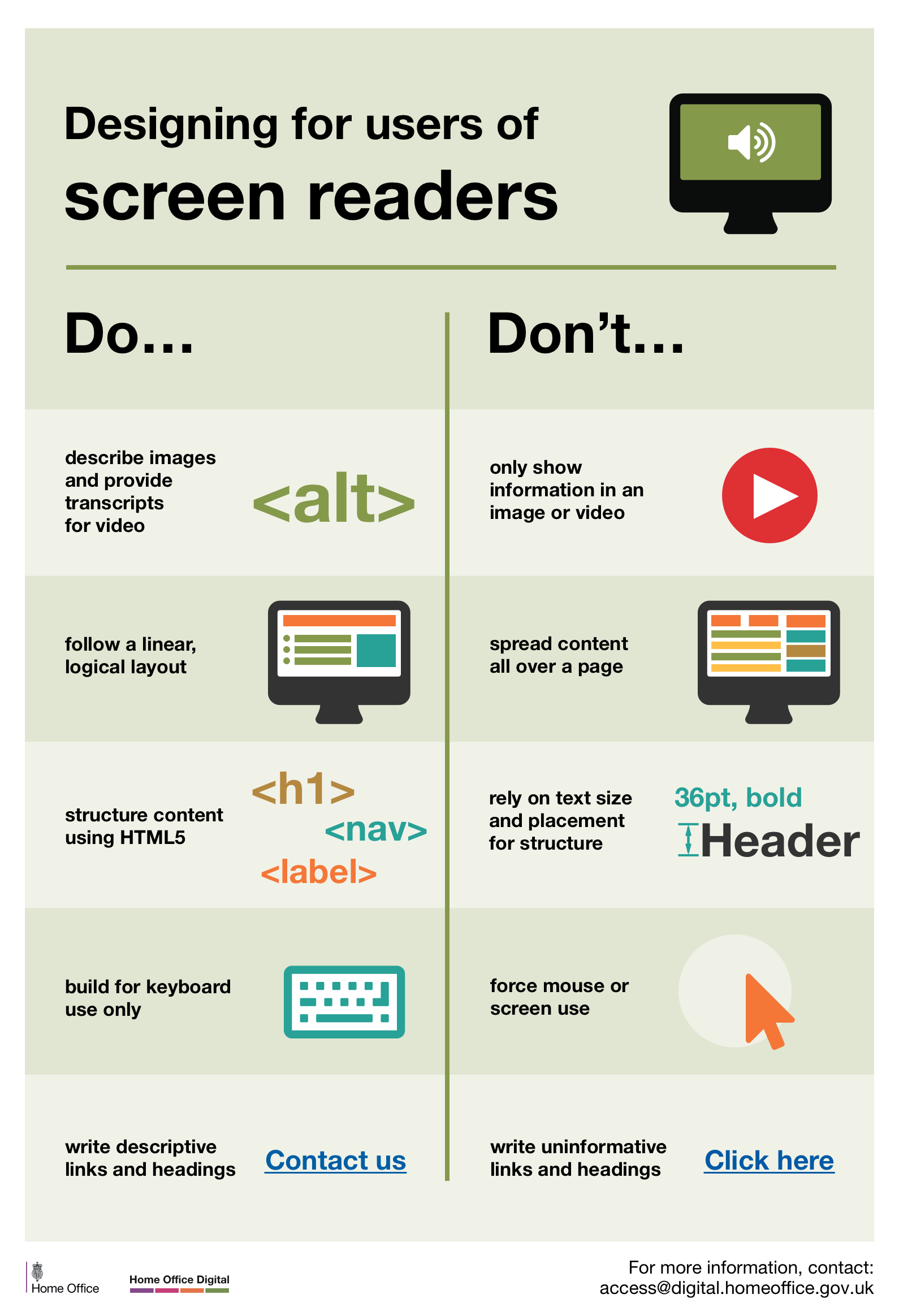
Designing for users of screen readers
Do
- describe images and provide transcripts for video
- follow a linear, logical layout
- structure content using HTML5
- build for keyboard use only
- write descriptive links and heading - for example, Contact us
Don't
- only show information in an image or video
- spread content all over a page
- rely on text size and placement for structure
- force mouse or screen use
- write uninformative links and heading - for example, Click here
View poster for screen readers
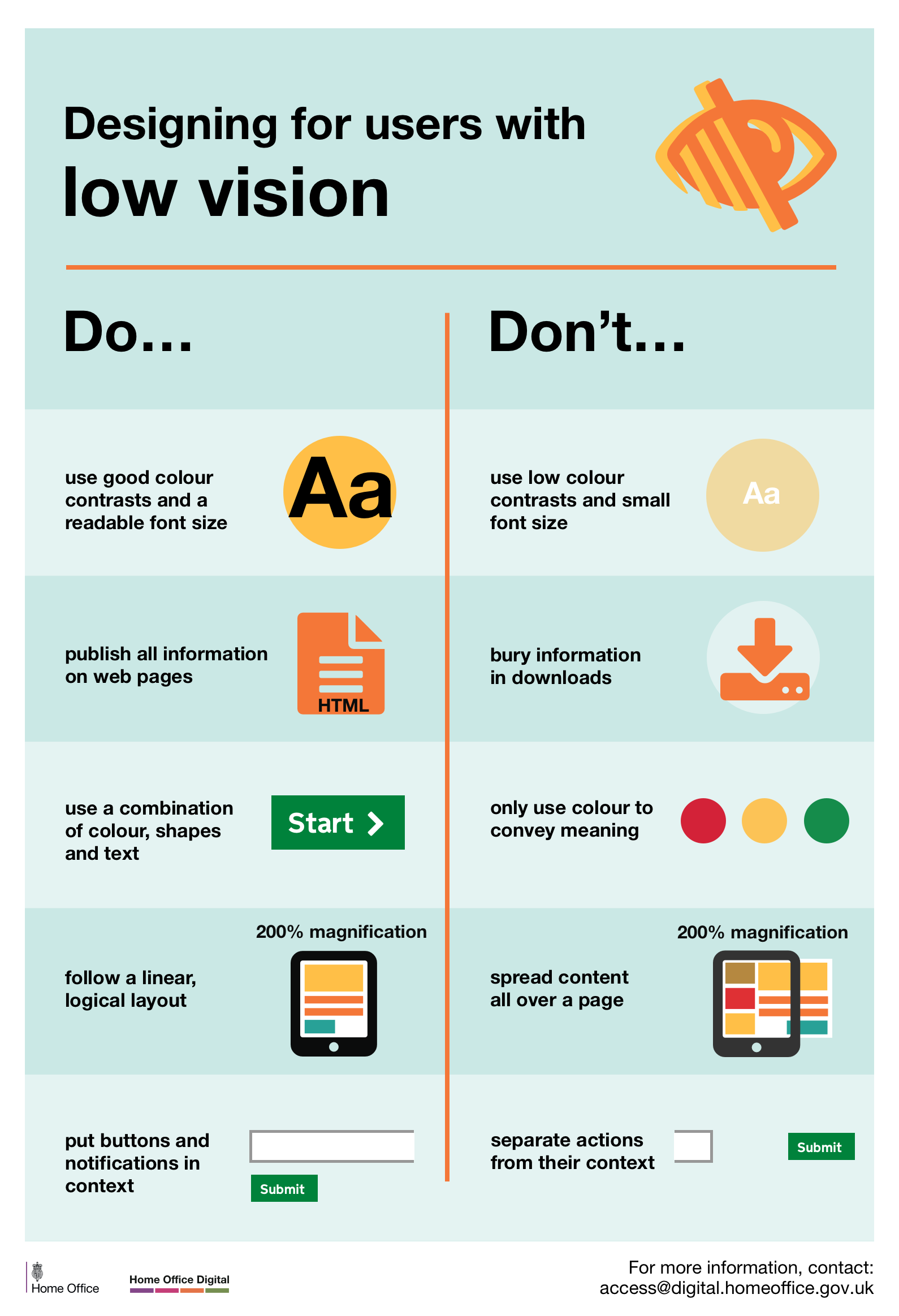
Designing for users with low vision
Do
- use good contrasts and a readable font size
- publish all information on web pages (HTML)
- use a combination of colour, shapes and text
- follow a linear, logical layout -and ensure text flows and is visible when text is magnified to 200%
- put buttons and notifications in context
Don't
- use low colour contrasts and small font size
- bury information in downloads
- only use colour to convey meaning
- spread content all over a page -and force user to scroll horizontally when text is magnified to 200%
- separate actions from their context
Designing for users with physical or motor disabilities
Do
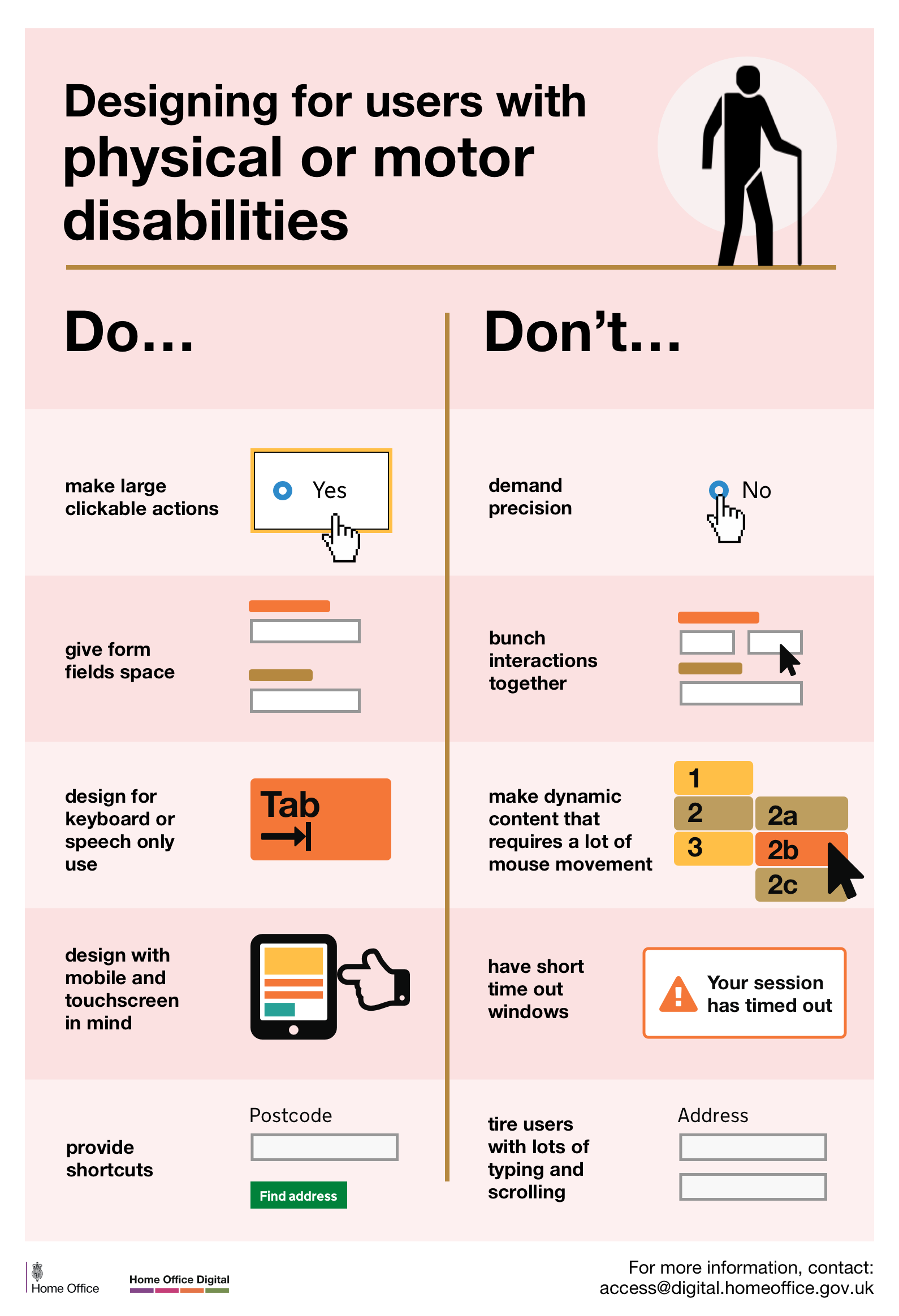
- make large clickable actions
- give form fields space
- design for keyboard or speech only use
- design with mobile and touch screen in mind
- provide shortcuts
Don't
- demand precision
- bunch interactions together
- make dynamic content that requires a lot of mouse movement
- have short time out windows
- tire users with lots of typing and scrolling
View poster for physical or motor disabilities
Designing for users who are D/deaf or hard of hearing
Do
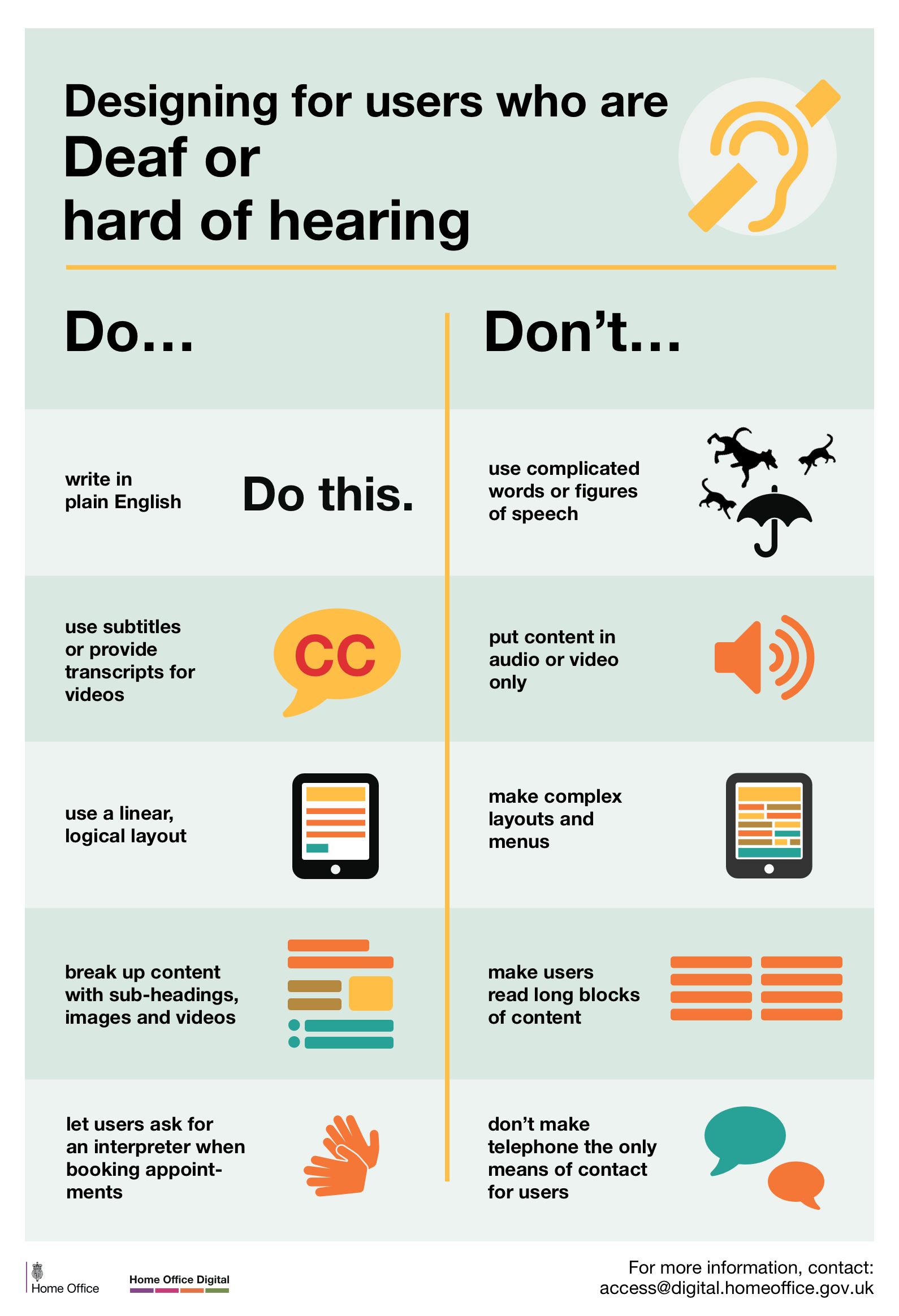
- write in plain English
- use subtitles or provide transcripts for video
- use a linear, logical layout
- break up content with sub-headings, images and videos
- let users ask for their preferred communication support when booking appointments
Don't
- use complicated words or figures of speech
- put content in audio or video only
- make complex layouts and menus
- make users read long blocks of content
- don't make telephone the only means of contact for users
View poster for Deaf or hard of hearing
Designing for users with dyslexia
Do
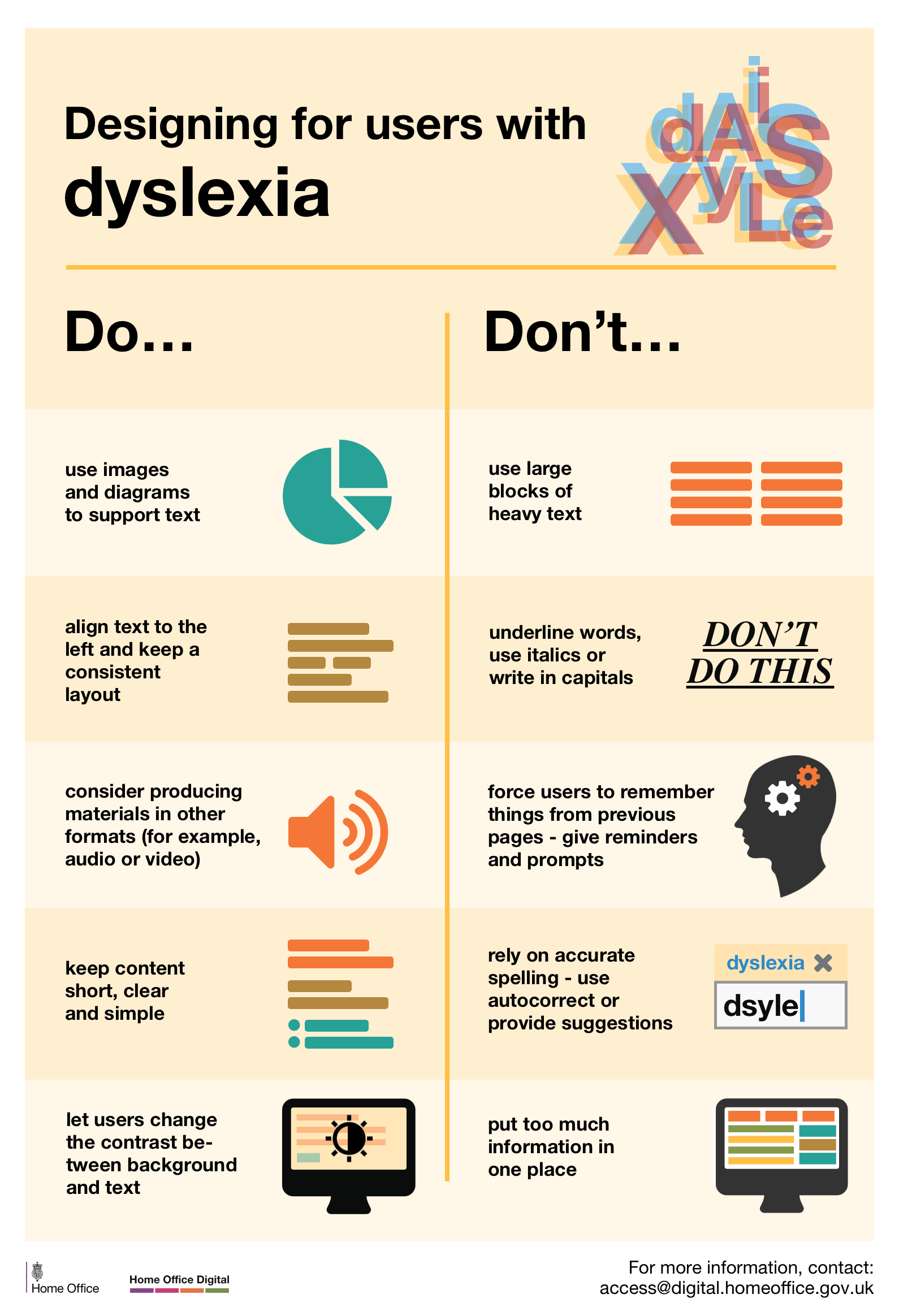
- use images and diagrams to support text
- align text to the left and keep a consistent layout
- consider producing materials in other formats (for example, audio and video)
- keep content short, clear and simple
- let users change the contrast between background and text
Don't
- use large blocks of heavy text
- underline words, use italics or write capitals
- force users to remember things from previous pages - give reminders and prompts
- rely on accurate spelling - use autocorrect or provide suggestions
- put too much information in one place
Follow Karwai on Twitter and don't forget to sign up to email alerts.
74 comments
Darren
Downloaded, printed, and displayed in Dept for International Trade! I loved these when I worked in 2MS and I'm glad you've shared them.
Link to this commentKarwai Pun
Thanks Darren. Glad you liked them.
Link to this commentmukul
nice post.
Link to this commentbernard
Hi Darren,
We'd love if you could take a photo or two to show us them hanging. You can send them to us on Twitter - @hodigital, @krwpn, or @bernardtyers
Link to this commentSimon Hurst
Brilliant work, great job.
Link to this commentKarwai Pun
Thanks Simon. We'll be adding more to the series.
Link to this commentMark Lomas
Great posters and tips!
Link to this commentKarwai Pun
Glad you like them. It's been a hugely collaborative effort with our team here at Home Office Digital.
Link to this commentTom Norman
Excellent work Karwai!
Link to this commentKarwai Pun
Thank you Tom.
Link to this commentJoy Hooper
These posters look excellent - most timely. I have already shared these with some of my colleagues.
Link to this commentKarwai Pun
Thanks Joy.
Link to this commentMichael
I like the idea here but a couple of things:
1) GitHub is terrible on mobile so you can't read or view these properly (in fact it's terrible everywhere)
Link to this comment2) left justified for dyslexics is a myth. I'm dyslexic and text needs to be justified or I'm lost at the end of every line. It's specific learning difficulties, far better to make it appealing and something I want to read
3) don't make long scrolling pages - they are really difficult to understand
4) someone needs to sort out the forms here... The auto focus is confusing
Karwai Pun
Hi Michael, appreciate your points. Apologise if this wasn’t made clear but we present these posters for general guidance; however, it is worth testing these design principles with users to ensure we get the right balance and make compromises where necessary as what may work for some may not work for others.
Link to this commentMichael
No worries. If you can move the images off GitHub it would be much easier to see the content.
Also, from my perspective it's worth speaking to the folks at TFL for good accessible mobile websites - GOV.UK has become text heavy and really difficult to navigate.
Link to this commentKarwai Pun
Hi Michael, we've provided additional links to view each poster now towards the end of the blog post. Hope that helps.
Link to this commentBrian Donahower, MSEd.
As Michael indicates, there is a difference between meeting regulatory accessibility guidelines (US: Section 508 refresh & WCAG 2.0) and meeting the needs of disabled [adult] learners. Simple example pointed out to me by a screen reader user... at the end of a text-only accessible document (typically HTML5). add an H2 Header that indicates End of Document. His best advice though: Download a trial version of JAWS, arrow through the content page by page, and listen to your content before you publish.
Link to this commentMax
Very useful, thanks. Small thing, I think there's a typo in the "What the posters say" section.
"let uses as for an interpreter when booking appointments"
Link to this commentKarwai Pun
Thanks Max, it's been updated now
Link to this commentLuca Ruffini
Great job Karwai!
Link to this commentKarwai Pun
Thank you Luca.
Link to this commentDavid Boden
As a blind person, I am really pleased that all this is being publicised. However, it should have been proofread and typos removed before making it public. "make button vague" should be "make buttons vague"; "image of video" should be "image or video"; "use a liner" should be "use a linear,; "layouts and and menus" should be "layouts and menus". Keep up the good work though.
Link to this commentKarwai Pun
Hi David,
Link to this commentWe've made the corrections, thanks for letting us know.
David Wilton
great post and resources
Link to this commentWill these posters be available in Welsh?
We can't use them, put them up or promote unless we have in both languages as per Welsh language legislation.
Karwai Pun
Hi David,
Link to this commentIn the GitHub link, we've provided a Sketch workfile that you can download and use so the posters could be translated into different languages. Hope that helps.
bernard
Hi David,
We've gotten lots of requests about translating them to other languages.
Here's a discussion on Github where someone wants to translate them to French: https://github.com/UKHomeOffice/posters/issues/4
We'd really appreciate (if you can) to commit the translations to our repository so they're available there for everyone.
Link to this commentKerry Lambeth
Hi Karwai,
These look great and so useful - thank you for creating them! Would there be a problem with using them on HS2 Ltd's internal communications pages? We're doing a visibility push around accessibility in comms in December, and these would be a great resource to share.
Link to this commentKarwai Pun
Hi Kerry,
Link to this commentYes, please feel free to use them. We want these to be shared as much as possible.
bernard
Kerry,
It'd be great to see some photos of the posters, in action!
It'd be great if you could tweet some to us: @hodigital, @krwpn, or @bernardtyers
Link to this commentNicky Reeves
tthese are great, many thanks. Can I encourage you to develop one that specifically considers people who navigate their computer with voice recognition software,, as I do?
Link to this commentjamesbuller
Great idea Nicky. Do you have any particular recommendations that you would want included?
Link to this commentjimmy
nice
Link to this commentJonghoKim
I want to deploy the language of various countries.
Link to this commentAs an example of, Korean
Karwai Pun
We have a Sketch workfile on GitHub that can be used to reversion the posters into different languages.
Link to this commentChob
Is there any possibility to get another source file to translate them? Accessibility should expand to non-Mac users 😉
Link to this commentKarwai Pun
We're currently looking to create them in another source file for all users. We'll let you know once that's done. Appreciate your interest in these!
Link to this commentbernard
Hi JonghoKim,
We've gotten lots of requests about translating them to other languages.
Here's a discussion on Github where someone wants to translate them to French: https://github.com/UKHomeOffice/posters/issues/4
We'd really appreciate (if you can) to commit the translations to our repository so they're available there for everyone.
Link to this commentAlexis
I'd love to see the research your team has done that led to these wonderful posters. Specifically, the work done to optimize for hard of hearing users. Are there links to studies? Thanks!
Link to this commentKarwai Pun
Hi Alexis, regarding our D/deaf and hard of hearing poster, this article was quite useful in feeding into our designs: http://alistapart.com/article/deafnessandtheuserexperience
Link to this commentInca
Great simple overview!
I'd like to add a do/don't to many, concerning animation, sliders and moving text: provide a way to pause them and navigate them manually.
This is important to limit distractions, and to accomodate those who cannot take in the information of the animation / slider / moving text at the pace it dictates. This may be true for low vision users, users on the autistic spectrum, users with dyslexia and users with motor disabilities, and also users with cognitive impairments.
Link to this commentKarwai Pun
Appreciate the feedback Inca. We can feed this into future iterations of our posters.
Link to this commentOllie Nilsen
Great work, Karwai
Link to this commentKarwai Pun
Thanks Ollie.
Link to this commentBart Nelis
Very nice infographic... I really like the fact that it is not just about 'blind people' but all sorts of users
Link to this commentKarwai Pun
Glad you like them, thanks Bart.
Link to this commentDavid
Speaking of accessibility, a download link for the posters would be awesome 😀
Link to this commentKarwai Pun
Hello, there's a download link on GitHub: https://github.com/UKHomeOffice/posters/tree/master/accessibility
Link to this commentglen
Nice posters. They'd be even nicer if you went one more step and made the PDF files accessible (ie, tagged pdf). Visually, they look like tables so you could tag them as tables. Or you could tag them as bulleted lists like you did in this article.
Link to this commentglen
I should have started off by saying 'thank you' for working on accessibility rather than going right into my suggestion. Quite rude, sorry.
Link to this commentKarwai Pun
No worries Glen. We've received quite a lot of attention on these posters and are aiming to make them as accessible as we can . Tagging the PDFs will be the next thing we look to improve. Many thanks.
Link to this commentMustafa Zahid Efe
They're really important advices. I gonna translate those to Turkish. I hope it won't be problem 🙂
Link to this commentbernard
Hi Mustafa,
Please do translate them -
Here's a discussion on Github where someone wants to translate them to French: https://github.com/UKHomeOffice/posters/issues/4
We'd really appreciate (if you can) to commit the translations to our repository so they're available there for everyone.
Link to this commentJules
As someone with mild aspergers - and an aspergers son - and a School Governor with interest in the Autistic Spectrum may I comment on the Accessibility Poster :
i) "Simple colours".
This may SEEM to chime with "write in plain English" - but it doesn't actually help.
Autistic spectrum people tend to take things literally. Euphemisms (or over-simplified icons) can be not understood.
So things need to be familiar - not in code (hence plain English) - but this also means that realism (or skeumorphism) is better than unrealistic "flat" - so shading and depth are preferable to bright "Fisher Price" colours.
ii) "Don't ...." use flat monotone icons - absolutely, so why are there so many around?
iii) Use bullets not text blocks. Absolutely - so why so few lists of Contents ? These help provide context and info in a quick to read, user-friendly fashion.
iv) Buttons SHOULD be descriptive - so what is wrong with "click here". It tells the User exactly what to do.
Doubt arises if the text alongside is unclear - or the "button" doesn't look like a "button" but a plain slab with plain text instead - like "Attach files".
v) "Yes" to simple layouts rather than the jumble shown to the right - but distinct panels and columns for Contents, themes or functions all in one view are preferable to a single column that has to be scrolled. Why ? Because context is best assimilated all together rather than relying on memory as content/navigation scrolls out of view.
Link to this commentKarwai Pun
Hi Jules, many thanks for your feedback. Regarding your point on buttons, while "click here" do literally tell the user what to do, what we were aiming for was to explain that the words were unclear as to indicate what will happen next once that button is clicked. However, your other suggestions, including the one on skeumorphism and coordinating layouts so memory is not heavily relied upon is duly noted. You've raised some interesting points to consider which can feed into improving and iterating these posters further which is greatly appreciated so many thanks for that.
Link to this commentNathan McIntosh
Hey Jules,
When screen readers are used some users navigate quickly using only the links on the page as navigation "waypoints" to jump to the section they want.
If there are 5 "Click here's" on the page (and typically no <alt> text) it can be hard to know which one is the right "Click here".
Then you expect the user to listen to a full url to figure out what the destination of that link will be.
We found this out by seeing exactly how some blind users navigate pages using a screen reader.
Hope that helps. 🙂
Link to this commentJon Kantner
Very helpful stuff! By the way, I have one question. Would “hiding in the shadows” be considered a figure of speech? I want to use it in a blog post, but I’m not sure if it would confuse those with autism or other brain disorder.
Link to this commentKarwai Pun
"Hiding in the shadows" can be interpreted literally but it does depend on an individual basis. Someone with high-functioning autism may have a hard time understanding idioms although it won't necessarily affect their basic language skills.
Link to this commentJake
Thanks for this great post. I saw a link to it in this week's issue of "Top Tech Tidbits for Thursday." I think you've covered some good tips for screen reader access. Inaccessible CAPTCHA's are a big "no-no" in my books. I am not a fan of audio CAPTCHAs either because people who are deaf/hard-of-hearing cannot use them. I personally have gotten some of the audio ones to work, but if at all possible they should be avoided.
Link to this commentKarwai Pun
We're gathering a lot of useful tips and advice from feedback we've received to feed into future iterations of the posters so really appreciate your feedback. Thanks Jake.
Link to this commentVi-Naita Begonia
Can I translate them into Chinese and forward?
Link to this commentKarwai Pun
Yes. If you can commit the translations to our repository so they're available for everyone.
Link to this commentThere's a discussion on Github where someone wanted to translate them to French: https://github.com/UKHomeOffice/posters/issues/4
Steve Blakeborough
This is an excellent resource. Thank you so much for sharing. I'll definitely be printing them out and putting them up in the office.
Link to this commentLynn Fisher
Thank you very much for these posters. The City of Philadelphia Office of Emergency Management will keep these helpful tips in mind while designing our outreach materials.
Link to this commentLloyd
Great series - have them on my wall at work!
Would love to have seen "don't upload images of text" for the screen readers poster though. It's something I come across at work a lot, and it's a big no-no for users with disabilities.
Link to this commentKarwai Pun
Hi Lloyd, we're keeping a list of suggestions and tips from everyone for future iteration and next steps with the posters so we really appreciate your feedback. Thank you.
Link to this commentResearch Snipers
This is a really great post. I was expecting a dry list of boring do’s and don’ts. But the way you put it together is pretty good. Thanks!
Link to this commentconseguir dinero online
A great list, I really congratulate you for all the work done, without a doubt the one who made this publication deserves 5 points
Link to this commentClaire Murray
These are great resources and i've linked to them from our website http://www.pifonline.org.uk
We (the Patient Information Forum) are putting together an event on accessible health information, we'd love to have someone from your team come and talk about your work developing these guidelines and designing accessible digital information.
You can contact us at claire.murray@pifonline.org.uk if you'd be interested to find out more about our work and the event.
Link to this commentKarwai Pun
Hi Claire, thank you, glad you found the posters really helpful. We'll get in touch with you soon to discuss your event in more detail.
Link to this commentAyietim
Great Post.
Link to this commentGustavo Woltmann
This information is very timely, I will comment it to some friends who are engaged in this, thanks for this incredible post
Link to this commentCheryl Joyce
This work is really refreshing and highlights the specific needs of the different users quite accurately.
Just a thought, although there are some common issues within the different user groups, people are individuals, so I think the ability to personalise is what will truly enable accessibility.
I am the mother of an autistic child and a policy/procurement professional for CCS. I'm personally grateful for these efforts and would like to know how to get involved?
I do have a question, from the designer's pov:
These needs are wide ranging and sometimes contradictory across the different types of users. How can a designer meet all these needs for one website?
Is there a way to design all the elements for each of the different users and then put them on some sort of overlay? And when say, an autistic person uses the site, they can turn on the design that's meant for them, or a person who is blind can turn on the design suited for them etc..
Or should a designer include as many elements as possible to suit as many different users as possible, and then allow ways for the user to personalise the site to their needs?
Hope this is helpful, thanks
Link to this commentKarwai Pun
Hi Cheryl,
Thank you for your comments. Regarding your question about how to design to meet all needs, the baseline would be to design in such a way that you’re incorporating as many of the best design practices as possible so that anyone regardless of ability or condition can use your site; from there, you can further personalise the site according to specific needs like customising personal settings or downloading plug-ins and certain software tools which can help.
With the posters, we’re currently looking at ways of improving them based on the feedback we’ve received by starting to code them as a site so they can be more responsive and accessible. Some of the approaches we’re looking at is perhaps showing all of the best design practice with the ability to choose those design principles that impact certain users more than others. We’re still thinking about this so your comments on personalisation based on needs has been timely and welcomed.
If you’d like to get involved, we’ll let you know soon where you can give feedback and suggestions on our new poster project. Thank you.
Link to this commentGeorgina
Really useful resource, thanks. I plan on printing them out on putting them round the office to make people keep thinking about them.
Link to this comment