I made a FAQ for some common questions I’ve come across recently! Please let me know if you have any additional questions or if you spot any mistakes.
Updated 6.16.2015: Updated the guide to reflect changes made with version 1.3. Please let me know if I’ve missed something!
Can someone confirm for me if the Android version of the game still requires you to type in the daily password?
Updated 6.11.2015: Version 1.3 is live!
What’s new:
– Menu changes
– Your list of cats, album, and treasures have been consolidated under the “cat” tab”
– Help, communication, and remodeling are now consolidated under the “etc” tab
– New cats and items have been added
– Four new cats include two regular and two rare cats
– Items are now listed with “S” or “L” to indicate if they’re small or large items
– Changes to the daily password
– A stamp card has been added! When you’ve entered the daily password five times, you will get a present.
If you have any more questions for me, please feel free to leave a comment! I’ll do my best to help you. (Because of some comments I received, I should clarify that I’m in no way affiliated with the developer and only translated bits and pieces of the game!) Also, if you can, please take screencaps if you have a question with text or something! It’ll be easier for me to understand what you’re talking about ;w;
Related posts: Neko Atsume walkthrough
How do I download Neko Atsume from the iOS App Store?
I was able to download Neko Atsume from the North American App Store. Be sure to search for the game in its Japanese title, ねこあつめ. Just in case, here’s the link to the game.
If the game isn’t available in your country’s App Store, then here is the link to the game from the Japanese App Store. Follow the tutorial from this post to download games from the Japanese App Store.
How do I download Neko Atsume for Android devices?
Neko Atsume is now available in the North American store of Google Play! You can download it here.
If it’s still not available in your region’s store, then here is the link to Neko Atsume in the Japanese store. Follow this guide to download Japanese games with a VPN.
You can still download the game’s APK file, but if you update your game with the updated APK file instead of legitimately updating it through the Google Play store, it will overwrite your game, and you will lose your cats.
How do I play Neko Atsume?
If you don’t know any Japanese, don’t fret! This game is super easy to get through even without knowing the language.
When you start the game, a tutorial will start. Just tap on the arrows to move forward. The game won’t let you purchase items freely until you finish the tutorial, so just keep tapping the arrows.
To get cats to come visit you, you need to leave out food and some toys for them to play. Tap the bowl of food to refill, or if you want to exchange your food for something more high quality, then go to “goods” and pick the food you want to replace with the existing one. Food will run out eventually, so check every few hours to refill the food. (If you extend your house, be sure to put food in the other half of your house, too.) You will want to check the app occasionally anyway to you can catch some cats to log into their profiles. If you miss a cat, they’ll show up as a silhouette in their profile until you’re able to see them in action.
The same goes for the toys you leave for cats to play; just click on “goods” and pick some items to leave out. Some items are large and can only be placed in the middle. (With version 1.3, they’ve updated the items with “S” and “L” icons to indicate which items are small and large respectively.)
For reference, here is a screencap of an extended garden (with the default theme) to show you where food bowls and items are located. The location of food bowls and items WILL change if you change your theme.

When cats visit, you can tap on them to view their profile. You can take pictures of them as well, which go into their album.
How often do I need to refill the food?
There are six different types of food with varying times to completely consume.
Value crisps (default): every eight hours
High quality crisps: every six hours
Canned cat food: every three hours
Canned bonito: every three hours (needs to be confirmed)
High quality canned tuna: every three hours
Sashimi: every three hours
Canned cat food, canned bonito, high quality canned tuna, and sashimi require gold sardines to purchase.
What does the menu say?
The layout of the menu has changed with version 1.3. “Cats” and “Etc” have sub-menus.

Cats:
Notebook: Where cats’ profiles are stored
Album: Lists your “free” album and album belonging to all cats. More details below
Treasures: Where you can view all the treasures from cats who have visited frequently. You can also view them from the cats’ profiles under “notebook”
Shopping: Where you can buy new food and goods for your cats
Goods: Where you can view and leave out your purchased food and goods
Camera: Where you can take pictures of your cats or of the entire scenery (“さつえい” actually means “photography.”)
Garden: Click here to return to your garden
Sardines: Where you can view and collect the sardines cats have left you as thanks for the food and goods. When you have fish ready to be collected, there will be a little speech bubble at the bottom of your garden that you can tap as a shortcut.
Settings: Where you can adjust the volume of the background music and sound effects. As of version 1.2, when you’ve started the app, you can also change the volume by tapping on the cog in the bottom right-hand corner.
News: Has links to leave a review, to make a tweet about the game, and to other games from the same developer. “あいことば” (the daily password) is located here on the board held by a cat.
Etc:

Help: The entire tutorial (in Japanese) on how to play Neko Atsume
Info: The first link is where you enter the “あいことば” word under “news”. (More details about “あいことば” below.) The middle link is for you to send any problems/complaints to their support team. The third link has commonly asked questions (in Japanese) and will redirect you to your browser. (“つうしん” actually means “communication.”
Remodel: Where you can remodel your house/garden. You can purchase different models for quite a bit of gold sardines. Once you’ve purchased some, tap here to remodel. This option only appears after you’ve expanded your house. If you haven’t, this option appears as a paw print on the menu.
What does the cat’s profile say?

1. The name of the cat (You can also rename the cat by tapping on this box)
2. Personality
3. Attack strength
4. Number of times visited
5. Physical characteristic(s)
6. Top three played-with goods
7. Album (I go into detail later on the album’s functions)
8. Treasure (Tap on the treasure to see its description)
How do I change the names of cats?

Tap the box at the very top, enter in your desired name, and hit “決定”. To cancel, hit “やめる”.
Do the cats’ “fighting strength” mean anything?
I’m not 100% sure about this, but I heard that a stronger cat will push a weaker cat out of the way if it wants to play with the same item.
How do I get rare cats to visit my garden?
Many cats will be more likely to come if there are specific items out. Rare cats will only come when one or two specific items are out. You can view what I have here for more details, but here’s the list of rare cats and the items that attract them:
Tatejima-san: Baseball
Nagagutsu-san: Mr. Mouse
Prince-san: High quality cushion
Nabeneko-san: Earthen pot
Nekomata-san: Chirimen zabuton, kotatsu
Koikoi-san: Deluxe house
Yamaneko-san: Athletic Tower EX
Ekichou-san: Here-and-there rail
Manzoku-san: Any food that isn’t value crisps
Osamurai-san: Sakura chirimen, high quality log
Amesho-san: High quality hammock
Bistro-san: Stove, glass flower vase
Maromayu-san: Mari ball
Sphinx-san: Pyramid tent
Cafe-san: Deluxe cafe
If you have higher quality food out that’s not the default food, more cats (and rare cats!) will be more likely to visit.
If you have a special item out but a rare cat hasn’t visited yet, just be patient!
How do I buy items?
When you collect enough sardines (the currency in this game), you can click on “shopping” in the menu. You can’t buy non-food items more than once, so those items will be marked with “買” so that you don’t have to worry about having doubles.
You can also exchange gold fish for normal fish or vice versa if you need to.
What are the names of the items?
Here is a table with the items and their names. (New items will be added to the end of the table because I didn’t think this through before making this table… and it takes me forever to edit this, haha…)
Version 1.3 items start from the watermelon.
Notes:
Zabuton: a flat cushion used for sitting or kneeling on the floor
Neko chigura: A type of cat house made of straw. Click here for more info!
Goza: A type of straw mat typically seen on top of tatami
Chikuwa: Tube-shaped food made of fish paste. Commonly seen in dishes like oden and hot pot. Click here for more info!
Nodategasa: A type of Japanese parasol
| Value crisps | High quality crisps | Canned cat food |
| Canned bonito | High quality canned tuna | Sashimi |
| Baseball | Rubber ball (red) | Rubber ball (yellow) |
| Rubber ball (blue) | Ping pong ball | Soccer ball |
| Mari ball | Mochi-like ball | Ball of yarn |
| Cake box | Cardboard box (small) | Cardboard box (medium) |
| Cardboard car | Deluxe house | Zabuton (purple) |
 |
||
| Zabuton (yellow) | Zabuton (green) | Chirimen zabuton |
| Sakura zabuton | Cushion (beige) | Cushion (pink) |
| Cushion (brown) | Cushion (yellow) | Cushion (green) |
| Thick cooling mat | Lumpy cushion | Sheep cushion |
| Sakura mochi cushion | Dome cushion | Neko chigura |
| High quality cushion | Beanbag | Big cushion |
| Hammock (yellow) | Hammock (peach) | Hammock (goza) |
| High quality hammock | Warm sock | Pom pom sock |
| Two-tiered tower | Three-tiered tower | Athletic tower |
| Athletic tower EX | Modern tower | Tunnel (I-type) |
| Tunnel (U-type) | Tunnel (T-type) | 3D tunnel |
| Carp banner tunnel | Chikuwa tunnel | Holstein tunnel |
| Green foxtail | Feather | Furball |
 |
||
| Mr. Mouse | Mr. Dragonfly | Knitted plush (mouse) |
| Knitted plush (fish) | Knitted plush (rabbit) | Automatic buzzer |
| Butterfly toy | Here-and-there rail | Kotatsu |
| Electric carpet (small) | Electric carpet (large) | Stove |
| Panel heater | Fan heater | Paper bag |
| Vinyl bag | Horizontal scratching post | Vertical scratching post |
| High quality log | Fruit basket | Earthen pot |
| Vase | Plum vase | Flowerpot |
| Bucket (blue) | Bucket (red) | Bucket (yellow) |
 |
 |
|
| Fishbowl | Watermelon ball | Deluxe cafe |
 |
 |
 |
| Very cool aluminum plate | Natural marble plate | Large cooling mat |
 |
 |
 |
| Natural tent | Red modern tent | Blizzard tent |
 |
 |
 |
| Pyramid tent | Nodategasa | Beach parasol |
 |
||
| Glass flower vase |
How do I take/rearrange/delete pictures?
The layout and features of the album has kind of changed as of version 1.3!
→ The album’s new layout

When you tap on “album,” you’ll see this long list of cats, along with numbers. Each one is a specific cat’s album, showing how many images are in each album. You can keep a maximum of eighteen images in an album, so if you see “5/18,” it means you have five images out of the max of eighteen in that particular album.
The very first option is the “free” album, where you can keep a collection of all/any cat you wish. It can hold a maximum of 48 images.
→ How to take a picture of one cat
Tap on the camera in the menu. Tap on the desired cat, drag the viewfinder around if you want to adjust, and tap the camera icon to take the picture.

The image will go into that specific cat’s album automatically. You can tap on this button to move the image to another cat’s album or to the “free” album.
→ How to take a picture of your entire garden
If you want to take a picture of the entire garden without the little fish icons in the bottom, tap on the icon with the hills at the top. (Once you’ve expanded your house, there will be an icon with two hills, which will take a picture of the extended portion of your house, too.) Tap on the camera icon, and the picture will be saved directly to your phone. To go back to taking pictures of cats, click on the cat icon at the top next to the hills icon.
→ How to rearrange pictures in your albums
Tap once on your desired picture to select it. After that, you can drag the picture around to the spot you want to move it.
→ How to delete pictures
There are now two ways to delete pictures.
The old way: Tap once on your desired picture to select it. Hold it for a few seconds, and an option to delete will appear. Tap “はい” to confirm or “いいえ” to decline.

The new way: Tap once on your desired picture to select it. Tap “さくじょ” at the top to delete a picture. Tap “はい” to confirm or “いいえ” to decline.
→ How to move pictures to another album
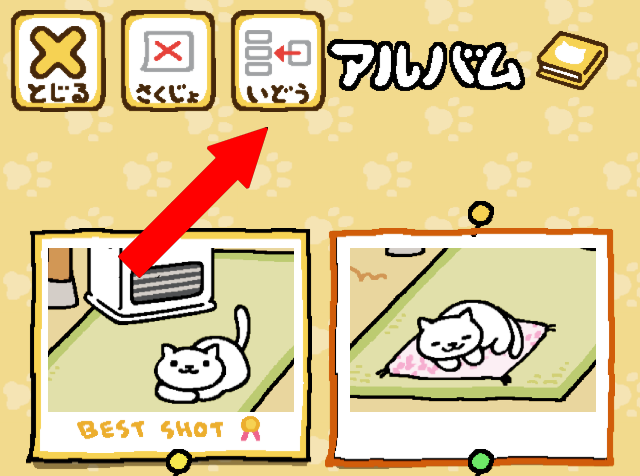
Tap once on your desired picture to select it, and tap “いどう.” It will pull up the list of all the cat albums, including the “free” album. Choose the album where you want to move your picture.
→ How to make a picture the default picture for a cat’s profile
Tap once on your desired photo to select it. Tap it once again to see “best shot” labeled on the photo. The image with the label “best shot” will be used on that cat’s profile.
How do I get regular/gold sardines?
Cats who are done leeching off you will give you fish as thanks. Most will give you regular fish, but sometimes they’re not stingy and will give you gold ones! I’m not sure what determines the amount of fish they give you, but I think the longer they stay, the more they give (as is the case with Manzoku-san, who will leave immediately once you refill the food, but he’ll give you 20-30 regular fish if you let him have his fill). Rarer cats usually will give you more fish than regular cats, too.
You can also purchase gold sardines with “real life” money, which can be found at the top after you’ve tapped on “shopping”.
Sometimes you can get a few extra gold fish from “あいことば” as stated below as well.
If you’re in a hurry to get lots of sardines, Manzoku-san and Koikoi-san tend to give more sardines and are easier to attract than other rare cats.
The screen faded to black, and a cat walked across the screen. What’s happening?
When a cat has visited several times, there is a chance that it will give you a treasure. These treasures will be added to a cat’s profile, along with a small description.
When the cat walks across your screen, it will wait in the middle. Tap it to receive the treasure, and your game will resume.
I believe the number of times a cat must visit before you receive a treasure is random because I’ve seen varying numbers being reported.
What do “treasures” do?
Nothing really… They’re proof that you’ve become friends with that cat! I put “treasure” in quotes because it’s probably treasures to cats but not to us… Like a cicada shell…
Anyway, it’s just something to look forward to if you want to complete every cats’ profile.
How do I expand my garden?

When you tap on “shopping,” scroll all the way to the end to find this preview that costs… 180 gold sardines! It’s expensive, but it will expand your garden/house so that you can set out more items for more cats to visit. Remember to set out food on both sides of your garden!
If you’re having trouble getting gold sardines but don’t want to resort using real life money, you can exchange 500 regular sardines for 10 gold sardines under “shopping” or enter the daily “あいことば” like I stated below and pray that you can get some gold fish. It’ll take a few days to get to 180 gold sardines, but it’ll happen!
How to I remodel my garden?
After you’ve expanded your garden, the paw print located on the bottom left-hand corner of your menu will change into an icon with a house, labeled as “もようがえ.”
Remodeling is expensive and will cost 280 gold sardines for each remodel, but you will receive a coupon (right after expanding your garden) for half off of your first remodel. Once you’ve purchased a model, you can switch themes any time by going to “もようがえ.”
A translation of the themes in the order they’re listed:
– Default
– Pond and alcove
– Wood deck
– Modern style
Note that each time you change your theme, your items will go back into your inventory, as the locations to place items change with each theme. Your food is safe, though, in case you’re using expensive food!
What is “あいことば”?

“あいことば” means password. If you tap on “news” on the menu, you’ll see a cat with a sign that says “今日のあいことば” (today’s password). By entering the daily password, you can get some free fish! You can do this once daily as the password changes everyday. (I think it changes at midnight JST). The amount and type of fish vary daily, and sometimes you can even get both regular and gold fish at once.
I’ve been told that iOS and Android versions of the game have different ways of getting the daily fish from the password, so I’m going to list the different methods! These methods are for version 1.2. (I haven’t confirmed if version 1.3 has updated the input method for Android yet.)
→ あいことば for iOS devices
Simply tap on the board with the あいことば. It will automatically redirect you to “つうしん.”

Tap on the first option (“あいことば入力”), and you will get your daily fish, with no need to type anything in.
→ あいことば for Android devices
For Android users, the password is published daily on reddit here. There’s also a IFTTT recipe that can send you the password to your phone using Pushbullet. Thanks Phermaportus for telling me about this!
I know some people were looking forward to practicing writing Japanese characters, so I’ve left the original ways to get the password below.
Remember the word listed on the board labeled “今日のあいことば.” Go back to the menu and tap “つうしん” (the icon to the right of “news”).
Tap on the top link to enter the password.
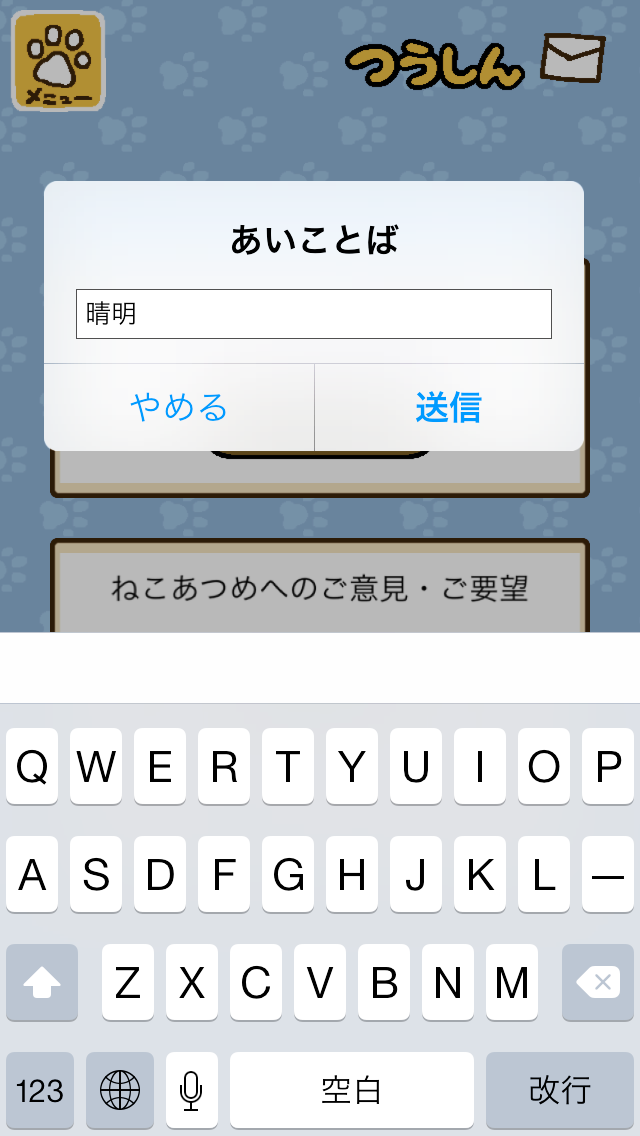
Type in the password. Tap “決定” to confirm or “やめる” to cancel. (If anyone is curious, this word is one of the 36 seasonal terms that means “clear and bright” and starts around the beginning of April. Bringing back nightmares from writing business letters in Japanese…)

After confirming, you’ll get some free fish!
The password is in Japanese, so you’ll need a Japanese keyboard to input the word or need to be able to copy/paste the word from elsewhere.
→ What if I don’t know Japanese, or what if I don’t have a Japanese keyboard installed?
You can use Google Translate! There are two ways you can use the Google Translate app: by handwriting characters via the scribble option or by using the camera/OCR option.
→ Using the scribble option with Google Translate
This works on both the mobile and app versions of Google Translate!

Tap here to switch from keyboard input to handwritten input.

Handwrite the characters and hope that Google Translate won’t mistake the characters for another word. (Sorry, my penmanship on touch screens is so atrocious!) You can then copy the word from here and paste it back into Neko Atsume.
→ Using the camera option with Google Translate
The Google Translate app now has an OCR function! I still prefer the scribble option over the camera/OCR option because the camera option has failed me too many times.
First, take a screencap of your Neko Atsume game with the daily password.
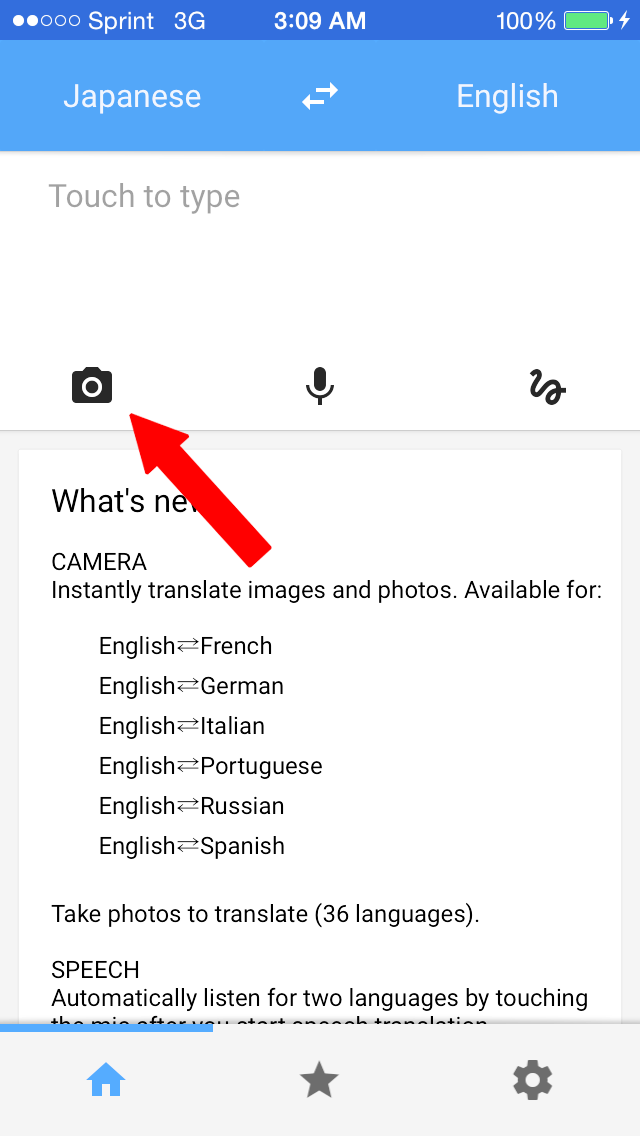
Tap here to use the camera/OCR function.

Make sure you have the translation set to “Japanese – English” and tap “import” to choose your recent screencap.

Highlight (by swiping with your finger) the daily password to get a read of the characters and its translation. You can then copy the characters and paste it back into your game.
But as you can see here, the app failed to read the word… I had seen some people mention using Google Translate’s camera app, so I thought I should add it here as well in case anyone is having trouble with the scribble option.
There’s a comment below that suggests using a separate OCR app for Android devices, so please check it out if the Google Translate isn’t working for you!
What’s this list that appears after entering the daily password?

A new feature with version 1.3, the daily password now comes with a stamp card! When you’ve filled in five passwords, you’ll get a present! I don’t know if the present will change each time, but I got canned cat food for my first present.
I don’t know if the stamp card will reset if you miss a day or if you can fill it out with any five days. If someone finds out, please let me know!
Is there a way to stop Manzoku-san from eating my expensive food?
Yes! If you’ve expanded your house, you can place your expensive food in the left half of your house. The lazy bastard won’t walk all the way inside the house, so your food is safe there. (I’ve heard he can still appear in the left half of the house, but only with the big cushion.)
Just make sure that your expensive food is located on the half of your garden with the food bowl located toward the top of the screen. For example, with the default theme of your garden, you would need to put your expensive food on the left half. With the pond and alcove theme, you would need to put your expensive food on the right half of your garden.
Thanks to everyone who gave me a heads-up about this tip!
My garden has absolutely no cats. What’s wrong?
The only thing that will keep cats from visiting is the lack of food. Check your game occasionally to make sure your food bowls aren’t empty. If you’ve expanded your garden/house, don’t forget to put food in BOTH halves.
Once you’ve refilled your food bowls, cats won’t visit immediately. Leave your game alone for maybe a few minutes and check again.
If you see a message that pops up on your new half of the house (which Google Translate translates as “rice is not grounded”), it means you didn’t put food out!
If I leave my app open for long periods of time, will cats still visit?
No. You need to either leave your game idle or force-close your game. Check back once in a while to check to see if you’ve gotten any new cats. It seems like this game was designed to not require a lot of attention, so constantly checking it every other minute won’t reflect any big changes.

What’s this cat doing, sitting on my menu?
He’s just advertising for other apps!

If you tap on the cat, it’ll say, “Do you want to see the flyer (cat)-san is holding?” Tap “はい” to see a link to another app or tap “いいえ” to decline. The cat doesn’t always appear on top of your menu, and sometimes the link to another app won’t generate, so don’t worry if you don’t see an ad.
Can my cats get fleas?
The first time I got this question, I thought it was a troll and deleted the question. Surprisingly, this question has been asked several times after that, and it has even been Googled several times, too!
The answer is NO.
On the same note, just because the cats have cute little buttholes drawn, doesn’t mean they’ll poop all over your garden. It’s just not part of this game, haha.
Pingback: Neko Atsume | I wish this day would never end
Pingback: Neko Atsume walkthrough | I wish this day would never end
Hello, thanks for the guide!! but I still got confused with the あいことば! can you please make a guide about it with screencap? thank you! :)
Sure thing!! I’ll update it when I get home!
Yes! The new way to get daily fish works, no need to type in Japanese! Thanks for that tip!
In the 1.2 version there is a little house in the bottom left of the menu, is it to buy house and gardens extensions?
Thanks for writing this guide, so helpful and I am really enjoying the game *^_^*
Thanks so much for verifying the daily fish/password for me!!
The house on the bottom left is to remodel your garden! Now you can change the entire theme of your garden once you’ve bought any of the themes. You can’t extend your house more than once (yet!)
Hi, thanks for the really helpful guide! Just a question though – do i need to be in the game when the cats leave treasures or can i collect them when i enter the game? :)
You can collect them when you enter the game! The treasures depend on the number of times a cat visits. The only thing I’m not sure about is if you need to have seen the cat at least once to log them into the profile before they give you a treasure ;w;
Pingback: Weekly Recap (4-12/4-18) | FinalPhoenix
I can’t seem to download it from the store! I just get a blank icon on my iPhone and a waiting message!
I think that has to do more with your internet connection because that has happened to me when I’m in my dorm! What iOS and device do you have, just in case?
Thank you for this guide! I have a question about something unusual happening in the game – twice, on open, I have seen a blacked-out screen overlaying the garden, and then one of the cats comes to the center of the screen. If you tap on the cat, a short flashing animation with a picture of an hourglass displays, with some text in a sign underneath. Then it disappears and shows you your typical cat garden view. What does it mean??????
It’s the treasures the cats bring that I mentioned in the guide. Each cat has a different treasure they will give you once they’ve visited several times.
Pingback: Why am I obsessed with this Japanese cat game?
Your instructions have been so incredibly helpful. Thank you so much for your time.
I have one question you might be able to assist with. You gave such clear instructions about using the scribble function in Google Translate for the password, which I had never considered using before but works really well. I was really looking forward to learning kanji! When I realised this is no longer needed, I was disappointed! I note however that the password still appears in the sign on the news screen. Do you know what use this the password is now?
Yes! The password on the board will still give you free daily fish, just without the need to type in the characters. If you tap on the board, it’ll direct you to the “つうしん” page, and you simple tap on the first option to “enter” the password and get your fish. Hope this helps! Let me know if you have any more questions ;w;
Hi – I expanded my garden, and am wondering what the llittle pop-up alert just inside the door, above the little…drawer? Platform? says. It appears whenever I log in to play.
Could you possibly take a screencap for me? Long story short, my phone crapped out and wiped my game, so I had to start over and haven’t expanded my garden again, haha.
Oh, this game is so cute! One question, though — I expanded my garden, and now whenever I start the game there’s a little alert pop-up above the platform/drawer/whatever-that-thing-is just inside the door. (The thing in the picture under your “how do I expand my garden” section). Do you know what that message says?
I don’t remember having an alert when I expanded my garden before, and I asked my friend, who also said she doesn’t have an alert ;A; but if it’s above that platform, my guess is that it’s a reminder for you to put food there since that’s where food goes for the house half of your place. Let me know if this works!
I put a food bowl there, and it seems to have done the trick! Thanks!
Hi,
Thank you for this guide. It has been very helpful and I am hooked on this game.
I’m hoping that you or others might advise me on what I’m doing wrong in trying to get the daily fish. The short updated method described does not appear to work for me and it would be so helpful if someone could help me.
I have been able to use Google translator to recreate some words and earn fish that way, but I cannot always get the characters correct or see them easily if they are very detailed.
even when wearing glasses. :(
Hi! Have you updated your game to the latest version (ver. 1.2)? I’ve asked around, and no one I know with the latest version is able to type in the password anymore.
If you’re still using google translate to handwrite characters though, there’s not really any tips to give because sometimes Google translate will misread my characters even after inputting them several, several times :( if you want to go the extra step and are familiar with stroke count of characters and radicals, you can go to jisho.org and look up kanji. On the mobile version of jisho.org, there is an option to look up kanji characters by radical easily on the bottom right-hand corner. Once you’ve found the kanji you’re looking for and are on that kanji’s page, it will show you the stroke order of how to “correctly” write the character. Sometimes Google translate will recognize a character more easily if it’s written in the correct stroke order. Hope this helps!
If it absolutely doesn’t work, you can always comment here with a screenshot of that day’s daily password, and I can reply to you with the password for you to easily copy/paste it into your game :) I’ll try my best to answer as soon as I can, but I can’t guarantee I can reply immediately!
You’re totally welcome! Now that you have food on that half of the garden, even more cats will come to visit :)
Is there any way to turn on notifications? Like for when my food runs out or a catcomes to visit? ☺
As far as I know, notifications aren’t supported by the game yet. It would be nice to have some for when food runs out though!
Sorry but when i type in the password for the day and press confirm, the game just automatically shuts down and i get nothing and i have to run it again. Do you know how to fix such bugs ? Thank you in advance.
Have you updated to the newest version (ver. 1.2)? In the new version, there’s no need to type the password anymore. It might be crashing because it’s an older version. In the updated version, you just need to tap the board with the password, and it will direct you to “つうしん,” where you tap the first option to “enter” the password you viewed.
Thank you . I’ve checked and my ver is 1.2.1 and when i tap the password and
press enter the game kicks me out i have no clue
Can I ask what device you have? I can ask my friends to see if they have any solutions for you!
Help! I got this game last night. I follow the tutorial and then get stuck in the shop. Whenever I click on an item I want to buy, a pop up with a red circle and japanese language pops up. I don’t know how to physically buy anything; one or two taps on an item just brings back the red circle message (an error message?) I also can’t seem to exit the shop. I go to the pawprint menu at the top left but tapping it doesn’t get me anywhere. I have to shut down the app completely to get out, then go through the tutorial again, which takes me right back to the shop again where I get stuck. D:
Could you possibly take a screencap of your error when you try to buy an item? I’ve never heard of this error before, but I can ask around to see if anyone else has encountered this. When you’re trying to buy items, have you finished the tutorial yet?
TomTom, I had the same issue. I have to bring up the app switch menu and then get back into the game to get past it. (Double click on the round button below iPhone/iPad screen.
Thanks so much for this tip!! I’d never encountered this before, so this is a huge help!
Hello! Thank you so much for this guide it has been unbelievably helpful! I’m having an issue doing the daily password with the update and I’ve checked and I have version 1.2.1!
Could you perhaps post a few screencaps of how to get the daily password done with the update because I think I might just be doing the wrong thing!
I’ll update this post when I have more time after exams, but to get the password with the updated version, all you have to do is tap the board with the cat under “news.” It’ll redirect you to “つうしん.” Tap the first option to “enter” the password (you won’t actually type anything; now the game recognizes that you’ve already viewed today’s password), and you’ll get your free fish.
The “free” fish doesn’t work for me after entering the password for the day. I have a Samsung Note 2. This make me sad.
I’m very delightful that you offer me your help. Thank you so much. I’m using samsung glaxy A5 for now.
Unfortunately, I’ve never had an android device before, so I’m not familiar with them :( I can ask my friends to see if they’ve had any problems with the daily password. Do you have the latest version, and is this your first time trying out the password?
Thanks for this detailed guide! :) Really helped.
Was wondering though, if it’s possible for you to add the screencap of the specific items to attract the rare cats? There’s a few high quality cushions for example, so I don’t really know which to purchase :P
Thank you in advance!
I have another post with items listed here: https://welcometowonderland.wordpress.com/2015/03/24/neko-atsume-walkthrough/
Is there any way of knowing what cats are male/female? :)
Hi! I feel I should point out that, as of at least a few days ago, neko atsume is openly available to westerners on the Play Store. You don’t need to use a VPN anymore.
Can you show us each part of the cats’ profiles? You mentioned strength, but which area is that? Thanks!
Thank you so much for the guide! I recently downloaded this game and your guide has been extremely helpful. I just wanted to let you know that my version 1.2.1 on an android tablet still requires the pw to be entered for free fish. Takes a little extra time but no biggie. Hopefully another patch will fix this.
No… The only one that is most likely male is Maromayu-san the attire he wears is for male attendants.
Thanks so much for the heads-up!! I’ll update this as soon as I can ;w;
I can add a screencap and update the post once I’m done with exams. But I’ll list it here:
せいかく: personality
せんとうりょく: attack strength
きた回数: number of times visited
あそんだグッズTOP3: top three played goods
The box with no label is its physical attributes.
Thanks so much! I’ll leave the tip on how to handwrite the password up then ;w;
Hi. I created a facebook page for Neko Atsume: the backyard cats. I would like to publish some of your useful tips and guides to play it. Would you allow me to publish it?
Yes, that’s fine. Please link back to me!
Thank you for the very detailed guide to the game, it’s saved me from resorting to my very rusty Japanese.
Just a quick question. Can I prop up my iPad, leave the app running and actually see cats leave and enter the garden, or do they only change when I open the app?
All android on version 1.2 still have to type in password. If you don’t want to try the Google translate method, you can download a Japanese OCR app that lets you take a screenshot of the text and it’ll give you the text version! The one I downloaded needed me to crop out just the text from the image because the other stuff on the screen confused the OCR (app I used was “OCR Instantly free” and downloaded the Japanese pack in the app) Hope this helps. :3
Thanks for the help! I accidentally didn’t allow to access my photos. Any way to reverse this?
I’m assuming you have an apple device, so go to settings and scroll down until you see the app (ねこあつめ). Tap on it to see “allow ねこあつめ to access” and toggle “photos” to on!
Thanks so much!
Thanks so much for this tutorial! I lived in Japan as a child but that was a long time ago, so my Japanese is very rusty. Fortunately I remember the kanji stroke order well enough to use the Google translate app like you showed here (so useful!) and I have used that to copy/paste into the app but it doesn’t look like what you pictured. Instead, I just get a black screen. Then when I paste in the word, I get a message (which I translated using the Google translate app again) saying there was an authentication failure. I have version 1.2.1, which I don’t know if you’re familar with. It seems to work differently then both the examples you have described. Does any of this see like something you’ve come across?
Hi, the page isn’t allowing me to respond directly to TomTom above, but I figured out what his problem was after the same thing happened to me. The red circle isn’t an error message, it’s telling you that the first thing you have to buy is a red ball. It won’t let you buy anything else until you’ve bought the red ball from the tutorial. So you have to swipe until you get to the page with the ball on it and purchase it (that’s what those nagging arrows are telling you to do).
Thanks so much for this! I went through the tutorial so fast and don’t remember anything from it, so it didn’t even occur to me that the “error” they were was just the red ball, haha. Thanks again!
Cats will only come if you leave your app running in the background or if you close your app completely, as far as I know!
Thanks for visiting!! It was really fun making this guide, hehe ;w;
I’ve never heard of this error before, but!! I’m assuming you have an android device since I believe the iOS version doesn’t need you to type in the password manually anymore. Another person commented earlier with the suggestion of using an OCR app instead of google translate, so I would try that out to see if it works better! Let me know if you have any more questions, and I can ask around.
the cats still wont come even though i put out like a hundred items….. what should I do?
Are you sure you put food out for them? An empty bowl is the only thing that will prevent cats from coming.
What does the bio say about the cats? Can u translate to English??(: like on the page where you can change its name, what do he numbers and the rest represent
I can make a screencap later once I’m done with exams and am able to update this post! For now, I already translated this in an earlier comment.
Thanks for your reply to the error message I was getting for the daily fish (Android, version 1.2.1). I have been able to get the fish now for the past three days and thought I would describe what I’m doing for people who have the same issue as I am. I think one person above has a similar situation.
First go to the News section in the main menu to see the daily password (on a sign above the regular menu). I write that down on a piece of paper. Then I open up the Google Translate app and use the handwriting function to write the password. Once I go to the result page for that, it will allow me to copy the characters. (I can’t copy them from the main translation page, I need to click on the blue arrow to the final results page, the one where it shows you the meaning in English and the Japanese characters.)
Having copied the characters for the daily password, I then go back to the game and click on the bottom right icon in the main menu, the one with the envelope on it. Click on the top oval, and that brings me to a black page. The section at the top between the two horizontal blue lines is where the password characters need to be pasted. Then, there will be some more kanji characters below that in a grey rectangle. Once you have pasted today’s password into the writing area, you click on the characters below it. That is how you enter the password.
Note: I can’t back out of the black screen or do anything else so I always need to close out the app and restart it if I end up there without a new password to enter. However when I enter the password it takes me back to the last place I was, and a couple of announcements appear (presumably) saying that I have entered the correct password and letting me know how many fish I got. Click on these to make them go away so you can return to the game.
I’m pretty sure the error message I got before was because I was trying to re-enter the password or was otherwise not doing the right thing, but the method descried aboove is working. The whole black screen thing is completely different from the screenshots posted here so I thought a detailed description might be helpful. :)
Sorry if this is too much of a bother but could u show what each goods for attracting the rare cats are? I cant seem to find some… Thanks so much if u do:D
I’ve listed them on my other post here: https://welcometowonderland.wordpress.com/2015/03/24/neko-atsume-walkthrough/
Hi, today i had a message (an no cats;( on the screen which appears every time i open the app (iOS). do you have an idea? Thanks in advance – and thank you for your guide.
Could you take a screencap of the message that appears? Have you had cats come before?
Hey, for anyone having trouble with the daily password on Android, the password is always published on the NekoAtsume subreddit. reddit.com/r/NekoAtsume
There’s also a IFTTT recipe that sends the password to your phone using Pushbullet.
https://ifttt.com/recipes/288575-push-neko-atsume-s-password-of-the-day
Thank you sooooo much for this! I’m gonna edit this post later and add this under the “ai kotoba” section 😊 thanks again!
If I buy a new garden theme/expansion, will the cats leave, as if I moved the toy they were playing with? Or will they still be there??
Yes, the cats will leave. Your items will go back into your inventory as well because the positions of the items will change with each theme.
Hey, is it possible to save photos to my phone? I’m on Android
Aside from screencapping the way your phone allows you to, the game will save photos directly to your gallery if you choose to take a photo via the camera option in the menu. Just tap the icon with one or two hills to take a picture of your garden.
However, since I’ve never had an android device, I can’t tell you how to allow apps access to your gallery…
Pingback: neko atsume | clover,love.
Pingback: Neko Atsume: Why Everyone's Going Nuts Over Virtual Kitties - Gamezebo
Hello! I was wondering if you would be interested in creating a walkthrough for/semi-translating this game: ねこ村
its really similar to nekoatsume, lots of adorable cats, but its gameplay is slightly more complicated, and there are some features of it I don’t really understand. ^^;
I can definitely check it out!! I’ll let you know soon about my progress hehe ;w;
By the way, can you let me know which parts of the game you need help with! I’ll make sure I’ll focus on that in the walkthrough ;w;
This is a great game but there is one problem. When I try to take a picture of my cats, a full black photo appears instead of the cat. Is there a way to fix this?
Do you have apple or android? I’ve heard that the latest update for Apple was supposed to fix this glitch. Otherwise, people have been bypassing it by just screencapping :(
I have an Android phone. Samsung Galaxy S3
Is this a problem with my phone or the game itself.
Thank you :)
Pingback: Bermain Bersama Kucing-Kucing Menggemaskan di Neko Atsume | Avatar IT
Hi! I am not playing this game yet, though a friend is, and I am following her updates with great interest. I just want to salute you for doing SO MUCH work on this! Very impressive!
Hello! I am playing the game using ios… By clicking on the daily free fish I didn’t get any free fish though… How do I insert the screenshot here?
You can either upload your picture using another website (like imgur or gyazo), or you can send it to me via Twitter! (@dolceconaffetto)
will they ever add new cats and toys ?
I’m not sure, as I’m not connected to the developers in any way. If you’d like, they do have a Twitter (though it’s in Japanese): @nekoatsume_tw
They made a tweet when they did an update for the iOS version, so I assume that if they plan on making any future updates, they will tweet about it.
Pingback: ねこあつめ - Neko Atsume! - 着物月 Kimono Tsuki
Hi I just started playing and added an extension to the garden. A message popped up. What does it mean when it says, “Rice is not grounded” ? Many thanks for your help
Hi! Can you take a screencap of the Japanese message? If it’s what I’m thinking of, you haven’t put food on your new half of your house, so it’s just a reminder.
Above my table there’s a message that says this: ゴハン が せっち さ れ て い ませ ん
What does it mean and how do I get rid of it?
Also how do I get cats to come into my new house extension ;_;
Lovely help this website have been thanks so much :)
It’s saying you don’t have food set out. Cats won’t come to the new half of your house without food, so you need to put food in both halves of the house.
Just a lazy tip if you’re not the kind to enter the password and would rather go to Reddit to do so:
I have Google Keep on my phone and I’m usually in front of my PC 80% of the time. What I do is:
– Visit reddit for the password
– Copy password into Google Keep on PC
– Wait till the “All Notes Saved” appear on the upper right
– Open Keep on my phone, wait a moment for it to sync
– Copy the password
– Insert password into app
I know it may seem a bit long, but it takes me about 30 seconds to do this, depending on the connection.
Hey great detailed piece, it really helped :-).
I’m currently having a problem that I don’t believe anyone else is experiencing (that I can see) and that is when I try re-naming my cats or entering the password for daily fish the app kicks me out. Anything that requires me typing it kicks me out basically.
Any advice haha? I have an Xperia z3 compact and have the latest version?
Reblogged this on Kimberly Sparkle Stewart and commented:
TR PETERSON. It’s a catlady walkthrough!
Pingback: Stuff We Mentioned on Episode 29: We’ve Taped This Podcast For You | Pale Blue Geek
Super helpful tips guide. I’m actually running into the same issues as Shannon in a previous comment. Can you help??
Pingback: Episode 3 – Crazy Cat Podcast
Ever hear of a game Bandai made in 1998 called “Every Day is Cat Day”? The concept seems pretty similar, but the earlier game’s presentation seemed a bit more ‘serious’. Like instead of the cartoony look of Neko Atsume, Every Day is Cat Day had much more realistic graphics (at least, as realistic as the PS1 could make them). I can’t help but wonder if that earlier game inspired this one…
Pingback: desk lunch – 2015-06-11 | Michelle Vider
I noticed this morning that they have updated some of the layout is the shopping area and added some new items. Also, I noticed this when I got the free fish this morning. Can you please tell us what it means?

I’ve already made an update at the top of the post that lists what’s included with the new update.
Also, sorry, I wasn’t able to see the picture you included through the WP app! That’s the stamp card for daily passwords. When you’ve filled it out five times, you will get a present.
I haven’t heard of it before! I guess I was still pretty young back then, haha. I heard that Hit Point is primarily known for RPGs and that Neko Atsume was just something they made on the side for fun, so it wouldn’t surprise me if they were inspired by the 1998 game ;w;
Sorry for my late reply! I’ve heard this bug happens with Android devices but not iOS… But I also don’t know a way around it yet. But version 1.3 was released today (for iOS at least, I’m not sure about Android yet)! Hopefully glitches have been fixed… Let me know if the update will resolve this glitch.
Hi – thanks for your reply. Maybe I’m missing it. I’m not sure we are discussing the same update though as this appears to be new as of the past 12 hours or so, is version 1.3.0 and has lots of brand new items for purchase. It also now has each item marked with either an L in a red square or an S in a blue square. New items featured are a ball that looks like a watermelon, a box that resembles a cafe, some matts – one is square and silverfish and one is square and looks like lime green marble (maybe they are mouse pads!) – a few pyramids that the cats cat play and sleep in, a couple umbrellas and what appears to be a vase.
If I missed your update on the new version, it’s probably because I was too excited to share about it and didn’t carefully check your posts.
Thank you so much for supplying this guide and walk through – it has been very helpful!
Ah, I just saw the post update. Thanks!
It is updated on Android, too. Yay, new cats!
Thanks so much for letting me know!! ;w;
It’s too bad, I hoped the update would fix the black photo glitch I have on android but it didn’t! I feel like half the game is taking cute photos of your favorite cats playing with different toys. I really hope it’s fixed soon. :( I even checked the file system and there’s the whole photo tree, storing black screenshots from the game. It’s not like it couldn’t create a save spot for the photos or anything :(
One of the new cats is a pharaoh that comes to the Egyptian pyramid. His name is Sphynx-San, I think.
Thanks!! I haven’t gotten him yet, so this really helps me out! ;w;
I noticed that the new update isn’t on my iPhone yet is on my iPad. Odd.
Pingback: On the iPad – Be the Crazy Cat Lady | The Ancient Gaming Noob
Thanks! I love this game! I have a question I can’t seem to find the answer for: how do you change the “profile” picture for a cat to one you’ve taken? My cat profiles all say, “no picture” and I’ve taken pictures of some of them but can’t figure out how to put that in the profile picture spot. Probably I’m missing something really obvious.
Double tap on the picture you want as the profile pic, and it’ll change to “best shot”! (Don’t double tap quickly though, it’s more like… tap once to select, and tap again to make it the profile pic!) thanks for bringing this up though; I’ll add it to the FAQ!
Pingback: Inside Neko Atsume, the Japanese cat-collecting game taking over your Twitter … | 10TravelTips
Thanks! Now I just need to get some non-butt-shots of my cats. :-)
thanks for always updating this game!
I’m excited to get new cats! I was checking here to see if you had a list of the “treasures” that the new cats bring. I’ll continue to check back. Thank you so much for all the effort you’ve put into this guide. It has made my gameplay much more enjoyable.
Pingback: Inside Neko Atsume, the Japanese cat-collecting game taking over your Twitter … | Travelers-Pro
I love all the effort you’ve put into this website. Very helpful! I have one question, how do you paste the password in? I’ve used Google translate to translate it and managed to copy it. However, when I go to the section to add it in, I can’t seem to find a paste option. Ideas?
There’s a new update with new cats! Will you be covering it?
if i want to change my phone will the game data be deleted?? how to retain the data ahaha cos i dont want to replay the game all over again
I will as soon as I have time
If you’re changing from iOS to Android or vice versa, I don’t think you can keep your data :( but if it’s jut a phone upgrade, I *think* you can retain your data as long as you back up your phone. I was able to wipe my phone to factory settings and resume playing the game from a backup. But let me ask my friends first! As far as I know, I don’t think there’s an option to upload your save data online like some games, but I haven’t checked in a while either.
Hello! This entire walkthrough was super helpful, thank you so much! Before reading this walkthrough I didnt even know the “あいことば” function even existed OTL
Have you found what attracts the newly added cats yet? I’ve bought some of them but only one new cat has appeared so far qwq
Yes, still have to type in daily password on android.
The list of cats who came only showed the cat’s face and the silver/gold fish reward but no toy that each had played with (except the big fat cat that ate up all the food).
I’m currently working on it! ;w; one of the new (regular) cats has only played with the deluxe cafe for me so far, so I missed it in action. The rare cats are: Sphinx-san with the pyramid tent and Cafe-san with the deluxe cafe!
Thanks so much!!
I’m assuming you’re on Android if you need to input the password. I feel really silly saying this, but I don’t remember how the text box for the daily password looks like since you don’t have to type it in for iOS anymore… TwT But if I remember correctly, a text box *should* pop up when you tap the first option under “つうしん.” Then just tap the text box and paste your text like how your device allows you to.
Thanks for confirming for me!
For the list of cats, sorry if I’m misunderstanding, but do you mean that the item the cats played with is no longer listed when you collect sardines? They’re still listed for me, but I have iOS ;w;
Hi! If you miss a word, the list does not reset, yo can still get the present the next day :)
Thanks so much for confirming this for me!! ;w;