
Raspberry Pi でOSのインストールと初期設定を行う
クレジットカードサイズのボードコンピュータである”Raspberry Pi”に、SoftEther VPN , Asteriskとfsprotectをインストールして、SoftEther VPN & IP-PBX専用機を構築します。
※外出先のiPhoneなどからVPN接続し、自宅(または職場)のひかり電話を利用することを目指します。
たった2,950円の基板(RSコンポーネンツ)ですが、Linuxを搭載したサーバを構築することができます。
使い心地は、AMD Athlon™ II NEO N40L 1.5GHz プロセッサを搭載したMicroServerと同じ感覚で使えます。
※キーボード、マウスとモニタを接続すれば、GUIを搭載した”パソコン”としても使えますが、当方は、LANケーブルのみを接続して、サーバ専用機として使用します。
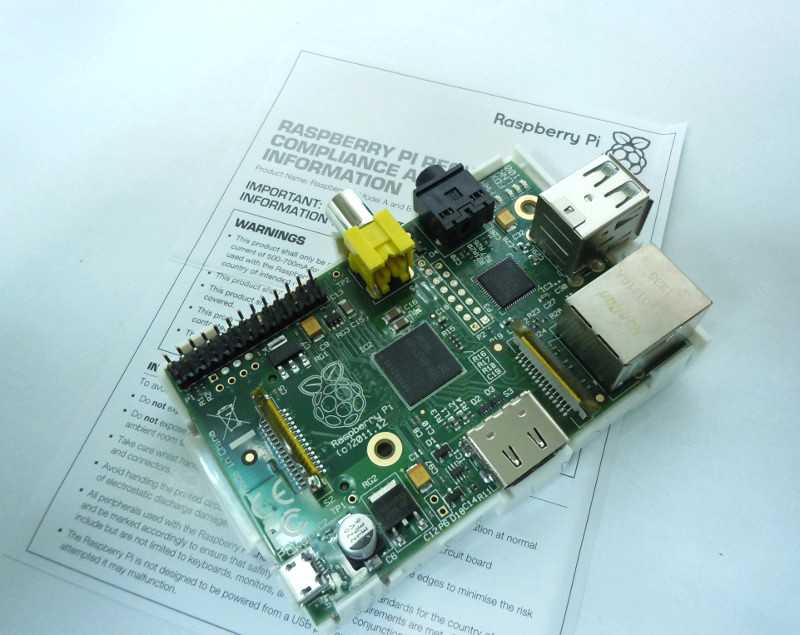
CPU : Broadcom BCM2835 (ARM1176JZFS , 1GHz)
GPU : Dual Core VideoCore IV (OpenGL ES 2.0)
Memory : 512MB (Model B 2012年10月15日以降より)
Network : SMSC LAN9512 10/100BaseT Ethernet
Size : 85.0 x 56.0 mm
処理能力はだいぶ劣りますが、HP社のMicroServerで実現していたVPNサーバとAsterisk(IP-PBX)の機能を、Raspberry Piで代替させます。
※ハードウェア構成は、出来るだけシンプルな構成とし、不意の停電でもデータが壊れにくいファイルシステムを採用します。
- 1回目:Raspberry Pi でOSのインストールと初期設定を行う
- 2回目:Raspberry Pi で使用しないデーモンを停止する
- 3回目:Raspberry Pi でRAMディスクを使う
- 4回目:Raspberry Pi でカーネルにaufsを組み込む
- 5回目:Raspberry Pi で消費電流を測定する
- 6回目:Raspberry Pi でSoftEther VPN 1.0 RC2を試す
- 7回目:SoftEther VPN 1.0 RC2でtapデバイスを試す
- 8回目:Raspberry Pi でAsteriskを試す
- 9回目:Raspberry Pi でfsprotectを試す
Raspbianのインストール
OSは、Windowsではなく、Raspberry Pi に最適化された”Raspbian”というDebian WheezyベースのLinuxデストリビューションをインストールします。
最初に、SDカードにOS(Raspbian)をインストールします。WindowsPCを使用して、OSをダウンロードします。
Raspbianは、こちら Raspberry PiのWebサイト からダウンロードできます。
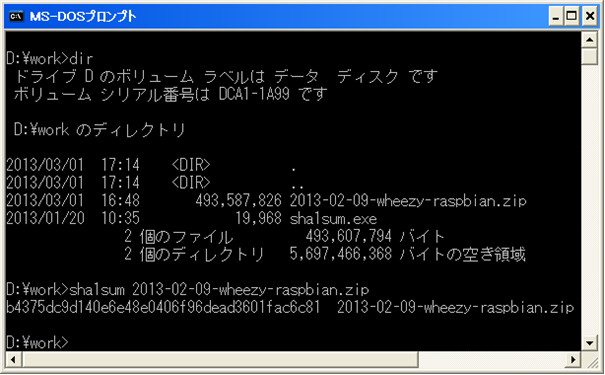
ダウンロードしたzipファイルを解凍し、checksumを確認しておきます。
checksumを確認するプログラムは、”sha1sum.exe”というフリーソフトを使用します。
sha1sum.exeプログラムは、こちら sourceforge.jpのWebサイト からダウンロードできます。
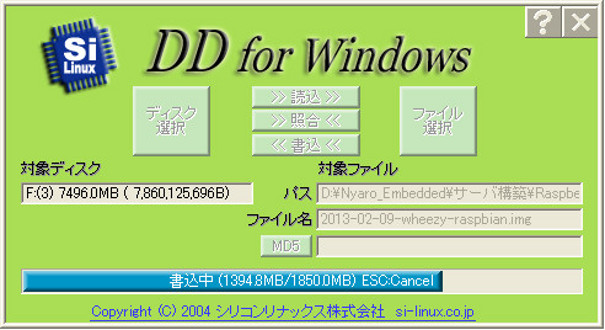
シリコンリナックス社のDD for Windows を使用して、OSイメージをSDカードに書き込みます。
書き込みプログラムは、こちら シリコンリナックス社のWebサイト からダウンロードできます。
Raspbianの初期設定
OSイメージの書き込みが完了したら、SDカードをRaspberry Piに挿入して、電源を投入します。
今回は、シリアルコンソールを使用して、初期設定を行います。
ターミナルプログラムの設定は、「115Kbps,8bit,non,1stop,フロー制御なし」 を指定します。
※シリアルコンソールケーブルは、3.3Vレベルの信号である必要があります。
Raspberry PiのRXD入力端子は、5V tolerantではありませんので、5V信号を印加することはできません!
GPIOの詳細は、こちら RPi Low-level peripherals を参照ください。
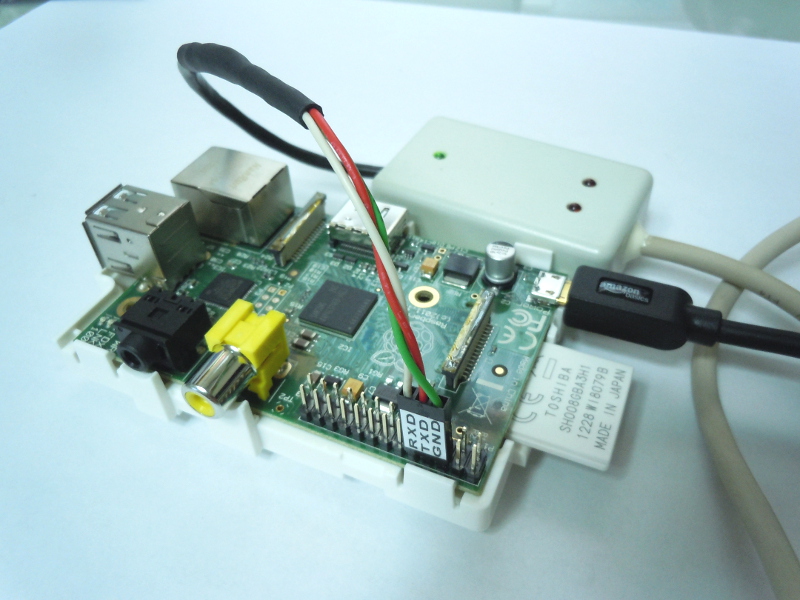
<使用する信号>
6Pin : GND
8Pin : TXD (PCのUARTのRXDと接続します)
10Pin : RXD (PCのUARTのTXDと接続します)
Raspberry Pi に電源を接続します。
Uncompressing Linux... done, booting the kernel. [ 0.000000] Booting Linux on physical CPU 0 [ 0.000000] Initializing cgroup subsys cpu [ 0.000000] Linux version 3.6.11+ (dc4@dc4-arm-01) (gcc version 4.7.2 20120731 (prerelease) (crosstool-NG linaro-1.13.1+bzr2458 - Linaro GCC 2012.08) ) #371 PREEMPT Thu Feb 7 16:31:35 GMT 2013 [ 0.000000] CPU: ARMv6-compatible processor [410fb767] revision 7 (ARMv7), cr=00c5387d [ 0.000000] CPU: PIPT / VIPT nonaliasing data cache, VIPT nonaliasing instruction cache [ 0.000000] Machine: BCM2708 [ 0.000000] cma: CMA: reserved 16 MiB at 1b000000 [ 0.000000] Memory policy: ECC disabled, Data cache writeback [ 0.000000] Built 1 zonelists in Zone order, mobility grouping on. Total pages: 113792 [ 0.000000] Kernel command line: dma.dmachans=0x7f35 bcm2708_fb.fbwidth=1024 bcm2708_fb.fbheight=768 bcm2708.boardrev=0xf bcm2708.serial=0xfebafb3d smsc95xx.macaddr=B8:27:EB:BA:FB:3D sdhci-bcm2708.emmc_clock_freq=100000000 vc_mem.mem_base=0x1ec00000 vc_mem.mem_size=0x20000000 dwc_otg.lpm_enable=0 console=ttyAMA0,115200 kgdboc=ttyAMA0,115200 console=tty1 root=/dev/mmcblk0p2 rootfstype=ext4 elevator=deadline rootwait [ 0.000000] PID hash table entries: 2048 (order: 1, 8192 bytes) [ 0.000000] Dentry cache hash table entries: 65536 (order: 6, 262144 bytes) [ 0.000000] Inode-cache hash table entries: 32768 (order: 5, 131072 bytes) [ 0.000000] Memory: 448MB = 448MB total [ 0.000000] Memory: 432264k/432264k available, 26488k reserved, 0K highmem [ 0.000000] Virtual kernel memory layout: [ 0.000000] vector : 0xffff0000 - 0xffff1000 ( 4 kB) [ 0.000000] fixmap : 0xfff00000 - 0xfffe0000 ( 896 kB) [ 0.000000] vmalloc : 0xdc800000 - 0xff000000 ( 552 MB) [ 0.000000] lowmem : 0xc0000000 - 0xdc000000 ( 448 MB) [ 0.000000] modules : 0xbf000000 - 0xc0000000 ( 16 MB) [ 0.000000] .text : 0xc0008000 - 0xc04e5470 (4982 kB) [ 0.000000] .init : 0xc04e6000 - 0xc0506f24 ( 132 kB) [ 0.000000] .data : 0xc0508000 - 0xc053c060 ( 209 kB) [ 0.000000] .bss : 0xc053c084 - 0xc05e4738 ( 674 kB) [ 0.000000] NR_IRQS:330 [ 0.000000] sched_clock: 32 bits at 1000kHz, resolution 1000ns, wraps every 4294967ms [ 0.000000] Console: colour dummy device 80x30 [ 0.000000] console [tty1] enabled [ 0.001007] Calibrating delay loop... 464.48 BogoMIPS (lpj=2322432) [ 0.060064] pid_max: default: 32768 minimum: 301 [ 0.060414] Mount-cache hash table entries: 512 [ 0.061175] Initializing cgroup subsys cpuacct [ 0.061229] Initializing cgroup subsys devices [ 0.061263] Initializing cgroup subsys freezer [ 0.061293] Initializing cgroup subsys blkio [ 0.061385] CPU: Testing write buffer coherency: ok [ 0.061719] hw perfevents: enabled with v6 PMU driver, 3 counters available [ 0.061858] Setting up static identity map for 0x39d3f8 - 0x39d454 [ 0.063361] devtmpfs: initialized [ 0.074081] NET: Registered protocol family 16 [ 0.080517] DMA: preallocated 4096 KiB pool for atomic coherent allocations [ 0.081614] bcm2708.uart_clock = 0 [ 0.082972] hw-breakpoint: found 6 breakpoint and 1 watchpoint registers. [ 0.083026] hw-breakpoint: maximum watchpoint size is 4 bytes. [ 0.083064] mailbox: Broadcom VideoCore Mailbox driver [ 0.083155] bcm2708_vcio: mailbox at f200b880 [ 0.083257] bcm_power: Broadcom power driver [ 0.083294] bcm_power_open() -> 0 [ 0.083320] bcm_power_request(0, 8) [ 0.584007] bcm_mailbox_read -> 00000080, 0 [ 0.584048] bcm_power_request -> 0 [ 0.584074] Serial: AMBA PL011 UART driver [ 0.584218] dev:f1: ttyAMA0 at MMIO 0x20201000 (irq = 83) is a PL011 rev3 [ 0.908034] console [ttyAMA0] enabled [ 0.931538] bio: create slab at 0 [ 0.936413] SCSI subsystem initialized [ 0.940507] usbcore: registered new interface driver usbfs [ 0.946090] usbcore: registered new interface driver hub [ 0.951690] usbcore: registered new device driver usb [ 0.958028] Switching to clocksource stc [ 0.962270] FS-Cache: Loaded [ 0.965412] CacheFiles: Loaded [ 0.980187] NET: Registered protocol family 2 [ 0.985466] TCP established hash table entries: 16384 (order: 5, 131072 bytes) [ 0.993200] TCP bind hash table entries: 16384 (order: 4, 65536 bytes) [ 0.999988] TCP: Hash tables configured (established 16384 bind 16384) [ 1.006593] TCP: reno registered [ 1.009845] UDP hash table entries: 256 (order: 0, 4096 bytes) [ 1.015741] UDP-Lite hash table entries: 256 (order: 0, 4096 bytes) [ 1.022329] NET: Registered protocol family 1 [ 1.027188] RPC: Registered named UNIX socket transport module. [ 1.033233] RPC: Registered udp transport module. [ 1.037957] RPC: Registered tcp transport module. [ 1.042702] RPC: Registered tcp NFSv4.1 backchannel transport module. [ 1.049810] bcm2708_dma: DMA manager at f2007000 [ 1.054593] bcm2708_gpio: bcm2708_gpio_probe c0515d98 [ 1.060058] vc-mem: phys_addr:0x00000000 mem_base=0x1ec00000 mem_size:0x20000000(512 MiB) [ 1.069203] audit: initializing netlink socket (disabled) [ 1.074801] type=2000 audit(0.930:1): initialized [ 1.197625] VFS: Disk quotas dquot_6.5.2 [ 1.201660] Dquot-cache hash table entries: 1024 (order 0, 4096 bytes) [ 1.208721] FS-Cache: Netfs nfs registered for caching [ 1.214467] NFS: Registering the id_resolver key type [ 1.219676] Key type id_resolver registered [ 1.223970] Key type id_legacy registered [ 1.228329] msgmni has been set to 876 [ 1.233839] Block layer SCSI generic (bsg) driver version 0.4 loaded (major 252) [ 1.241544] io scheduler noop registered [ 1.245590] io scheduler deadline registered (default) [ 1.250773] io scheduler cfq registered [ 1.281991] Console: switching to colour frame buffer device 128x48 [ 1.297450] kgdb: Registered I/O driver kgdboc. [ 1.302790] vc-cma: Videocore CMA driver [ 1.306827] vc-cma: vc_cma_base = 0x00000000 [ 1.311633] vc-cma: vc_cma_size = 0x00000000 (0 MiB) [ 1.317196] vc-cma: vc_cma_initial = 0x00000000 (0 MiB) [ 1.331614] brd: module loaded [ 1.339735] loop: module loaded [ 1.343402] vchiq: vchiq_init_state: slot_zero = 0xdb000000, is_master = 0 [ 1.351167] Loading iSCSI transport class v2.0-870. [ 1.357085] usbcore: registered new interface driver smsc95xx [ 1.363389] dwc_otg: version 3.00a 10-AUG-2012 (platform bus) [ 1.574448] Core Release: 2.80a [ 1.577707] Setting default values for core params [ 1.586422] Finished setting default values for core params [ 1.800830] Using Buffer DMA mode [ 1.807888] Periodic Transfer Interrupt Enhancement - disabled [ 1.817456] Multiprocessor Interrupt Enhancement - disabled [ 1.826756] OTG VER PARAM: 0, OTG VER FLAG: 0 [ 1.834807] Dedicated Tx FIFOs mode [ 1.843375] dwc_otg bcm2708_usb: DWC OTG Controller [ 1.852041] dwc_otg bcm2708_usb: new USB bus registered, assigned bus number 1 [ 1.863207] dwc_otg bcm2708_usb: irq 32, io mem 0x00000000 [ 1.872566] Init: Port Power? op_state=1 [ 1.880220] Init: Power Port (0) [ 1.887224] usb usb1: New USB device found, idVendor=1d6b, idProduct=0002 [ 1.897834] usb usb1: New USB device strings: Mfr=3, Product=2, SerialNumber=1 [ 1.908845] usb usb1: Product: DWC OTG Controller [ 1.917260] usb usb1: Manufacturer: Linux 3.6.11+ dwc_otg_hcd [ 1.926705] usb usb1: SerialNumber: bcm2708_usb [ 1.935673] hub 1-0:1.0: USB hub found [ 1.943192] hub 1-0:1.0: 1 port detected [ 1.951291] Initializing USB Mass Storage driver... [ 1.960064] usbcore: registered new interface driver usb-storage [ 1.969713] USB Mass Storage support registered. [ 1.978071] usbcore: registered new interface driver libusual [ 1.987792] mousedev: PS/2 mouse device common for all mice [ 1.997871] bcm2835-cpufreq: min=700000 max=700000 cur=700000 [ 2.003734] bcm2835-cpufreq: switching to governor powersavebcm2835-cpufreq: switching to governor powersave [ 2.017410] cpuidle: using governor ladder [ 2.028919] cpuidle: using governor menu [ 2.036612] sdhci: Secure Digital Host Controller Interface driver [ 2.046675] sdhci: Copyright(c) Pierre Ossman [ 2.054890] sdhci: Enable low-latency mode [ 2.102312] mmc0: SDHCI controller on BCM2708_Arasan [platform] using platforms DMA [ 2.114169] mmc0: BCM2708 SDHC host at 0x20300000 DMA 2 IRQ 77 [ 2.126089] sdhci-pltfm: SDHCI platform and OF driver helper [ 2.141435] usbcore: registered new interface driver usbhid [ 2.151159] Indeed it is in host mode hprt0 = 00021501 [ 2.165148] usbhid: USB HID core driver [ 2.192765] TCP: cubic registered [ 2.200013] Initializing XFRM netlink socket [ 2.232182] NET: Registered protocol family 17 [ 2.240771] Key type dns_resolver registered [ 2.249030] mmc0: could read SD Status register (SSR) at the 2th attempt [ 2.272606] VFP support v0.3: implementor 41 architecture 1 part 20 variant b rev 5 [ 2.284684] mmc0: new high speed SDHC card at address f33e [ 2.303449] registered taskstats version 1 [ 2.315989] mmcblk0: mmc0:f33e SD08G 7.32 GiB [ 2.327096] mmcblk0: p1 p2 [ 2.349244] EXT4-fs (mmcblk0p2): mounted filesystem with ordered data mode. Opts: (null) [ 2.361593] VFS: Mounted root (ext4 filesystem) on device 179:2. [ 2.380544] devtmpfs: mounted [ 2.388057] Freeing init memory: 128K [ 2.432218] usb 1-1: new high-speed USB device number 2 using dwc_otg [ 2.443287] Indeed it is in host mode hprt0 = 00001101 [ 2.662580] usb 1-1: New USB device found, idVendor=0424, idProduct=9512 [ 2.675514] usb 1-1: New USB device strings: Mfr=0, Product=0, SerialNumber=0 [ 2.688860] hub 1-1:1.0: USB hub found [ 2.696954] hub 1-1:1.0: 3 ports detected [ 2.982412] usb 1-1.1: new high-speed USB device number 3 using dwc_otg [ 3.113065] usb 1-1.1: New USB device found, idVendor=0424, idProduct=ec00 [ 3.124321] usb 1-1.1: New USB device strings: Mfr=0, Product=0, SerialNumber=0 [ 3.140605] smsc95xx v1.0.4 [ 3.207108] smsc95xx 1-1.1:1.0: eth0: register smsc95xx at usb-bcm2708_usb-1.1, smsc95xx USB 2.0 Ethernet, b8:27:eb:xx:xx:xx [ 3.332461] usb 1-1.2: new low-speed USB device number 4 using dwc_otg [ 3.459966] usb 1-1.2: New USB device found, idVendor=056e, idProduct=0037 [ 3.481110] usb 1-1.2: New USB device strings: Mfr=1, Product=2, SerialNumber=0 [ 3.505535] usb 1-1.2: Product: ELECOM PALVO series [ 3.523955] usb 1-1.2: Manufacturer: ELECOM [ 3.557146] input: ELECOM ELECOM PALVO series as /devices/platform/bcm2708_usb/usb1/1-1/1-1.2/1-1.2:1.0/input/input0 [ 3.582388] hid-generic 0003:056E:0037.0001: input,hidraw0: USB HID v1.10 Mouse [ELECOM ELECOM PALVO series] on usb-bcm2708_usb-1.2/input0 [ 3.849265] udevd[142]: starting version 175 [ 8.789951] EXT4-fs (mmcblk0p2): re-mounted. Opts: (null) [ 9.218173] EXT4-fs (mmcblk0p2): re-mounted. Opts: (null) [ 9.923898] bcm2835 ALSA card created! [ 9.941886] bcm2835 ALSA chip created! [ 9.956668] bcm2835 ALSA chip created! [ 9.968394] bcm2835 ALSA chip created! [ 9.980084] bcm2835 ALSA chip created! [ 9.992524] bcm2835 ALSA chip created! [ 10.005198] bcm2835 ALSA chip created! [ 10.015309] bcm2835 ALSA chip created! Debian GNU/Linux 7.0 raspberrypi ttyAMA0 raspberrypi login:
piユーザでログインすると、「まだ、設定が途中なので、”sudo raspi-config” を実行するように」というメッセージが表示されますので、指示に従います。
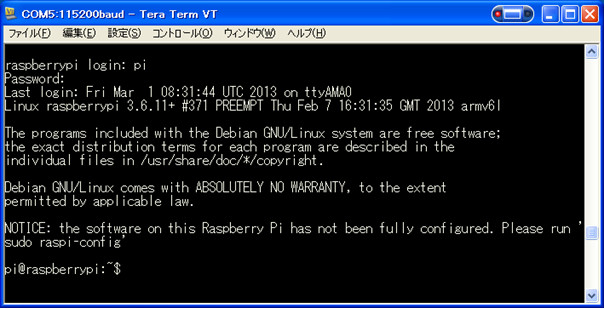
sudo raspi-configを実行します。
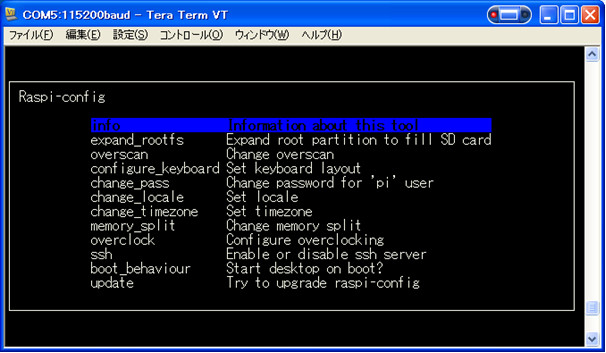
raspi-config では、以下の項目を設定します。他の項目は、設定ファイル(config.txt)を修正して、対応します。
- expand_rootfs : SDカードの空き領域を無くします。
- change_pass : piユーザのパスワードを変更します。
- change_timezone : タイムゾーンをJSTに変更します。
- memory_split : GPUにアサインするメモリを16MBに変更します。
- update : Raspbianを最新版にアップデートします。
rootユーザのパスワード設定
rootユーザのパスワードを設定します。
pi@raspberrypi:~$ sudo passwd root
Enter new UNIX password:
Retype new UNIX password:
passwd: password updated successfully
pi@raspberrypi:~$
キーボードの設定変更
USBキーボードの設定を変更します。当方は、106日本語キーボードを指定しました。
root@raspberrypi:~# pico /etc/default/keyboard
# KEYBOARD CONFIGURATION FILE

# Consult the keyboard(5) manual page.
XKBMODEL="jp106"
XKBLAYOUT="jp"
XKBVARIANT=""
XKBOPTIONS=""

BACKSPACE="guess"
ネットワークアドレスの変更
初期状態は、DHCPでアドレスの払い出しを受ける設定になっていますので、固定ipアドレスを割り当てるように変更します。
※wlan0は、使用する予定がありませんので、設定を削除(コメント行)します。
root@raspberrypi:~# pico /etc/network/interfaces
auto lo

iface lo inet loopback
# iface eth0 inet dhcp
auto eth0
iface eth0 inet static
address 192.168.0.xxx
netmask 255.255.255.0
network 192.168.0.0
broadcast 192.168.0.255
gateway 192.168.0.1

dns-search pc-links.com
dns-nameserver 192.168.0.1

# allow-hotplug wlan0
# iface wlan0 inet manual
# wpa-roam /etc/wpa_supplicant/wpa_supplicant.conf
# iface default inet dhcp
ホスト名の変更
必要に応じて、/etc/hostname , /etc/hosts ファイルを修正して、ホスト名を適当な名前に変更します。
コマンドプロンプト表示の変更
debianでは、カレントディレクトリまでのフルパスで表示され、プロンプト横幅一杯までパスが表示されますので、Redhat 系のプロンプト表示に変更します。また、alias設定も有効にします。
root@ms03:~# pico .bashrc
# ~/.bashrc: executed by bash(1) for non-login shells.

# Note: PS1 and umask are already set in /etc/profile. You should not
# need this unless you want different defaults for root.
# PS1='${debian_chroot:+($debian_chroot)}\h:\w\$ '
PS1='${debian_chroot:+($debian_chroot)}[\u@\h \W]\$ '
# umask 022

# You may uncomment the following lines if you want `ls' to be colorized:
export LS_OPTIONS='--color=auto'
eval "`dircolors`"

alias ls='ls $LS_OPTIONS'
alias ll='ls $LS_OPTIONS -l'
alias l='ls $LS_OPTIONS -lA'

#
# Some more alias to avoid making mistakes:
alias rm='rm -i'
alias cp='cp -i'
alias mv='mv -i'
設定変更が完了したら、.bashrcを実行して、変更を反映させます。
root@ms03:~# . .bashrc
[root@ms03 ~]#
日本語対応
ロケールを日本に変更し、日本語フォントをインストールして、日本語表示に対応します。
最初に、dpkg-reconfigure locales コマンドを実行して、en_US.UTF-8 UTF-8 , ja_JP.UTF-8 UTF-8 ロケールを追加します。en_GB.UTF.8 UTF-8 ロケールは削除します。
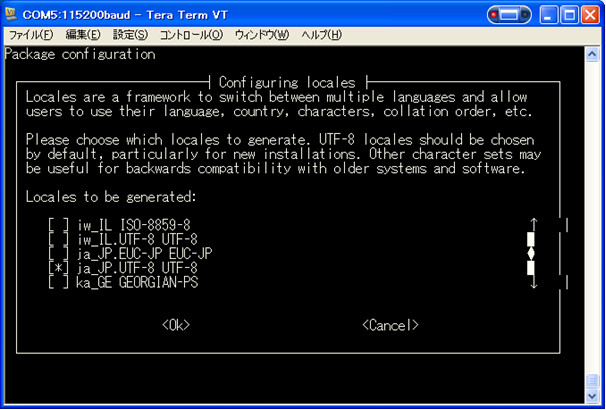
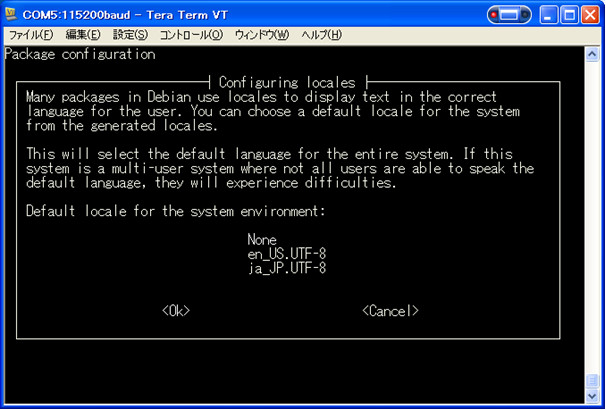
次に、フリーで使用できるフォントをインストールします。
[root@ms03 ~]# apt-get install ttf-kochi-gothic xfonts-intl-japanese xfonts-intl-japanese-big xfonts-kaname
Reading package lists... Done
Building dependency tree
Reading state information... Done
Suggested packages:
  xfonts-cjk emacs-intl-fonts
The following NEW packages will be installed:
  ttf-kochi-gothic xfonts-intl-japanese xfonts-intl-japanese-big xfonts-kaname
0 upgraded, 4 newly installed, 0 to remove and 57 not upgraded.
Need to get 6008 kB of archives.
After this operation, 11.3 MB of additional disk space will be used.
Get:1 http://mirrordirector.raspbian.org/raspbian/ wheezy/main ttf-kochi-gothicall 20030809-15 [3142 kB]
Get:2 http://mirrordirector.raspbian.org/raspbian/ wheezy/main xfonts-intl-japanese all 1.2.1-8 [928 kB]
Get:3 http://mirrordirector.raspbian.org/raspbian/ wheezy/main xfonts-intl-japanese-big all 1.2.1-8 [655 kB]
Get:4 http://mirrordirector.raspbian.org/raspbian/ wheezy/main xfonts-kaname all 1.1-9.1 [1282 kB]
Fetched 6008 kB in 11s (513 kB/s)
Selecting previously unselected package ttf-kochi-gothic.
(Reading database ... 59216 files and directories currently installed.)
Unpacking ttf-kochi-gothic (from .../ttf-kochi-gothic_20030809-15_all.deb) ...
Selecting previously unselected package xfonts-intl-japanese.
Unpacking xfonts-intl-japanese (from .../xfonts-intl-japanese_1.2.1-8_all.deb)...
Selecting previously unselected package xfonts-intl-japanese-big.
Unpacking xfonts-intl-japanese-big (from .../xfonts-intl-japanese-big_1.2.1-8_all.deb) ...
Selecting previously unselected package xfonts-kaname.
Unpacking xfonts-kaname (from .../xfonts-kaname_1.1-9.1_all.deb) ...
Processing triggers for fontconfig ...
Setting up ttf-kochi-gothic (20030809-15) ...
Setting up xfonts-intl-japanese (1.2.1-8) ...
Setting up xfonts-intl-japanese-big (1.2.1-8) ...
Setting up xfonts-kaname (1.1-9.1) ...
環境設定
ログイン時に、自動的に環境変数LANGをexportするように、.profile に”export LANG=ja_JP.UTF-8″を最終行に、追記しておきます。
[root@ms03 ~]# pico .profile
# ~/.profile: executed by Bourne-compatible login shells.

if [ "$BASH" ]; then
  if [ -f ~/.bashrc ]; then
    . ~/.bashrc
  fi
fi

mesg n
export LANG=ja_JP.UTF-8
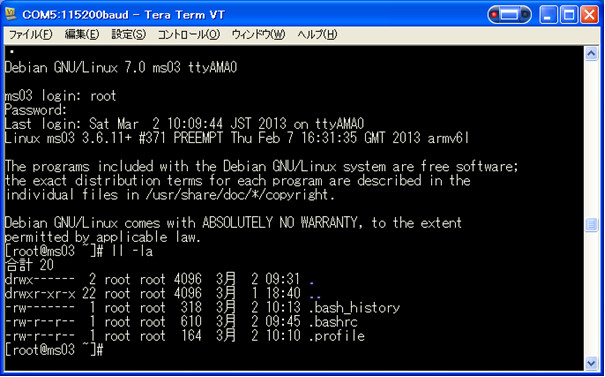
ここで、一旦、OSを再起動させて、日本語表示を確認しておきます。
[root@ms03 ~]# reboot
モニタ設定とオーバークロック設定
config.txtファイルを修正して、使用するモニタの解像度に設定を合わせます。
また、動作スピードを1000MHzに変更(オーバークロック)します。
※ハードウェアの信頼性を確認する目的で、1000MHz(1GHz)での動作試験を実施します。
※2013年10月10日 : 1GHz動作時、稀にOSの起動に失敗する場合があったので、設定値を変更しました。
[root@ms03 ~]# pico /boot/config.txt
# uncomment if you get no picture on HDMI for a default "safe" mode
#hdmi_safe=1

# uncomment this if your display has a black border of unused pixels visible
# and your display can output without overscan
disable_overscan=1

# uncomment the following to adjust overscan. Use positive numbers if console
# goes off screen, and negative if there is too much border
#overscan_left=16
#overscan_right=16
#overscan_top=16
#overscan_bottom=16

# uncomment to force a console size. By default it will be display's size minus
# overscan.
#framebuffer_width=1280
#framebuffer_height=720
# IBM Model 9511-DW4 XGA(1024x768)/DVI-IF
framebuffer_width=1024
framebuffer_height=768


# uncomment if hdmi display is not detected and composite is being output
#hdmi_force_hotplug=1

# uncomment to force a specific HDMI mode (this will force VGA)
#hdmi_group=1
#hdmi_mode=1
# XGA mode select(1024x768/60Hz)
hdmi_group=2
hdmi_mode=16


# uncomment to force a HDMI mode rather than DVI. This can make audio work in
# DMT (computer monitor) modes
#hdmi_drive=2
#Normal DVI mode (No sound) Select
hdmi_drive=1


# uncomment to increase signal to HDMI, if you have interference, blanking, or
# no display
#config_hdmi_boost=4

# uncomment for composite PAL
#sdtv_mode=2

#uncomment to overclock the arm. 700 MHz is the default.
# 稀に、OSの起動に失敗 (kernel PANIC) する場合があったので、設定値を見直し
# arm_freq=1000
arm_freq=950

# Disables dynamic cpufreq driver and minimum settings below.
# force_turbo=1

# ブート時40秒経過後にarm_freqを1000MHzに上げるようにする(SDカードデータ破損対応)
initial_turbo=40


# for more options see http://elinux.org/RPi_config.txt
gpu_mem=16

# Minimum value of core_freq used for dynamic clocking. Default 250
# 稀に、OSの起動に失敗 (kernel PANIC) する場合があったので、設定値を見直し
# core_freq=500
core_freq=450

# Minimum value of sdram_freq used for dynamic clocking. Default 400
# 稀に、OSの起動に失敗 (kernel PANIC) する場合があったので、設定値を見直し
# sdram_freq=600
sdram_freq=450

# ARM/GPU core voltage adjust. [-16,8] equates to [0.8V,1.4V] with 0.025V steps.
# Force_turbo will allow values higher than 6. Default 0 (1.2V)
over_voltage=6
SSH接続設定の変更
SSH接続は、ローカルLANからの接続のみを許可するように、アクセス制限を行います。
最初に、hosts.denyファイルを修正します。
[root@ms03 ~]# pico /etc/hosts.deny
# /etc/hosts.deny: list of hosts that are _not_ allowed to access the system.
#                  See the manual pages hosts_access(5) and hosts_options(5).
#
# Example:    ALL: some.host.name, .some.domain
#             ALL EXCEPT in.fingerd: other.host.name, .other.domain
#
# If you're going to protect the portmapper use the name "portmap" for the
# daemon name. Remember that you can only use the keyword "ALL" and IP
# addresses (NOT host or domain names) for the portmapper, as well as for
# rpc.mountd (the NFS mount daemon). See portmap(8) and rpc.mountd(8)
# for further information.
#
# The PARANOID wildcard matches any host whose name does not match its
# address.
#
# You may wish to enable this to ensure any programs that don't
# validate looked up hostnames still leave understandable logs. In past
# versions of Debian this has been the default.
# ALL: PARANOID
#
# アクセス制限を追加
sshd: ALL
hosts.allowファイルを修正します。
[root@ms03 ~]# pico /etc/hosts.allow
# /etc/hosts.allow: list of hosts that are allowed to access the system.
#                   See the manual pages hosts_access(5) and hosts_options(5).
#
# Example:    ALL: LOCAL @some_netgroup
#             ALL: .foobar.edu EXCEPT terminalserver.foobar.edu
#
# If you're going to protect the portmapper use the name "portmap" for the
# daemon name. Remember that you can only use the keyword "ALL" and IP
# addresses (NOT host or domain names) for the portmapper, as well as for
# rpc.mountd (the NFS mount daemon). See portmap(8) and rpc.mountd(8)
# for further information.
#
# アクセス制限を追加
# ローカルLANからのアクセスのみを許可
sshd: 192.168.0.0/24 127.0.0.0/8
最後にsshd_configファイルを修正して、rootユーザでのログインを禁止します。
# Authentication:
LoginGraceTime 120

# rootでのログインを禁止
# PermitRootLogin yes
PermitRootLogin no
sshd_configファイルを修正したので、sshを再起動させます。
[root@ms03 ~]# /etc/init.d/ssh restart
Restarting OpenBSD Secure Shell server: sshd.
次回からのログインは、シリアルコンソールではなく、SSHを使用してログインするようにします。
以上で、「Raspberry Pi でOSのインストールと初期設定を行う」を終了します。