While dealing with big genetic data sets I often got stuck with limitation of programming languages in terms of reading big files. Also sometimes it is not convenient to load the data file in Python or R in order to perform few basic checks and exploratory analysis. Unix commands are pretty handy in these scenarios and often takes significantly less time in execution.
Lets consider movie data set from some parallel universe (with random values) for this assignment. There are 8 fields in total,
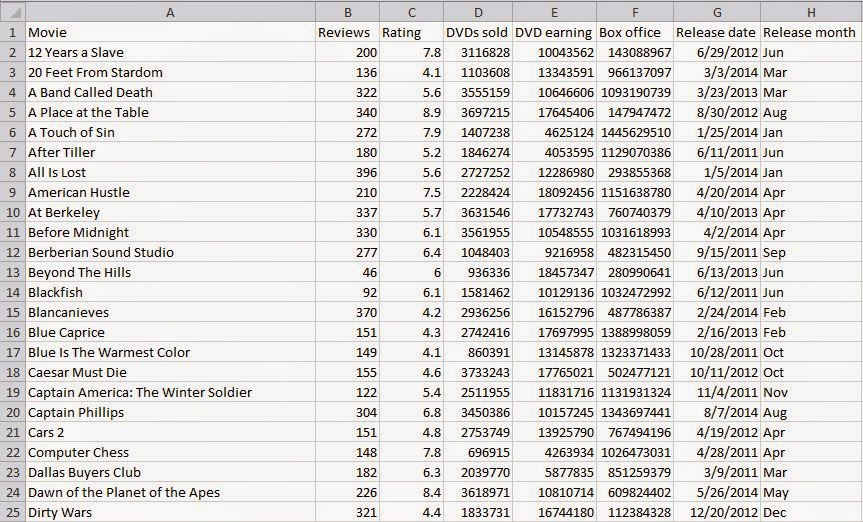
With few duplicate records
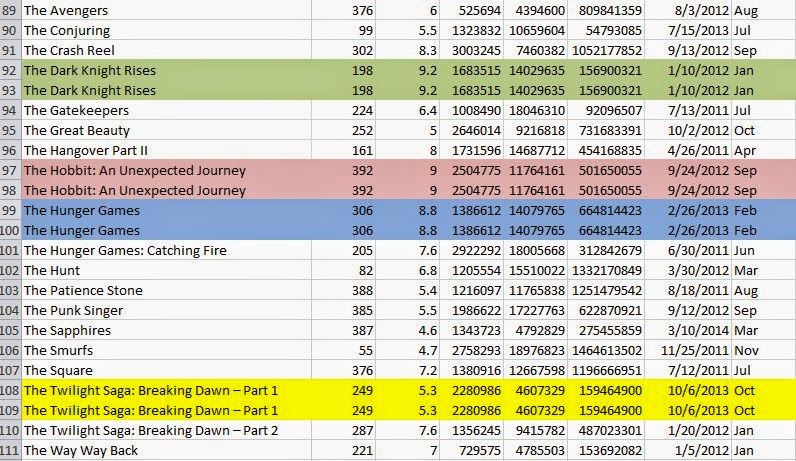
Lets start with few basic examples,
Check column names of file
head -1 movies.csv
We can use cat to display the file but we are interested in column names which is only first row of the file. So we have used head command.
Check number of records in the file
wc -l movies.csv
The command wc gives us number of characters, number of words and number of lines in a file. As we are interested in number of lines we use wc -l.
Check 50th record
head -50 movies.csv | tail -1
The operator | is called pipe and it will forward the output of first command as input of second command. Similar to pipe we have > which will write output to file and >> which will append command output at end of the file.

Find and then remove duplicate elements
## Check duplicate records ##
uniq -d movies.csv
## Remove duplicate records ##
uniq -u movies.csv > uniqMovie.csv
## Crosscheck the new file for duplicates ##
uniq -d uniqMovie.csv
In uniq, -d is used to find duplicates and -u is used to find unique records. So in order to remove duplicates we have selected unique records and redirected those to a new file.
*If we don't want new file we can redirect the output to same file in two steps which will overwrite original file. [Correction based on HN input by CraigJPerry]
We can use a temporary file for this,
uniq -u movies.csv > temp.csv
mv temp.csv movie.csv
**Important thing to note here is uniq wont work if duplicate records are not adjacent. [Addition based on HN inputs]

Display 10 movies with lowest ratings
sort -n -t',' -k3 uniqMovie.csv | head -10
# -n to inform its numerical sorting and not lexical sorting
# -t specifies delimiter which is comma is this case
# -k indicates which column, 3rd in our case
Numerical sorting is 1, 2, 15, 17, 130, 140 and lexical sorting is 1, 130, 140, 15, 17, 2. Note that sort will do lexical sorting of input by default. We can use -r to sort in descending order.

Check number of columns
awk -F "," '{print NF}' uniqMovie.csv | head -1
# -F "," specifies field separator as comma
We use -F to specify the field separator as comma. Then by using pipe | we redirect the output to head and just select first record (which is to avoid printing output on multiple lines). We can crosscheck this result with the output of first command where we used head to check column names. We would prefer awk to find number of columns when we have too many columns or we have no idea about number of columns.

Create separate file for every month based on release date

What is the average number of reviews for all movies?
awk -F "," '{colSum+=$2} END { print "Average = ",colSum/NR}' movies.csv
Here the colSum is a variable to store the sum and looped over column of interest specified by $2. Then the average is calculated and displayed.

head -1 movies.csv
We can use cat to display the file but we are interested in column names which is only first row of the file. So we have used head command.
Check number of records in the file
wc -l movies.csv
The command wc gives us number of characters, number of words and number of lines in a file. As we are interested in number of lines we use wc -l.
Check 50th record
head -50 movies.csv | tail -1
The operator | is called pipe and it will forward the output of first command as input of second command. Similar to pipe we have > which will write output to file and >> which will append command output at end of the file.

Find and then remove duplicate elements
## Check duplicate records ##
uniq -d movies.csv
## Remove duplicate records ##
uniq -u movies.csv > uniqMovie.csv
## Crosscheck the new file for duplicates ##
uniq -d uniqMovie.csv
In uniq, -d is used to find duplicates and -u is used to find unique records. So in order to remove duplicates we have selected unique records and redirected those to a new file.
*If we don't want new file we can redirect the output to same file in two steps which will overwrite original file. [Correction based on HN input by CraigJPerry]
We can use a temporary file for this,
uniq -u movies.csv > temp.csv
mv temp.csv movie.csv
**Important thing to note here is uniq wont work if duplicate records are not adjacent. [Addition based on HN inputs]

sort -n -t',' -k3 uniqMovie.csv | head -10
# -n to inform its numerical sorting and not lexical sorting
# -t specifies delimiter which is comma is this case
# -k indicates which column, 3rd in our case
Numerical sorting is 1, 2, 15, 17, 130, 140 and lexical sorting is 1, 130, 140, 15, 17, 2. Note that sort will do lexical sorting of input by default. We can use -r to sort in descending order.

Check number of columns
awk -F "," '{print NF}' uniqMovie.csv | head -1
# -F "," specifies field separator as comma
We use -F to specify the field separator as comma. Then by using pipe | we redirect the output to head and just select first record (which is to avoid printing output on multiple lines). We can crosscheck this result with the output of first command where we used head to check column names. We would prefer awk to find number of columns when we have too many columns or we have no idea about number of columns.
NF stores value of Number of Fields based on the field separator we have provided. Similar to NF we also have NR which stores number of rows and uses \n as row separator.
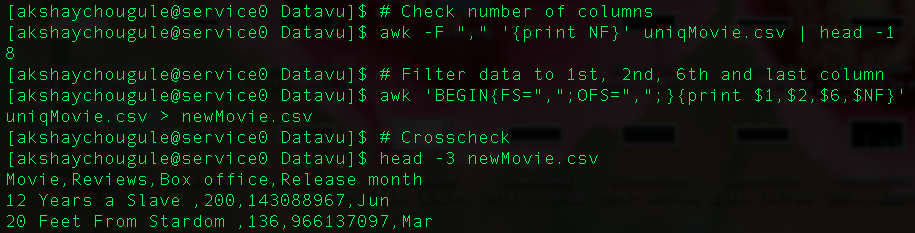
Filter the data to get only 1st, 2nd, 6th and last record
awk 'BEGIN{FS=",";OFS=",";}{print $1,$2,$6,$NF}' uniqMovie.csv > newMovie.csv
Here we have used built-in variables like FS and OFS similar to NR and NF mentioned in last example. FS is nothing but field separator similar to -F. OFS is output field separator, which will add specified field separator between every column while writing it into new file above. We use $n for referring n-th column.
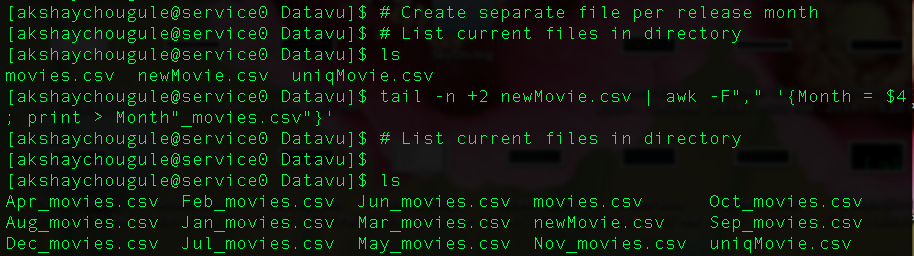
Create separate file for every month based on release date
tail -n +2 newMovie.csv | awk -F"," '{Month = $4; print > Month"_movies.csv"}'
We want a file for every value in 4th column except the column name, which is in the first row. So we use tail command to select all records starting from 2nd one (to exclude the column name).
Here we store all unique values of release month on variable Month and then we print all records associated with that month in a csv file. Also to name every csv file we use Month variable followed by "_movies.csv".
awk -F "," '{colSum+=$2} END { print "Average = ",colSum/NR}' movies.csv
Here the colSum is a variable to store the sum and looped over column of interest specified by $2. Then the average is calculated and displayed.

Next example is based on what we have discussed so far. See if you can do it.
Display total of box office sales of top 20 movies
Hint:
Sort records according to box office sales, then select 20 records with highest sales. Then find sum of the column and then display it on screen
Feel free to suggest corrections, better ways to solve these examples in comments section.
Follow discussion on: Hacker News
Follow discussion on: Hacker News
A better way to print a specific line than
ReplyDeletehead -50 movies.csv | tail -1
is
sed '50q;d' movies.csv
It's faster for big files, starts fewer processes, and requires less typing.
Thank you, useful to know!
DeleteYou can also use:
Deletesed -n 50,50p movies.csv
(with no quotes needed around the 50,50p )
That sed command can be made into a script called body (because it complements head and tail):
Deletehttps://news.ycombinator.com/item?id=8234255
@Vasudev: Interesting to know but could not replicate it.
DeleteHow did you create the file?
I don't think you meant to use `uniq -u`. This removes all copies of each line that is duplicated, meaning that The Dark Knight Rises will not appear at all in the output. If you just use `uniq`, one copy of each line will remain. Also, it is worth nothing that `uniq` requires the file to be sorted first, because it only detects duplicate lines that are adjacent.
ReplyDelete+1. I tend to go with `sort -u` most of the time as it takes care of sorting and deduping in one command.
DeleteYes, I want to repeat a part of Nathan's comment so that it is not lost: You must pass data to `sort` before using `uniq`! This is because uniq only looks at two sequential lines of context at a time, it does not remember state from the rest of the file.
DeleteJust a heads up that most of these commands will fail with non-trivial data because CSV files can contain rows that span multiple lines. I wrote csvkit to solve exactly this problem: http://csvkit.readthedocs.org/en/0.8.0/ Similar commands, but it handles CSV format correctly.
ReplyDeleteyes, csvkit is a suite of tools that replace UNIX tools and add csv awareness
Deleteanother option is to use csvquote (https://github.com/dbro/csvquote) to temporarily replace the commas and newlines inside quotes, then use the UNIX commands as normal, and lastly restore the commas and newlines. the docs give some examples similar to what's in this blog post.
$$ Check number of records in the file
ReplyDelete$$ wc -l movies.csv
Will the returned count include the header line?
Yes, it will count header as just another record.
DeleteYou can exclude header by,
$$ tail -n +2 movie.csv | wc -l
From the manpage: uniq [-c | -d | -u] [-i] [-f num] [-s chars] [input_file [output_file]]
ReplyDelete`uniq movies.csv > uniqMovie.csv` You can lose the pipe
Just waiting for the perl guys to pipe up to replace the venerable awk :)
ReplyDeleteIs there any way to find duplicate records, disregarding one of the columns? For example, I have a CSV file with 11 columns and I'd like to find the number of duplicate rows where each column is the same except for the 10th column. Is that possible using a Unix command? I'd love to not have to open the file with Python. Thanks, and nice tutorial!
ReplyDeleteYou can do this using `cut` to remove the offending column and passing the result to ` | sort | uniq -d` but be careful, cut does not understand the quoting mechanisms of CSV so if there is any data with quoted commas then it can easily snip the wrong data.
DeleteBetter to use something like csvkit if this is anything but quick-and-dirty data parsing.
And here is an example that snips out the second from last column and looks for duplicates, assuming that there are no quoted commas in the last two columns:
Deletesed -e 's/\(.*\),.*,\(.*\)/\1,\2/' < /tmp/report.csv | sort | uniq -d
This relies on the regex rule of "longest leftmost" so I didn't need to use any character classes of [^,] or similar. If you'd picked a different column it would necessarily be more complicated.
http://tldp.org/LDP/abs/html/string-manipulation.html
ReplyDeleteI think you meant to say the n-th column? "Filter the data to get only 1st, 2nd, 6th and last record
ReplyDeleteawk 'BEGIN{FS=",";OFS=",";}{print $1,$2,$6,$NF}' uniqMovie.csv > newMovie.csv