| Search tool or Browse all tools by sections |
| Tool | Description | Type | Rating | Comment | |||||||||||
XMedia Recode |
XMedia Recode is a free All-In-One video converter and audio converter tool. Convert Blu-ray, DVD, AVI, MP4, 3GP, WMV, ASF, MKV, etc. Profiles for most devices like iPod, iPhone, Samsung, SonyEricsson, Zune, PSP, Blackberry, LG, etc. German site but english language setting available. GUI/Frontend for FFMPEG.
|
Freeware Released:20111223 Size:6.9MB |
8.0 (8.0) 119 votes Guides Similar tools |
Read 120 comments (22657740 views) |
|||||||||||
|
Latest version: 3.0.6.0 (December 23, 2011) Download sites: More info from author/developer site More download options: Download portable version here (direct link) Supported operating systems: More information and other downloads: gdiplus.zip is required for Windows 2000 and older. Extract and put it in the xmedia recode folder. Sections/Browse similar tools: All In One Video Converters, Portable/Mobile/PSP/iPod, Video Encoders / Converters Alert me! when this software has been updated. |
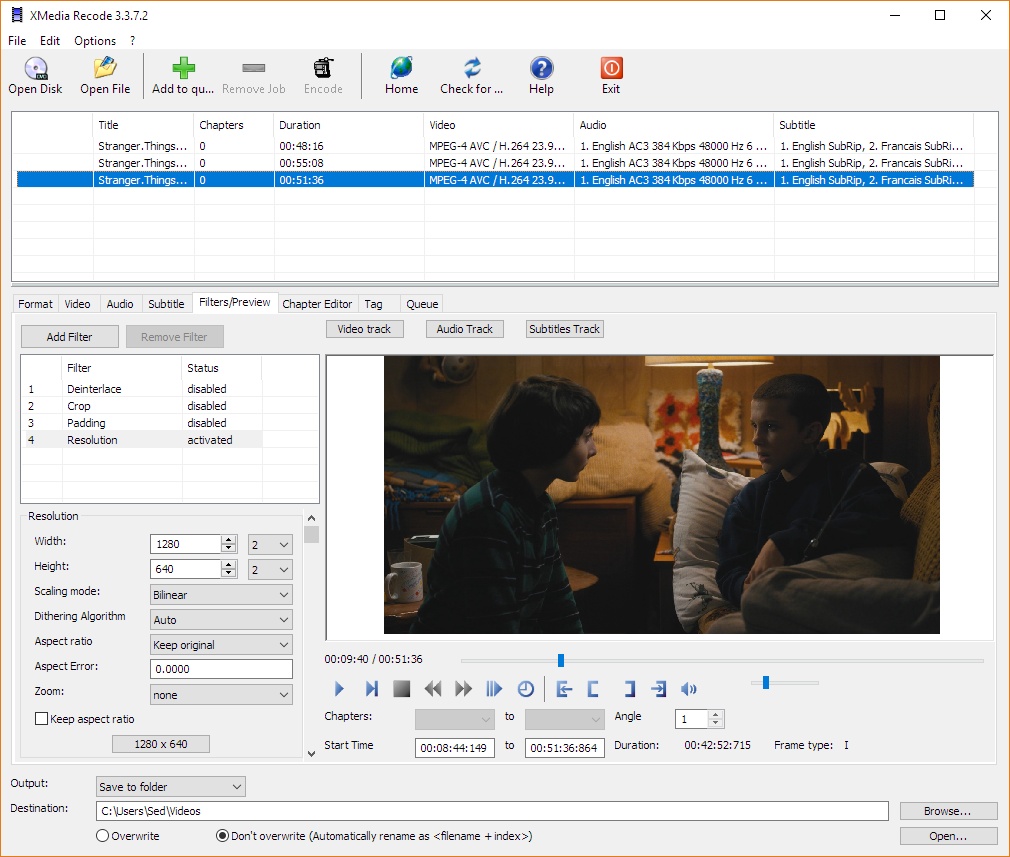 Click to enlarge screenshot |
||||||||||||||
Version history:
Version 3.0.6.0 View full changelog Publication: 23.12.2011 Update of ffmpeg New profiles (Acer, HTC, Motorola, Samsung) Troubleshooting the setting of B-frames were not used in MPEG2 codec
Report this tool(dead link/new version out)
|
|||||||||||||||
| Comments | Post comment | ||||||||||||||
|
|||||||||||||||
3.0.2.5 works great, but with any version newer than that results in a crash on the second pass using custom mkv mpeg4/h264 with 128kbps audio with high profile 4.1 2pass encoding. source video is a 720p 30fps video and I used subme 9, merange 32, me=umh, 9 reference frames, no-fast pskip off, no DCT decimate, CABAC on, mixed ref frames on. I've tried every version above 3.0.2.5 and they all crash at the very beginning of the second pass.
|
|||||||||||||||
Good soft. But has a problem (crashing) when cropping or rescaling. Using file libswscale.dll from ver.2.3.3.3 solved the problem for me (thanks to people here, who found the solution). No forum, no bugreport feedback. No answer from developer at all. I wanted to make a donation, but such an attitude killed my intention. Now searching for alternative.
|
|||||||||||||||
I have a WD Live Plus unit, and I use the Xmedia Recode preset for WD Live for encoding to MP4/H.264. I compress most videos to around 1.2 gig from around 4 plus gig. I watch the videos on a Sony Bravia 46" LCD TV. The quality is not HD, but certainly very acceptable. The downside of this program is help is in German. Not much support for English language. I tried different presets, plus fooling around with custom settings, you know just to tinker with. It will crash if your settings are not right. No notice or anything, it just goes away! All in all its a decent program for the price.
|
|||||||||||||||
Too bad. Doesn't work for me 2.....moving to Xilisoft Video Converter
|
|||||||||||||||
what a nice video converter has now become a crap , go to hell developers of XMedia Recode, because it neither opens or works like before, 2.3.0.4 was the last version that worked properly on all computers
|
|||||||||||||||
I use this program at least 10 times a week without a problem and I reviewed it before.But it will crash,close and disappear if the INPUT file is improper is some way (like a bad header or starting point).It may also crash,close and disappear if your output file is not set up correctly.It would be nice if the program warned you first before it closed or gave you some kind of error message.There are programs that are easier to use but Xmedia Recode gives me the best finished product,and I gave it a 10 because of that.If Xmedia Recode starts up in your PC then there is NUTHING wrong with your computer or your operating system or Xmedia Recode.The problem is ALWAYS the INPUT file,if Xmedia Recode dosent like it,,it will just crash without warning.When I made those same INPUT files proper and used the right parameters on the output file then Xmedia Recode encoded them without an issue.This program does have a learning curve to it and it is not for a beginner in my opinion...;)~
|
|||||||||||||||
Copy video still comes out at 1000fps Here are steps: 1. select mkv/ac3 profile 2. open an mkv file with i.e DTS 3 check copy video on video tab 4. encode.... out put file comes out at 1000fps report by MediaInfo and VLC
|
|||||||||||||||
excellent tool. works great. ignore the clowns who run their computers with out of date, insecure operating systems that were retired years ago.
|
|||||||||||||||
Yes u r right because the last version that worked properly was 2.3.0.4 , after that all versions are going on having bugs and it stopped functioning in my Win XP because now it requires WinXP SP2 to work and also now it is not working properly at all like before and i had informed this to the developer many times but he is not responding at all.... now it has became a crap
|
|||||||||||||||
To the last poster, I am not the first poster to complain about this. I posted the details as it would help any others who is having the problem. I did not reduce any rating. I opened a thread instead of just posting trash here. If there is no problem at all in the program, it should work on every machine. Don't think it is OK if it works for you.
|
|||||||||||||||
as i've said before this isn't the place to air personal problems with your own install. the current version works like a champ and previous ones have also on winxp and win7-64, using 6 different computers here. try opening a thread in the forum instead.
|
|||||||||||||||
Worked like charm until 2.3.3.3. did not use the tool for sometime and upgraded to win7 64 bit in between. Downloaded the available version. The program started crashing. After that keep on trying all versions and all crashed. Was suspecting 64 bit. Finally after a hint from Baldrick, started experimenting with different encode parameters to find the problem. And I found the problem to be resizing and module crashing is libswscale.dll which is resizing library of ffmpeg. I tried downloading old versions and noticed 2.3.3.3 works fine. If you want to use the program stay with 2.3.3.3. Copying libswscale.dll from 2.3.3.3 to latest version (3.0.3.4) solved crashing issue in latest version. Tried replacing the latest dll from fmpeg but understand the program is actually using very old version of ffmpeg dlls avcodec51, I think the latest is avcodec53. I remember to see "updated ffmpeg" with every new version????. I am not 100% sure here. I hope the developer will fix this issue as soon as possible.
|
|||||||||||||||
copy video still comes out at: Frame rate: 1 000.000 fps
|
|||||||||||||||
When converting to VCD, go to Video Settings tab, and check the VBVbuffersize setting, as recent versions of Xmedia Recode set this by default to 1150. Changing this value back to prior default of 327680 will stop the "Wrong video settings" error window from popping up, and enable the conversion.
|
|||||||||||||||
Great converter, but there is a small issue when copy video, the final video came out Frame rate : 1 000.000 fps
|
|||||||||||||||
I use this program for years now, to convert files for my Nokia mobilephone (mp4 + aac), without any issue or crashes. In my opinion it is a very good program, even it's not intended specially for "programmers" or beginers. Very much thanks to the author, which made this good software and released it FREE.
|
|||||||||||||||
...work perfect...
|
|||||||||||||||
The last version that worked properly was 2.3.0.4 but now it requires to have installed windows service pack 2 to start otherwise it will not work nor it will open, best turns to worst this software shows this to all
|
|||||||||||||||
New version crashes at start of encode. Reinstalled older version, now that no longer works either.
|
|||||||||||||||
Yes. What happened to this App? Used to work fine in the past. Now crashes immediately on encoding. Had to give 1's because it no longer encodes.
|
|||||||||||||||
I was looking for something with a bit more flexibility than handbrake (avs scripts etc). But not as daunting as Megui. This program is a perfect example of how not to write a program. I did not find the initial screen to be intuitive while it was not difficult to figure out it was not very intuitive newbies will definitely need to use a guide. Crashes with no meaning full messages, I spent two hours trying to encode the movie Obsessed with AC3 audio, at first directly from the disk with AnyDVD in the background couldn't even make it trough the set up process would crash at various points tried many different settings. I then ripped the movie to the hard drive and tried again. Program would crash while encoding after multiple attempts I could not get the program to complete successfully. Going back to handbrake until i have the time to write my own program.If handbrake would accept avisynth scripts it would be perfect.
|
|||||||||||||||
This program does many things with an excellent gui. However, the one function that I keep looking for on new versions is the ability to create MKVs from DVDs without changing the bitrate. (Mpeg2 copy only).
|
|||||||||||||||
I don't think I like this software any more. Past few versions crash when converting mpg or DVD to flv. Often crashes on me when converting mp4 to mpg. Does do well converting audio files, but for video it is very hit and miss.
|
|||||||||||||||
It is a great little program if you can get it to work properly. Current version does not do subtitle copying properly. It strips the secondary time codes so that the subs stay on the screen in the new mkv file you are creating. I was hoping to use this program to convert some old mkv and ogm files of mine to bluray ready mkv files to through into multiavchd as it can not handle ogg audio properly. The files turned out great except that the sub tracks were completely destroyed. I hope this gets fixed in a later version, but there is no english forum, and the program is on the wall of shame for FFMPEG, so I do not know if these issues will get fixed.
|
|||||||||||||||
Im running this program in 2 desktops and a laptop with NO problems converting all types of files daily.Use a vidio/audio calculator called (Aspect 2) for xvid conversions you can find it here in video help also google Yiu Korochko's x264 Bitrate Calculator for mkv conversions to 720p and 1080p.Use these 2 little apps everytime you want to encode files with Xmedia Recode.Your input files must be proper or the program will crash without warning.And most of all READ about converting video and audio files..Wild conversions or improper file inputs will not work in ANY program.At least all the ones I messed with in the last 15 years or so of encoding.Xmedia Recode just slams a door in your face and says to itself nope improper file input and closes or crashes on you,hehehe..And please dont take offence to what im saying and dont say I know,I know,I know,because just when you think you mastered something there is always more to learn..Once learned this program produces a perfect end result..Good Luck!
|
|||||||||||||||
|
|||||||||||||||
| 1 tool hits, Showing 1 to 1 tools |
-
|
Explanation:
New tool= New tool since your last visit
New version= New version since your last visit
New comments= New comments since your last visit
Type and download
Freeware = Free software.
Free software = Free software and also open source code.
Adware = Free software but supported by advertising, usually with a included browser toolbar. It may be disabled when installing or after installation.
Trialware = Also called shareware or demo. Trial version available for download and testing with usually a time limit or limited functions.
Payware = No demo or trial available.
Spyware/Malware = Don't download.
v1.0.1 = Latest version available.
Download beta = It could be a BETA, RC(Release Candidate) and even a ALPHA version of the software.
Download (direct link) = A direct link to the software download.
Download (author site/developer site) = A link to the software developer site.
Download (mirror link) = A mirror link to the software download. It may not contain the latest versions.
Download old versions = Free downloads of previous versions of the program.
Download 64 bit version = If you have a 64bit operating system you can download this version.
Download portable version = No installation is required, just extract the files to a folder and run directly.
= Windows version available.
= Mac OS version available.
= Linux version available.
Our hosted tools are virus and malware scanned with several antivirus programs using www.virustotal.com and virusscan.jotti.org.
Rating
The first rating is a standard average rating and the one between () is a weighted average.
Browse software by sections